# git-loom

*git-loom* is a Git CLI tool that makes working with integration branches seamless. Inspired by tools like [jujutsu](https://github.com/martinvonz/jj) and [Git Butler](https://gitbutler.com/), git-loom helps you work on multiple features simultaneously while keeping your branches organized and independent.
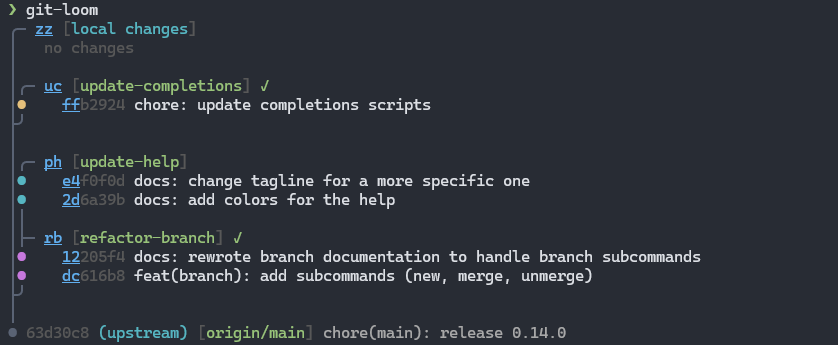
> [!IMPORTANT]
> *git-loom* has been written with the help of AI, especially [Claude](https://claude.ai/)
## Documentation
Full documentation is available at **<https://narnaud.github.io/git-loom/>**
- [Shell setup](https://narnaud.github.io/git-loom/shell-setup.html) (completions for PowerShell, Clink)
- [Configuration](https://narnaud.github.io/git-loom/configuration.html) (remote type, push remote, hidden branches)
## Commands
```
Workflow:
init Initialize a new integration branch
update, up Pull-rebase and update submodules
push, pr Push a branch to remote
Staging:
add Stage files using short IDs or paths [-p for interactive hunks]
Commits:
commit, ci Create a commit on a feature branch
fold Amend, fixup, or move commits [amend, am, fixup, mv, rub]
absorb Auto-distribute changes into originating commits
split Split a commit into two
swap Swap two commits
reword, rw Reword a commit message or rename a branch
drop, rm Drop a change, commit, or branch
Branches:
branch, br Manage feature branches (create, merge, unmerge)
switch, sw Switch to any branch for testing (without weaving)
Inspection:
status Show the branch-aware status (default command)
show, sh Show commit details (like git show)
diff, di Show a diff using short IDs (like git diff)
trace Show the latest command trace
Recovery:
continue, c Resume a paused operation after resolving conflicts
abort, a Cancel a paused operation and restore original state
```
## Installation
```bash
cargo install git-loom
```
See the [installation guide](https://narnaud.github.io/git-loom/installation.html) for more options (Scoop, pre-built binaries, from source).
## Contributing
Contributions are welcome! This project is in early development, so there's plenty of room for new ideas and improvements.
### Pre-commit Setup
This project uses [pre-commit](https://pre-commit.com/) to manage Git hooks. Install the hooks with:
```bash
pre-commit install --install-hooks
```
This ensures commit messages and code quality checks run automatically before each commit.
## License
MIT License - Copyright (c) Nicolas Arnaud-Cormos
See [LICENSE](LICENSE) file for details.
## Acknowledgments
Inspired by:
- [jujutsu](https://github.com/martinvonz/jj) - A Git-compatible VCS with powerful features for managing complex workflows
- [Git Butler](https://gitbutler.com/) - A Git client that makes working with virtual branches easy