# 
*git-loom* is a Git CLI tool that weaves your branches together into a single integration branch. Inspired by tools like [jujutsu](https://github.com/martinvonz/jj) and [Git Butler](https://gitbutler.com/), *git-loom* helps you work on multiple features simultaneously while keeping your branches organized and independent.
Think of it as a loom that weaves multiple threads (feature branches) into a single fabric (integration branch).
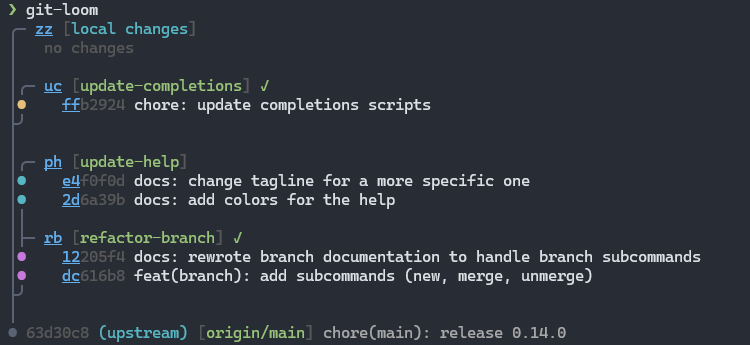
## Core Concepts
### Integration Branch
An integration branch merges multiple feature branches together, allowing you to:
- Work on several features at once in a single branch
- Test how features interact with each other
- Keep feature branches independent and manageable
- See a clear relationship between your integration and feature branches
You create an integration branch with [`git loom init`](commands/init.md). It tracks a remote upstream (e.g. `origin/main`) and serves as the hub for all your feature work.
### Feature Branches
Feature branches are independent branches combined into the integration branch. You can manage them — reorder, amend, split — without leaving the integration context:
- Commit to the feature branch from the integration branch with [`git loom commit`](commands/commit.md)
- Move commits between branches with [`git loom fold`](commands/fold.md)
- Remove branches cleanly with [`git loom drop`](commands/drop.md)
- Create feature branches with [`git loom branch`](commands/branch.md)
> [!TIP]
> [`git loom commit`](commands/commit.md) is the primary way to create branches — it will prompt you for the branch name, or let you create a new one on the fly. Use [`git loom branch`](commands/branch.md) only for advanced cases where you need to create an empty branch ahead of time or for branching out loose commits.
### Weaving
When a feature branch is created inside the integration branch, *git-loom* automatically **weaves** it into the topology — restructuring the linear history into a merge-based layout where each feature branch appears as a side branch joined by a merge commit. This is what makes `git loom status` able to display the clear branch-aware graph.
### Short IDs
*git-loom* assigns compact, human-friendly identifiers to branches, commits, and files shown in `git loom status`. You can use these short IDs with any command instead of typing full hashes or branch names. What you see in the status output is what you type.
Commit IDs are persistent: every commit loom creates carries a Gerrit-style `Change-Id` trailer, and its ID (letters such as `mqt`) is derived from that trailer rather than from the hash. Rewrites change the hash, not the ID, so you can chain commands on the same ID across an `update`, a `fold`, or a `swap`.
## Quick Start
```bash
# Start on your main branch
git checkout main
# Create an integration branch
git loom init
# Create a commit on a feature branch (branch `feature-auth` is automatically created)
git loom commit -b feature-auth -m "add login form" zz
# Create a second commit on the branch
git loom commit -b feature-auth -m "improve login form" zz
# See the branch-aware status
git loom status
# Push a feature branch for review
git loom push feature-auth
```