# 
*git-loom* is a Git CLI tool that weaves your branches together into a single integration branch. Inspired by tools like [jujutsu](https://github.com/martinvonz/jj) and [Git Butler](https://gitbutler.com/), *git-loom* helps you work on multiple features simultaneously while keeping your branches organized and independent.
Think of it as a loom that weaves multiple threads (feature branches) into a single fabric (integration branch).
## Core Concepts
### Integration Branch
An integration branch merges multiple feature branches together, allowing you to:
- Work on several features at once in a single branch
- Test how features interact with each other
- Keep feature branches independent and manageable
- See a clear relationship between your integration and feature branches
You create an integration branch with [`git loom init`](commands/init.md). It tracks a remote upstream (e.g. `origin/main`) and serves as the hub for all your feature work.
### Feature Branches
Feature branches are independent branches combined into the integration branch. You can manage them — reorder, amend, split — without leaving the integration context:
- Commit to the feature branch from the integration branch with [`git loom commit`](commands/commit.md)
- Move commits between branches with [`git loom fold`](commands/fold.md)
- Remove branches cleanly with [`git loom drop`](commands/drop.md)
- Create feature branches with [`git loom branch`](commands/branch.md)
> [!TIP]
> [`git loom commit`](commands/commit.md) is the primary way to create branches — it will prompt you for the branch name, or let you create a new one on the fly. Use [`git loom branch`](commands/branch.md) only for advanced cases where you need to create an empty branch ahead of time or for branching out loose commits.
### Weaving
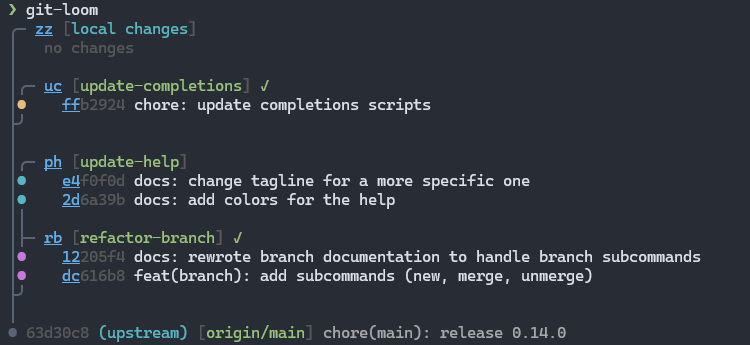
When a feature branch is created inside the integration branch, *git-loom* automatically **weaves** it into the topology — restructuring the linear history into a merge-based layout where each feature branch appears as a side branch joined by a merge commit. This is what makes `git loom status` able to display the clear branch-aware graph.
### Short IDs
*git-loom* assigns compact, human-friendly identifiers to branches, commits, and files shown in `git loom status`. You can use these short IDs with any command instead of typing full hashes or branch names. What you see in the status output is what you type.
## Quick Start
```bash
# Start on your main branch
git checkout main
# Create an integration branch
git loom init
# Create a commit on a feature branch (branch `feature-auth` is automatically created)
git loom commit -b feature-auth -m "add login form" zz
# Create a second commit on the branch
git loom commit -b feature-auth -m "improve login form" zz
# See the branch-aware status
git loom status
# Push a feature branch for review
git loom push feature-auth
```