# git-loom
> Supercharge your Git workflow by weaving together multiple feature branches
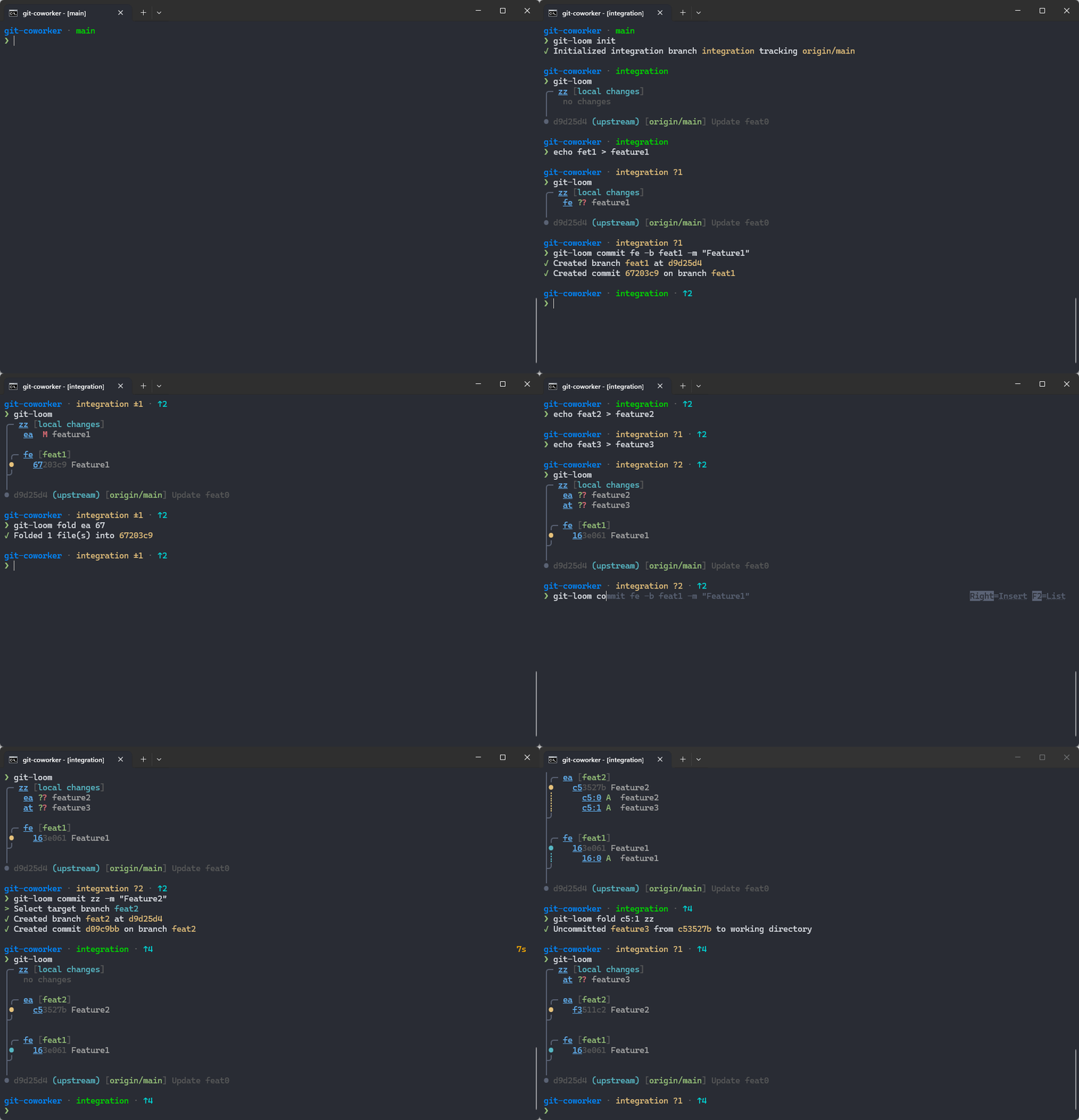
**git-loom** is a Git CLI tool that makes working with integration branches seamless. Inspired by tools like [jujutsu](https://github.com/martinvonz/jj) and [Git Butler](https://gitbutler.com/), git-loom helps you work on multiple features simultaneously while keeping your branches organized and independent.
> [!IMPORTANT]
> `git-loom` has been written with the help of AI, especially [Claude](https://claude.ai/)
## What is git-loom?
git-loom introduces the concept of **integration branches** - a special branch that weaves together multiple feature branches, allowing you to:
- Work on several features at once in a single branch
- Test how features interact with each other
- Keep feature branches independent and manageable
- Easily amend, reorder, or move commits between branches
- See a clear relationship between your integration and feature branches
Think of it as a loom that weaves multiple threads (feature branches) into a single fabric (integration branch).
## Installation
### Cargo (all platforms)
```bash
cargo install git-loom
```
### Scoop (Windows)
```
scoop bucket add narnaud https://github.com/narnaud/scoop-bucket
scoop install git-loom
```
### Pre-built binaries
Download the latest archive for your platform from the [Releases](https://github.com/narnaud/git-loom/releases) page:
| Linux x86_64 | `git-loom-x86_64-unknown-linux-gnu.tar.gz` |
| Linux aarch64 | `git-loom-aarch64-unknown-linux-gnu.tar.gz` |
| macOS x86_64 | `git-loom-x86_64-apple-darwin.tar.gz` |
| macOS Apple Silicon | `git-loom-aarch64-apple-darwin.tar.gz` |
| Windows x86_64 | `git-loom-x86_64-pc-windows-msvc.zip` |
Extract the binary and place it somewhere on your `PATH`.
### From Source
Requires Rust 1.90 or later.
```bash
git clone https://github.com/narnaud/git-loom.git
cd git-loom
cargo install --path .
```
## Usage
```
Usage: git-loom [OPTIONS] [COMMAND]
Commands:
status Show the branch-aware status (default)
init Initialize a new integration branch tracking a remote
branch Create a new feature branch
reword Reword a commit message or rename a branch
commit Create a commit on a feature branch without leaving integration
drop Drop a commit or a branch from history
fold Fold source(s) into a target (amend files, fixup commits, move commits)
update Pull-rebase the integration branch and update submodules
completions Generate shell completions (powershell, clink)
help Print this message or the help of the given subcommand(s)
Options:
--no-color Disable colored output
-h, --help Print help
```
## Set Up Your Shell
### PowerShell
Add the following to your PowerShell profile (`$PROFILE`):
```powershell
### Clink
Create a file at `%LocalAppData%\clink\git-loom.lua` with:
```lua
load(io.popen('git-loom completions clink'):read("*a"))()
```
## Core Concepts
### Integration Branch
A branch that merges multiple feature branches together. This allows you to:
- Work on multiple features in a single context
- Test how features work together
- See the combined state of your work
### Feature Branches
Independent branches that are combined into the integration branch. You can manage them (reorder, amend, split) without leaving the integration context.
## Configuration
### Git Config Settings
| `loom.remote-type` | `github`, `gerrit` | Auto-detected | Override the remote type for `git loom push` |
#### `loom.remote-type`
By default, `git loom push` auto-detects the remote type:
- **GitHub** if the remote URL contains `github.com`
- **Gerrit** if `.git/hooks/commit-msg` contains "gerrit"
- **Plain Git** otherwise
You can override this with:
```bash
git config loom.remote-type github # Force GitHub push (push + open PR)
git config loom.remote-type gerrit # Force Gerrit push (refs/for/<branch>)
```
### Environment Variables
| `NO_COLOR` | Disable colored output when set (follows the [NO_COLOR](https://no-color.org/) standard) |
| `TERM` | Colors are automatically disabled when `TERM=dumb` |
### CLI Flags
| `--no-color` | Disable colored output |
## Contributing
Contributions are welcome! This project is in early development, so there's plenty of room for new ideas and improvements.
### Pre-commit Setup
This project uses [pre-commit](https://pre-commit.com/) to manage Git hooks. Install the hooks with:
```bash
pre-commit install --hook-type commit-msg
```
This ensures commit messages and code quality checks run automatically before each commit.
## License
MIT License - Copyright (c) Nicolas Arnaud-Cormos
See [LICENSE](LICENSE) file for details.
## Acknowledgments
Inspired by:
- [jujutsu](https://github.com/martinvonz/jj) - A Git-compatible VCS with powerful features for managing complex workflows
- [Git Butler](https://gitbutler.com/) - A Git client that makes working with virtual branches easy