# gr pp
`gr pp` is a command that allows you to handle pipelines from the command line.
## List pipelines
To list pipelines for the current project, you can use the following command:
```bash
gr pp list
```
## Lint pipeline configuration (`.gitlab-ci.yml`)
To lint the pipeline configuration file (`.gitlab-ci.yml`), you can use the following command:
```bash
gr pp lint
```
## Get runners available for the project (Gitlab)
To get the runners available for the project, you can use the following command:
```bash
gr pp rn list <status>
```
Where `<status>` can be one of the following values:
- `online`
- `offline`
- `stale`
- `never-contacted`
- `all`
## Get the merged .gitlab-ci.yml
In the scenario where you use a Gitlab pipeline declared in `.gitlab-ci.yml` and
the pipeline contains `include` statements, you can use the following command to
obtain the total configuration of the pipeline:
```bash
gr pp merged-ci
```
This will print out to the console the total merged `.gitlab-ci.yml` file that
includes all the contents from the included yaml files. If the pipeline has
errors it will print out the errors if any.
## Mermaid diagram of .gitlab-ci.yml
This command is intended to provide a quick and general idea about the project's
pipeline structure by computing a state Mermaid diagram off of the
`.gitlab-ci.yml` contents. The implementation is not exhaustive and does not
cover all the possible cases that can govern a pipeline creation. It just
computes the stages involved, its jobs and the links in between them. The
command does not compute whether a stage belongs to a specific branch or to a merge
request event.
```bash
gr pp chart
```
For example, given the following `.gitlab-ci.yml`:
```yaml
stages:
- build
- tests
- deploy
compile:
stage: build
script:
- echo "build the project"
unittests:
stage: tests
script:
- echo "Run unit tests"
integration:
stage: tests
script:
- echo "Run integration tests"
deploy_job:
stage: deploy
script:
- echo "Deploying the project..."
```
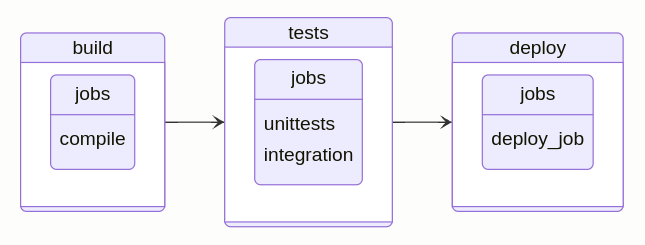
The corresponding Mermaid diagram that would get generated would look like this:
```verbatim
stateDiagram-v2
direction LR
state build{
direction LR
state "jobs" as anchorT0
state "compile" as anchorT0
}
build --> tests
state tests{
direction LR
state "jobs" as anchorT1
state "unittests" as anchorT1
state "integration" as anchorT1
}
tests --> deploy
state deploy{
direction LR
state "jobs" as anchorT2
state "deploy_job" as anchorT2
}
```
If you copy the above diagram and paste it in a markdown file or in the mermaid
live editor <https://mermaid.live>, you will get the following diagram: