# ghr
`ghr` is a fast terminal workspace for staying on top of GitHub. It brings pull requests, issues, notifications, repo tabs, conversations, checks, and diffs into one stateful TUI, so you can triage, review, comment, approve, merge, and jump back in without waiting on a fresh GitHub fetch.
[](https://github.com/chenyukang/ghr/actions/workflows/ci.yml)
[](https://github.com/chenyukang/ghr/actions/workflows/release.yml)
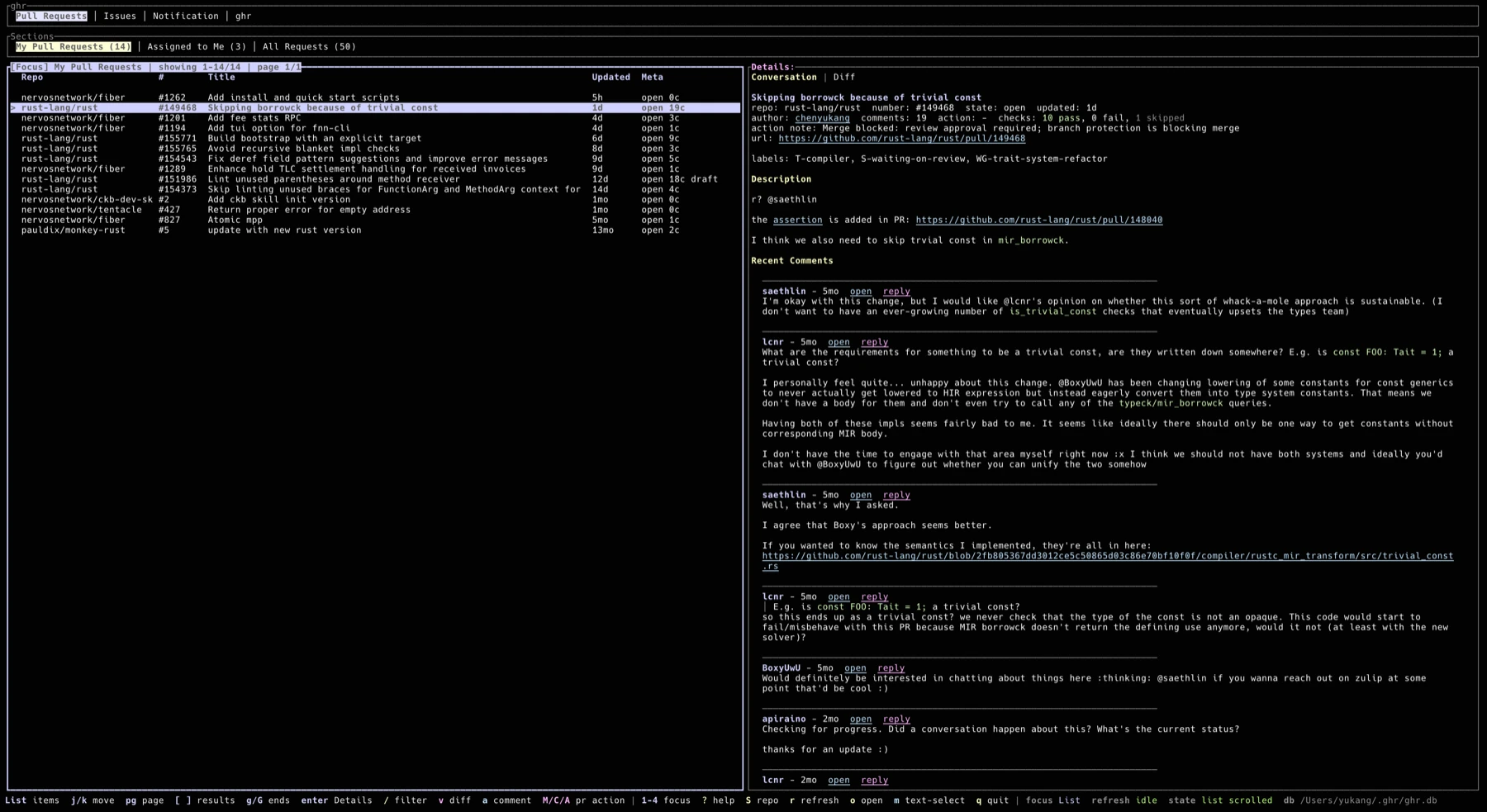
**Conversation and triage view**
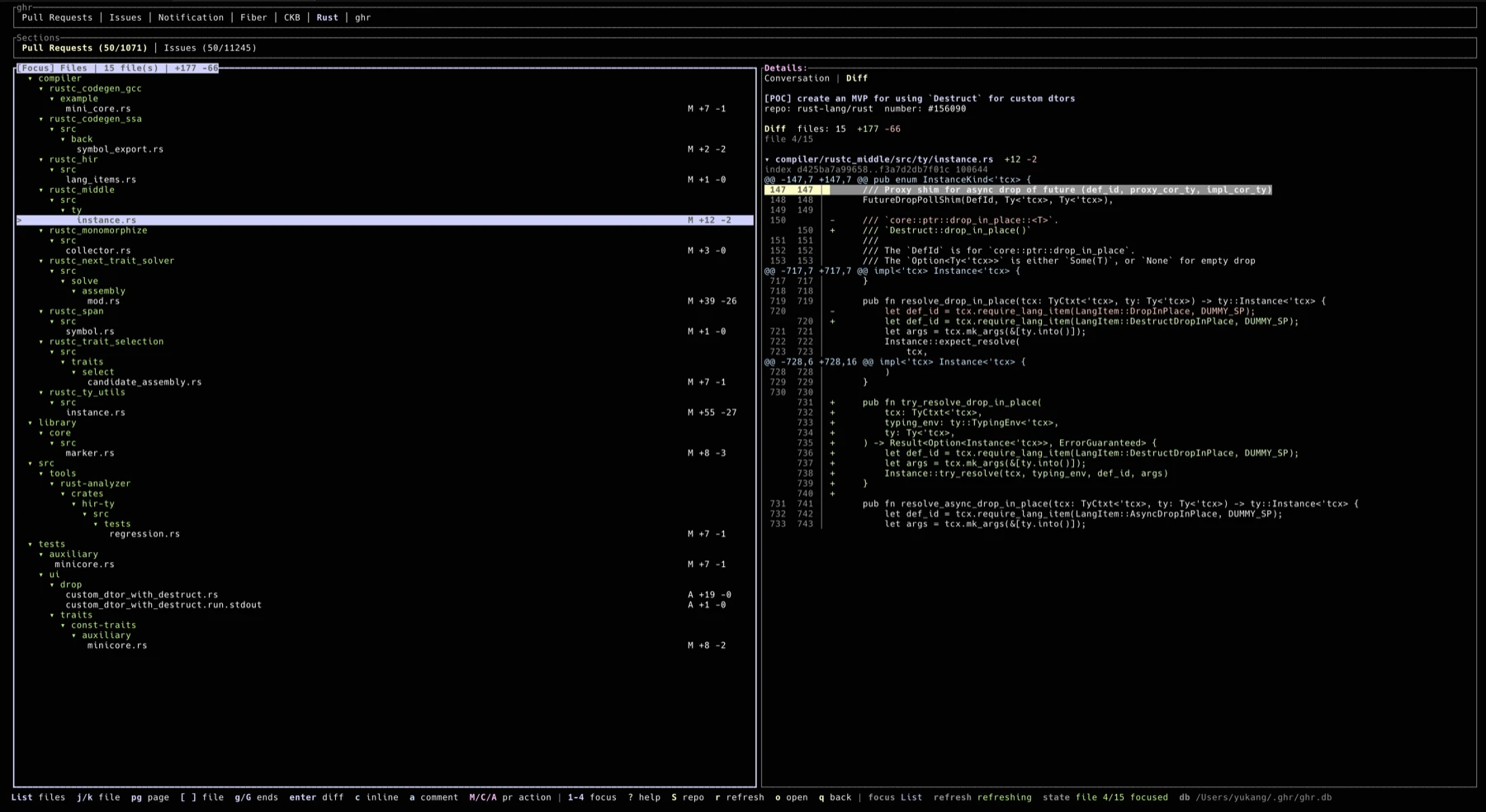
**Pull request diff review view**
## Features
- Pull request, issue, and notification views.
- Snapshot-first startup: cached data is shown immediately, then refreshed in the background.
- Configurable sections and repo tabs, including multi-query sections such as `All Requests`.
- Automatic current-repo tab persistence when launched inside a Git checkout with a GitHub remote.
- Paged PR and issue lists with configurable page size.
- Persistent ignored PRs and issues, stored in UI state and hidden from all lists.
- Fuzzy filtering in every loaded list with `/`, quick PR/issue section filters with `f`, plus repo-scoped GitHub search with `S`.
- Details pane with rendered Markdown, clickable links, fenced code blocks with lightweight Rust and plain/log highlighting, descriptions, comments, review comments, labels, milestones, action hints, and check summaries.
- PR diff mode with a changed-file list, per-file diff rendering, inline review comments, and review ranges.
- Comment, reply, edit, milestone, merge, close/reopen, update-branch, rerun-failed-checks, local PR checkout, draft / ready-for-review, and full PR review submit flows from inside the TUI.
- Unread notification handling with local cache updates and GitHub read-state sync.
- Mouse support for tabs, lists, links, comments, scrolling, text selection mode, and split resizing.
- UI state persistence under `~/.ghr`, including focus, selected item, scroll position, split ratio, and diff mode.
- Local state under `~/.ghr`: config, SQLite snapshot database, logs, and UI state.
- Uses the GitHub CLI for authentication, API access, and browser opening behavior.
## Requirements
- GitHub CLI [gh](https://cli.github.com/)
- An authenticated GitHub CLI session:
```bash
gh auth login
```
## Installation
Install the latest release binary on macOS or Linux:
```bash
Install the latest release binary on Windows PowerShell:
```powershell
Then authenticate GitHub CLI and run ghr:
```bash
gh auth login
ghr
```
The installers detect your OS and CPU architecture, download the matching GitHub release asset, verify its `.sha256`, and install `ghr` into `~/.local/bin` by default. Use `GHR_INSTALL_DIR` to choose another install directory, or `GHR_VERSION` to pin a release tag:
```bash
You can still install from crates.io if you prefer building locally:
```bash
cargo install ghr-cli
```
## Usage
Run `ghr` from any terminal after `gh auth login`. When started inside a Git checkout with a GitHub remote, ghr adds that repository as a local project tab automatically.
## Keybindings
Press `?` in the TUI for the live shortcut reference. The top-right status shows the current app state; the footer stays focused on the most useful shortcuts for the active area.
| `:` | Open the command palette and fuzzy search every shortcut |
| `:` then `Project Switch` | Filter configured repos by prefix and activate a project tab |
| `:` then `Project Add` | Add a repo project to the menu and save it to `config.toml` |
| `:` then `Project Remove` | Select a configured repo project, confirm, and remove it from `config.toml` |
| `:` then `Copy GitHub Link` | Copy the selected comment link, or the current PR/issue link, to the clipboard |
| `:` then `Copy Content` | Copy the selected comment content, or the current PR/issue description, to the clipboard |
| `:` then `Info` | Show version, config/db/log paths, ghr process memory usage, ignored item count, and current UI state |
| `1` / `2` / `3` / `4` | Focus ghr / Sections / list / Details |
| `Tab` / `Shift+Tab` | Switch list/details focus; when ghr or Sections is focused, move within that tab group |
| `h` / `l` | Move within the focused ghr or Sections tab group, wrapping at the ends |
| `Enter` | Focus the details pane from the list |
| `Esc` | Return from details to list, clear search, or leave diff mode |
| `j` / `k` | Move list selection, choose diff files, select diff lines, or scroll details |
| `[` / `]` in List | Load previous/next GitHub result page |
| `PgDown` / `PgUp` or `d` / `u` | Page current list/details movement |
| `n` / `p` in Details | Focus next/previous comment in conversation or diff details |
| `h` / `l` in diff Details | Page down/up through the file diff |
| `g` / `G` | Jump to top/bottom in list, details, or diff |
| `[` / `]` in diff mode | Switch diff files |
| `/` | Fuzzy filter the current list |
| `f` | Filter the current PR/issue section with qualifiers such as `state:closed label:bug author:alice`; empty input or `clear` resets |
| `S` | Search matching PRs and issues in the current repo |
| `i` | Ignore the selected PR or issue and hide it from future lists |
| `v` | Open PR diff mode |
| `q` in diff mode | Return to the state before opening diff |
| `o` | Open the selected item in the browser; in diff mode, open the PR `changes` page |
| `a` | Add a normal issue or PR comment |
| `L` | Add a label to the selected issue or PR; type a prefix and choose from repo labels |
| `N` | In a PR list, create a PR from the repo `local_dir` current branch; in an issue list, create an issue |
| `+` | Add a reaction to the selected issue, PR, or focused comment |
| `@` / `-` | Assign or unassign assignees on the selected issue or PR |
| `c` in Details | Add a normal comment in conversation mode, or an inline review comment in diff mode |
| `R` | Reply to the focused comment |
| `e` | Edit the focused comment when it is yours; in diff mode, end a review range |
| `T` | Edit the selected issue or PR title/body |
| `m` | Toggle terminal text selection mode; in diff details, begin a review range |
| `M` | Open a merge confirmation for the selected PR, defaulting to merge commits |
| `C` | Open a close or reopen confirmation for the selected issue or PR |
| `X` | Open a confirmation to run `gh pr checkout <number> --repo <owner/repo>` from the matching local checkout |
| `F` | Rerun failed checks for the selected PR |
| `U` | Open an update-branch confirmation for the selected PR |
| `m` / `s` / `r` in merge confirmation | Choose merge, squash, or rebase before confirming |
| `Tab` in merge confirmation | Cycle merge method |
| `s` | Submit a PR review summary as comment, request changes, or approve |
| `A` | Approve through the PR review summary flow |
| `Ctrl+D` | Discard a pending PR review created in this session |
| `E` | Open an enable auto-merge confirmation for the selected PR |
| `O` | Open a disable auto-merge confirmation for the selected PR |
| `D` | Toggle the selected open PR between draft and ready for review |
| `P` | Request or re-request PR reviewers with comma-separated logins |
| `Y` | Remove pending PR review requests with comma-separated logins |
| `t` | Change or clear the selected issue/PR milestone |
| `y` / `Enter` | Confirm the current action in the confirmation dialog |
| `Enter` in Reviewer Action | Submit the reviewer login list |
| `Ctrl+Enter` | Send or update a comment/title/body from the editor dialog |
| `Ctrl+Enter` in issue dialog | Create the issue |
| `r` | Refresh from GitHub |
| `q` / `Ctrl+C` | Save UI state and quit |
Diff review ranges:
- Press `m` on a diff line to begin a range, move the highlight, then press `e` to end it.
- Press `c` after ending a range to post an inline review comment for the selected range.
- With the mouse, single click selects one diff line. Double click begins a range, then single click the end line to complete it.
- Press `s` to open the review summary editor, use `Tab` or `1` / `2` / `3` to choose comment, request changes, or approve, then press `Ctrl+Enter` to submit.
- Press `Ctrl+P` in the review summary editor to create a pending review draft, then press `s` later to submit it or `D` to discard it.
Local PR checkout:
- Press `X` on a pull request in the list or Details pane, then confirm with `y` or `Enter`.
- Pull request Details show the remote branch when GitHub provides it.
- Checkout runs from the matching local repository directory. Set `local_dir` on a repo entry to make the target explicit:
```toml
[[repos]]
name = "Rust"
repo = "rust-lang/rust"
local_dir = "~/code/rust"
show_prs = true
show_issues = true
```
- If `local_dir` is not set, `ghr` tries the directory where it was launched when that directory has a GitHub remote for the pull request repository. If neither path matches, `ghr` shows a hint instead of running checkout.
Mouse behavior:
- Click ghr or Sections tabs to switch views or sections.
- Click list rows to select them and focus Details. Mouse hover and mouse wheel do not change PR/issue selection.
- Scroll Details with the mouse wheel.
- Drag the split between list and Details to resize panes; the ratio is saved.
- Press `m` outside diff mode to temporarily disable TUI mouse capture for terminal text selection; press `m` again to restore mouse controls.
## Default Sections
Pull Requests:
- `My Pull Requests`: open PRs authored by you.
- `Assigned to Me`: open PRs assigned to you.
- `All Requests`: recent PRs authored by you, involving you, or reviewed by you, including closed PRs.
Issues:
- `Assigned to Me`
- `Mentioned`
- `Involved`
Notifications:
- `Unread`
- `Review Requested`
- `Assigned`
- `Mentioned`
- `All`
## Configuration
The config file is created at:
```text
~/.ghr/config.toml
```
Example:
```toml
[[repos]]
name = "Rust"
repo = "rust-lang/rust"
show_prs = true
show_issues = true
labels = ["T-compiler"]
pr_labels = ["S-waiting-on-review"]
issue_labels = ["E-easy"]
[defaults]
view = "pull_requests"
command_palette_key = ":"
log_level = "info"
pr_per_page = 50
issue_per_page = 50
notification_limit = 50
refetch_interval_seconds = 60
include_read_notifications = true
[[pr_sections]]
title = "My Pull Requests"
filters = "is:open author:@me archived:false sort:created-desc"
[[pr_sections]]
title = "All Requests"
queries = [
"author:@me archived:false sort:created-desc",
"involves:@me -author:@me archived:false sort:created-desc",
"reviewed-by:@me -author:@me archived:false sort:created-desc",
]
exclude_repos = ["some-org/archive-*"]
```
Use `filters` for a single GitHub search query. Use `queries` when a section should merge several GitHub searches into one deduplicated list. Label filters can be written directly in either form, for example `filters = "is:open label:bug archived:false sort:updated-desc"` or `label:"good first issue"` for labels with spaces.
Use `[[repos]]` to add repository tabs to the top bar. Each configured repo shows its `name` as a top-level tab; inside that tab, `show_prs` and `show_issues` control whether the sections are shown as `Pull Requests` and `Issues`. Repo tabs default to open PRs and open issues. Set `labels` to filter both repo PR and issue lists, or use `pr_labels` / `issue_labels` for kind-specific filters.
When `ghr` starts inside a Git checkout with a GitHub remote, it adds that repository as a repo tab if it is not already configured and saves it back to `config.toml` with `local_dir` set to the launch directory. If the repo already exists in the config but has no `local_dir`, `ghr` fills that field without overwriting an existing value.
Set `command_palette_key` to change the command palette shortcut. Printable keys such as `":"` are treated as text while typing in search, filter, and editor dialogs; use a modified key such as `"Ctrl+L"` if you want the palette to open from those text inputs.
Set `log_level` to `trace`, `debug`, `info`, `warn`, or `error`. In `debug` mode, `gh` / `gh api` requests plus UI focus/view changes and mouse clicks are written to `~/.ghr/ghr.log`. `RUST_LOG` still overrides this config value when it is set.
`pr_per_page` and `issue_per_page` control the page size used for PR and issue search sections. Use `[` and `]` in the list to load adjacent GitHub result pages.
## Local Data
`ghr` keeps all local files in `~/.ghr`:
- `config.toml`: user configuration
- `ghr.db`: SQLite snapshot cache
- `ghr.log`: log file
- `state.toml`: persisted UI state, including ignored PRs/issues
The snapshot cache is intentionally local and disposable. Delete `~/.ghr/ghr.db` if you want to rebuild it from GitHub.
## Contributing
Contributions are very welcome! Please open an issue or a pull request with any bug fixes, improvements, or new features.