# Geometry, meshes, and numerical integration for finite element analyses <!-- omit from toc -->
[](https://codecov.io/gh/cpmech/gemlab)
[](https://github.com/cpmech/gemlab/actions/workflows/arch.yml)
[](https://github.com/cpmech/gemlab/actions/workflows/ubuntu.yml)
[](https://docs.rs/gemlab)
## Contents <!-- omit from toc -->
- [Introduction](#introduction)
- [Documentation](#documentation)
- [Installation](#installation)
- [Arch Linux](#arch-linux)
- [1. Default](#1-default)
- [2. Alternative](#2-alternative)
- [Debian/Ubuntu Linux](#debianubuntu-linux)
- [1. Default](#1-default-1)
- [2. Alternative](#2-alternative-1)
- [Examples](#examples)
- [MSH file format](#msh-file-format)
- [Numerical integration](#numerical-integration)
- [Roadmap](#roadmap)
- [Appendix A - Shapes and local numbering of nodes](#appendix-a---shapes-and-local-numbering-of-nodes)
- [Lines (Lin)](#lines-lin)
- [Triangles (Tri)](#triangles-tri)
- [Quadrilaterals (Qua)](#quadrilaterals-qua)
- [Tetrahedra (Tet)](#tetrahedra-tet)
- [Hexahedra (Hex)](#hexahedra-hex)
- [Appendix B - Geometry versus space dimensions](#appendix-b---geometry-versus-space-dimensions)
## Introduction
This crate contains structures and functions for geometry computations, generate meshes, and perform numerical integration for finite element analyses (FEM/FEA).
### Documentation
[](https://docs.rs/gemlab)
## Installation
This crate depends on [Russell (Rust Scientific Library)](https://github.com/cpmech/russell) and, therefore, has the same dependencies as `russell`. Among the combinations described in `russell` website, the following are recommended here:
1. **Default** - Use [OpenBLAS](https://github.com/OpenMathLib/OpenBLAS) and [SuiteSparse](https://github.com/DrTimothyAldenDavis/SuiteSparse)
2. **Alternative** - Use [Intel MKL](https://www.intel.com/content/www/us/en/developer/tools/oneapi/onemkl.html) and locally compiled [SuiteSparse](https://github.com/DrTimothyAldenDavis/SuiteSparse) and the [MUMPS solver](https://mumps-solver.org)
Therefore, the following (re-exported) **features** are available here:
* `intel_mkl` - Tells `russell` to use Intel MKL
* `local_sparse` - Tells `russell` that the local linear solvers are available locally
### Arch Linux
#### 1. Default
Install some dependencies:
```bash
pacman -Syu blas-openblas python-matplotlib suitesparse
```
#### 2. Alternative
Check [Russell (Rust Scientific Library)](https://github.com/cpmech/russell) out for detailed instructions on how to install the optional dependencies.
### Debian/Ubuntu Linux
#### 1. Default
Install some dependencies:
```bash
sudo apt-get install -y liblapacke-dev libopenblas-dev libsuitesparse-dev python3-matplotlib
```
#### 2. Alternative
Check [Russell (Rust Scientific Library)](https://github.com/cpmech/russell) out for detailed instructions on how to install the optional dependencies.
## Examples
### MSH file format
The MSH file format contains three mandatory sections and two optional sections. The MSH file is a plain text file where comments are marked with `#` and empty lines are allowed. The mandatory sections are `header`, `points`, and `cells`. We use "cells" here to refer to 2D polygons or 3D polyhedra (aka Elements in the Finite Element Method). The `header` section specifies the space dimension (2 or 3), the number of points, the number of cells, and the optional number of marked edges and faces. The optional sections specify the marked edges and faces. An example of MSH file is shown below:
```text
#
# 8-------------11
# /. /|
# {-5}/ . {-5}/ |
# / . {-9} / |{123}
# / . / | id = 1
# 2.0 9-------------10 | marker = 2
# | . | |
# | 4---------|----7*
# | /. | /|
# | / . | / |
# | / . | / |{-4}
# |/ . |/ |
# 1.0 5--------------6 | id = 0
# | . |{-8}| marker = 1
# | 0---------|----3 0.0
# | / | /
# | / | /
# | / | /
# |/ |/
# 0.0 1*-------------2* 1.0
# 0.0 1.0
#
# header
# ndim npoint ncell nmarked_edge nmarked_face
3 12 2 4 2
# points
# id marker x y z
0 0 0.0 0.0 0.0
1 -1 1.0 0.0 0.0
2 -1 1.0 1.0 0.0
3 0 0.0 1.0 0.0
4 0 0.0 0.0 1.0
5 0 1.0 0.0 1.0
6 0 1.0 1.0 1.0
7 -1 0.0 1.0 1.0
8 0 0.0 0.0 2.0
9 0 1.0 0.0 2.0
10 0 1.0 1.0 2.0
11 0 0.0 1.0 2.0
# cells
# id marker kind points
0 1 hex8 0 1 2 3 4 5 6 7
1 2 hex8 4 5 6 7 8 9 10 11
# marked edges
# marker p1 p2
123 7 11
-5 11 10
-4 7 3
-5 8 9
# marked faces
# marker p1 p2 p3 {p4}
-8 3 2 7 6
-9 8 10 9 11
```
### Numerical integration
```rust
use gemlab::integ::Gauss;
use gemlab::mesh::{At, Features, Mesh};
use gemlab::shapes::Scratchpad;
use gemlab::StrError;
use std::collections::HashSet;
fn main() -> Result<(), StrError> {
// Input the raw mesh data using a text file
//
// 1.0 5------,6.------7
// | [3],' `.[4] |
// | ,' `. |
// |,' `.|
// 0.5 3 [2] 4
// |`. .'|
// | `. .' |
// | [0]`. .'[1] |
// 0.0 0------`1'------2
// 0.0 0.5 1.0
let path = "./data/meshes/four_tri3_one_qua4.msh";
let mesh = Mesh::read(path)?;
// Extract features such boundary edges and faces.
// Search entities along the boundary of the mesh given coordinates.
// The `At` enum provides an easy way to define the type of the
// constraint such as line, plane, circle, etc.
let feat = Features::new(&mesh, false);
assert_eq!(feat.search_point_ids(At::Y(0.5), |_| true)?, &[3, 4]);
assert_eq!(feat.search_edge_keys(At::X(1.0), |_| true)?, &[(2, 4), (4, 7)]);
// Perform numerical integration to compute
// the area of cell # 2
let ndim = 2;
let cell_2 = &mesh.cells[2];
let mut pad = Scratchpad::new(ndim, cell_2.kind)?;
mesh.set_pad(&mut pad, &cell_2.points);
let gauss = Gauss::new(cell_2.kind);
let mut area = 0.0;
for p in 0..gauss.npoint() {
let iota = gauss.coords(p);
let weight = gauss.weight(p);
let det_jac = pad.calc_jacobian(iota)?;
area += weight * det_jac;
}
assert_eq!(area, 0.5);
Ok(())
}
```
## Roadmap
- [x] Implement read/write mesh functions
- [x] Add tests for the numerical integrations
- [x] Implement triangle and tetrahedron generators
- [x] Implement drawing functions
## Appendix A - Shapes and local numbering of nodes
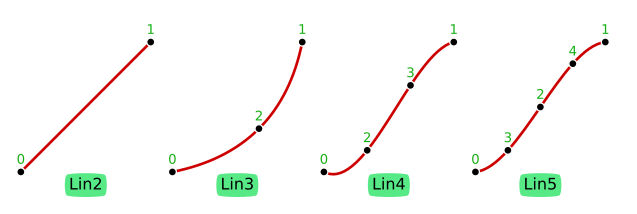
### Lines (Lin)
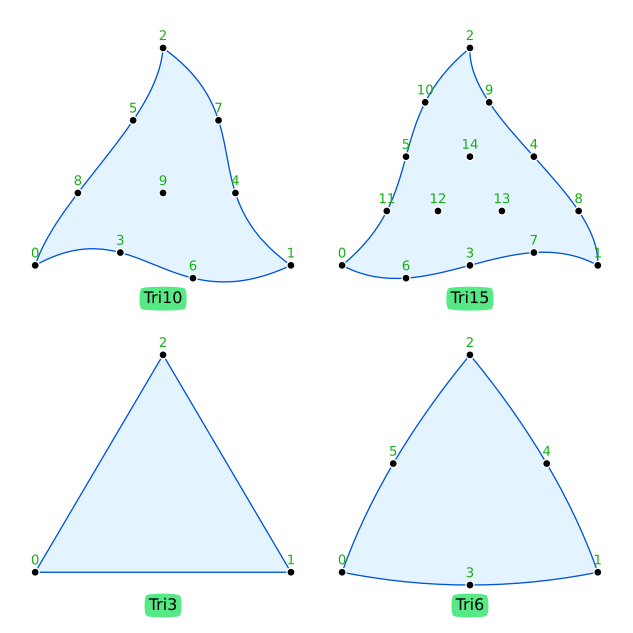
### Triangles (Tri)
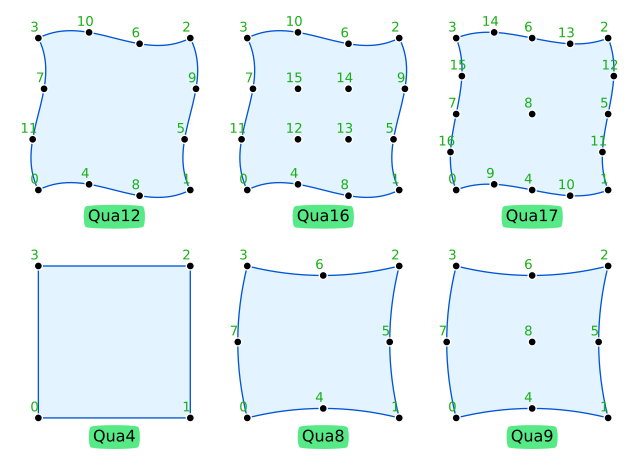
### Quadrilaterals (Qua)
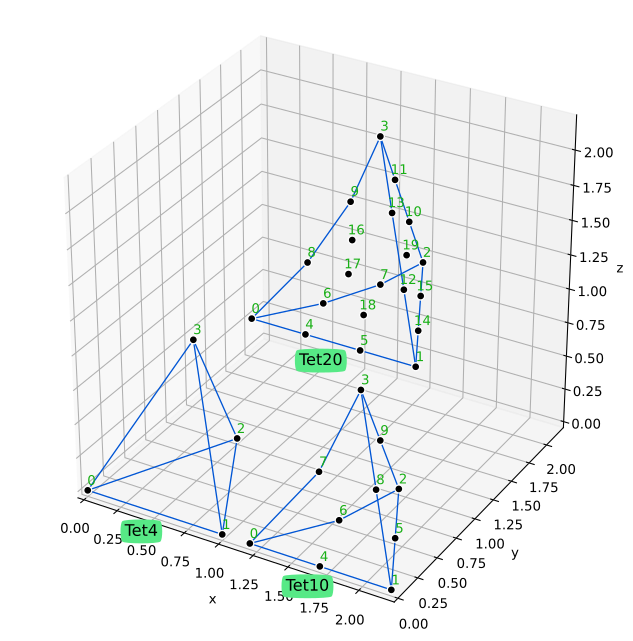
### Tetrahedra (Tet)
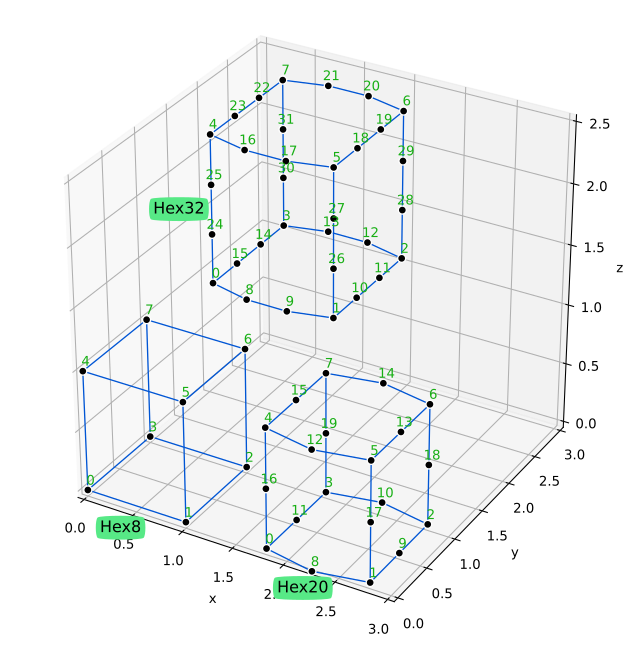
### Hexahedra (Hex)
## Appendix B - Geometry versus space dimensions
The following table shows what combinations of geometry-number-of-dimensions (`geo_ndim`) and
space-number-of-dimensions (`space_ndim`) are possible. There are three cases:
1. Case `CABLE` -- `geo_ndim = 1` and `space_ndim = 2 or 3`; e.g., line in 2D or 3D (cables and rods)
2. Case `SHELL` -- `geo_ndim = 2` and `space_ndim = 3`; e.g. Tri or Qua in 3D (shells and surfaces)
3. Case `SOLID` -- `geo_ndim = space_ndim`; e.g., Tri and Qua in 2D or Tet and Hex in 3D
| `geo_ndim` | `space_ndim = 2` | `space_ndim = 3` |
| :--------: | :--------------: | :--------------: |
| 1 | `CABLE` | `CABLE` |
| 2 | `SOLID` | `SHELL` |
| 3 | impossible | `SOLID` |