[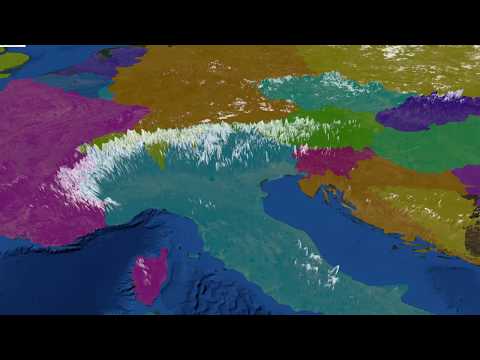](https://www.youtube.com/watch?v=cRsTWwsw5y0)
> Click the image above to see a video demo and high-level overview of this
> project.
# Gaia, a planet visualizer in Rust
> Satellite imagery from [NASA Blue Marble][nasa]
>
> Elevation data from [NOAA GLOBE][noaa]
>
> Political border data from [Natural Earth][natural-earth].
This is a program that lets you view the world. You can scroll up and down and
move the camera around. It's written entirely in Rust, using the
[Piston](piston) game engine.
Though currently tightly coupled with the specific use-case of the demo, Gaia is
meant to eventually be a game engine for world-map-based applications.
## Screenshots
![Screenshot 1][screenshot1]
> The Eastern Mediterranean Sea, with the bottom of the Italian peninsula on the
> left, and the Nile Delta at the bottom right.
![Screenshot 2][screenshot2]
> Eastern Italy and the Balkan states.
## How to compile it
Gaia uses publicly-available data to present the world. First, you must download
the raw data from NASA and NOAA (these amount to about a gigabyte of data), and
then allow Imagemagick to convert these data into the format Gaia requires.
There's a script that does this for you. First, make sure you have Imagemagick's
`convert` available, and then run:
```
$ ./scripts/download_world_assets
```
From the directory this README is in.
**Warning:** This script will first take up 100% of you network bandwidth as it
downloads tremendous files, and then take up 100% of your CPU as it does image
processing on large images. Your computer might be brought to its knees.
You'll also need to provide a vector polygon dataset. This step hasn't been
automated. The demos use the administrative map of the world from [Natural
Earth][natural-earth]. You'll need to convert the Shapefile into GeoJSON using a
tool like `ogr2ogr`. I haven't automated this step because the Natural Earth
dataset is not what I ultimately intend to use Gaia for.
Once that's done, you can run the usual Cargo command: (be sure to use the
release mode)
```
$ cargo run --release --example demo
```
After a few seconds of compilation and texture-loading, our beautiful planet
should appear before you.
[nasa]: https://visibleearth.nasa.gov/view.php?id=73909
[noaa]: https://www.ngdc.noaa.gov/mgg/topo/globe.html
[piston]: http://www.piston.rs/
[natural-earth]: http://www.naturalearthdata.com/
[screenshot1]: ./screenshots/screenshot1.jpg
[screenshot2]: ./screenshots/screenshot2.jpg