# fURL (`furl-cli`)
[](https://github.com/ghimiresdp/furl-cli/actions/workflows/ci.yml)
[](https://github.com/ghimiresdp/furl-cli/actions/workflows/release.yml)
A fast, multithreaded CLI downloader built in Rust.
furl is a high-performance command-line tool designed to download files faster
by utilizing multiple threads to fetch chunks of data concurrently. Inspired by
the simplicity of cURL and the robustness of wget.
## ✨ Features
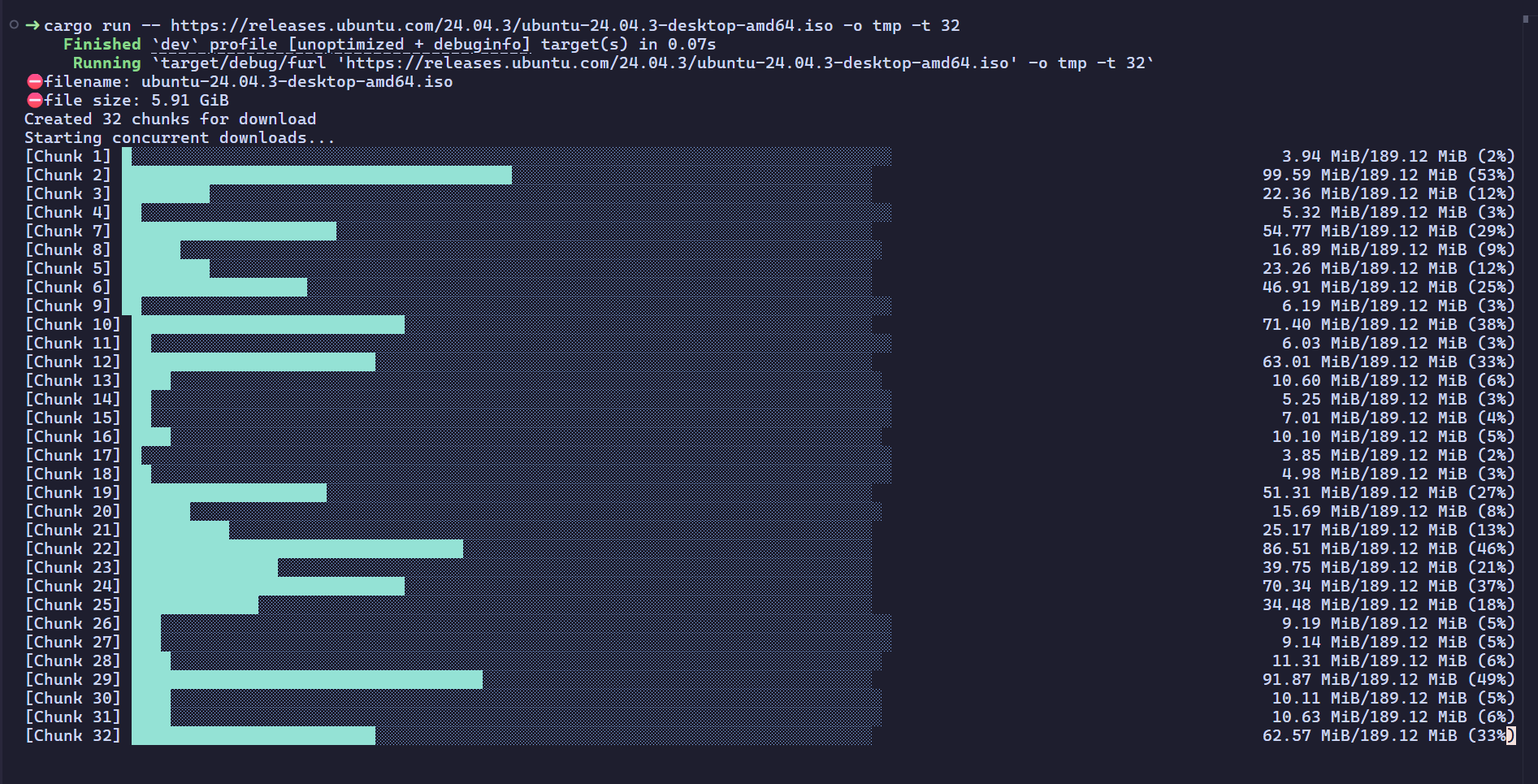
- **Smart Parallel Downloads**: Automatically splits large files into chunks and
downloads them across multiple threads when needed and size is known. Also
automatically shrinks the maximum length of chunk to 10MB for better resource
utilization.
- **Modern Async**: Built on top of `tokio` and `reqwest` for maximum efficiency.
- **Visual Progress**: Beautiful, real-time progress bars using `indicatif`.
- **Rust Powered**: Memory-safe and "fearless" concurrency.
## Installation
You can install `furl` using WinGet, Cargo, or by building it from source.
### Windows (Recommended: WinGet)
For Windows users, WinGet is the recommended installation method.
Requirement: WinGet must be available on your system (included by default on modern Windows 10/11 setups).
```shell
winget install ghimiresdp.furl
```
### Crates.io
Use this method on any platform where Rust is installed.
Requirement: Rust toolchain and Cargo must be installed.
Install Rust from the official guide: <https://www.rust-lang.org/tools/install>
```shell
cargo install furl-cli
```
### From Source
Use this method if you want to build from the latest source code or contribute changes.
Requirement: Git, Rust toolchain, and Cargo must be installed.
Install Rust from the official guide: <https://www.rust-lang.org/tools/install>
```shell
git clone https://github.com/ghimiresdp/furl-cli.git
cd furl-cli
cargo build --release
```
### Pre-built Binaries
If `furl` is not yet available in your package manager, you can download pre-built binaries from the **Assets** section of the [latest release](https://github.com/ghimiresdp/furl-cli/releases/latest).
If you need an older version, browse all published releases in the [Releases](https://github.com/ghimiresdp/furl-cli/releases) section and check the **Assets** section for that release.
## 🛠 Usage
`furl` can be used in 2 modes `Library mode` and `Binary mode`.
### Binary Mode
You need to install the `furl-cli` and add it to the path before you can use it
in the binary mode. For more details, you can check the
[Installation](#installation) section.
#### Without output directory
When no output directory is passed, it automatically downloads the file in the
current terminal directory (PWD).
```bash
furl [URL]
```
**Example:**
```bash
furl https://raw.githubusercontent.com/ghimiresdp/furl-cli/refs/heads/main/res/images/example.png
```
#### With output directory
```bash
furl [URL] -o [path/to/the/directory]
```
**Example:**
```bash
furl https://raw.githubusercontent.com/ghimiresdp/furl-cli/refs/heads/main/res/images/example.png -o ./tmp -t 32
```
### Library Mode
In library mode, you can just import the `Downloader` struct and use its
`download()` method to download files.
```rust
use furl_core::Downloader;
// since Downloader::download() method is async, it needs to be implemented
// inside the async function. if it is main function, we can use
// `#[tokio::main]` macro.
#[tokio::main]
async fn main(){
let download_url = "https://raw.githubusercontent.com/ghimiresdp/furl-cli/refs/heads/main/res/images/example.png";
let mut downloader = Downloader::new(download_url);
if let Ok(_) = downloader.download("/home/user/Downloads", Some(4)).await {
println!("Download Complete!")
}
return;
}
```
## 🗺 Roadmap
- [x] Multithreaded chunk downloading
- [x] Customize number of threads with arguments
- [x] Basic CLI argument parsing (clap)
- [x] Real-time progress bars
- [x] Smart Threading (Completely ignore threading for files smaller than 1 MB).
- [x] Package manager support (Windows: WinGet)
- [ ] Package manager support (Linux: APT)
- [ ] Package manager support (Linux: Flatpak)
- [ ] Package manager support (Linux: Snap)
- [ ] Package manager support (macOS: Homebrew)
- [ ] Resume interrupted downloads (Checkpoints)
- [ ] Support for Proxy and Basic Auth
- [ ] Config file support (furl.toml)
## 🤝 Contributing
Contributions are welcome! Since this project is actively being developed,
please open an issue first to discuss the changes you'd like to make.
1. Fork the Project
2. Create your Feature Branch (`git checkout -b feature/AmazingFeature`)
3. Commit your Changes (`git commit -m 'Add some AmazingFeature'`)`
4. Push to the Branch (`git push origin feature/AmazingFeature`)
5. Open a Pull Request
For more details, please check [CONTRIBUTING.md](CONTRIBUTING.md).
## 📄 License
This project is licensed under the Apache License 2.0.
See the [LICENSE](LICENSE) file for details.
### Third-Party Licenses
This software uses several open-source components. You can view the full list of
dependencies and their licenses using `cargo-license`:
> [!NOTE]
> furl-cli (or fURL) is a successor to my previous project
> [ghimiresdp/rust-raid](https://github.com/ghimiresdp/rust-raid)'s
> [cget](https://github.com/ghimiresdp/rust-raid/tree/main/projects/cget) download manager.
> It incorporates refined logic and improved multithreading from that original
> implementation.