# FlowDB Supabase Server — 基于 Axum 的 Web UI 教程
[« 返回教程](../index.md)
---
本教程将带你使用 **Axum** + FlowDB JsonDB 构建一个 **Supabase 风格的后端服务**,包含 REST API 和 HTML/JS 单页界面。
最终你将获得:
- 完整的用户认证 REST API(注册/登录)和待办 CRUD
- 每个请求强制执行的行级安全(RLS)
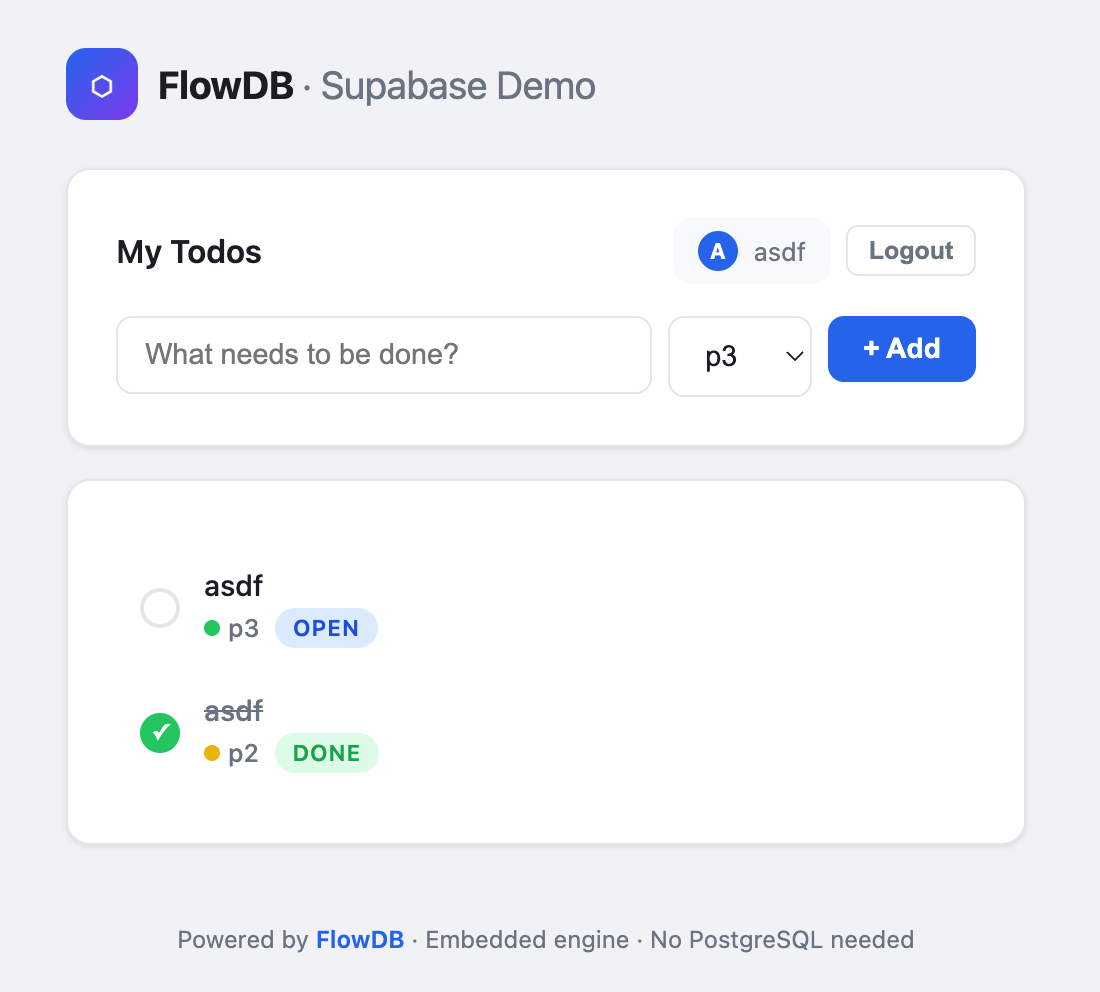
- 调用 API 的单页 Web 界面
- 单个二进制文件即可运行——无需 PostgreSQL,无需 Docker
> **源代码**: [`examples/supabase-server.rs`](https://github.com/restsend/flowdb/blob/main/examples/supabase-server.rs)
> **UI 模板**: [`examples/supabase-ui.html`](https://github.com/restsend/flowdb/blob/main/examples/supabase-ui.html)
---
## 第一步 — 依赖
在 `Cargo.toml` 中添加:
```toml
[dependencies]
flowdb = "0.6"
serde = { version = "1", features = ["derive"] }
serde_json = "1"
tokio = { version = "1", features = ["full"] }
axum = "0.8"
tower-http = { version = "0.6", features = ["cors"] }
tracing-subscriber = "0.3"
tempfile = "3"
```
---
## 第二步 — 应用状态
```rust
use std::sync::Arc;
use flowdb::jsondb::JsonDB;
struct AppState {
db: JsonDB,
}
```
用 `Arc` 包裹以便在各个 handler 间共享。
---
## 第三步 — 请求/响应类型
```rust
use serde::{Deserialize, Serialize};
#[derive(Deserialize)]
struct SignUpReq { email: String, password: String }
#[derive(Serialize)]
struct AuthRes { user_id: String, token: String }
#[derive(Deserialize)]
struct LoginReq { email: String, password: String }
#[derive(Deserialize)]
struct CreateTodoReq {
title: String,
#[serde(default = "default_priority")]
priority: i64,
}
fn default_priority() -> i64 { 0 }
#[derive(Deserialize)]
struct UpdateTodoReq {
title: Option<String>,
status: Option<String>,
priority: Option<i64>,
}
```
更新字段使用 `Option`,允许客户端发送部分更新。
---
## 第四步 — 认证辅助函数
```rust
fn uuid_v4() -> String { /* 确定性 UUID 生成,见完整代码 */ }
fn extract_user_id(auth: &str, db: &JsonDB) -> Result<String, StatusCode> {
let token = auth.strip_prefix("Bearer ")
.ok_or(StatusCode::UNAUTHORIZED)?;
let session = db.get("sessions", &json!(token))
.map_err(|_| StatusCode::INTERNAL_SERVER_ERROR)?
.ok_or(StatusCode::UNAUTHORIZED)?;
session["user_id"].as_str().map(String::from)
.ok_or(StatusCode::UNAUTHORIZED)
}
```
从 `Authorization` 头部提取 `Bearer` token,在 JsonDB 中查找会话,返回 `user_id`。
---
## 第五步 — 数据库 Schema
服务启动时初始化存储和索引:
```rust
use flowdb::jsondb::StoreSchema;
db.apply_schemas(&[
StoreSchema::new("users", "id")
.with_index("by_email", &["email"], true),
StoreSchema::new("sessions", "token")
.with_index("by_user", &["user_id"], false),
StoreSchema::new("todos", "id")
.with_index("by_user_status", &["user_id", "status"], false)
.with_index("by_user_priority", &["user_id", "priority"], false),
]).unwrap();
```
---
## 第六步 — 认证 Handler
### 注册 (POST /api/signup)
```rust
async fn signup_handler(
State(state): State<Arc<AppState>>,
Json(req): Json<SignUpReq>,
) -> Result<Json<AuthRes>, StatusCode> {
let user_id = uuid_v4();
let token = uuid_v4();
let mut tx = state.db
.transaction(&["users", "sessions"], TransactionMode::ReadWrite)
.map_err(|_| StatusCode::INTERNAL_SERVER_ERROR)?;
tx.put("users", json!({
"id": user_id, "email": req.email,
"password": req.password, "created_at": now_iso(),
})).map_err(|_| StatusCode::CONFLICT)?;
tx.put("sessions", json!({
"token": token, "user_id": user_id, "created_at": now_iso(),
})).map_err(|_| StatusCode::INTERNAL_SERVER_ERROR)?;
tx.commit().map_err(|_| StatusCode::INTERNAL_SERVER_ERROR)?;
Ok(Json(AuthRes { user_id, token }))
}
```
关键点:
- 使用显式 **事务** 确保用户与会话原子创建。
- 如果邮箱重复,唯一索引 `by_email` 会使 `put` 返回错误,映射为 `409 CONFLICT`。
### 登录 (POST /api/login)
```rust
async fn login_handler(...) -> Result<Json<AuthRes>, StatusCode> {
let users = state.db
.get_by_index("users", "by_email", &json!(req.email))?;
let user = users.into_iter().next().ok_or(StatusCode::UNAUTHORIZED)?;
if user["password"] != req.password {
return Err(StatusCode::UNAUTHORIZED);
}
// 创建新会话并返回 token
}
```
`by_email` 唯一索引使邮箱查询高效——O(log n) 的查找复杂度。
---
## 第七步 — 待办 Handler
### 列出待办 (GET /api/todos)
```rust
async fn list_todos_handler(
State(state): State<Arc<AppState>>,
headers: HeaderMap,
) -> Result<Json<Vec<serde_json::Value>>, StatusCode> {
let user_id = extract_user_id(...)?;
let todos = state.db.query("todos")
.where_eq("user_id", json!(user_id))
.order_by("priority", SortDir::Desc)
.collect()?;
Ok(Json(todos))
}
```
RLS:查询按会话中的 `user_id` 过滤,复合索引 `by_user_status` 提供高效查找。
### 创建待办 (POST /api/todos)
```rust
async fn create_todo_handler(...) -> Result<Json<serde_json::Value>, StatusCode> {
let user_id = extract_user_id(...)?;
let doc = json!({
"id": uuid_v4(), "user_id": user_id,
"title": req.title, "status": "open",
"priority": req.priority, "created_at": now_iso(),
});
state.db.put("todos", doc.clone())?;
Ok(Json(doc))
}
```
### 更新待办 (PUT /api/todos/:id)
```rust
async fn update_todo_handler(...) -> Result<Json<serde_json::Value>, StatusCode> {
let user_id = extract_user_id(...)?;
let mut doc = state.db.get("todos", &json!(id))?
.ok_or(StatusCode::NOT_FOUND)?;
// RLS: 只有所有者可以修改
if doc["user_id"] != user_id { return Err(StatusCode::FORBIDDEN); }
// 应用部分更新...
state.db.put("todos", doc.clone())?;
Ok(Json(doc))
}
```
### 删除待办 (DELETE /api/todos/:id)
```rust
async fn delete_todo_handler(...) -> Result<Json<serde_json::Value>, StatusCode> {
let user_id = extract_user_id(...)?;
let doc = state.db.get("todos", &json!(id))?
.ok_or(StatusCode::NOT_FOUND)?;
if doc["user_id"] != user_id { return Err(StatusCode::FORBIDDEN); }
state.db.delete("todos", &json!(id))?;
Ok(Json(json!({"deleted": true})))
}
```
---
## 第八步 — 路由组装
```rust
let app = Router::new()
.route("/", get(index_handler))
.route("/api/signup", post(signup_handler))
.route("/api/login", post(login_handler))
.route("/api/todos", get(list_todos_handler).post(create_todo_handler))
.route("/api/todos/{id}", put(update_todo_handler).delete(delete_todo_handler))
.layer(CorsLayer::permissive())
.with_state(state);
let listener = tokio::net::TcpListener::bind("0.0.0.0:3000").await.unwrap();
axum::serve(listener, app).await.unwrap();
```
---
## 第九步 — HTML/JS 单页界面
`index_handler` 返回嵌入式 HTML 页面,使用原生 JavaScript:
- 未认证时显示登录/注册表单
- 认证后显示待办列表
- 使用 `fetch()` + `Authorization: Bearer <token>` 调用 REST API
- 支持创建、切换状态和删除
完整 HTML 代码存放在 [`examples/supabase-ui.html`](https://github.com/restsend/flowdb/blob/main/examples/supabase-ui.html),通过 `include_str!` 在编译时加载,保持 Rust 代码简洁且便于独立编辑 UI。
---
## 运行
```bash
cargo run --example supabase-server
```
打开 [http://localhost:3000](http://localhost:3000)。
### 测试 API
```bash
# 注册
curl -X POST http://localhost:3000/api/signup \
-H 'Content-Type: application/json' \
-d '{"email":"alice@test.com","password":"secret"}'
# 创建待办
curl -X POST http://localhost:3000/api/todos \
-H "Authorization: Bearer <token>" \
-H 'Content-Type: application/json' \
-d '{"title":"Buy milk","priority":2}'
# 列出待办
curl http://localhost:3000/api/todos \
-H "Authorization: Bearer <token>"
```
---
## 架构回顾
```
浏览器 ──HTTP──> Axum Router ──> JsonDB (FlowDB)
│
┌────┴────┐
│ 认证 │
│ (用户, │
│ 会话) │
└────┬────┘
│
┌────┴────┐
│ 业务数据 │
│ (待办, │
│ RLS) │
└─────────┘
```
- 所有请求经过 Axum 路由
- 认证端点管理用户和会话
- 待办端点使用会话中的 `user_id` 强制执行 RLS
- JsonDB 提供 ACID 事务(注册时)和快速索引查询(待办列表)
- 整个栈在单进程中运行,零外部依赖