floem_winit/keyboard.rs
1//! Types related to the keyboard.
2
3// This file contains a substantial portion of the UI Events Specification by the W3C. In
4// particular, the variant names within `Key` and `KeyCode` and their documentation are modified
5// versions of contents of the aforementioned specification.
6//
7// The original documents are:
8//
9// ### For `Key`
10// UI Events KeyboardEvent key Values
11// https://www.w3.org/TR/2017/CR-uievents-key-20170601/
12// Copyright © 2017 W3C® (MIT, ERCIM, Keio, Beihang).
13//
14// ### For `KeyCode`
15// UI Events KeyboardEvent code Values
16// https://www.w3.org/TR/2017/CR-uievents-code-20170601/
17// Copyright © 2017 W3C® (MIT, ERCIM, Keio, Beihang).
18//
19// These documents were used under the terms of the following license. This W3C license as well as
20// the W3C short notice apply to the `Key` and `KeyCode` enums and their variants and the
21// documentation attached to their variants.
22
23// --------- BEGGINING OF W3C LICENSE --------------------------------------------------------------
24//
25// License
26//
27// By obtaining and/or copying this work, you (the licensee) agree that you have read, understood,
28// and will comply with the following terms and conditions.
29//
30// Permission to copy, modify, and distribute this work, with or without modification, for any
31// purpose and without fee or royalty is hereby granted, provided that you include the following on
32// ALL copies of the work or portions thereof, including modifications:
33//
34// - The full text of this NOTICE in a location viewable to users of the redistributed or derivative
35// work.
36// - Any pre-existing intellectual property disclaimers, notices, or terms and conditions. If none
37// exist, the W3C Software and Document Short Notice should be included.
38// - Notice of any changes or modifications, through a copyright statement on the new code or
39// document such as "This software or document includes material copied from or derived from
40// [title and URI of the W3C document]. Copyright © [YEAR] W3C® (MIT, ERCIM, Keio, Beihang)."
41//
42// Disclaimers
43//
44// THIS WORK IS PROVIDED "AS IS," AND COPYRIGHT HOLDERS MAKE NO REPRESENTATIONS OR WARRANTIES,
45// EXPRESS OR IMPLIED, INCLUDING BUT NOT LIMITED TO, WARRANTIES OF MERCHANTABILITY OR FITNESS FOR
46// ANY PARTICULAR PURPOSE OR THAT THE USE OF THE SOFTWARE OR DOCUMENT WILL NOT INFRINGE ANY THIRD
47// PARTY PATENTS, COPYRIGHTS, TRADEMARKS OR OTHER RIGHTS.
48//
49// COPYRIGHT HOLDERS WILL NOT BE LIABLE FOR ANY DIRECT, INDIRECT, SPECIAL OR CONSEQUENTIAL DAMAGES
50// ARISING OUT OF ANY USE OF THE SOFTWARE OR DOCUMENT.
51//
52// The name and trademarks of copyright holders may NOT be used in advertising or publicity
53// pertaining to the work without specific, written prior permission. Title to copyright in this
54// work will at all times remain with copyright holders.
55//
56// --------- END OF W3C LICENSE --------------------------------------------------------------------
57
58// --------- BEGGINING OF W3C SHORT NOTICE ---------------------------------------------------------
59//
60// winit: https://github.com/rust-windowing/winit
61//
62// Copyright © 2021 World Wide Web Consortium, (Massachusetts Institute of Technology, European
63// Research Consortium for Informatics and Mathematics, Keio University, Beihang). All Rights
64// Reserved. This work is distributed under the W3C® Software License [1] in the hope that it will
65// be useful, but WITHOUT ANY WARRANTY; without even the implied warranty of MERCHANTABILITY or
66// FITNESS FOR A PARTICULAR PURPOSE.
67//
68// [1] http://www.w3.org/Consortium/Legal/copyright-software
69//
70// --------- END OF W3C SHORT NOTICE ---------------------------------------------------------------
71
72pub use smol_str::SmolStr;
73
74/// Contains the platform-native physical key identifier
75///
76/// The exact values vary from platform to platform (which is part of why this is a per-platform
77/// enum), but the values are primarily tied to the key's physical location on the keyboard.
78///
79/// This enum is primarily used to store raw keycodes when Winit doesn't map a given native
80/// physical key identifier to a meaningful [`KeyCode`] variant. In the presence of identifiers we
81/// haven't mapped for you yet, this lets you use use [`KeyCode`] to:
82///
83/// - Correctly match key press and release events.
84/// - On non-web platforms, support assigning keybinds to virtually any key through a UI.
85#[derive(Clone, Copy, PartialEq, Eq, PartialOrd, Ord, Hash)]
86#[cfg_attr(feature = "serde", derive(Serialize, Deserialize))]
87pub enum NativeKeyCode {
88 Unidentified,
89 /// An Android "scancode".
90 Android(u32),
91 /// A macOS "scancode".
92 MacOS(u16),
93 /// A Windows "scancode".
94 Windows(u16),
95 /// An XKB "keycode".
96 Xkb(u32),
97}
98
99impl std::fmt::Debug for NativeKeyCode {
100 fn fmt(&self, f: &mut std::fmt::Formatter<'_>) -> std::fmt::Result {
101 use NativeKeyCode::{Android, MacOS, Unidentified, Windows, Xkb};
102 let mut debug_tuple;
103 match self {
104 Unidentified => {
105 debug_tuple = f.debug_tuple("Unidentified");
106 }
107 Android(code) => {
108 debug_tuple = f.debug_tuple("Android");
109 debug_tuple.field(&format_args!("0x{code:04X}"));
110 }
111 MacOS(code) => {
112 debug_tuple = f.debug_tuple("MacOS");
113 debug_tuple.field(&format_args!("0x{code:04X}"));
114 }
115 Windows(code) => {
116 debug_tuple = f.debug_tuple("Windows");
117 debug_tuple.field(&format_args!("0x{code:04X}"));
118 }
119 Xkb(code) => {
120 debug_tuple = f.debug_tuple("Xkb");
121 debug_tuple.field(&format_args!("0x{code:04X}"));
122 }
123 }
124 debug_tuple.finish()
125 }
126}
127
128/// Contains the platform-native logical key identifier
129///
130/// Exactly what that means differs from platform to platform, but the values are to some degree
131/// tied to the currently active keyboard layout. The same key on the same keyboard may also report
132/// different values on different platforms, which is one of the reasons this is a per-platform
133/// enum.
134///
135/// This enum is primarily used to store raw keysym when Winit doesn't map a given native logical
136/// key identifier to a meaningful [`Key`] variant. This lets you use [`Key`], and let the user
137/// define keybinds which work in the presence of identifiers we haven't mapped for you yet.
138#[derive(Clone, PartialEq, Eq, Hash, PartialOrd, Ord)]
139#[cfg_attr(feature = "serde", derive(Serialize, Deserialize))]
140pub enum NativeKey {
141 Unidentified,
142 /// An Android "keycode", which is similar to a "virtual-key code" on Windows.
143 Android(u32),
144 /// A macOS "scancode". There does not appear to be any direct analogue to either keysyms or
145 /// "virtual-key" codes in macOS, so we report the scancode instead.
146 MacOS(u16),
147 /// A Windows "virtual-key code".
148 Windows(u16),
149 /// An XKB "keysym".
150 Xkb(u32),
151 /// A "key value string".
152 Web(SmolStr),
153}
154
155impl std::fmt::Debug for NativeKey {
156 fn fmt(&self, f: &mut std::fmt::Formatter<'_>) -> std::fmt::Result {
157 use NativeKey::{Android, MacOS, Unidentified, Web, Windows, Xkb};
158 let mut debug_tuple;
159 match self {
160 Unidentified => {
161 debug_tuple = f.debug_tuple("Unidentified");
162 }
163 Android(code) => {
164 debug_tuple = f.debug_tuple("Android");
165 debug_tuple.field(&format_args!("0x{code:04X}"));
166 }
167 MacOS(code) => {
168 debug_tuple = f.debug_tuple("MacOS");
169 debug_tuple.field(&format_args!("0x{code:04X}"));
170 }
171 Windows(code) => {
172 debug_tuple = f.debug_tuple("Windows");
173 debug_tuple.field(&format_args!("0x{code:04X}"));
174 }
175 Xkb(code) => {
176 debug_tuple = f.debug_tuple("Xkb");
177 debug_tuple.field(&format_args!("0x{code:04X}"));
178 }
179 Web(code) => {
180 debug_tuple = f.debug_tuple("Web");
181 debug_tuple.field(code);
182 }
183 }
184 debug_tuple.finish()
185 }
186}
187
188impl From<NativeKeyCode> for NativeKey {
189 #[inline]
190 fn from(code: NativeKeyCode) -> Self {
191 match code {
192 NativeKeyCode::Unidentified => NativeKey::Unidentified,
193 NativeKeyCode::Android(x) => NativeKey::Android(x),
194 NativeKeyCode::MacOS(x) => NativeKey::MacOS(x),
195 NativeKeyCode::Windows(x) => NativeKey::Windows(x),
196 NativeKeyCode::Xkb(x) => NativeKey::Xkb(x),
197 }
198 }
199}
200
201impl PartialEq<NativeKey> for NativeKeyCode {
202 #[allow(clippy::cmp_owned)] // uses less code than direct match; target is stack allocated
203 #[inline]
204 fn eq(&self, rhs: &NativeKey) -> bool {
205 NativeKey::from(*self) == *rhs
206 }
207}
208
209impl PartialEq<NativeKeyCode> for NativeKey {
210 #[inline]
211 fn eq(&self, rhs: &NativeKeyCode) -> bool {
212 rhs == self
213 }
214}
215
216/// Represents the location of a physical key.
217///
218/// This type is a superset of [`KeyCode`], including an [`Unidentified`](Self::Unidentified)
219/// variant.
220#[derive(Debug, Clone, Copy, PartialEq, Eq, PartialOrd, Ord, Hash)]
221#[cfg_attr(feature = "serde", derive(Serialize, Deserialize))]
222pub enum PhysicalKey {
223 /// A known key code
224 Code(KeyCode),
225 /// This variant is used when the key cannot be translated to a [`KeyCode`]
226 ///
227 /// The native keycode is provided (if available) so you're able to more reliably match
228 /// key-press and key-release events by hashing the [`PhysicalKey`]. It is also possible to use
229 /// this for keybinds for non-standard keys, but such keybinds are tied to a given platform.
230 Unidentified(NativeKeyCode),
231}
232
233impl From<KeyCode> for PhysicalKey {
234 #[inline]
235 fn from(code: KeyCode) -> Self {
236 PhysicalKey::Code(code)
237 }
238}
239
240impl From<NativeKeyCode> for PhysicalKey {
241 #[inline]
242 fn from(code: NativeKeyCode) -> Self {
243 PhysicalKey::Unidentified(code)
244 }
245}
246
247impl PartialEq<KeyCode> for PhysicalKey {
248 #[inline]
249 fn eq(&self, rhs: &KeyCode) -> bool {
250 match self {
251 PhysicalKey::Code(ref code) => code == rhs,
252 _ => false,
253 }
254 }
255}
256
257impl PartialEq<PhysicalKey> for KeyCode {
258 #[inline]
259 fn eq(&self, rhs: &PhysicalKey) -> bool {
260 rhs == self
261 }
262}
263
264impl PartialEq<NativeKeyCode> for PhysicalKey {
265 #[inline]
266 fn eq(&self, rhs: &NativeKeyCode) -> bool {
267 match self {
268 PhysicalKey::Unidentified(ref code) => code == rhs,
269 _ => false,
270 }
271 }
272}
273
274impl PartialEq<PhysicalKey> for NativeKeyCode {
275 #[inline]
276 fn eq(&self, rhs: &PhysicalKey) -> bool {
277 rhs == self
278 }
279}
280
281/// Code representing the location of a physical key
282///
283/// This mostly conforms to the UI Events Specification's [`KeyboardEvent.code`] with a few
284/// exceptions:
285/// - The keys that the specification calls "MetaLeft" and "MetaRight" are named "SuperLeft" and
286/// "SuperRight" here.
287/// - The key that the specification calls "Super" is reported as `Unidentified` here.
288///
289/// [`KeyboardEvent.code`]: https://w3c.github.io/uievents-code/#code-value-tables
290#[non_exhaustive]
291#[derive(Debug, Clone, Copy, PartialEq, Eq, PartialOrd, Ord, Hash)]
292#[cfg_attr(feature = "serde", derive(Serialize, Deserialize))]
293pub enum KeyCode {
294 /// <kbd>`</kbd> on a US keyboard. This is also called a backtick or grave.
295 /// This is the <kbd>半角</kbd>/<kbd>全角</kbd>/<kbd>漢字</kbd>
296 /// (hankaku/zenkaku/kanji) key on Japanese keyboards
297 Backquote,
298 /// Used for both the US <kbd>\\</kbd> (on the 101-key layout) and also for the key
299 /// located between the <kbd>"</kbd> and <kbd>Enter</kbd> keys on row C of the 102-,
300 /// 104- and 106-key layouts.
301 /// Labeled <kbd>#</kbd> on a UK (102) keyboard.
302 Backslash,
303 /// <kbd>[</kbd> on a US keyboard.
304 BracketLeft,
305 /// <kbd>]</kbd> on a US keyboard.
306 BracketRight,
307 /// <kbd>,</kbd> on a US keyboard.
308 Comma,
309 /// <kbd>0</kbd> on a US keyboard.
310 Digit0,
311 /// <kbd>1</kbd> on a US keyboard.
312 Digit1,
313 /// <kbd>2</kbd> on a US keyboard.
314 Digit2,
315 /// <kbd>3</kbd> on a US keyboard.
316 Digit3,
317 /// <kbd>4</kbd> on a US keyboard.
318 Digit4,
319 /// <kbd>5</kbd> on a US keyboard.
320 Digit5,
321 /// <kbd>6</kbd> on a US keyboard.
322 Digit6,
323 /// <kbd>7</kbd> on a US keyboard.
324 Digit7,
325 /// <kbd>8</kbd> on a US keyboard.
326 Digit8,
327 /// <kbd>9</kbd> on a US keyboard.
328 Digit9,
329 /// <kbd>=</kbd> on a US keyboard.
330 Equal,
331 /// Located between the left <kbd>Shift</kbd> and <kbd>Z</kbd> keys.
332 /// Labeled <kbd>\\</kbd> on a UK keyboard.
333 IntlBackslash,
334 /// Located between the <kbd>/</kbd> and right <kbd>Shift</kbd> keys.
335 /// Labeled <kbd>\\</kbd> (ro) on a Japanese keyboard.
336 IntlRo,
337 /// Located between the <kbd>=</kbd> and <kbd>Backspace</kbd> keys.
338 /// Labeled <kbd>¥</kbd> (yen) on a Japanese keyboard. <kbd>\\</kbd> on a
339 /// Russian keyboard.
340 IntlYen,
341 /// <kbd>a</kbd> on a US keyboard.
342 /// Labeled <kbd>q</kbd> on an AZERTY (e.g., French) keyboard.
343 KeyA,
344 /// <kbd>b</kbd> on a US keyboard.
345 KeyB,
346 /// <kbd>c</kbd> on a US keyboard.
347 KeyC,
348 /// <kbd>d</kbd> on a US keyboard.
349 KeyD,
350 /// <kbd>e</kbd> on a US keyboard.
351 KeyE,
352 /// <kbd>f</kbd> on a US keyboard.
353 KeyF,
354 /// <kbd>g</kbd> on a US keyboard.
355 KeyG,
356 /// <kbd>h</kbd> on a US keyboard.
357 KeyH,
358 /// <kbd>i</kbd> on a US keyboard.
359 KeyI,
360 /// <kbd>j</kbd> on a US keyboard.
361 KeyJ,
362 /// <kbd>k</kbd> on a US keyboard.
363 KeyK,
364 /// <kbd>l</kbd> on a US keyboard.
365 KeyL,
366 /// <kbd>m</kbd> on a US keyboard.
367 KeyM,
368 /// <kbd>n</kbd> on a US keyboard.
369 KeyN,
370 /// <kbd>o</kbd> on a US keyboard.
371 KeyO,
372 /// <kbd>p</kbd> on a US keyboard.
373 KeyP,
374 /// <kbd>q</kbd> on a US keyboard.
375 /// Labeled <kbd>a</kbd> on an AZERTY (e.g., French) keyboard.
376 KeyQ,
377 /// <kbd>r</kbd> on a US keyboard.
378 KeyR,
379 /// <kbd>s</kbd> on a US keyboard.
380 KeyS,
381 /// <kbd>t</kbd> on a US keyboard.
382 KeyT,
383 /// <kbd>u</kbd> on a US keyboard.
384 KeyU,
385 /// <kbd>v</kbd> on a US keyboard.
386 KeyV,
387 /// <kbd>w</kbd> on a US keyboard.
388 /// Labeled <kbd>z</kbd> on an AZERTY (e.g., French) keyboard.
389 KeyW,
390 /// <kbd>x</kbd> on a US keyboard.
391 KeyX,
392 /// <kbd>y</kbd> on a US keyboard.
393 /// Labeled <kbd>z</kbd> on a QWERTZ (e.g., German) keyboard.
394 KeyY,
395 /// <kbd>z</kbd> on a US keyboard.
396 /// Labeled <kbd>w</kbd> on an AZERTY (e.g., French) keyboard, and <kbd>y</kbd> on a
397 /// QWERTZ (e.g., German) keyboard.
398 KeyZ,
399 /// <kbd>-</kbd> on a US keyboard.
400 Minus,
401 /// <kbd>.</kbd> on a US keyboard.
402 Period,
403 /// <kbd>'</kbd> on a US keyboard.
404 Quote,
405 /// <kbd>;</kbd> on a US keyboard.
406 Semicolon,
407 /// <kbd>/</kbd> on a US keyboard.
408 Slash,
409 /// <kbd>Alt</kbd>, <kbd>Option</kbd>, or <kbd>⌥</kbd>.
410 AltLeft,
411 /// <kbd>Alt</kbd>, <kbd>Option</kbd>, or <kbd>⌥</kbd>.
412 /// This is labeled <kbd>AltGr</kbd> on many keyboard layouts.
413 AltRight,
414 /// <kbd>Backspace</kbd> or <kbd>⌫</kbd>.
415 /// Labeled <kbd>Delete</kbd> on Apple keyboards.
416 Backspace,
417 /// <kbd>CapsLock</kbd> or <kbd>⇪</kbd>
418 CapsLock,
419 /// The application context menu key, which is typically found between the right
420 /// <kbd>Super</kbd> key and the right <kbd>Control</kbd> key.
421 ContextMenu,
422 /// <kbd>Control</kbd> or <kbd>⌃</kbd>
423 ControlLeft,
424 /// <kbd>Control</kbd> or <kbd>⌃</kbd>
425 ControlRight,
426 /// <kbd>Enter</kbd> or <kbd>↵</kbd>. Labeled <kbd>Return</kbd> on Apple keyboards.
427 Enter,
428 /// The Windows, <kbd>⌘</kbd>, <kbd>Command</kbd>, or other OS symbol key.
429 SuperLeft,
430 /// The Windows, <kbd>⌘</kbd>, <kbd>Command</kbd>, or other OS symbol key.
431 SuperRight,
432 /// <kbd>Shift</kbd> or <kbd>⇧</kbd>
433 ShiftLeft,
434 /// <kbd>Shift</kbd> or <kbd>⇧</kbd>
435 ShiftRight,
436 /// <kbd> </kbd> (space)
437 Space,
438 /// <kbd>Tab</kbd> or <kbd>⇥</kbd>
439 Tab,
440 /// Japanese: <kbd>変</kbd> (henkan)
441 Convert,
442 /// Japanese: <kbd>カタカナ</kbd>/<kbd>ひらがな</kbd>/<kbd>ローマ字</kbd> (katakana/hiragana/romaji)
443 KanaMode,
444 /// Korean: HangulMode <kbd>한/영</kbd> (han/yeong)
445 ///
446 /// Japanese (Mac keyboard): <kbd>か</kbd> (kana)
447 Lang1,
448 /// Korean: Hanja <kbd>한</kbd> (hanja)
449 ///
450 /// Japanese (Mac keyboard): <kbd>英</kbd> (eisu)
451 Lang2,
452 /// Japanese (word-processing keyboard): Katakana
453 Lang3,
454 /// Japanese (word-processing keyboard): Hiragana
455 Lang4,
456 /// Japanese (word-processing keyboard): Zenkaku/Hankaku
457 Lang5,
458 /// Japanese: <kbd>無変換</kbd> (muhenkan)
459 NonConvert,
460 /// <kbd>⌦</kbd>. The forward delete key.
461 /// Note that on Apple keyboards, the key labelled <kbd>Delete</kbd> on the main part of
462 /// the keyboard is encoded as [`Backspace`].
463 ///
464 /// [`Backspace`]: Self::Backspace
465 Delete,
466 /// <kbd>Page Down</kbd>, <kbd>End</kbd>, or <kbd>↘</kbd>
467 End,
468 /// <kbd>Help</kbd>. Not present on standard PC keyboards.
469 Help,
470 /// <kbd>Home</kbd> or <kbd>↖</kbd>
471 Home,
472 /// <kbd>Insert</kbd> or <kbd>Ins</kbd>. Not present on Apple keyboards.
473 Insert,
474 /// <kbd>Page Down</kbd>, <kbd>PgDn</kbd>, or <kbd>⇟</kbd>
475 PageDown,
476 /// <kbd>Page Up</kbd>, <kbd>PgUp</kbd>, or <kbd>⇞</kbd>
477 PageUp,
478 /// <kbd>↓</kbd>
479 ArrowDown,
480 /// <kbd>←</kbd>
481 ArrowLeft,
482 /// <kbd>→</kbd>
483 ArrowRight,
484 /// <kbd>↑</kbd>
485 ArrowUp,
486 /// On the Mac, this is used for the numpad <kbd>Clear</kbd> key.
487 NumLock,
488 /// <kbd>0 Ins</kbd> on a keyboard. <kbd>0</kbd> on a phone or remote control
489 Numpad0,
490 /// <kbd>1 End</kbd> on a keyboard. <kbd>1</kbd> or <kbd>1 QZ</kbd> on a phone or remote control
491 Numpad1,
492 /// <kbd>2 ↓</kbd> on a keyboard. <kbd>2 ABC</kbd> on a phone or remote control
493 Numpad2,
494 /// <kbd>3 PgDn</kbd> on a keyboard. <kbd>3 DEF</kbd> on a phone or remote control
495 Numpad3,
496 /// <kbd>4 ←</kbd> on a keyboard. <kbd>4 GHI</kbd> on a phone or remote control
497 Numpad4,
498 /// <kbd>5</kbd> on a keyboard. <kbd>5 JKL</kbd> on a phone or remote control
499 Numpad5,
500 /// <kbd>6 →</kbd> on a keyboard. <kbd>6 MNO</kbd> on a phone or remote control
501 Numpad6,
502 /// <kbd>7 Home</kbd> on a keyboard. <kbd>7 PQRS</kbd> or <kbd>7 PRS</kbd> on a phone
503 /// or remote control
504 Numpad7,
505 /// <kbd>8 ↑</kbd> on a keyboard. <kbd>8 TUV</kbd> on a phone or remote control
506 Numpad8,
507 /// <kbd>9 PgUp</kbd> on a keyboard. <kbd>9 WXYZ</kbd> or <kbd>9 WXY</kbd> on a phone
508 /// or remote control
509 Numpad9,
510 /// <kbd>+</kbd>
511 NumpadAdd,
512 /// Found on the Microsoft Natural Keyboard.
513 NumpadBackspace,
514 /// <kbd>C</kbd> or <kbd>A</kbd> (All Clear). Also for use with numpads that have a
515 /// <kbd>Clear</kbd> key that is separate from the <kbd>NumLock</kbd> key. On the Mac, the
516 /// numpad <kbd>Clear</kbd> key is encoded as [`NumLock`].
517 ///
518 /// [`NumLock`]: Self::NumLock
519 NumpadClear,
520 /// <kbd>C</kbd> (Clear Entry)
521 NumpadClearEntry,
522 /// <kbd>,</kbd> (thousands separator). For locales where the thousands separator
523 /// is a "." (e.g., Brazil), this key may generate a <kbd>.</kbd>.
524 NumpadComma,
525 /// <kbd>. Del</kbd>. For locales where the decimal separator is "," (e.g.,
526 /// Brazil), this key may generate a <kbd>,</kbd>.
527 NumpadDecimal,
528 /// <kbd>/</kbd>
529 NumpadDivide,
530 NumpadEnter,
531 /// <kbd>=</kbd>
532 NumpadEqual,
533 /// <kbd>#</kbd> on a phone or remote control device. This key is typically found
534 /// below the <kbd>9</kbd> key and to the right of the <kbd>0</kbd> key.
535 NumpadHash,
536 /// <kbd>M</kbd> Add current entry to the value stored in memory.
537 NumpadMemoryAdd,
538 /// <kbd>M</kbd> Clear the value stored in memory.
539 NumpadMemoryClear,
540 /// <kbd>M</kbd> Replace the current entry with the value stored in memory.
541 NumpadMemoryRecall,
542 /// <kbd>M</kbd> Replace the value stored in memory with the current entry.
543 NumpadMemoryStore,
544 /// <kbd>M</kbd> Subtract current entry from the value stored in memory.
545 NumpadMemorySubtract,
546 /// <kbd>*</kbd> on a keyboard. For use with numpads that provide mathematical
547 /// operations (<kbd>+</kbd>, <kbd>-</kbd> <kbd>*</kbd> and <kbd>/</kbd>).
548 ///
549 /// Use `NumpadStar` for the <kbd>*</kbd> key on phones and remote controls.
550 NumpadMultiply,
551 /// <kbd>(</kbd> Found on the Microsoft Natural Keyboard.
552 NumpadParenLeft,
553 /// <kbd>)</kbd> Found on the Microsoft Natural Keyboard.
554 NumpadParenRight,
555 /// <kbd>*</kbd> on a phone or remote control device.
556 ///
557 /// This key is typically found below the <kbd>7</kbd> key and to the left of
558 /// the <kbd>0</kbd> key.
559 ///
560 /// Use <kbd>"NumpadMultiply"</kbd> for the <kbd>*</kbd> key on
561 /// numeric keypads.
562 NumpadStar,
563 /// <kbd>-</kbd>
564 NumpadSubtract,
565 /// <kbd>Esc</kbd> or <kbd>⎋</kbd>
566 Escape,
567 /// <kbd>Fn</kbd> This is typically a hardware key that does not generate a separate code.
568 Fn,
569 /// <kbd>FLock</kbd> or <kbd>FnLock</kbd>. Function Lock key. Found on the Microsoft
570 /// Natural Keyboard.
571 FnLock,
572 /// <kbd>PrtScr SysRq</kbd> or <kbd>Print Screen</kbd>
573 PrintScreen,
574 /// <kbd>Scroll Lock</kbd>
575 ScrollLock,
576 /// <kbd>Pause Break</kbd>
577 Pause,
578 /// Some laptops place this key to the left of the <kbd>↑</kbd> key.
579 ///
580 /// This also the "back" button (triangle) on Android.
581 BrowserBack,
582 BrowserFavorites,
583 /// Some laptops place this key to the right of the <kbd>↑</kbd> key.
584 BrowserForward,
585 /// The "home" button on Android.
586 BrowserHome,
587 BrowserRefresh,
588 BrowserSearch,
589 BrowserStop,
590 /// <kbd>Eject</kbd> or <kbd>⏏</kbd>. This key is placed in the function section on some Apple
591 /// keyboards.
592 Eject,
593 /// Sometimes labelled <kbd>My Computer</kbd> on the keyboard
594 LaunchApp1,
595 /// Sometimes labelled <kbd>Calculator</kbd> on the keyboard
596 LaunchApp2,
597 LaunchMail,
598 MediaPlayPause,
599 MediaSelect,
600 MediaStop,
601 MediaTrackNext,
602 MediaTrackPrevious,
603 /// This key is placed in the function section on some Apple keyboards, replacing the
604 /// <kbd>Eject</kbd> key.
605 Power,
606 Sleep,
607 AudioVolumeDown,
608 AudioVolumeMute,
609 AudioVolumeUp,
610 WakeUp,
611 // Legacy modifier key. Also called "Super" in certain places.
612 Meta,
613 // Legacy modifier key.
614 Hyper,
615 Turbo,
616 Abort,
617 Resume,
618 Suspend,
619 /// Found on Sun’s USB keyboard.
620 Again,
621 /// Found on Sun’s USB keyboard.
622 Copy,
623 /// Found on Sun’s USB keyboard.
624 Cut,
625 /// Found on Sun’s USB keyboard.
626 Find,
627 /// Found on Sun’s USB keyboard.
628 Open,
629 /// Found on Sun’s USB keyboard.
630 Paste,
631 /// Found on Sun’s USB keyboard.
632 Props,
633 /// Found on Sun’s USB keyboard.
634 Select,
635 /// Found on Sun’s USB keyboard.
636 Undo,
637 /// Use for dedicated <kbd>ひらがな</kbd> key found on some Japanese word processing keyboards.
638 Hiragana,
639 /// Use for dedicated <kbd>カタカナ</kbd> key found on some Japanese word processing keyboards.
640 Katakana,
641 /// General-purpose function key.
642 /// Usually found at the top of the keyboard.
643 F1,
644 /// General-purpose function key.
645 /// Usually found at the top of the keyboard.
646 F2,
647 /// General-purpose function key.
648 /// Usually found at the top of the keyboard.
649 F3,
650 /// General-purpose function key.
651 /// Usually found at the top of the keyboard.
652 F4,
653 /// General-purpose function key.
654 /// Usually found at the top of the keyboard.
655 F5,
656 /// General-purpose function key.
657 /// Usually found at the top of the keyboard.
658 F6,
659 /// General-purpose function key.
660 /// Usually found at the top of the keyboard.
661 F7,
662 /// General-purpose function key.
663 /// Usually found at the top of the keyboard.
664 F8,
665 /// General-purpose function key.
666 /// Usually found at the top of the keyboard.
667 F9,
668 /// General-purpose function key.
669 /// Usually found at the top of the keyboard.
670 F10,
671 /// General-purpose function key.
672 /// Usually found at the top of the keyboard.
673 F11,
674 /// General-purpose function key.
675 /// Usually found at the top of the keyboard.
676 F12,
677 /// General-purpose function key.
678 /// Usually found at the top of the keyboard.
679 F13,
680 /// General-purpose function key.
681 /// Usually found at the top of the keyboard.
682 F14,
683 /// General-purpose function key.
684 /// Usually found at the top of the keyboard.
685 F15,
686 /// General-purpose function key.
687 /// Usually found at the top of the keyboard.
688 F16,
689 /// General-purpose function key.
690 /// Usually found at the top of the keyboard.
691 F17,
692 /// General-purpose function key.
693 /// Usually found at the top of the keyboard.
694 F18,
695 /// General-purpose function key.
696 /// Usually found at the top of the keyboard.
697 F19,
698 /// General-purpose function key.
699 /// Usually found at the top of the keyboard.
700 F20,
701 /// General-purpose function key.
702 /// Usually found at the top of the keyboard.
703 F21,
704 /// General-purpose function key.
705 /// Usually found at the top of the keyboard.
706 F22,
707 /// General-purpose function key.
708 /// Usually found at the top of the keyboard.
709 F23,
710 /// General-purpose function key.
711 /// Usually found at the top of the keyboard.
712 F24,
713 /// General-purpose function key.
714 F25,
715 /// General-purpose function key.
716 F26,
717 /// General-purpose function key.
718 F27,
719 /// General-purpose function key.
720 F28,
721 /// General-purpose function key.
722 F29,
723 /// General-purpose function key.
724 F30,
725 /// General-purpose function key.
726 F31,
727 /// General-purpose function key.
728 F32,
729 /// General-purpose function key.
730 F33,
731 /// General-purpose function key.
732 F34,
733 /// General-purpose function key.
734 F35,
735}
736
737/// A [`Key::Named`] value
738///
739/// This mostly conforms to the UI Events Specification's [`KeyboardEvent.key`] with a few
740/// exceptions:
741/// - The `Super` variant here, is named `Meta` in the aforementioned specification. (There's
742/// another key which the specification calls `Super`. That does not exist here.)
743/// - The `Space` variant here, can be identified by the character it generates in the
744/// specificaiton.
745///
746/// [`KeyboardEvent.key`]: https://w3c.github.io/uievents-key/
747#[non_exhaustive]
748#[derive(Debug, Clone, Copy, PartialEq, Eq, Hash, PartialOrd, Ord)]
749#[cfg_attr(feature = "serde", derive(Serialize, Deserialize))]
750pub enum NamedKey {
751 /// The `Alt` (Alternative) key.
752 ///
753 /// This key enables the alternate modifier function for interpreting concurrent or subsequent
754 /// keyboard input. This key value is also used for the Apple <kbd>Option</kbd> key.
755 Alt,
756 /// The Alternate Graphics (<kbd>AltGr</kbd> or <kbd>AltGraph</kbd>) key.
757 ///
758 /// This key is used enable the ISO Level 3 shift modifier (the standard `Shift` key is the
759 /// level 2 modifier).
760 AltGraph,
761 /// The `Caps Lock` (Capital) key.
762 ///
763 /// Toggle capital character lock function for interpreting subsequent keyboard input event.
764 CapsLock,
765 /// The `Control` or `Ctrl` key.
766 ///
767 /// Used to enable control modifier function for interpreting concurrent or subsequent keyboard
768 /// input.
769 Control,
770 /// The Function switch `Fn` key. Activating this key simultaneously with another key changes
771 /// that key’s value to an alternate character or function. This key is often handled directly
772 /// in the keyboard hardware and does not usually generate key events.
773 Fn,
774 /// The Function-Lock (`FnLock` or `F-Lock`) key. Activating this key switches the mode of the
775 /// keyboard to changes some keys' values to an alternate character or function. This key is
776 /// often handled directly in the keyboard hardware and does not usually generate key events.
777 FnLock,
778 /// The `NumLock` or Number Lock key. Used to toggle numpad mode function for interpreting
779 /// subsequent keyboard input.
780 NumLock,
781 /// Toggle between scrolling and cursor movement modes.
782 ScrollLock,
783 /// Used to enable shift modifier function for interpreting concurrent or subsequent keyboard
784 /// input.
785 Shift,
786 /// The Symbol modifier key (used on some virtual keyboards).
787 Symbol,
788 SymbolLock,
789 // Legacy modifier key. Also called "Super" in certain places.
790 Meta,
791 // Legacy modifier key.
792 Hyper,
793 /// Used to enable "super" modifier function for interpreting concurrent or subsequent keyboard
794 /// input. This key value is used for the "Windows Logo" key and the Apple `Command` or `⌘` key.
795 ///
796 /// Note: In some contexts (e.g. the Web) this is referred to as the "Meta" key.
797 Super,
798 /// The `Enter` or `↵` key. Used to activate current selection or accept current input. This key
799 /// value is also used for the `Return` (Macintosh numpad) key. This key value is also used for
800 /// the Android `KEYCODE_DPAD_CENTER`.
801 Enter,
802 /// The Horizontal Tabulation `Tab` key.
803 Tab,
804 /// Used in text to insert a space between words. Usually located below the character keys.
805 Space,
806 /// Navigate or traverse downward. (`KEYCODE_DPAD_DOWN`)
807 ArrowDown,
808 /// Navigate or traverse leftward. (`KEYCODE_DPAD_LEFT`)
809 ArrowLeft,
810 /// Navigate or traverse rightward. (`KEYCODE_DPAD_RIGHT`)
811 ArrowRight,
812 /// Navigate or traverse upward. (`KEYCODE_DPAD_UP`)
813 ArrowUp,
814 /// The End key, used with keyboard entry to go to the end of content (`KEYCODE_MOVE_END`).
815 End,
816 /// The Home key, used with keyboard entry, to go to start of content (`KEYCODE_MOVE_HOME`).
817 /// For the mobile phone `Home` key (which goes to the phone’s main screen), use [`GoHome`].
818 ///
819 /// [`GoHome`]: Self::GoHome
820 Home,
821 /// Scroll down or display next page of content.
822 PageDown,
823 /// Scroll up or display previous page of content.
824 PageUp,
825 /// Used to remove the character to the left of the cursor. This key value is also used for
826 /// the key labeled `Delete` on MacOS keyboards.
827 Backspace,
828 /// Remove the currently selected input.
829 Clear,
830 /// Copy the current selection. (`APPCOMMAND_COPY`)
831 Copy,
832 /// The Cursor Select key.
833 CrSel,
834 /// Cut the current selection. (`APPCOMMAND_CUT`)
835 Cut,
836 /// Used to delete the character to the right of the cursor. This key value is also used for the
837 /// key labeled `Delete` on MacOS keyboards when `Fn` is active.
838 Delete,
839 /// The Erase to End of Field key. This key deletes all characters from the current cursor
840 /// position to the end of the current field.
841 EraseEof,
842 /// The Extend Selection (Exsel) key.
843 ExSel,
844 /// Toggle between text modes for insertion or overtyping.
845 /// (`KEYCODE_INSERT`)
846 Insert,
847 /// The Paste key. (`APPCOMMAND_PASTE`)
848 Paste,
849 /// Redo the last action. (`APPCOMMAND_REDO`)
850 Redo,
851 /// Undo the last action. (`APPCOMMAND_UNDO`)
852 Undo,
853 /// The Accept (Commit, OK) key. Accept current option or input method sequence conversion.
854 Accept,
855 /// Redo or repeat an action.
856 Again,
857 /// The Attention (Attn) key.
858 Attn,
859 Cancel,
860 /// Show the application’s context menu.
861 /// This key is commonly found between the right `Super` key and the right `Control` key.
862 ContextMenu,
863 /// The `Esc` key. This key was originally used to initiate an escape sequence, but is
864 /// now more generally used to exit or "escape" the current context, such as closing a dialog
865 /// or exiting full screen mode.
866 Escape,
867 Execute,
868 /// Open the Find dialog. (`APPCOMMAND_FIND`)
869 Find,
870 /// Open a help dialog or toggle display of help information. (`APPCOMMAND_HELP`,
871 /// `KEYCODE_HELP`)
872 Help,
873 /// Pause the current state or application (as appropriate).
874 ///
875 /// Note: Do not use this value for the `Pause` button on media controllers. Use `"MediaPause"`
876 /// instead.
877 Pause,
878 /// Play or resume the current state or application (as appropriate).
879 ///
880 /// Note: Do not use this value for the `Play` button on media controllers. Use `"MediaPlay"`
881 /// instead.
882 Play,
883 /// The properties (Props) key.
884 Props,
885 Select,
886 /// The ZoomIn key. (`KEYCODE_ZOOM_IN`)
887 ZoomIn,
888 /// The ZoomOut key. (`KEYCODE_ZOOM_OUT`)
889 ZoomOut,
890 /// The Brightness Down key. Typically controls the display brightness.
891 /// (`KEYCODE_BRIGHTNESS_DOWN`)
892 BrightnessDown,
893 /// The Brightness Up key. Typically controls the display brightness. (`KEYCODE_BRIGHTNESS_UP`)
894 BrightnessUp,
895 /// Toggle removable media to eject (open) and insert (close) state. (`KEYCODE_MEDIA_EJECT`)
896 Eject,
897 LogOff,
898 /// Toggle power state. (`KEYCODE_POWER`)
899 /// Note: Note: Some devices might not expose this key to the operating environment.
900 Power,
901 /// The `PowerOff` key. Sometime called `PowerDown`.
902 PowerOff,
903 /// Initiate print-screen function.
904 PrintScreen,
905 /// The Hibernate key. This key saves the current state of the computer to disk so that it can
906 /// be restored. The computer will then shutdown.
907 Hibernate,
908 /// The Standby key. This key turns off the display and places the computer into a low-power
909 /// mode without completely shutting down. It is sometimes labelled `Suspend` or `Sleep` key.
910 /// (`KEYCODE_SLEEP`)
911 Standby,
912 /// The WakeUp key. (`KEYCODE_WAKEUP`)
913 WakeUp,
914 /// Initate the multi-candidate mode.
915 AllCandidates,
916 Alphanumeric,
917 /// Initiate the Code Input mode to allow characters to be entered by
918 /// their code points.
919 CodeInput,
920 /// The Compose key, also known as "Multi_key" on the X Window System. This key acts in a
921 /// manner similar to a dead key, triggering a mode where subsequent key presses are combined to
922 /// produce a different character.
923 Compose,
924 /// Convert the current input method sequence.
925 Convert,
926 /// The Final Mode `Final` key used on some Asian keyboards, to enable the final mode for IMEs.
927 FinalMode,
928 /// Switch to the first character group. (ISO/IEC 9995)
929 GroupFirst,
930 /// Switch to the last character group. (ISO/IEC 9995)
931 GroupLast,
932 /// Switch to the next character group. (ISO/IEC 9995)
933 GroupNext,
934 /// Switch to the previous character group. (ISO/IEC 9995)
935 GroupPrevious,
936 /// Toggle between or cycle through input modes of IMEs.
937 ModeChange,
938 NextCandidate,
939 /// Accept current input method sequence without
940 /// conversion in IMEs.
941 NonConvert,
942 PreviousCandidate,
943 Process,
944 SingleCandidate,
945 /// Toggle between Hangul and English modes.
946 HangulMode,
947 HanjaMode,
948 JunjaMode,
949 /// The Eisu key. This key may close the IME, but its purpose is defined by the current IME.
950 /// (`KEYCODE_EISU`)
951 Eisu,
952 /// The (Half-Width) Characters key.
953 Hankaku,
954 /// The Hiragana (Japanese Kana characters) key.
955 Hiragana,
956 /// The Hiragana/Katakana toggle key. (`KEYCODE_KATAKANA_HIRAGANA`)
957 HiraganaKatakana,
958 /// The Kana Mode (Kana Lock) key. This key is used to enter hiragana mode (typically from
959 /// romaji mode).
960 KanaMode,
961 /// The Kanji (Japanese name for ideographic characters of Chinese origin) Mode key. This key is
962 /// typically used to switch to a hiragana keyboard for the purpose of converting input into
963 /// kanji. (`KEYCODE_KANA`)
964 KanjiMode,
965 /// The Katakana (Japanese Kana characters) key.
966 Katakana,
967 /// The Roman characters function key.
968 Romaji,
969 /// The Zenkaku (Full-Width) Characters key.
970 Zenkaku,
971 /// The Zenkaku/Hankaku (full-width/half-width) toggle key. (`KEYCODE_ZENKAKU_HANKAKU`)
972 ZenkakuHankaku,
973 /// General purpose virtual function key, as index 1.
974 Soft1,
975 /// General purpose virtual function key, as index 2.
976 Soft2,
977 /// General purpose virtual function key, as index 3.
978 Soft3,
979 /// General purpose virtual function key, as index 4.
980 Soft4,
981 /// Select next (numerically or logically) lower channel. (`APPCOMMAND_MEDIA_CHANNEL_DOWN`,
982 /// `KEYCODE_CHANNEL_DOWN`)
983 ChannelDown,
984 /// Select next (numerically or logically) higher channel. (`APPCOMMAND_MEDIA_CHANNEL_UP`,
985 /// `KEYCODE_CHANNEL_UP`)
986 ChannelUp,
987 /// Close the current document or message (Note: This doesn’t close the application).
988 /// (`APPCOMMAND_CLOSE`)
989 Close,
990 /// Open an editor to forward the current message. (`APPCOMMAND_FORWARD_MAIL`)
991 MailForward,
992 /// Open an editor to reply to the current message. (`APPCOMMAND_REPLY_TO_MAIL`)
993 MailReply,
994 /// Send the current message. (`APPCOMMAND_SEND_MAIL`)
995 MailSend,
996 /// Close the current media, for example to close a CD or DVD tray. (`KEYCODE_MEDIA_CLOSE`)
997 MediaClose,
998 /// Initiate or continue forward playback at faster than normal speed, or increase speed if
999 /// already fast forwarding. (`APPCOMMAND_MEDIA_FAST_FORWARD`, `KEYCODE_MEDIA_FAST_FORWARD`)
1000 MediaFastForward,
1001 /// Pause the currently playing media. (`APPCOMMAND_MEDIA_PAUSE`, `KEYCODE_MEDIA_PAUSE`)
1002 ///
1003 /// Note: Media controller devices should use this value rather than `"Pause"` for their pause
1004 /// keys.
1005 MediaPause,
1006 /// Initiate or continue media playback at normal speed, if not currently playing at normal
1007 /// speed. (`APPCOMMAND_MEDIA_PLAY`, `KEYCODE_MEDIA_PLAY`)
1008 MediaPlay,
1009 /// Toggle media between play and pause states. (`APPCOMMAND_MEDIA_PLAY_PAUSE`,
1010 /// `KEYCODE_MEDIA_PLAY_PAUSE`)
1011 MediaPlayPause,
1012 /// Initiate or resume recording of currently selected media. (`APPCOMMAND_MEDIA_RECORD`,
1013 /// `KEYCODE_MEDIA_RECORD`)
1014 MediaRecord,
1015 /// Initiate or continue reverse playback at faster than normal speed, or increase speed if
1016 /// already rewinding. (`APPCOMMAND_MEDIA_REWIND`, `KEYCODE_MEDIA_REWIND`)
1017 MediaRewind,
1018 /// Stop media playing, pausing, forwarding, rewinding, or recording, if not already stopped.
1019 /// (`APPCOMMAND_MEDIA_STOP`, `KEYCODE_MEDIA_STOP`)
1020 MediaStop,
1021 /// Seek to next media or program track. (`APPCOMMAND_MEDIA_NEXTTRACK`, `KEYCODE_MEDIA_NEXT`)
1022 MediaTrackNext,
1023 /// Seek to previous media or program track. (`APPCOMMAND_MEDIA_PREVIOUSTRACK`,
1024 /// `KEYCODE_MEDIA_PREVIOUS`)
1025 MediaTrackPrevious,
1026 /// Open a new document or message. (`APPCOMMAND_NEW`)
1027 New,
1028 /// Open an existing document or message. (`APPCOMMAND_OPEN`)
1029 Open,
1030 /// Print the current document or message. (`APPCOMMAND_PRINT`)
1031 Print,
1032 /// Save the current document or message. (`APPCOMMAND_SAVE`)
1033 Save,
1034 /// Spellcheck the current document or selection. (`APPCOMMAND_SPELL_CHECK`)
1035 SpellCheck,
1036 /// The `11` key found on media numpads that
1037 /// have buttons from `1` ... `12`.
1038 Key11,
1039 /// The `12` key found on media numpads that
1040 /// have buttons from `1` ... `12`.
1041 Key12,
1042 /// Adjust audio balance leftward. (`VK_AUDIO_BALANCE_LEFT`)
1043 AudioBalanceLeft,
1044 /// Adjust audio balance rightward. (`VK_AUDIO_BALANCE_RIGHT`)
1045 AudioBalanceRight,
1046 /// Decrease audio bass boost or cycle down through bass boost states. (`APPCOMMAND_BASS_DOWN`,
1047 /// `VK_BASS_BOOST_DOWN`)
1048 AudioBassBoostDown,
1049 /// Toggle bass boost on/off. (`APPCOMMAND_BASS_BOOST`)
1050 AudioBassBoostToggle,
1051 /// Increase audio bass boost or cycle up through bass boost states. (`APPCOMMAND_BASS_UP`,
1052 /// `VK_BASS_BOOST_UP`)
1053 AudioBassBoostUp,
1054 /// Adjust audio fader towards front. (`VK_FADER_FRONT`)
1055 AudioFaderFront,
1056 /// Adjust audio fader towards rear. (`VK_FADER_REAR`)
1057 AudioFaderRear,
1058 /// Advance surround audio mode to next available mode. (`VK_SURROUND_MODE_NEXT`)
1059 AudioSurroundModeNext,
1060 /// Decrease treble. (`APPCOMMAND_TREBLE_DOWN`)
1061 AudioTrebleDown,
1062 /// Increase treble. (`APPCOMMAND_TREBLE_UP`)
1063 AudioTrebleUp,
1064 /// Decrease audio volume. (`APPCOMMAND_VOLUME_DOWN`, `KEYCODE_VOLUME_DOWN`)
1065 AudioVolumeDown,
1066 /// Increase audio volume. (`APPCOMMAND_VOLUME_UP`, `KEYCODE_VOLUME_UP`)
1067 AudioVolumeUp,
1068 /// Toggle between muted state and prior volume level. (`APPCOMMAND_VOLUME_MUTE`,
1069 /// `KEYCODE_VOLUME_MUTE`)
1070 AudioVolumeMute,
1071 /// Toggle the microphone on/off. (`APPCOMMAND_MIC_ON_OFF_TOGGLE`)
1072 MicrophoneToggle,
1073 /// Decrease microphone volume. (`APPCOMMAND_MICROPHONE_VOLUME_DOWN`)
1074 MicrophoneVolumeDown,
1075 /// Increase microphone volume. (`APPCOMMAND_MICROPHONE_VOLUME_UP`)
1076 MicrophoneVolumeUp,
1077 /// Mute the microphone. (`APPCOMMAND_MICROPHONE_VOLUME_MUTE`, `KEYCODE_MUTE`)
1078 MicrophoneVolumeMute,
1079 /// Show correction list when a word is incorrectly identified. (`APPCOMMAND_CORRECTION_LIST`)
1080 SpeechCorrectionList,
1081 /// Toggle between dictation mode and command/control mode.
1082 /// (`APPCOMMAND_DICTATE_OR_COMMAND_CONTROL_TOGGLE`)
1083 SpeechInputToggle,
1084 /// The first generic "LaunchApplication" key. This is commonly associated with launching "My
1085 /// Computer", and may have a computer symbol on the key. (`APPCOMMAND_LAUNCH_APP1`)
1086 LaunchApplication1,
1087 /// The second generic "LaunchApplication" key. This is commonly associated with launching
1088 /// "Calculator", and may have a calculator symbol on the key. (`APPCOMMAND_LAUNCH_APP2`,
1089 /// `KEYCODE_CALCULATOR`)
1090 LaunchApplication2,
1091 /// The "Calendar" key. (`KEYCODE_CALENDAR`)
1092 LaunchCalendar,
1093 /// The "Contacts" key. (`KEYCODE_CONTACTS`)
1094 LaunchContacts,
1095 /// The "Mail" key. (`APPCOMMAND_LAUNCH_MAIL`)
1096 LaunchMail,
1097 /// The "Media Player" key. (`APPCOMMAND_LAUNCH_MEDIA_SELECT`)
1098 LaunchMediaPlayer,
1099 LaunchMusicPlayer,
1100 LaunchPhone,
1101 LaunchScreenSaver,
1102 LaunchSpreadsheet,
1103 LaunchWebBrowser,
1104 LaunchWebCam,
1105 LaunchWordProcessor,
1106 /// Navigate to previous content or page in current history. (`APPCOMMAND_BROWSER_BACKWARD`)
1107 BrowserBack,
1108 /// Open the list of browser favorites. (`APPCOMMAND_BROWSER_FAVORITES`)
1109 BrowserFavorites,
1110 /// Navigate to next content or page in current history. (`APPCOMMAND_BROWSER_FORWARD`)
1111 BrowserForward,
1112 /// Go to the user’s preferred home page. (`APPCOMMAND_BROWSER_HOME`)
1113 BrowserHome,
1114 /// Refresh the current page or content. (`APPCOMMAND_BROWSER_REFRESH`)
1115 BrowserRefresh,
1116 /// Call up the user’s preferred search page. (`APPCOMMAND_BROWSER_SEARCH`)
1117 BrowserSearch,
1118 /// Stop loading the current page or content. (`APPCOMMAND_BROWSER_STOP`)
1119 BrowserStop,
1120 /// The Application switch key, which provides a list of recent apps to switch between.
1121 /// (`KEYCODE_APP_SWITCH`)
1122 AppSwitch,
1123 /// The Call key. (`KEYCODE_CALL`)
1124 Call,
1125 /// The Camera key. (`KEYCODE_CAMERA`)
1126 Camera,
1127 /// The Camera focus key. (`KEYCODE_FOCUS`)
1128 CameraFocus,
1129 /// The End Call key. (`KEYCODE_ENDCALL`)
1130 EndCall,
1131 /// The Back key. (`KEYCODE_BACK`)
1132 GoBack,
1133 /// The Home key, which goes to the phone’s main screen. (`KEYCODE_HOME`)
1134 GoHome,
1135 /// The Headset Hook key. (`KEYCODE_HEADSETHOOK`)
1136 HeadsetHook,
1137 LastNumberRedial,
1138 /// The Notification key. (`KEYCODE_NOTIFICATION`)
1139 Notification,
1140 /// Toggle between manner mode state: silent, vibrate, ring, ... (`KEYCODE_MANNER_MODE`)
1141 MannerMode,
1142 VoiceDial,
1143 /// Switch to viewing TV. (`KEYCODE_TV`)
1144 TV,
1145 /// TV 3D Mode. (`KEYCODE_3D_MODE`)
1146 TV3DMode,
1147 /// Toggle between antenna and cable input. (`KEYCODE_TV_ANTENNA_CABLE`)
1148 TVAntennaCable,
1149 /// Audio description. (`KEYCODE_TV_AUDIO_DESCRIPTION`)
1150 TVAudioDescription,
1151 /// Audio description mixing volume down. (`KEYCODE_TV_AUDIO_DESCRIPTION_MIX_DOWN`)
1152 TVAudioDescriptionMixDown,
1153 /// Audio description mixing volume up. (`KEYCODE_TV_AUDIO_DESCRIPTION_MIX_UP`)
1154 TVAudioDescriptionMixUp,
1155 /// Contents menu. (`KEYCODE_TV_CONTENTS_MENU`)
1156 TVContentsMenu,
1157 /// Contents menu. (`KEYCODE_TV_DATA_SERVICE`)
1158 TVDataService,
1159 /// Switch the input mode on an external TV. (`KEYCODE_TV_INPUT`)
1160 TVInput,
1161 /// Switch to component input #1. (`KEYCODE_TV_INPUT_COMPONENT_1`)
1162 TVInputComponent1,
1163 /// Switch to component input #2. (`KEYCODE_TV_INPUT_COMPONENT_2`)
1164 TVInputComponent2,
1165 /// Switch to composite input #1. (`KEYCODE_TV_INPUT_COMPOSITE_1`)
1166 TVInputComposite1,
1167 /// Switch to composite input #2. (`KEYCODE_TV_INPUT_COMPOSITE_2`)
1168 TVInputComposite2,
1169 /// Switch to HDMI input #1. (`KEYCODE_TV_INPUT_HDMI_1`)
1170 TVInputHDMI1,
1171 /// Switch to HDMI input #2. (`KEYCODE_TV_INPUT_HDMI_2`)
1172 TVInputHDMI2,
1173 /// Switch to HDMI input #3. (`KEYCODE_TV_INPUT_HDMI_3`)
1174 TVInputHDMI3,
1175 /// Switch to HDMI input #4. (`KEYCODE_TV_INPUT_HDMI_4`)
1176 TVInputHDMI4,
1177 /// Switch to VGA input #1. (`KEYCODE_TV_INPUT_VGA_1`)
1178 TVInputVGA1,
1179 /// Media context menu. (`KEYCODE_TV_MEDIA_CONTEXT_MENU`)
1180 TVMediaContext,
1181 /// Toggle network. (`KEYCODE_TV_NETWORK`)
1182 TVNetwork,
1183 /// Number entry. (`KEYCODE_TV_NUMBER_ENTRY`)
1184 TVNumberEntry,
1185 /// Toggle the power on an external TV. (`KEYCODE_TV_POWER`)
1186 TVPower,
1187 /// Radio. (`KEYCODE_TV_RADIO_SERVICE`)
1188 TVRadioService,
1189 /// Satellite. (`KEYCODE_TV_SATELLITE`)
1190 TVSatellite,
1191 /// Broadcast Satellite. (`KEYCODE_TV_SATELLITE_BS`)
1192 TVSatelliteBS,
1193 /// Communication Satellite. (`KEYCODE_TV_SATELLITE_CS`)
1194 TVSatelliteCS,
1195 /// Toggle between available satellites. (`KEYCODE_TV_SATELLITE_SERVICE`)
1196 TVSatelliteToggle,
1197 /// Analog Terrestrial. (`KEYCODE_TV_TERRESTRIAL_ANALOG`)
1198 TVTerrestrialAnalog,
1199 /// Digital Terrestrial. (`KEYCODE_TV_TERRESTRIAL_DIGITAL`)
1200 TVTerrestrialDigital,
1201 /// Timer programming. (`KEYCODE_TV_TIMER_PROGRAMMING`)
1202 TVTimer,
1203 /// Switch the input mode on an external AVR (audio/video receiver). (`KEYCODE_AVR_INPUT`)
1204 AVRInput,
1205 /// Toggle the power on an external AVR (audio/video receiver). (`KEYCODE_AVR_POWER`)
1206 AVRPower,
1207 /// General purpose color-coded media function key, as index 0 (red). (`VK_COLORED_KEY_0`,
1208 /// `KEYCODE_PROG_RED`)
1209 ColorF0Red,
1210 /// General purpose color-coded media function key, as index 1 (green). (`VK_COLORED_KEY_1`,
1211 /// `KEYCODE_PROG_GREEN`)
1212 ColorF1Green,
1213 /// General purpose color-coded media function key, as index 2 (yellow). (`VK_COLORED_KEY_2`,
1214 /// `KEYCODE_PROG_YELLOW`)
1215 ColorF2Yellow,
1216 /// General purpose color-coded media function key, as index 3 (blue). (`VK_COLORED_KEY_3`,
1217 /// `KEYCODE_PROG_BLUE`)
1218 ColorF3Blue,
1219 /// General purpose color-coded media function key, as index 4 (grey). (`VK_COLORED_KEY_4`)
1220 ColorF4Grey,
1221 /// General purpose color-coded media function key, as index 5 (brown). (`VK_COLORED_KEY_5`)
1222 ColorF5Brown,
1223 /// Toggle the display of Closed Captions. (`VK_CC`, `KEYCODE_CAPTIONS`)
1224 ClosedCaptionToggle,
1225 /// Adjust brightness of device, by toggling between or cycling through states. (`VK_DIMMER`)
1226 Dimmer,
1227 /// Swap video sources. (`VK_DISPLAY_SWAP`)
1228 DisplaySwap,
1229 /// Select Digital Video Rrecorder. (`KEYCODE_DVR`)
1230 DVR,
1231 /// Exit the current application. (`VK_EXIT`)
1232 Exit,
1233 /// Clear program or content stored as favorite 0. (`VK_CLEAR_FAVORITE_0`)
1234 FavoriteClear0,
1235 /// Clear program or content stored as favorite 1. (`VK_CLEAR_FAVORITE_1`)
1236 FavoriteClear1,
1237 /// Clear program or content stored as favorite 2. (`VK_CLEAR_FAVORITE_2`)
1238 FavoriteClear2,
1239 /// Clear program or content stored as favorite 3. (`VK_CLEAR_FAVORITE_3`)
1240 FavoriteClear3,
1241 /// Select (recall) program or content stored as favorite 0. (`VK_RECALL_FAVORITE_0`)
1242 FavoriteRecall0,
1243 /// Select (recall) program or content stored as favorite 1. (`VK_RECALL_FAVORITE_1`)
1244 FavoriteRecall1,
1245 /// Select (recall) program or content stored as favorite 2. (`VK_RECALL_FAVORITE_2`)
1246 FavoriteRecall2,
1247 /// Select (recall) program or content stored as favorite 3. (`VK_RECALL_FAVORITE_3`)
1248 FavoriteRecall3,
1249 /// Store current program or content as favorite 0. (`VK_STORE_FAVORITE_0`)
1250 FavoriteStore0,
1251 /// Store current program or content as favorite 1. (`VK_STORE_FAVORITE_1`)
1252 FavoriteStore1,
1253 /// Store current program or content as favorite 2. (`VK_STORE_FAVORITE_2`)
1254 FavoriteStore2,
1255 /// Store current program or content as favorite 3. (`VK_STORE_FAVORITE_3`)
1256 FavoriteStore3,
1257 /// Toggle display of program or content guide. (`VK_GUIDE`, `KEYCODE_GUIDE`)
1258 Guide,
1259 /// If guide is active and displayed, then display next day’s content. (`VK_NEXT_DAY`)
1260 GuideNextDay,
1261 /// If guide is active and displayed, then display previous day’s content. (`VK_PREV_DAY`)
1262 GuidePreviousDay,
1263 /// Toggle display of information about currently selected context or media. (`VK_INFO`,
1264 /// `KEYCODE_INFO`)
1265 Info,
1266 /// Toggle instant replay. (`VK_INSTANT_REPLAY`)
1267 InstantReplay,
1268 /// Launch linked content, if available and appropriate. (`VK_LINK`)
1269 Link,
1270 /// List the current program. (`VK_LIST`)
1271 ListProgram,
1272 /// Toggle display listing of currently available live content or programs. (`VK_LIVE`)
1273 LiveContent,
1274 /// Lock or unlock current content or program. (`VK_LOCK`)
1275 Lock,
1276 /// Show a list of media applications: audio/video players and image viewers. (`VK_APPS`)
1277 ///
1278 /// Note: Do not confuse this key value with the Windows' `VK_APPS` / `VK_CONTEXT_MENU` key,
1279 /// which is encoded as `"ContextMenu"`.
1280 MediaApps,
1281 /// Audio track key. (`KEYCODE_MEDIA_AUDIO_TRACK`)
1282 MediaAudioTrack,
1283 /// Select previously selected channel or media. (`VK_LAST`, `KEYCODE_LAST_CHANNEL`)
1284 MediaLast,
1285 /// Skip backward to next content or program. (`KEYCODE_MEDIA_SKIP_BACKWARD`)
1286 MediaSkipBackward,
1287 /// Skip forward to next content or program. (`VK_SKIP`, `KEYCODE_MEDIA_SKIP_FORWARD`)
1288 MediaSkipForward,
1289 /// Step backward to next content or program. (`KEYCODE_MEDIA_STEP_BACKWARD`)
1290 MediaStepBackward,
1291 /// Step forward to next content or program. (`KEYCODE_MEDIA_STEP_FORWARD`)
1292 MediaStepForward,
1293 /// Media top menu. (`KEYCODE_MEDIA_TOP_MENU`)
1294 MediaTopMenu,
1295 /// Navigate in. (`KEYCODE_NAVIGATE_IN`)
1296 NavigateIn,
1297 /// Navigate to next key. (`KEYCODE_NAVIGATE_NEXT`)
1298 NavigateNext,
1299 /// Navigate out. (`KEYCODE_NAVIGATE_OUT`)
1300 NavigateOut,
1301 /// Navigate to previous key. (`KEYCODE_NAVIGATE_PREVIOUS`)
1302 NavigatePrevious,
1303 /// Cycle to next favorite channel (in favorites list). (`VK_NEXT_FAVORITE_CHANNEL`)
1304 NextFavoriteChannel,
1305 /// Cycle to next user profile (if there are multiple user profiles). (`VK_USER`)
1306 NextUserProfile,
1307 /// Access on-demand content or programs. (`VK_ON_DEMAND`)
1308 OnDemand,
1309 /// Pairing key to pair devices. (`KEYCODE_PAIRING`)
1310 Pairing,
1311 /// Move picture-in-picture window down. (`VK_PINP_DOWN`)
1312 PinPDown,
1313 /// Move picture-in-picture window. (`VK_PINP_MOVE`)
1314 PinPMove,
1315 /// Toggle display of picture-in-picture window. (`VK_PINP_TOGGLE`)
1316 PinPToggle,
1317 /// Move picture-in-picture window up. (`VK_PINP_UP`)
1318 PinPUp,
1319 /// Decrease media playback speed. (`VK_PLAY_SPEED_DOWN`)
1320 PlaySpeedDown,
1321 /// Reset playback to normal speed. (`VK_PLAY_SPEED_RESET`)
1322 PlaySpeedReset,
1323 /// Increase media playback speed. (`VK_PLAY_SPEED_UP`)
1324 PlaySpeedUp,
1325 /// Toggle random media or content shuffle mode. (`VK_RANDOM_TOGGLE`)
1326 RandomToggle,
1327 /// Not a physical key, but this key code is sent when the remote control battery is low.
1328 /// (`VK_RC_LOW_BATTERY`)
1329 RcLowBattery,
1330 /// Toggle or cycle between media recording speeds. (`VK_RECORD_SPEED_NEXT`)
1331 RecordSpeedNext,
1332 /// Toggle RF (radio frequency) input bypass mode (pass RF input directly to the RF output).
1333 /// (`VK_RF_BYPASS`)
1334 RfBypass,
1335 /// Toggle scan channels mode. (`VK_SCAN_CHANNELS_TOGGLE`)
1336 ScanChannelsToggle,
1337 /// Advance display screen mode to next available mode. (`VK_SCREEN_MODE_NEXT`)
1338 ScreenModeNext,
1339 /// Toggle display of device settings screen. (`VK_SETTINGS`, `KEYCODE_SETTINGS`)
1340 Settings,
1341 /// Toggle split screen mode. (`VK_SPLIT_SCREEN_TOGGLE`)
1342 SplitScreenToggle,
1343 /// Switch the input mode on an external STB (set top box). (`KEYCODE_STB_INPUT`)
1344 STBInput,
1345 /// Toggle the power on an external STB (set top box). (`KEYCODE_STB_POWER`)
1346 STBPower,
1347 /// Toggle display of subtitles, if available. (`VK_SUBTITLE`)
1348 Subtitle,
1349 /// Toggle display of teletext, if available (`VK_TELETEXT`, `KEYCODE_TV_TELETEXT`).
1350 Teletext,
1351 /// Advance video mode to next available mode. (`VK_VIDEO_MODE_NEXT`)
1352 VideoModeNext,
1353 /// Cause device to identify itself in some manner, e.g., audibly or visibly. (`VK_WINK`)
1354 Wink,
1355 /// Toggle between full-screen and scaled content, or alter magnification level. (`VK_ZOOM`,
1356 /// `KEYCODE_TV_ZOOM_MODE`)
1357 ZoomToggle,
1358 /// General-purpose function key.
1359 /// Usually found at the top of the keyboard.
1360 F1,
1361 /// General-purpose function key.
1362 /// Usually found at the top of the keyboard.
1363 F2,
1364 /// General-purpose function key.
1365 /// Usually found at the top of the keyboard.
1366 F3,
1367 /// General-purpose function key.
1368 /// Usually found at the top of the keyboard.
1369 F4,
1370 /// General-purpose function key.
1371 /// Usually found at the top of the keyboard.
1372 F5,
1373 /// General-purpose function key.
1374 /// Usually found at the top of the keyboard.
1375 F6,
1376 /// General-purpose function key.
1377 /// Usually found at the top of the keyboard.
1378 F7,
1379 /// General-purpose function key.
1380 /// Usually found at the top of the keyboard.
1381 F8,
1382 /// General-purpose function key.
1383 /// Usually found at the top of the keyboard.
1384 F9,
1385 /// General-purpose function key.
1386 /// Usually found at the top of the keyboard.
1387 F10,
1388 /// General-purpose function key.
1389 /// Usually found at the top of the keyboard.
1390 F11,
1391 /// General-purpose function key.
1392 /// Usually found at the top of the keyboard.
1393 F12,
1394 /// General-purpose function key.
1395 /// Usually found at the top of the keyboard.
1396 F13,
1397 /// General-purpose function key.
1398 /// Usually found at the top of the keyboard.
1399 F14,
1400 /// General-purpose function key.
1401 /// Usually found at the top of the keyboard.
1402 F15,
1403 /// General-purpose function key.
1404 /// Usually found at the top of the keyboard.
1405 F16,
1406 /// General-purpose function key.
1407 /// Usually found at the top of the keyboard.
1408 F17,
1409 /// General-purpose function key.
1410 /// Usually found at the top of the keyboard.
1411 F18,
1412 /// General-purpose function key.
1413 /// Usually found at the top of the keyboard.
1414 F19,
1415 /// General-purpose function key.
1416 /// Usually found at the top of the keyboard.
1417 F20,
1418 /// General-purpose function key.
1419 /// Usually found at the top of the keyboard.
1420 F21,
1421 /// General-purpose function key.
1422 /// Usually found at the top of the keyboard.
1423 F22,
1424 /// General-purpose function key.
1425 /// Usually found at the top of the keyboard.
1426 F23,
1427 /// General-purpose function key.
1428 /// Usually found at the top of the keyboard.
1429 F24,
1430 /// General-purpose function key.
1431 F25,
1432 /// General-purpose function key.
1433 F26,
1434 /// General-purpose function key.
1435 F27,
1436 /// General-purpose function key.
1437 F28,
1438 /// General-purpose function key.
1439 F29,
1440 /// General-purpose function key.
1441 F30,
1442 /// General-purpose function key.
1443 F31,
1444 /// General-purpose function key.
1445 F32,
1446 /// General-purpose function key.
1447 F33,
1448 /// General-purpose function key.
1449 F34,
1450 /// General-purpose function key.
1451 F35,
1452}
1453
1454/// Key represents the meaning of a keypress.
1455///
1456/// This is a superset of the UI Events Specification's [`KeyboardEvent.key`] with
1457/// additions:
1458/// - All simple variants are wrapped under the `Named` variant
1459/// - The `Unidentified` variant here, can still identifiy a key through it's `NativeKeyCode`.
1460/// - The `Dead` variant here, can specify the character which is inserted when pressing the
1461/// dead-key twice.
1462///
1463/// [`KeyboardEvent.key`]: https://w3c.github.io/uievents-key/
1464#[derive(Debug, Clone, PartialEq, Eq, Hash, PartialOrd, Ord)]
1465#[cfg_attr(feature = "serde", derive(Serialize, Deserialize))]
1466pub enum Key<Str = SmolStr> {
1467 /// A simple (unparameterised) action
1468 Named(NamedKey),
1469
1470 /// A key string that corresponds to the character typed by the user, taking into account the
1471 /// user’s current locale setting, and any system-level keyboard mapping overrides that are in
1472 /// effect.
1473 Character(Str),
1474
1475 /// This variant is used when the key cannot be translated to any other variant.
1476 ///
1477 /// The native key is provided (if available) in order to allow the user to specify keybindings
1478 /// for keys which are not defined by this API, mainly through some sort of UI.
1479 Unidentified(NativeKey),
1480
1481 /// Contains the text representation of the dead-key when available.
1482 ///
1483 /// ## Platform-specific
1484 /// - **Web:** Always contains `None`
1485 Dead(Option<char>),
1486}
1487
1488impl From<NamedKey> for Key {
1489 #[inline]
1490 fn from(action: NamedKey) -> Self {
1491 Key::Named(action)
1492 }
1493}
1494
1495impl From<NativeKey> for Key {
1496 #[inline]
1497 fn from(code: NativeKey) -> Self {
1498 Key::Unidentified(code)
1499 }
1500}
1501
1502impl<Str> PartialEq<NamedKey> for Key<Str> {
1503 #[inline]
1504 fn eq(&self, rhs: &NamedKey) -> bool {
1505 match self {
1506 Key::Named(ref a) => a == rhs,
1507 _ => false,
1508 }
1509 }
1510}
1511
1512impl<Str: PartialEq<str>> PartialEq<str> for Key<Str> {
1513 #[inline]
1514 fn eq(&self, rhs: &str) -> bool {
1515 match self {
1516 Key::Character(ref s) => s == rhs,
1517 _ => false,
1518 }
1519 }
1520}
1521
1522impl<Str: PartialEq<str>> PartialEq<&str> for Key<Str> {
1523 #[inline]
1524 fn eq(&self, rhs: &&str) -> bool {
1525 self == *rhs
1526 }
1527}
1528
1529impl<Str> PartialEq<NativeKey> for Key<Str> {
1530 #[inline]
1531 fn eq(&self, rhs: &NativeKey) -> bool {
1532 match self {
1533 Key::Unidentified(ref code) => code == rhs,
1534 _ => false,
1535 }
1536 }
1537}
1538
1539impl<Str> PartialEq<Key<Str>> for NativeKey {
1540 #[inline]
1541 fn eq(&self, rhs: &Key<Str>) -> bool {
1542 rhs == self
1543 }
1544}
1545
1546impl Key<SmolStr> {
1547 /// Convert `Key::Character(SmolStr)` to `Key::Character(&str)` so you can more easily match on
1548 /// `Key`. All other variants remain unchanged.
1549 pub fn as_ref(&self) -> Key<&str> {
1550 match self {
1551 Key::Named(a) => Key::Named(*a),
1552 Key::Character(ch) => Key::Character(ch.as_str()),
1553 Key::Dead(d) => Key::Dead(*d),
1554 Key::Unidentified(u) => Key::Unidentified(u.clone()),
1555 }
1556 }
1557}
1558
1559impl NamedKey {
1560 /// Convert an action to its approximate textual equivalent.
1561 ///
1562 /// # Examples
1563 ///
1564 /// ```
1565 /// use winit::keyboard::NamedKey;
1566 ///
1567 /// assert_eq!(NamedKey::Enter.to_text(), Some("\r"));
1568 /// assert_eq!(NamedKey::F20.to_text(), None);
1569 /// ```
1570 pub fn to_text(&self) -> Option<&str> {
1571 match self {
1572 NamedKey::Enter => Some("\r"),
1573 NamedKey::Backspace => Some("\x08"),
1574 NamedKey::Tab => Some("\t"),
1575 NamedKey::Space => Some(" "),
1576 NamedKey::Escape => Some("\x1b"),
1577 _ => None,
1578 }
1579 }
1580}
1581
1582impl Key {
1583 /// Convert a key to its approximate textual equivalent.
1584 ///
1585 /// # Examples
1586 ///
1587 /// ```
1588 /// use winit::keyboard::{NamedKey, Key};
1589 ///
1590 /// assert_eq!(Key::Character("a".into()).to_text(), Some("a"));
1591 /// assert_eq!(Key::Named(NamedKey::Enter).to_text(), Some("\r"));
1592 /// assert_eq!(Key::Named(NamedKey::F20).to_text(), None);
1593 /// ```
1594 pub fn to_text(&self) -> Option<&str> {
1595 match self {
1596 Key::Named(action) => action.to_text(),
1597 Key::Character(ch) => Some(ch.as_str()),
1598 _ => None,
1599 }
1600 }
1601}
1602
1603/// The location of the key on the keyboard.
1604///
1605/// Certain physical keys on the keyboard can have the same value, but are in different locations.
1606/// For instance, the Shift key can be on the left or right side of the keyboard, or the number
1607/// keys can be above the letters or on the numpad. This enum allows the user to differentiate
1608/// them.
1609///
1610/// See the documentation for the [`location`] field on the [`KeyEvent`] struct for more information.
1611///
1612/// [`location`]: ../event/struct.KeyEvent.html#structfield.location
1613/// [`KeyEvent`]: crate::event::KeyEvent
1614#[derive(Debug, Clone, Copy, PartialEq, Eq, Hash)]
1615#[cfg_attr(feature = "serde", derive(Serialize, Deserialize))]
1616pub enum KeyLocation {
1617 /// The key is in its "normal" location on the keyboard.
1618 ///
1619 /// For instance, the "1" key above the "Q" key on a QWERTY keyboard will use this location. This
1620 /// invariant is also returned when the location of the key cannot be identified.
1621 ///
1622 /// 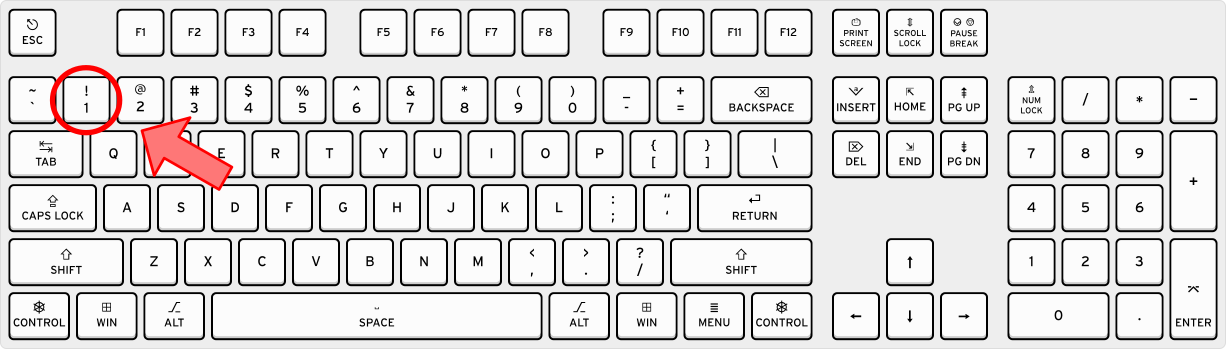
1623 ///
1624 /// <sub>
1625 /// For image attribution, see the
1626 /// <a href="https://github.com/rust-windowing/winit/blob/master/docs/res/ATTRIBUTION.md">
1627 /// ATTRIBUTION.md
1628 /// </a>
1629 /// file.
1630 /// </sub>
1631 Standard,
1632
1633 /// The key is on the left side of the keyboard.
1634 ///
1635 /// For instance, the left Shift key below the Caps Lock key on a QWERTY keyboard will use this
1636 /// location.
1637 ///
1638 /// 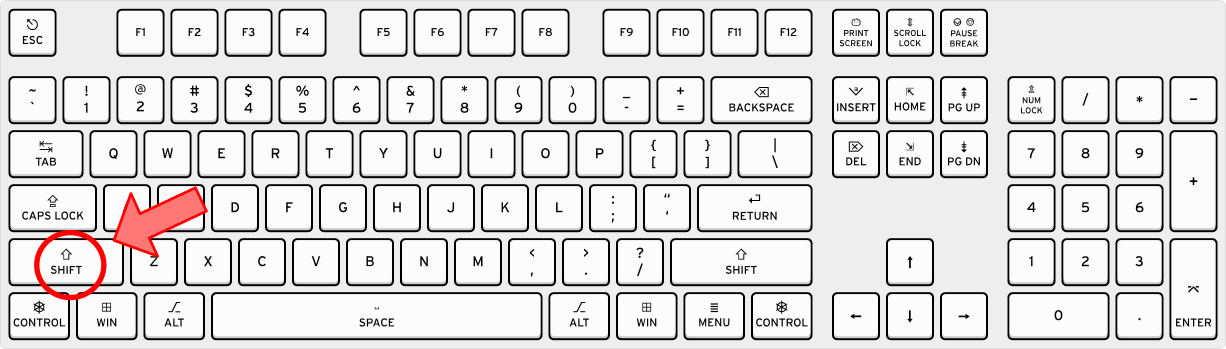
1639 ///
1640 /// <sub>
1641 /// For image attribution, see the
1642 /// <a href="https://github.com/rust-windowing/winit/blob/master/docs/res/ATTRIBUTION.md">
1643 /// ATTRIBUTION.md
1644 /// </a>
1645 /// file.
1646 /// </sub>
1647 Left,
1648
1649 /// The key is on the right side of the keyboard.
1650 ///
1651 /// For instance, the right Shift key below the Enter key on a QWERTY keyboard will use this
1652 /// location.
1653 ///
1654 /// 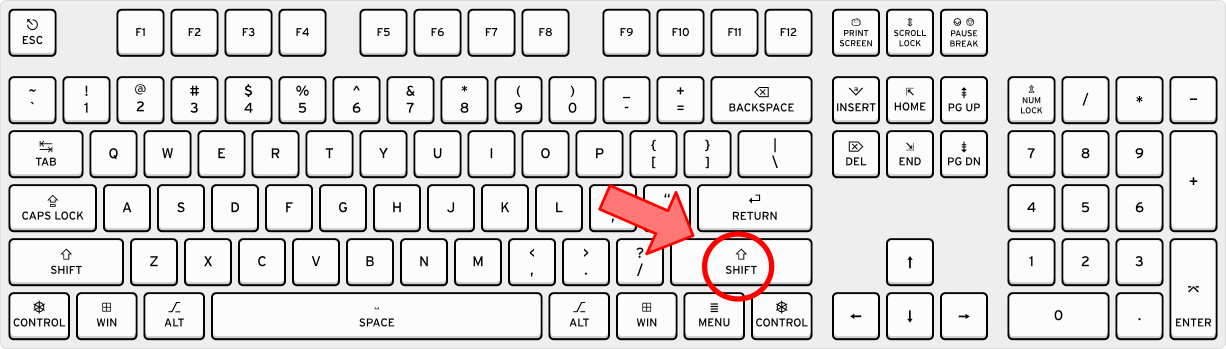
1655 ///
1656 /// <sub>
1657 /// For image attribution, see the
1658 /// <a href="https://github.com/rust-windowing/winit/blob/master/docs/res/ATTRIBUTION.md">
1659 /// ATTRIBUTION.md
1660 /// </a>
1661 /// file.
1662 /// </sub>
1663 Right,
1664
1665 /// The key is on the numpad.
1666 ///
1667 /// For instance, the "1" key on the numpad will use this location.
1668 ///
1669 /// 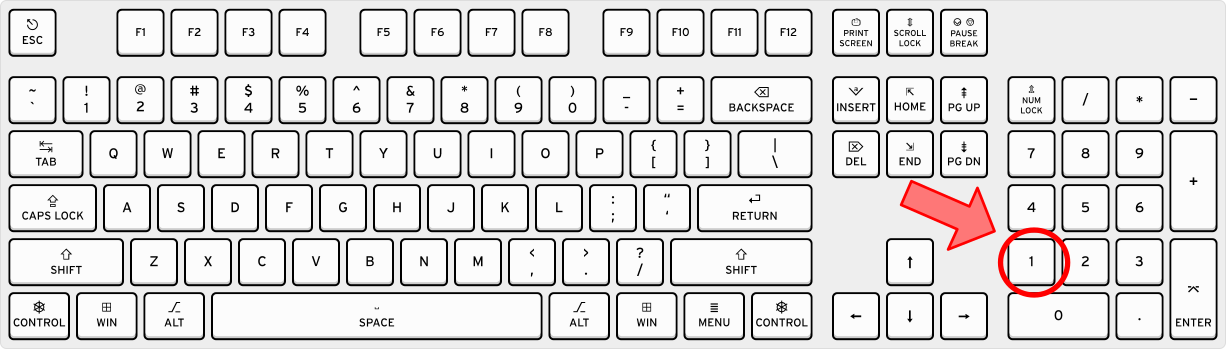
1670 ///
1671 /// <sub>
1672 /// For image attribution, see the
1673 /// <a href="https://github.com/rust-windowing/winit/blob/master/docs/res/ATTRIBUTION.md">
1674 /// ATTRIBUTION.md
1675 /// </a>
1676 /// file.
1677 /// </sub>
1678 Numpad,
1679}
1680
1681bitflags! {
1682 /// Represents the current state of the keyboard modifiers
1683 ///
1684 /// Each flag represents a modifier and is set if this modifier is active.
1685 #[derive(Default, Debug, Clone, Copy, PartialEq, Eq, PartialOrd, Ord, Hash)]
1686 pub struct ModifiersState: u32 {
1687 /// The "shift" key.
1688 const SHIFT = 0b100;
1689 /// The "control" key.
1690 const CONTROL = 0b100 << 3;
1691 /// The "alt" key.
1692 const ALT = 0b100 << 6;
1693 /// This is the "windows" key on PC and "command" key on Mac.
1694 const SUPER = 0b100 << 9;
1695 }
1696}
1697
1698impl ModifiersState {
1699 /// Returns `true` if the shift key is pressed.
1700 pub fn shift_key(&self) -> bool {
1701 self.intersects(Self::SHIFT)
1702 }
1703 /// Returns `true` if the control key is pressed.
1704 pub fn control_key(&self) -> bool {
1705 self.intersects(Self::CONTROL)
1706 }
1707 /// Returns `true` if the alt key is pressed.
1708 pub fn alt_key(&self) -> bool {
1709 self.intersects(Self::ALT)
1710 }
1711 /// Returns `true` if the super key is pressed.
1712 pub fn super_key(&self) -> bool {
1713 self.intersects(Self::SUPER)
1714 }
1715}
1716
1717/// The state of the particular modifiers key.
1718#[derive(Default, Debug, Clone, Copy, PartialEq, Eq)]
1719pub enum ModifiersKeyState {
1720 /// The particular key is pressed.
1721 Pressed,
1722 /// The state of the key is unknown.
1723 #[default]
1724 Unknown,
1725}
1726
1727// NOTE: the exact modifier key is not used to represent modifiers state in the
1728// first place due to a fact that modifiers state could be changed without any
1729// key being pressed and on some platforms like Wayland/X11 which key resulted
1730// in modifiers change is hidden, also, not that it really matters.
1731//
1732// The reason this API is even exposed is mostly to provide a way for users
1733// to treat modifiers differently based on their position, which is required
1734// on macOS due to their AltGr/Option situation.
1735bitflags! {
1736 #[derive(Default, Debug, Clone, Copy, PartialEq, Eq, Hash)]
1737 pub(crate) struct ModifiersKeys: u8 {
1738 const LSHIFT = 0b0000_0001;
1739 const RSHIFT = 0b0000_0010;
1740 const LCONTROL = 0b0000_0100;
1741 const RCONTROL = 0b0000_1000;
1742 const LALT = 0b0001_0000;
1743 const RALT = 0b0010_0000;
1744 const LSUPER = 0b0100_0000;
1745 const RSUPER = 0b1000_0000;
1746 }
1747}
1748
1749#[cfg(feature = "serde")]
1750mod modifiers_serde {
1751 use super::ModifiersState;
1752 use serde::{Deserialize, Deserializer, Serialize, Serializer};
1753
1754 #[derive(Default, Serialize, Deserialize)]
1755 #[serde(default)]
1756 #[serde(rename = "ModifiersState")]
1757 pub struct ModifiersStateSerialize {
1758 pub shift_key: bool,
1759 pub control_key: bool,
1760 pub alt_key: bool,
1761 pub super_key: bool,
1762 }
1763
1764 impl Serialize for ModifiersState {
1765 fn serialize<S>(&self, serializer: S) -> Result<S::Ok, S::Error>
1766 where
1767 S: Serializer,
1768 {
1769 let s = ModifiersStateSerialize {
1770 shift_key: self.shift_key(),
1771 control_key: self.control_key(),
1772 alt_key: self.alt_key(),
1773 super_key: self.super_key(),
1774 };
1775 s.serialize(serializer)
1776 }
1777 }
1778
1779 impl<'de> Deserialize<'de> for ModifiersState {
1780 fn deserialize<D>(deserializer: D) -> Result<Self, D::Error>
1781 where
1782 D: Deserializer<'de>,
1783 {
1784 let ModifiersStateSerialize {
1785 shift_key,
1786 control_key,
1787 alt_key,
1788 super_key,
1789 } = ModifiersStateSerialize::deserialize(deserializer)?;
1790 let mut m = ModifiersState::empty();
1791 m.set(ModifiersState::SHIFT, shift_key);
1792 m.set(ModifiersState::CONTROL, control_key);
1793 m.set(ModifiersState::ALT, alt_key);
1794 m.set(ModifiersState::SUPER, super_key);
1795 Ok(m)
1796 }
1797 }
1798}