<p align="center">
<img src="https://raw.githubusercontent.com/Misterio77/flavours/master/logo.svg" alt="flavours logo"/>
</p>
---
A manager/builder for [Base16](https://github.com/chriskempson/base16). Written in Rust🦀.
[](https://crates.io/crates/flavours)
[](https://github.com/misterio77/flavours/actions?query=workflow%3ARust)
[](https://repology.org/project/flavours/versions)
## What
This is a CLI program that both builds and manages Base16 schemes and templates.
The base16 specification consists of both schemes (with 16 colors) and templates. There'll probably be templates for most applications you use, but you can easily make one for literally any app that supports any sort of color customization.
Once your configuration files are set, you can theme your entire desktop with just *one* command. No more hassle manually changing themes when you get bored.
Why have one color if you can have all the colors?
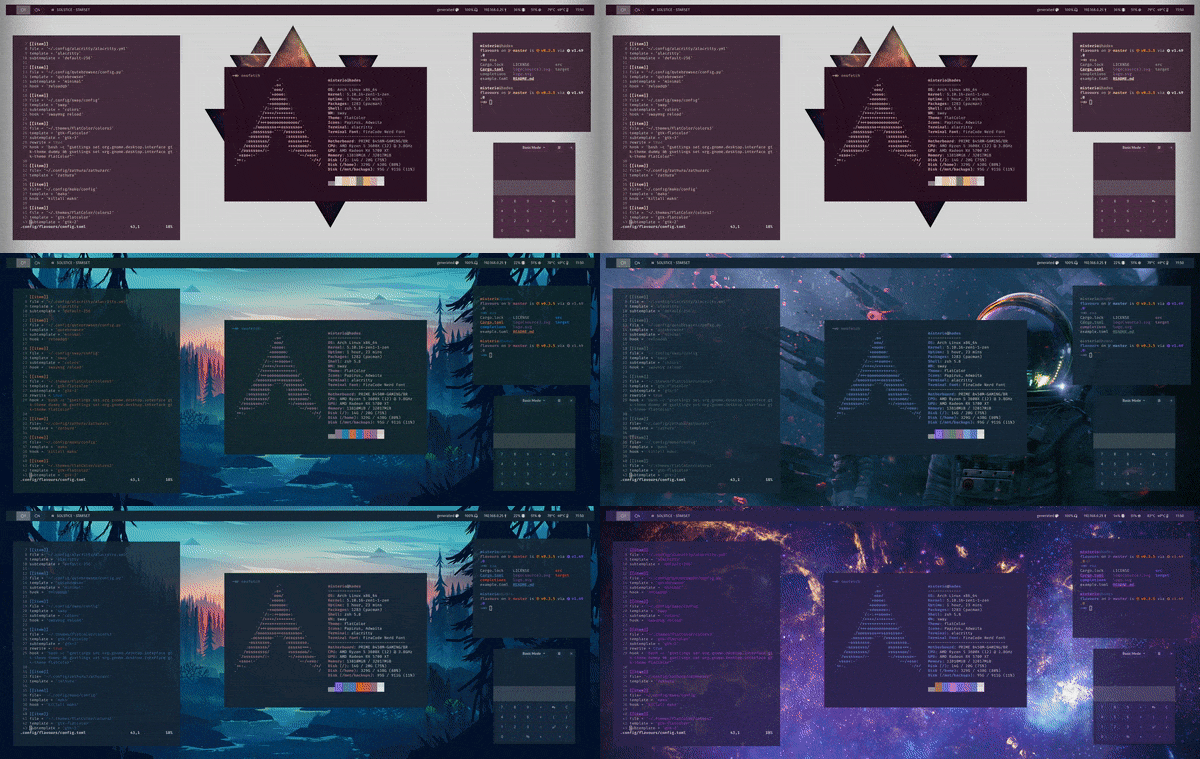
Here's how it looks in action (sway, waybar, alacritty):
## How
### Installation
#### Packages
- [AUR Package](https://aur.archlinux.org/packages/flavours/) for Arch (and derivatives):
`yay -S flavours`
- [nixpkg](https://github.com/NixOS/nixpkgs/blob/master/pkgs/applications/misc/flavours/default.nix#L17) for NixOS:
`nix-env -iA nixos.flavours`
Let me know if you want to package flavours for your favorite distro.
#### Cargo
Just install cargo and run `cargo install flavours` (don't forget to include `~/.cargo/bin` on your PATH).
#### Post-install
After installing, you should probably use `flavours update all` to grab all published schemes and templates from the base16 repos. If you want, you can manually tweak the templates, schemes or even the repo lists (everything's located in `~/.local/share/flavours` on Linux, and can be changed with `-d`/`--directory` cli option or `FLAVOURS_DATA_DIRECTORY` environment variable).
### Usage
You can use flavours and base16 templates to automatically inject schemes into any application config file that supports colors codes.
[Dave Snider](https://www.youtube.com/channel/UC7uO9V1Frl_wPd9d1qOm_RQ) did a great [3 episode series about flavours](https://youtu.be/1HPo4VvI6dA) (and theming in general). If you're into guide videos, i strongly recommend you take a look.
#### Setup
Choose a [template](https://github.com/chriskempson/base16#template-repositories) for each app you want themed (or create your own).
On each of your apps config files, place a start and end comment to tell flavours where to **replace** lines (defaults are `# Start flavours` and `# End flavours`, can be changed individually on each app). These usually should be located where you set color options on your app configuration. If the specific app supports including colors from another file, or if the template provides the entire file, you can forgo the comments altogether and use the `rewrite=true` on flavours config.
For reference, here's a couple configuration files from my [dots](https://github.com/Misterio77/dotfiles):
- [flavours](https://github.com/Misterio77/dotfiles/blob/sway/home/.config/flavours/config.toml) itself
- [alacritty](https://github.com/Misterio77/dotfiles/blob/sway/home/.config/alacritty/alacritty.yml)
- [qutebrowser](https://github.com/Misterio77/dotfiles/blob/sway/home/.config/qutebrowser/config.py)
- [zathura](https://github.com/Misterio77/dotfiles/blob/sway/home/.config/zathura/zathurarc)
- [sway](https://github.com/Misterio77/dotfiles/blob/sway/home/.config/sway/config)
- [waybar](https://github.com/Misterio77/dotfiles/blob/sway/home/.config/waybar/colors.css)
- [rofi](https://github.com/Misterio77/dotfiles/blob/sway/home/.config/rofi/themes/colors.rasi)
On flavours configuration (`~/.config/flavours/config.toml` on Linux, can be changed with `-c`/`--config` flag or `FLAVOURS_CONFIG_FILE` environment variable):
- Optionally, set a `shell` through which your hook commands should be executed. Defaults to `sh -c '{}'`. You can make the hooks run directly (pre-0.4 behaviour) by setting it to just `{}`.
- Create a `[[item]]` section for each app, each section can have the following entries:
- Specify the `file` to write (required)
- A `template` (required)
- A `hook` to execute. Defaults to none.
- A `subtemplate`. Defaults to `default`.
- Specify whether the hook is considered (by your usage) to be `light` or not. `flavours apply --light` will skip running hooks marked with `light=false`. Defaults to `true`.
- Whether to use `rewrite` mode (if you do, you don't need the start and end comments). Defaults to `false`.
- Or change the `start` and `end` lines (useful for config files which comments are not started with `#`). Defaults to `# Start flavours` and `# End flavours` (case-insensitive).
Here's an example:
```toml
# Commands go through bash
shell = "bash -c '{}'"
# Sway supports the default '#' comments, so it can be ommited
# 'rewrite' is also ommited, as it defaults to false
[[item]]
file = "~/.config/sway/config"
template = "sway"
subtemplate = "colors"
hook = "swaymsg reload"
# Swaymsg reload temporarily freezes input, so it's marked as not-light
light = false
# This one uses waybar 'default' subtemplate, so it can be ommited
[[item]]
file = "~/.config/waybar/colors.css"
template = "waybar"
# Waybar uses a separate color file, so we can safely rewrite the whole file
rewrite = true
[[item]]
file = "~/.config/beautifuldiscord/style.css"
template = "styles"
subtemplate = "css-variables"
# What if the configuration doesn't support '#' comments? Just change them!
start= "/* Start flavours */"
end = "/* End flavours */"
```
Vóila. You're now ready to apply schemes.
#### Applying
`flavours apply` is the command you'll probably be using all the time. So it's built to be as useful as possible.
The syntax is `flavours apply [PATTERN]`, where PATTERN can be a scheme name, multiple scheme name, a glob (such as `*light`) expression, or can be ommited.
If more than one scheme is specified or matched, flavours will choose one randomly (`flavours apply *light` will pick one random scheme ending with light, and apply it).
You can, for instance:
- Specify a scheme: `flavours apply pasque`
- Specify multiple schemes: `flavours apply pasque paraiso atlas`
- Use glob: `flavours apply "gruvbox*"`
- Omit: `flavours apply` (is the same as running `flavours apply "*"`)
#### Other commands
You can also use `flavours current` to see the last scheme you applied, `flavours list` to list all available schemes (you can also use PATTERN like on apply to list only specific scheme(s)), `flavours info` to show info (including truecolor colored output) about some scheme(s) (also supports the PATTERN syntax).
You can also use flavours as a simple [base16 builder](https://github.com/chriskempson/base16/blob/master/builder.md). Just use the build command: `flavours build <path_to_scheme> <path_to_template>` (you can easily get a scheme path by using `flavours info theme_name | head -1 | cut -d '@' -f2`). This works great for automating static styles, and anything else you can come up with (i use it on my [personal website](https://misterio.me)).
Lastly, we have `flavours generate`, it can generate a scheme based on an image (usually your wallpaper), with the following syntax: `flavours generate <dark/light> /path/to/image/file`. By default, the scheme will be saved with the slug (the scheme name referenced in all other commands) `generated` (you can change it with `-s` or `--slug`, or output to stdout instead with `--stdout`).
In my setup, i use swaybg to apply wallpapers, and i can get my current wallpaper with `cat .bg`.
So my flavours command to generate and apply a dark scheme matching my wallpaper would be:
`flavours generate dark $(cat .bg) && flavours apply generated`
Which i include in the script i use to change my wallpapers randomly.
## Why
Why use this instead of other base16 managers, or even pywal?
While these projects are great and certainly fit some people's workflow, they didn't quite fit mine.
I decided to do my own project because i wanted a simple CLI program that can easily integrate with rofi, polybar, and everything else in my workflow. The main feature is being able to quickly and easily use a curated list of schemes, on all your apps. It's also objectively faster than _any_ other manager.
## When
All features are implemented! I'm currently working on improving code quality and stabilizing the features, but everything should work as intended.
### Thanks to:
- Functionality inspiration from [Base16 Universal Manager](https://github.com/pinpox/base16-universal-manager).
- Logo inspiration from [Starship prompt](https://starship.rs)
.svg)
