1
2
3
4
5
6
7
8
9
10
11
12
13
14
15
16
17
18
19
20
21
22
23
24
25
26
27
28
29
30
31
32
33
34
35
36
37
38
39
40
41
42
43
44
45
46
47
48
49
50
51
52
53
54
55
56
57
58
59
60
61
62
63
64
65
66
67
68
69
70
71
72
73
74
75
76
77
78
79
80
81
82
83
84
85
86
87
88
89
90
91
92
93
94
95
96
97
98
99
100
101
102
103
104
105
106
107
108
109
110
111
112
113
114
115
116
117
118
119
120
121
122
123
124
125
126
127
128
129
130
131
//! Featture toggles for Rust (called "feattles", for short), extensible and with background
//! synchronization and administration UI.
//!
//! ## Features
//! - Feature toggles that synchronize automatically with a backing storage
//! - Feature toggles can be as simple `bool`, but can also be lists, maps and arbitrary tpes (
//! (through the [`FeattleValue`] trait).
//! - Web UI with documentation, change history, validation
//! - JSON API to read and set the toggles
//! - Modular and extensible: use as much or as little of the bundled features as you want. Want to
//! use a different Web UI? A different storage layer? No problem.
//!
//! ## Example
//!
//! ```no_run
//! use feattle::*;
//! use std::sync::Arc;
//!
//! /// A struct with your feature toggles: you can use primitive types (like `bool`, `i32`, etc),
//! /// standard collections (like `Vec`, `BTreeSet`, etc) or any arbitrary type that implements
//! /// the required trait.
//! feattles! {
//! struct MyFeattles {
//! /// Is this usage considered cool?
//! is_cool: bool = true,
//! /// Limit the number of "blings" available.
//! /// This will not change the number of "blengs", though!
//! max_blings: i32,
//! /// List the actions that should not be available
//! blocked_actions: Vec<String>,
//! }
//! }
//!
//! #[tokio::main]
//! async fn main() {
//! // Store their values and history in AWS' S3
//! use std::future::IntoFuture;
//! use std::time::Duration;
//! use tokio::net::TcpListener;
//! let config = aws_config::load_from_env().await;
//! let persistence = Arc::new(S3::new(
//! &config,
//! "my-bucket".to_owned(),
//! "some/s3/prefix/".to_owned(),
//! ));
//!
//! // Create a new instance
//! let my_feattles = Arc::new(MyFeattles::new(persistence));
//!
//! // Poll the storage in the background
//! BackgroundSync::new(&my_feattles).start().await;
//!
//! // Start the admin UI with `warp`
//! let admin_panel = Arc::new(AdminPanel::new(my_feattles.clone(), "Project Panda - DEV".to_owned()));
//! tokio::spawn(run_warp_server(admin_panel.clone(), ([127, 0, 0, 1], 3030)));
//!
//! // Or serve the admin panel with `axum`
//! let router = axum_router(admin_panel, "admin");
//! let listener = TcpListener::bind(("127.0.0.1", 3031)).await.unwrap();
//! tokio::spawn(axum::serve(listener, router.into_make_service()).into_future());
//!
//! // Read values (note the use of `*`)
//! assert_eq!(*my_feattles.is_cool(), true);
//! assert_eq!(*my_feattles.max_blings(), 0);
//! assert_eq!(*my_feattles.blocked_actions(), Vec::<String>::new());
//! }
//! ```
//!
//! You can run a full example locally with: `cargo run --example full --features='s3 uuid warp axum'`.
//!
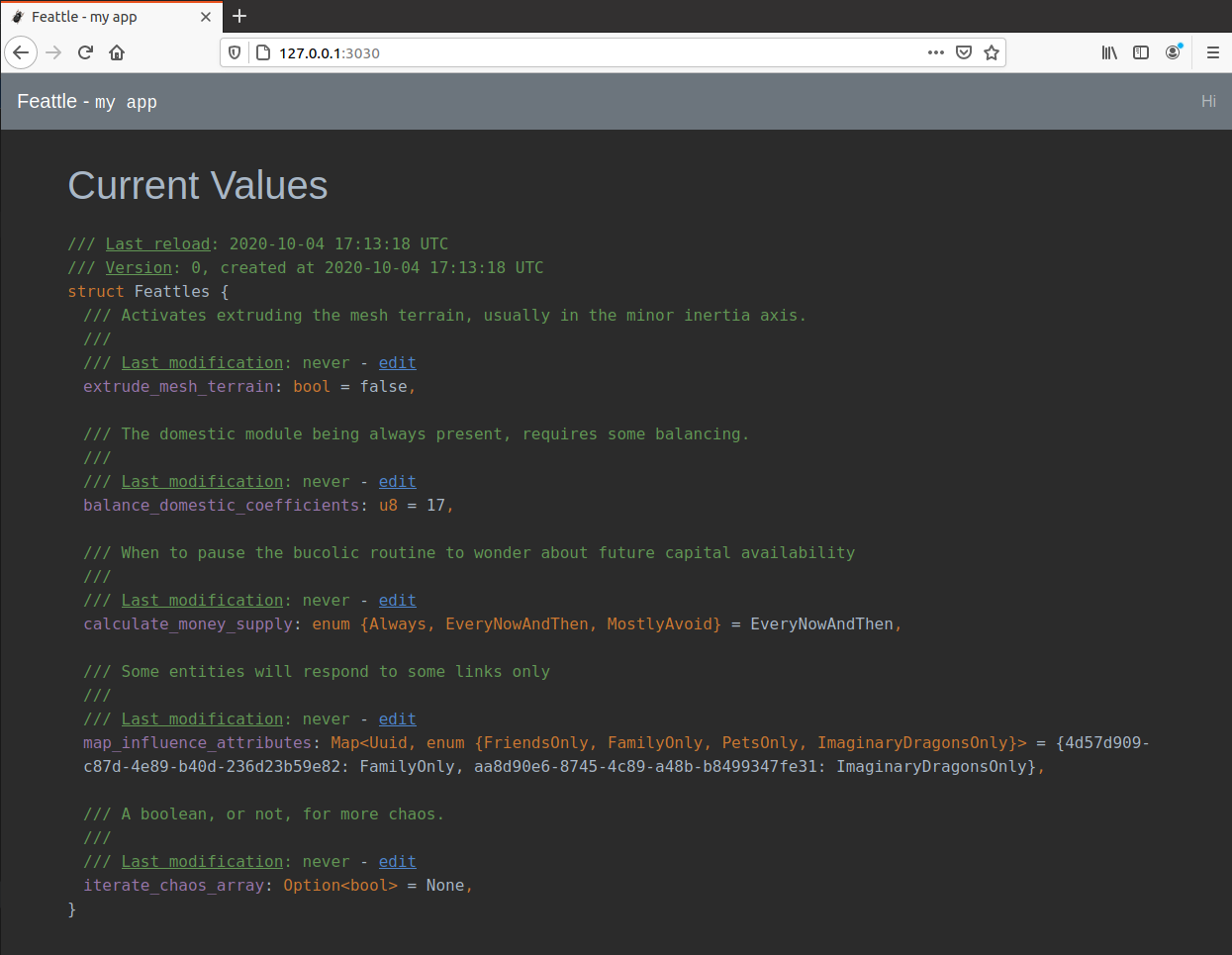
//! With this code, you'll get an Web Admin UI like:
//!
//! 
//!
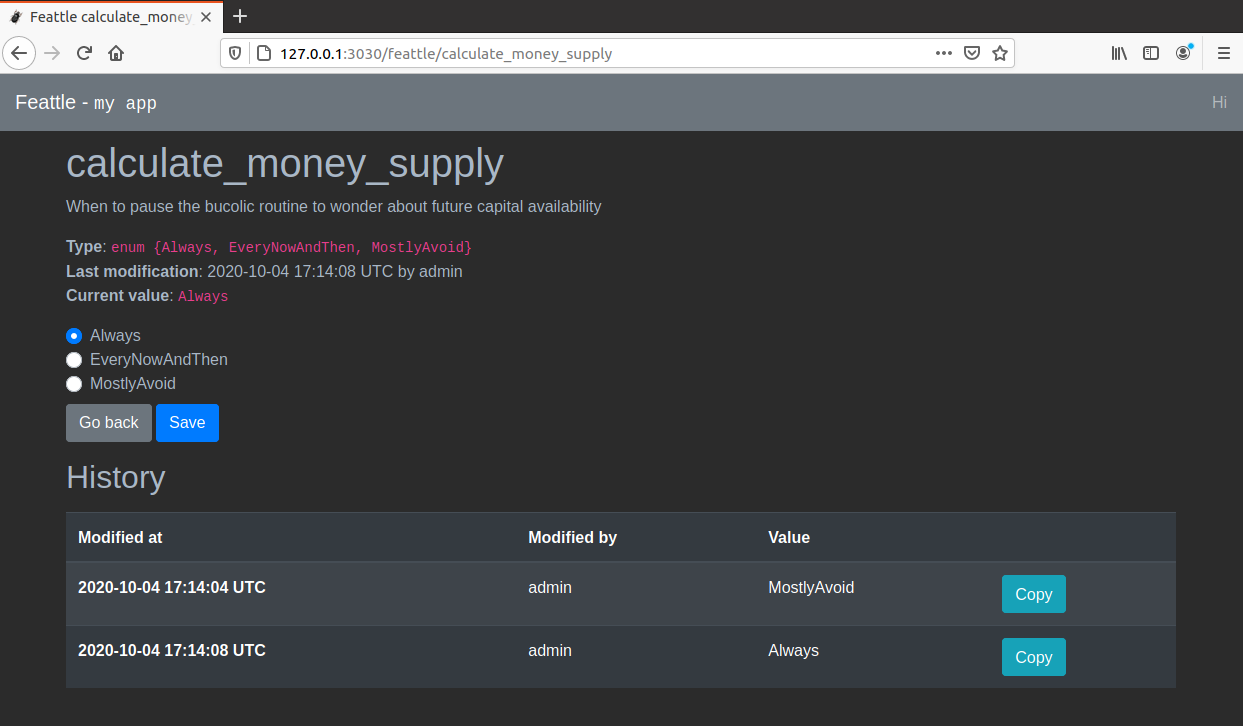
//! You can use the UI to edit the current values and see their change history. For example, this
//! is what you can expect when editing an `enum`:
//!
//! 
//!
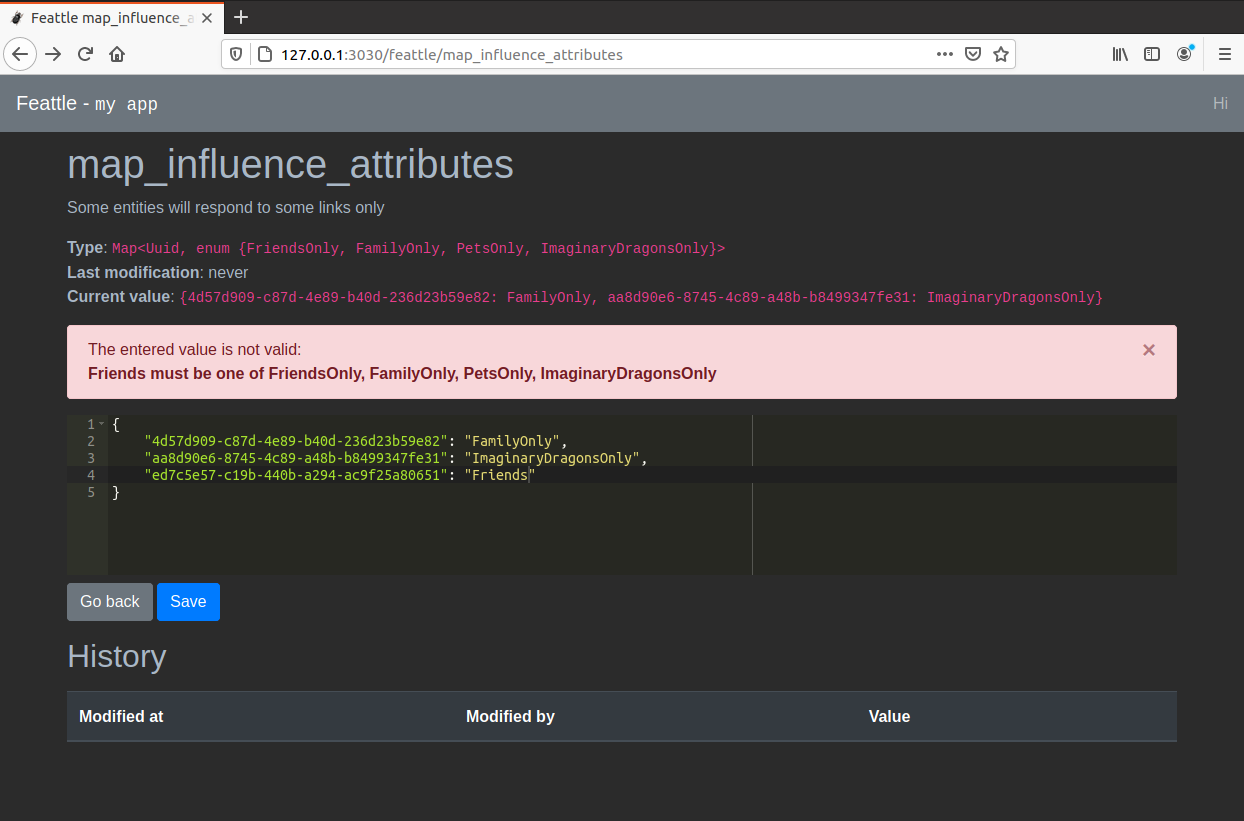
//! It also supports complex types with a JSON editor and helpful error diagnostics:
//!
//! 
//!
//! # How it works
//!
//! The macro will generate a struct with the given name and visibility modifier (assuming private
//! by default). The generated struct implements [`Feattles`] and also exposes one method for each
//! feattle.
//!
//! The methods created for each feattle allow reading their current value. For example, for a
//! feattle `is_cool: bool`, there will be a method like
//! `pub fn is_cool(&self) -> MappedRwLockReadGuard<bool>`. Note the use of
//! [`parking_lot::MappedRwLockReadGuard`] because the interior of the struct is stored behind a `RwLock` to
//! control concurrent access.
//!
//! A feattle is created with the syntax `$key: $type [= $default]`. You can use doc coments (
//! starting with `///`) to describe nicely what they do in your system. You can use any type that
//! implements [`FeattleValue`] and optionally provide a default. If not provided, the default
//! will be created with `Default::default()`.
//!
//! # Minimum supported Rust version
//!
//! As of this release, the MSRV is 1.82.0, as tested in the CI. A patch release will never require
//! a newer MSRV.
//!
//! # Optional features
//!
//! You can easily declare feattles with your custom types, use another persistance storage logic
//! or Web Framework (or any at all). For some out-of-the-box functionality, you can activate these
//! cargo features:
//!
//! - **uuid**: will add support for [`uuid::Uuid`].
//! - **rusoto_s3**: provides [`RusotoS3`] to integrate with AWS' S3
//! - **aws_sdk_s3**: provides [`S3`] to integrate with AWS' S3
//! - **warp**: provides [`run_warp_server`] for a read-to-use integration with [`warp`]
//! - **axum**: provides [`axum_router`] for a read-to-use integration with [`axum`]
//!
//! ## Crate's organization
//!
//! This crate is a simple re-export of these three components:
//!
//! * `feattle-core`: [](https://crates.io/crates/feattle-core)
//! * `feattle-sync`: [](https://crates.io/crates/feattle-sync)
//! * `feattle-ui`: [](https://crates.io/crates/feattle-ui)
//!
//! Having them separate allows for leaner lower-level integration. If you're creating a crate to
//! provide a different storage or admin, you just need `feattle-core`.
pub use *;
pub use *;
pub use *;