1
2
3
4
5
6
7
8
9
10
11
12
13
14
15
16
17
18
19
20
21
22
23
24
25
26
27
28
29
30
31
32
33
34
35
36
37
38
39
40
41
42
43
44
45
46
47
48
49
50
51
52
53
54
55
56
57
58
59
60
61
62
63
64
65
66
67
68
69
70
71
72
73
74
75
76
77
78
79
80
81
82
83
84
85
86
87
88
89
90
91
92
93
94
95
96
97
98
99
100
101
102
103
104
105
106
107
108
109
110
111
112
113
114
115
116
117
118
119
120
121
122
123
124
125
126
127
128
129
130
131
132
133
134
135
136
137
138
139
140
141
142
143
144
145
146
147
148
149
150
151
152
153
154
155
156
157
158
159
160
161
162
163
164
165
166
167
168
169
170
171
172
173
174
175
176
177
178
179
180
181
182
183
184
185
186
187
188
189
190
191
192
193
194
195
196
197
198
199
200
201
202
203
204
205
206
207
208
209
210
211
212
213
214
215
//! # Face ID
//!
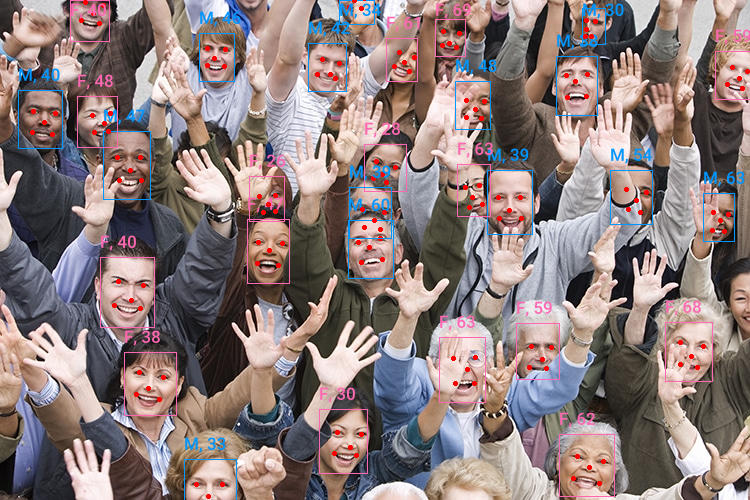
//! `face_id` is a crate for face detection, facial recognition (embeddings),
//! and attribute estimation (age/gender) using ONNX Runtime.
//!
//! 
//!
//! ## Overview
//!
//! This crate provides a pipeline for facial analysis. It wraps several
//! models (SCRFD for detection, `ArcFace` for recognition) and handles the
//! maths of face alignment and image preprocessing internally.
//!
//! ### The Pipeline
//! 1. **Detection**: Finds bounding boxes and 5-point facial landmarks (eyes, nose, mouth). Coordinates are **relative** to image dimensions (0.0 to 1.0).
//! 2. **Alignment**: Uses the Umeyama algorithm to warp the face into a canonical 112x112 pose.
//! 3. **Analysis**: Runs the aligned crops through specialized models to produce:
//! - **Embeddings**: 512-dimensional vectors representing identity.
//! - **Attributes**: Gender and age estimation.
//!
//! ## Quick Start
//!
//! The [`analyzer::FaceAnalyzer`] is the main entry point. It manages the sub-models
//! and performs batch inference for efficiency.
//!
//! ```rust
//! use face_id::analyzer::FaceAnalyzer;
//!
//! #[tokio::main]
//! async fn main() -> color_eyre::Result<()> {
//! // Initialize the analyzer.
//! // This downloads default models from HuggingFace on the first run.
//! let analyzer = FaceAnalyzer::from_hf().build().await?;
//!
//! let img = image::open("assets/img/crowd.jpg")?;
//! let faces = analyzer.analyze(&img)?;
//!
//! for (i, face) in faces.iter().enumerate() {
//! println!("Face {i}");
//! println!(" Box: {:?}", &face.detection.bbox); // Relative coordinates [0, 1]
//! println!(" Score: {:?}", &face.detection.score); // Confidence score of detection
//! println!(" Landmarks: {:?}", &face.detection.landmarks); // location of eyes, mouth, nose (relative)
//! println!(" Gender: {:?}", face.gender);
//! println!(" Age: {:?}", face.age);
//! println!(" Embedding [..5]: {:?}", &face.embedding[..5]);
//! }
//! Ok(())
//! }
//! ```
//!
//! ## Individual Components
//!
//! For more granular control, you can use the individual models directly.
//!
//! ### Detection
//! Use [`detector::ScrfdDetector`] to find faces. Bounding boxes and landmarks are returned in **relative** coordinates.
//! To convert them back to absolute pixels, use [`detector::DetectedFace::to_absolute`].
//!
//! ```rust
//! # use face_id::detector::ScrfdDetector;
//! # async fn run() -> color_eyre::Result<()> {
//! let mut detector = ScrfdDetector::from_hf().build().await?;
//! let detections = detector.detect(&image::open("input.jpg")?)?;
//! # Ok(())
//! # }
//! ```
//!
//! ### Recognition and Alignment
//! Recognition models like `ArcFace` require faces to be "aligned"—rotated and scaled so that
//! landmarks are in specific positions.
//!
//! ```rust
//! # use face_id::embedder::ArcFaceEmbedder;
//! # use face_id::face_align::norm_crop;
//! # async fn run(img: image::DynamicImage, landmarks: [(f32, f32); 5]) -> color_eyre::Result<()> {
//! let mut embedder = ArcFaceEmbedder::from_hf().build().await?;
//!
//! // Align face using 5-point landmarks (from a detector)
//! let aligned_crop = norm_crop(&img.to_rgb8(), &landmarks, 112);
//!
//! // Generate identity embedding
//! let embedding = embedder.compute_embedding(&aligned_crop)?;
//! # Ok(())
//! # }
//! ```
//!
//! ## Loading Local Models
//!
//! If you want to use local ONNX model files instead of downloading from `HuggingFace`,
//! use the builder method.
//!
//! ```rust,no_run
//! use face_id::analyzer::FaceAnalyzer;
//!
//! fn main() -> color_eyre::Result<()> {
//! let analyzer = FaceAnalyzer::builder(
//! "models/det.onnx", // Detector
//! "models/rec.onnx", // Embedder (Recognition)
//! "models/attr.onnx" // Gender/Age
//! )
//! .build()?;
//!
//! Ok(())
//! }
//! ```
//!
//! ## Customizing Hugging Face Models
//!
//! You can mix and match specific model versions from Hugging Face repositories.
//! For example, using the medium-complexity `10g_bnkps` detector instead of the default:
//!
//! ```rust
//! use face_id::analyzer::FaceAnalyzer;
//! use face_id::model_manager::HfModel;
//!
//! #[tokio::main]
//! async fn main() -> color_eyre::Result<()> {
//! let analyzer = FaceAnalyzer::from_hf()
//! // Specify a smaller detector model than the default:
//! // > `embedder_model` and `gender_age_model` can also be specified in the builder.
//! .detector_model(HfModel {
//! id: "public-data/insightface".to_string(),
//! file: "models/buffalo_l/det_10g.onnx".to_string(),
//! })
//! .detector_input_size((640, 640))
//! .detector_score_threshold(0.5)
//! .detector_iou_threshold(0.4)
//! .build()
//! .await?;
//!
//! Ok(())
//! }
//! ```
//!
//! ## Face Clustering & Cropping helpers
//!
//! You can cluster faces from multiple images and then extract high-quality thumbnails for the results.
//!
//! ```rust
//! # use std::fmt::format;
//! use face_id::analyzer::FaceAnalyzer;
//! # use face_id::helpers::{cluster_faces, extract_face_thumbnail};
//! # use std::path::PathBuf;
//! # use face_id::analyzer::FaceAnalysis;
//! # async fn run() -> color_eyre::Result<()> {
//! # let analyzer = FaceAnalyzer::from_hf().build().await?;
//! let paths = vec!["img1.jpg", "img2.jpg"];
//!
//! // Cluster faces across multiple images
//! let clusters = cluster_faces(&analyzer, paths)
//! .min_cluster_size(5)
//! .call()?;
//!
//! let mut face_idx = 0;
//! for (cluster_id, faces) in clusters {
//! println!("Cluster {cluster_id} has {} faces", faces.len());
//! for (path, face) in faces {
//! // Extract a square thumbnail with 60% padding
//! let img = image::open(path)?;
//! let thumbnail = extract_face_thumbnail(&img, &face.detection.bbox, 1.6, 256);
//! // Use the extracted thumbnail
//! face_idx += 1;
//! thumbnail.save(format!("face{face_idx}.jpg"));
//! }
//! }
//! # Ok(())
//! # }
//! ```
//!
//! ## Hardware Acceleration
//!
//! This crate supports a variety of Execution Providers (EPs) via `ort`. To use a specific GPU
//! backend, enable the corresponding feature in your `Cargo.toml` (e.g., `cuda`, `tensorrt`, `coreml`).
//!
//! ```rust
//! use face_id::analyzer::FaceAnalyzer;
//! use ort::ep::{DirectML, TensorRT, CUDA, CoreML};
//!
//! # async fn run() -> color_eyre::Result<()> {
//! let analyzer = FaceAnalyzer::from_hf()
//! .with_execution_providers(&[
//! CoreML::default().build(), // This will try CoreML, then DirectML, then TensorRT, then CUDA, then CPU.
//! DirectML::default().build(), // To check if an execution provider if working for you, add `.error_on_failure()`.
//! TensorRT::default().build(), // Otherwise it will silently try the next execution provider in the list.
//! CUDA::default().build().error_on_failure(),
//! ])
//! .build()
//! .await?;
//! # Ok(())
//! # }
//! ```
//!
//! ## Features
//!
//! - `hf-hub` (Default): Allows downloading models from Hugging Face.
//! - `copy-dylibs` / `download-binaries` (Default): Simplifies `ort` setup.
//! - `serde`: Enables serialization/deserialization for results.
//! - `clustering` (Default): Enables face clustering using HDBSCAN.
//! - **Execution Providers**: `cuda`, `tensorrt`, `coreml`, `directml`, `openvino`, etc.