
Please check the build logs for more information.
See Builds for ideas on how to fix a failed build, or Metadata for how to configure docs.rs builds.
If you believe this is docs.rs' fault, open an issue.
EveBox
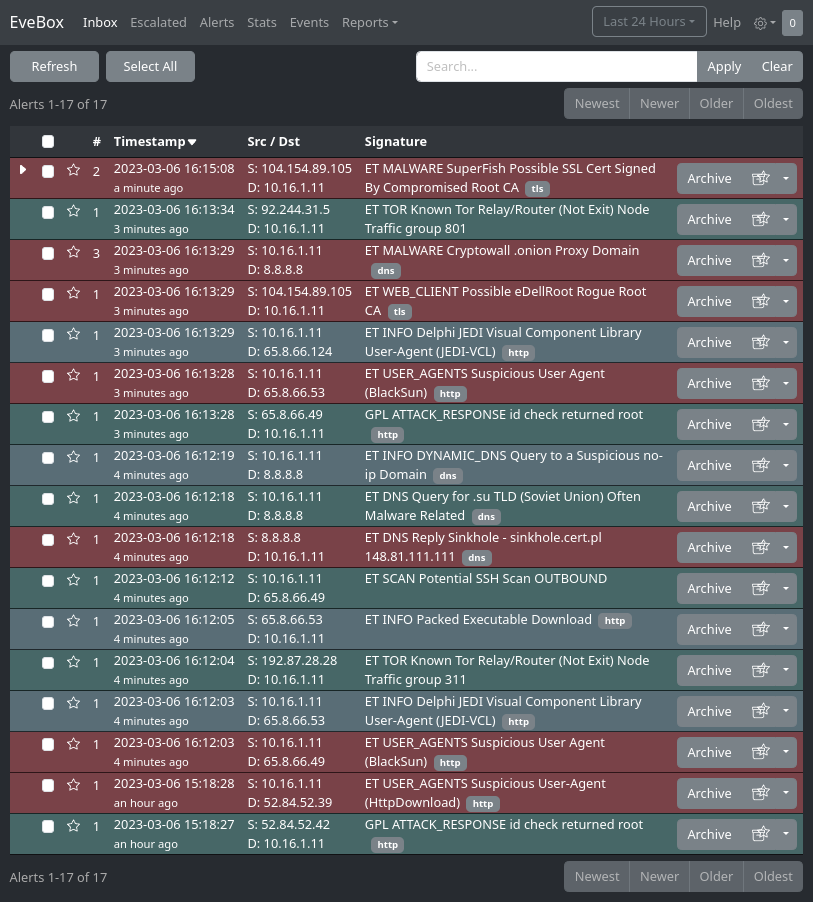
EveBox is a web-based Suricata "EVE" event viewer for Elasticsearch.
- Homepage and documentation: https://evebox.org
Features
- A web based event viewer with an "Inbox" approach to alert management.
- Event search.
- An agent for sending Suricata events to the EveBox server (but you can use Filebeat/Logstash instead).
- Embedded SQLite for self-contained installations.
Requirements
- Suricata - to generate alerts and events.
And one of...
- An existing ElasticSearch/Logstash (version 7 or greater) setup already handling Suricata events (EveBox has issues with Filebeat indices at this time).
- Just Elastic Search, using EveBox or the EveBox agent to add events.
- Nothing - EveBox can use an embedded SQLite database suitable for lower load installations (note: not all features supported yet).
- A modern web browser.
Installation.
Download a package and run the evebox application against your existing Elastic Search server.
Example:
./evebox server -e http://localhost:9200
Then visit http://localhost:5636 with your browser.
Available downloads including RPM and Debian package repositories can be found at https://evebox.org/#downloads.
On Linux, the latest release can also be installed with:
curl -sSf https://evebox.org/install.sh | sh
EveCtl
EveCtl (https://evebox.org/evectl) is an easy way to get started with Suricata and EveBox on Linux machines. (Note: Podman or Docker required).
ClearNDR Community Edition
EveBox is included in the ClearNDR Community Edition.
Docker
If you wish to install EveBox with Docker an up to date image is hosted on Docker hub.
Example:
docker pull jasonish/evebox:latest
docker run -it -p 5636:5636 jasonish/evebox:latest -e http://elasticsearch:9200
replacing your http://elasticsearch:9200 with that of your Elastic Search URL. You most likely do not want to use localhost here as that will be the localhost of the container, not of the host.
OR if you want to link to an already running Elastic Search container:
docker run -it -p 5636:5636 --link elasticsearch jasonish/evebox:latest
Then visit http://localhost:5636 with your browser.
Usage
EveBox runs as a server exposing a web interface on port 5636 by default.
With an Existing Elastic Search Server With Events
The basic mode where eve events are being sent to Elastic Search
with Logstash and or Filebeat.
evebox server -e http://elasticsearch:9200
With the Embedded SQLite Database
This is useful if you don't have Elastic Search and running EveBox on the same machine as Suricata. It uses an embedded SQLite database for events and is suitable for ligher loads. Currently SQLite does not support reporting.
evebox server -D . --datastore sqlite --input /var/log/suricata/eve.json
Oneshot Mode
To quickly inspect a Suricata EVE file, load it directly in oneshot mode:
evebox oneshot /path/to/eve.json
EVE events can also be read from stdin by using - as the input, for
example:
curl https://example.com/eve.json | evebox oneshot -
Oneshot mode can also process a PCAP with Suricata and load the generated EVE events:
evebox oneshot --pcap /path/to/capture.pcap
On Linux this defaults to containerized Suricata with Podman or Docker. A
locally installed Suricata (8.0.0 or newer) can be selected with
--suricata-backend local and is the default on Windows and macOS. Rule
updates require network access.
Packet capture on Windows
Install a current Npcap release to enable local packet
extraction:
server and agent pcap.directory sources, evebox pcap extract, and
packet downloads in oneshot PCAP mode. Use Npcap matching the EveBox
process architecture (64-bit for the Windows release build). The runtime must
provide the libpcap 1.10+ initialization API for UTF-8 filename support.
EveBox loads Npcap's wpcap.dll from the system Npcap directory at runtime.
Npcap is not bundled, and its SDK is not required to build EveBox. Without
a usable Npcap installation, EveBox still starts and can retrieve captures
from remote agents; local sources are disabled with a warning and explicit
extraction commands return an error. Restart EveBox after installing Npcap.
This reads existing capture files; it does not enable live capture. Oneshot analysis still requires Suricata separately. Linux release binaries continue to bundle statically linked libpcap.
More documentation can be found at http://evebox.readthedocs.io/en/latest/.
Building EveBox
EveBox consists of a JavaScript frontend, and a backend written in Rust. To build Evebox the following requirements must first be satisfied:
- Node.js v18 or newer installed.
- Latest Rust stable.
First checkout EveBox:
git clone https://github.com/jasonish/evebox.git ~/projects/evebox
Then build the binary:
make
Release artifacts are built separately using Docker:
./packaging/build-dist.sh
Windows PCAP tests
The normal Windows test suite does not require Npcap. After installing Npcap, also run the opt-in offline capture tests:
cargo test npcap -- --ignored
Possible Issues
Run in Development Mode
./dev.sh -e http://elasticsearch:9200
to run in development mode using an Elastic Search datastore at http://elasticsearch:9200.
The connect your browser to http://localhost:4200. Note this port is different than the EveBox port, as the Angular CLI/Webpack development server is used to serve up the web application with backend requests being proxied to the Go application.
In development mode changes to Go files will trigger a recompile/restart, and changes to the web app will trigger a recompile of the javascript and a browser refresh.
Change Log
See https://github.com/jasonish/evebox/blob/master/CHANGELOG.md .
License
MIT.