

esp-csi-rs
A Rust crate for collecting Channel State Information (CSI) on ESP32 series devices using the no-std embedded framework.


‼️ Command Line Interface (CLI) Option: If you'd like to extract CSI without having to code your own application, there is the CLI wrapper that was created for that purpose. The CLI also gives access to all the features available in this crate. Check out the
esp-csi-cli-rsrepository where you can flash a pre-built binary. This allows you to interact with your board/device immediately wihtout the need to code your own application.
Overview
esp_csi_rs builds on top of Espressif's low-level abstractions to enable easy CSI collection on embedded ESP devices. The crate supports various WiFi modes and network configurations and integrates with the esp-wifi and embassy async ecosystems.
Features
✅ Device Support
esp-csi-rs supports both 2.4 GHz and dual-band ESP devices, including ESP32-C5 (dual-band 2.4/5 GHz). The current list of supported devices is:
- ESP32
- ESP32-C3
- ESP32-C5 (2.4/5 GHz)
- ESP32-C6
- ESP32-S3
✅ Host Interface
With exception to the ESP32, esp-csi-rs leverages the USB-JTAG-SERIAL peripheral available on most recent ESP development boards. This allows for higher baud rates compared to using the UART interface.
✅ defmt & Serialized Output
esp-csi-rs reduces device-to-host transfer overhead by supporting both serialized output and defmt. The defmt frames are emitted directly over USB-Serial-JTAG via esp-println's defmt-espflash backend — espflash --monitor --log-format defmt decodes them inline. defmt is a highly efficient logging framework introduced by Ferrous Systems that targets resource-constrained devices. More detail about defmt can be found here.
✅ Async Logging
The crate supports both sync and async logging paths:
async-printforces async logging (override mode).- With
auto(and withoutasync-print), runtime backend selection applies:- USB-Serial-JTAG detected -> async logging
- UART path -> sync logging
This keeps JTAG throughput benefits while preserving UART's low-overhead sync path.
✅ Traffic Generation
When setting up a CSI collection system, dummy traffic on the network is needed to exchange packets that encapsulate the CSI data. esp-csi-rs allows you to control the intervals at which traffic is generated.
✅ Sequence Number Tags
Collected CSI is tagged with the sequence number of the frame that triggered it. Because an emitter's frames carry driver-assigned incrementing sequence numbers, a collector can measure gaps — i.e. how much of the sounding traffic it actually captured — and can do so per source MAC when several emitters share a channel.
Node Roles
A CSI measurement needs energy in the channel and something to measure the channel's response to it. Those are the two roles, and they are exhaustive:
- Emitter — puts known RF energy into the channel and never captures. It forces its transmit PHY to a fixed format and loop-injects a raw sounding frame, without associating to anything.
- Collector — captures the channel's response and delivers it.
Because the emitter's frames carry no meaning, it needs no peer, no handshake, and no protocol. That is what lets the two roles compose into any arrangement you like.
Collector Capture Paths
How a collector gets frames to measure is a separate question from what it is for, so these are variants of the collector role rather than roles of their own:
- Sniffer — lock a channel in promiscuous mode and measure every frame overheard. This is the path that pairs with an emitter.
- Station — associate to an AP or commercial router and measure CSI from the frames received.
- Access Point — run a self-contained softAP with built-in DHCP, so an associated station generates steady uplink traffic to measure.
CSI Output
A collector delivers its CSI by default. CSINode::set_csi_output_enabled(false) turns delivery off while leaving capture running: the RX path and its timing stay identical, but nothing is decoded, logged, or handed to a callback. Useful for a node whose only job is to keep traffic on air, or for measuring capture overhead without the delivery cost.
Bandwidth
An emitter transmits HT20 or HT40 (HtBandwidth) — plain 802.11n, supported on every chip listed above. 40 MHz needs a secondary channel above or below the primary, and every node in a capture set must agree on the primary channel.
Collection Setups
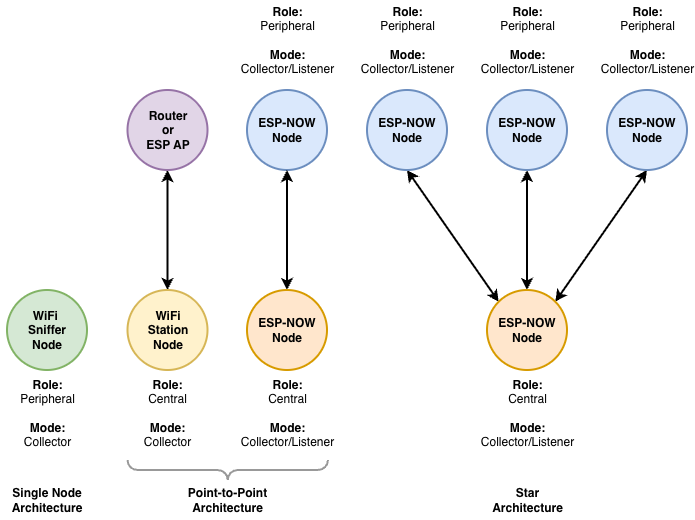
Roles compose, so the useful arrangements are combinations rather than fixed topologies:
- Single node: one sniffer collector, measuring whatever ambient traffic exists. The only setup that needs no second device. See
sniffer_wifi. - Emitter + collector: the controlled pairing. The emitter sounds the channel at a known rate and bandwidth; one or more sniffer collectors measure it. Adding collectors costs the emitter nothing, and several emitters can share one collector — each frame carries its transmitter's MAC, so a collector attributes measurements by source. See
ht20_emitter/ht40_emitter/collector_sniffer. - Associated link: a station collector against any access point — an ESP softAP collector or a commercial router — measuring the CSI of ordinary traffic on that link. See
wifi_ap/wifi_station.
Getting Started
To use esp_csi_rs in your project, create an ESP no-std project set up using the esp-generate tool (modify the chip/device accordingly):
Add the crate to your Cargo.toml. At a minimum, you would need to specify the device and the desired logging framework (println or defmt):
[]
= { = "0.10", = ["esp32c3", "println"] }
The crate uses Rust edition 2024 and tracks the latest Espressif Rust ecosystem (esp-hal 1.1, esp-radio 0.18, esp-rtos 0.3).
‼️ The selected logging framework needs to align with the selected framework for the
esp-backtracedependency. Thedefmtfeature already pulls the matchingesp-backtrace/defmt,esp-hal/defmt, andesp-radio/defmtflags for you.
Using defmt from your application
When enabling the defmt feature, the user app needs three additional things on top of the crate dep:
- Add
defmtas a direct dependency in your ownCargo.toml. Ourlog_ln!macro expands todefmt::println!(...)at the call site, so thedefmtcrate must be resolvable from your code. Plaindefmt = "1.0"is enough — do not adddefmt-rttor any other logger; we already provide one viaesp-println/defmt-espflash. - Add
-Tdefmt.xto your linker flags in your own.cargo/config.toml(Cargo doesn't propagate linker args from dependencies' build scripts):[] = ["-C", "link-arg=-Tlinkall.x", "-C", "link-arg=-Tdefmt.x"] - Decode with espflash:
espflash flash --monitor --log-format defmt <elf>. No probe-rs / J-Link needed — frames stream over the same USB-Serial-JTAG channel asprintln!.
[]
= { = "0.10", = ["esp32c3", "defmt"] }
= "1.0"
If you're cribbing from this repo's examples, you don't need any of the above — the in-repo .cargo/config.toml aliases (cargo esp32c3-defmt, etc.) and build.rs handle all three steps automatically.
Usage Examples
The repository contains an examples/ folder with configurations for each supported topology. Two flavors of cargo aliases ship in .cargo/config.toml:
| Logging | Run alias | Build alias |
|---|---|---|
println (default) |
cargo esp32c3 --example <name> |
cargo esp32c3-build --example <name> |
defmt |
cargo esp32c3-defmt --example <name> |
cargo esp32c3-build-defmt --example <name> |
Replace esp32c3 with any of: esp32, esp32c3, esp32c5, esp32c6, esp32s3. The -defmt aliases inject --features=defmt, override the espflash runner with --log-format defmt, and build.rs adds the -Tdefmt.x linker script automatically — no manual config edits required to switch between logging backends.
Replace <name> with the file name of any example, e.g. ht20_emitter, collector_sniffer, sniffer_wifi, wifi_station, wifi_ap.
WiFi Access Point CSI Collection
Run a self-contained softAP collector so a standard WifiStation node can
associate without an external router. The AP hands out DHCP leases from a
configurable pool and pings associated clients at a configurable rate; uplink
ICMP replies become CSI on the AP.
use ;
use AccessPointConfig;
let ap = default
.with_ssid
.with_auth_method;
let ap_cfg = new.with_lease_pool; // .2–.5
// CSINode::new_collector(CollectorMode::AccessPoint(ap_cfg), ..)
Defaults: AP 192.168.13.1, single lease 192.168.13.2, DHCP enabled. Use
[WifiApConfig::with_lease_pool] to support multiple associated stations — each
client gets a distinct address (MAC→IP binding) and the AP round-robins ICMP
downlink across the pool. Tune uplink traffic with node.set_traffic_freq_hz(...)
(or the example's ping rate). Pair with examples/wifi_station.rs on the same
SSID. Expect tens to low hundreds of CSI pps depending on bidirectional
contention and filter settings — WiFi airtime is the limit, not CPU.
Emitter / Collector CSI Collection
The controlled pairing: an emitter sounds the channel at a known rate and bandwidth while one or more sniffer collectors measure it. Nothing associates, so there is no handshake to fail and no protocol overhead competing for airtime.
use ;
use Duration;
// TX node — sound channel 7 at ~50 frames/s.
let emitter = new
.with_period;
let mut node = new_emitter;
// RX node — measure everything on channel 7.
let mut node = new_collector;
Both nodes must agree on the primary channel. By default the emitter broadcasts; addressing a specific collector with with_dst_mac tends to raise that collector's CSI callback rate. See ht20_emitter / ht40_emitter / collector_sniffer.
HT40 (40 MHz) CSI Collection
40 MHz gives roughly twice the subcarriers of HT20 — typically ~117–128 (csi_data_len / 2) versus ~56 for HT20 HT-LTF or ~53 for legacy 20 MHz L-LTF.
Select it on the emitter:
// Secondary channel above the primary: the 40 MHz block spans channels 7–11.
let emitter = new;
HT40 works on every supported chip — it is plain 802.11n, not a C5/C6 feature. On the dual-band C5 the band follows the primary channel number automatically (>= 36 selects 5 GHz).
Two things are easy to get wrong:
- Leave room in the band.
Ht40Aboveon channel 7 occupies up to channel 11;Ht40Belowoccupies down to channel 3. A primary too close to the band edge silently falls back. - The collector needs a 40 MHz RX path. Setting the secondary channel only configures the offset; the interface bandwidth has to be widened too, or 40 MHz frames cannot be decoded. The library does both together.
Filter out legacy / ACK CSI
With the default CsiConfig, the radio also reports legacy and control-path CSI (including ACKs), which can dominate the stats and look "stuck at ~53 subcarriers" even though HT40 is configured. Symptoms: subcarrier count stays ~53, the reported rate stays legacy, and the CSI count tracks ambient traffic rather than the emitter's rate.
emitter::phy::ht_csi_acquisition sets an HT-only acquisition for you. Doing it by hand on the newer PHY (C5/C6):
let csi_cfg = CsiConfig ;
The classic esp32 / C3 / S3 parts expose different controls — lltf_en / htltf_en / ltf_merge_en rather than acquire_csi_* — so use ht_csi_acquisition if you want one call that works everywhere.
Emitter chip support
Raw injection is verified on the ESP32-C5 and ESP32-C6 — roughly 90 CSI reports per second at a 10 ms period, measured at a paired collector.
On the ESP32-S3 it does not work. esp_wifi_80211_tx returns success for every frame and the forced TX PHY is accepted, but nothing reaches a collector. This is not a board fault (the same S3 associates to an access point and sustains ~290 reports/s as a station) and not a library bug (the identical code path radiates on C5/C6) — it appears to be raw-TX behaviour in esp-radio / ESP-IDF on that part.
To use an ESP32-S3 as the traffic source, pair it as a station against a softAP collector (wifi_station + wifi_ap) instead of running an emitter. That is an associated link rather than blind sounding, but it puts energy in the channel and yields more reports per second.
Any chip works fine as a collector.
Verify HT40 actually engaged
Check the collector's captured CSI: a subcarrier count >= 100 (commonly ~117) confirms HT40; ~53/~56 means it fell back to legacy or HT20. collector_sniffer prints a per-source CSI rate, which also tells you whether the emitter is being heard at all.
Example matrix
| Example pair | Chip(s) | Band / channel | Bandwidth |
|---|---|---|---|
ht20_emitter / collector_sniffer |
emitter: C5 / C6 (see below) | 2.4 GHz 7 | HT20 |
ht40_emitter / collector_sniffer |
emitter: C5 / C6 (see below) | 2.4 GHz 7+11 (C5 also 5 GHz) | HT40 |
wifi_ap / wifi_station |
all supported | 2.4 GHz 6 | HT20 |
sniffer_wifi |
all supported | any single channel | follows received frames |
Documentation
You can find full documentation on docs.rs.
Development
This crate is still in early development and currently supports no-std only. Contributions and suggestions are welcome!
License
Copyright 2026 The csi-rs Team
Licensed under the Apache License, Version 2.0 (the "License"); you may not use this file except in compliance with the License. You may obtain a copy of the License at http://www.apache.org/licenses/LICENSE-2.0
Unless required by applicable law or agreed to in writing, software distributed under the License is distributed on an "AS IS" BASIS, WITHOUT WARRANTIES OR CONDITIONS OF ANY KIND, either express or implied. See the License for the specific language governing permissions and limitations under the License.
Made with 🦀 for ESP chips