# Envoy
**Envoy** is a secure, Git-like CLI for managing encrypted environment files across machines and teams.
It lets you **encrypt once**, **sync safely**, and **restore automatically** — without ever committing secrets to Git.
---
## Why Envoy?
Managing `.env` files across devices is painful:
- You can’t commit them
- Copying them manually is error-prone
- Sharing them securely is hard
- CI environments need controlled access
Envoy solves this by treating secrets like **versioned artifacts**, not source code.
---
## Core Concepts
Envoy is built around a few simple ideas:
- **Secrets are encrypted locally** (never plaintext on the server)
- **One project passphrase restores managed files**
- **Each managed file gets a unique derived encryption key**
- **Encrypted blobs are content-addressed** (SHA-256)
- **Commits track manifest history** (like Git)
- **File access can be restricted to selected project members**
- **Git tracks intent, not data**
- **Cache is disposable**
- **Remotes behave like Git remotes**
If you understand Git, Envoy will feel familiar.
---
## Installation
### Quick Install
**macOS/Linux:**
```bash
**Windows (PowerShell):**
```powershell
### From Source
#### Requirements
- Rust (stable)
- Cargo
```bash
cargo install envoy-cli
```
Or build locally:
```bash
cargo build --release
```
---
## Authentication
Envoy uses GitHub OAuth (device flow).
```bash
envy login
```
This stores an API token in:
```bash
$HOME/.envoy/config.toml
```
Logout at any time:
```bash
envy logout
```
---
## Getting Started
### 1. Initialize a project
```bash
envy init
```
This creates the `.envoy/` directory and sets up the default remote (`origin`).
### 2. Stage files
`add` encrypts and stages a file (default `.env`) with the project passphrase.
Run it again after editing, just like `git add`.
```bash
envy add
envy add --input .env.testing
```
`envy encrypt` remains available for backwards-compatible per-file passphrases.
### 3. Commit changes
```bash
envy commit -m "Add production secrets"
```
- Creates an encrypted commit object
- Links to the current manifest state
- Updates local HEAD
### 4. Push to remote
```bash
envy push
```
- Uploads encrypted blobs and commits
- Updates remote HEAD
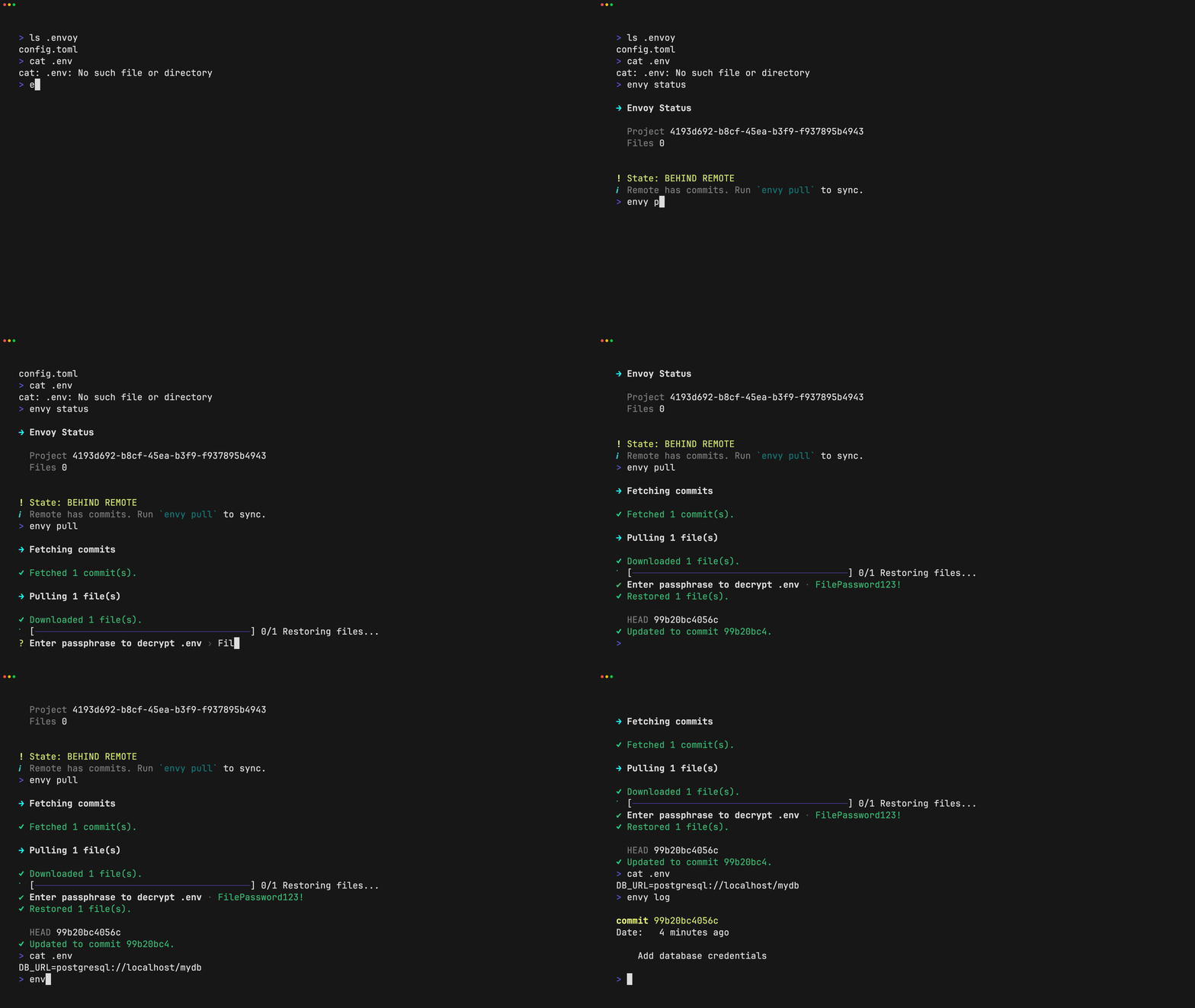
### 5. Pull and restore secrets
```bash
envy pull
```
- Downloads encrypted blobs and commits
- Decrypts them locally
- Restores files to their original paths
### 6. Check status
```bash
envy status
```
- Shows current manifest state
- Displays uncommitted changes
- Fetches remote to show sync status
### 7. Inspect changes
```bash
envy diff # working tree versus staged files
envy diff --cached # staged files versus HEAD
```
Envoy shows variable names but redacts values by default. Use
`--show-secrets` only when plaintext terminal output is acceptable.
### 8. Remove a tracked file
```bash
envy rm --input .env.testing
```
This stages the deletion and deletes the working-tree file. Add `--cached` to
stop tracking while keeping the local file. Pull applies committed deletions,
but refuses to delete a locally modified managed file.
### 9. Restrict a file to selected members
Use the internal user IDs shown by `envy member list`:
```bash
envy access grant .env.production USER_ID
envy access revoke .env.production USER_ID
envy access list .env.production
envy access unrestrict .env.production
```
The project owner publishes access changes with the next commit and push.
---
## Quick demos
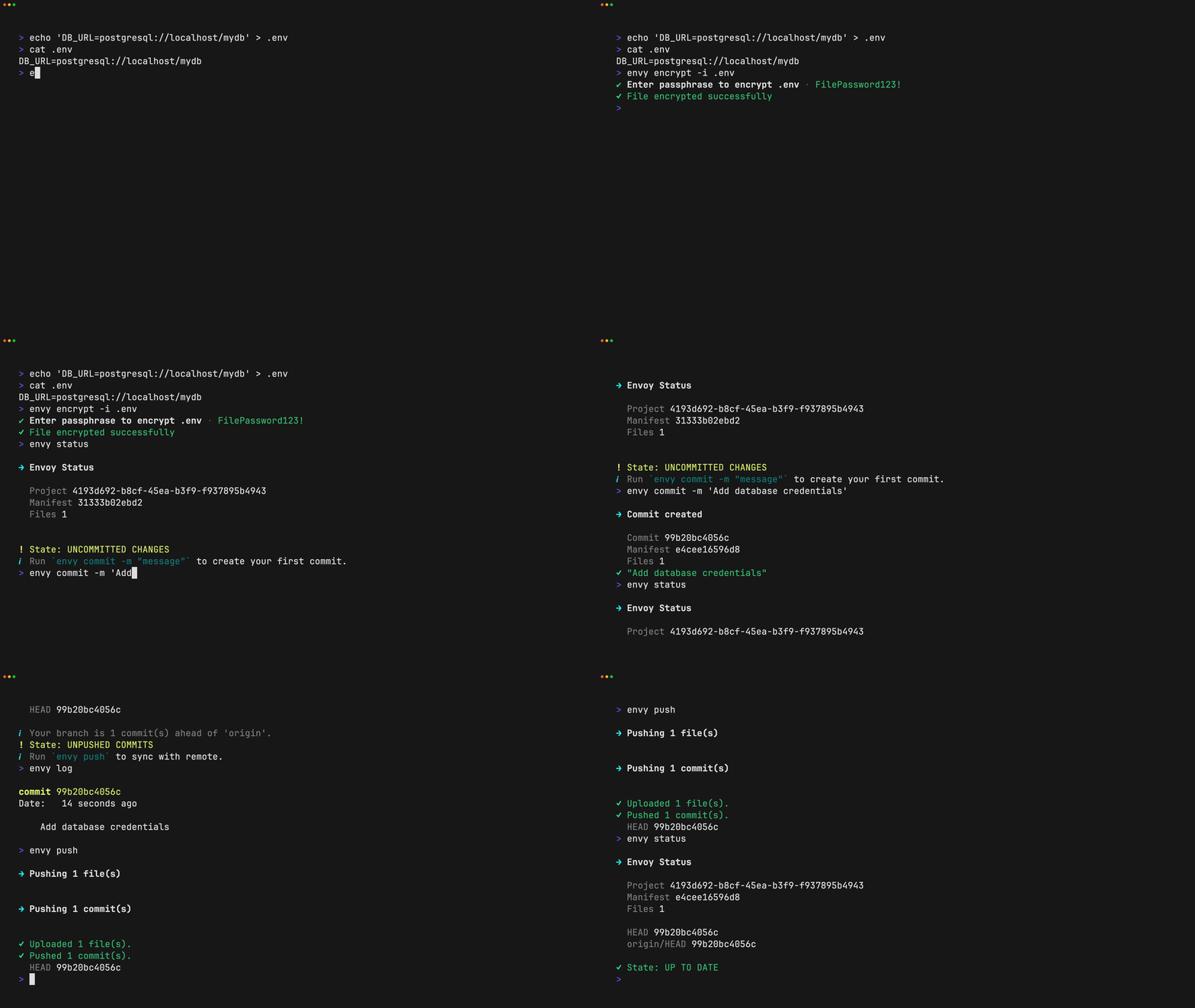
The following animated demos show common Envoy workflows.
### Initialize a project

### Encrypt a file
### Pull and restore secrets
---
## Configuration
### Project config (tracked)
`.envoy/config.toml`
```toml
version = 1
project_id = "..."
name = "..."
default_remote = "origin"
[remotes]
origin = "https://envoy-cli.vercel.app/api"
```
### Local state (not tracked)
```
.envoy/HEAD # Current commit hash
.envoy/refs/remotes/origin/HEAD # Remote HEAD
.envoy/latest # Current manifest blob hash
.envoy/cache/ # Encrypted blobs and commits
$HOME/.envoy/sessions.json # Encrypted, expiring project-key sessions
```
---
## Commands
| `envy init` | Initialize a new project |
| `envy add` | Encrypt and stage a file with the project passphrase |
| `envy encrypt` | Legacy per-file passphrase encryption |
| `envy rm` / `envy remove` | Stage a deletion and delete the working file |
| `envy diff [--cached]` | Show redacted working or staged changes |
| `envy commit -m "msg"` | Create a commit |
| `envy log` | View commit history |
| `envy status` | Show current state |
| `envy push` | Push commits to remote |
| `envy pull` | Pull and restore secrets |
| `envy access ...` | Manage per-file member access |
| `envy member ...` | Manage project members |
| `envy login` | Authenticate with GitHub |
| `envy logout` | Clear authentication |
---
## Non-interactive automation
Every command input can be supplied as an argument or as a newline-delimited
`key=value` record on stdin. Arguments take precedence over piped values, and
values may contain `=` characters.
```bash
printf '%s\n' \
'input=.env.production' \
'passphrase=project-passphrase' |
envy add
```
Managed files need only the project passphrase:
```bash
printf '%s\n' 'passphrase=project-passphrase' | envy pull
```
For legacy files created with `envy encrypt`, map their passphrases explicitly:
```bash
printf '%s\n' \
'passphrase=project-passphrase' \
'file:.env=development-passphrase' \
'file:.env.production=production-passphrase' |
envy pull
```
Use `file:*=shared-passphrase` when every file uses the same passphrase. The
equivalent arguments are `--file-passphrase "FILE=PASSPHRASE"` (repeatable) and
`--file-passphrase-all PASSPHRASE`.
Prefer stdin for secrets because command-line values may be visible in shell
history and process listings. See [`skills/use-envoy/SKILL.md`](skills/use-envoy/SKILL.md)
for the complete agent-oriented input matrix.
For isolated tests, set `ENVOY_HOME` to a temporary directory and
`ENVOY_NO_UPDATE_CHECK=1`.
---
## Security Model
- Encryption happens **client-side only**
- Keys are derived using **Argon2id** (memory-hard)
- Managed file keys are derived independently with **HKDF-SHA-256** and a
random salt
- Data is encrypted using **XChaCha20-Poly1305** (AEAD)
- Blobs are content-addressed via **SHA-256**
- Commits are encrypted and linked by parent hash
- Server never sees plaintext or keys
- Change detection uses plaintext hashes inside the encrypted manifest
- Legacy manifest v1 and per-file passphrase blobs remain readable
Envoy is designed so the server is **untrusted by default**.
For detailed cryptographic analysis, see [IMPLEMENTATION_SECURITY.md](docs/IMPLEMENTATION_SECURITY.md).
---
## License
MIT