# EMOM Timer
[](https://github.com/jac18281828/emomtimer/actions/workflows/ci-cd.yml)
[](https://github.com/jac18281828/emomtimer/actions/workflows/s3-sync.yml)
[](https://github.com/jac18281828/emomtimer/actions/workflows/deploy-crate.yml)
[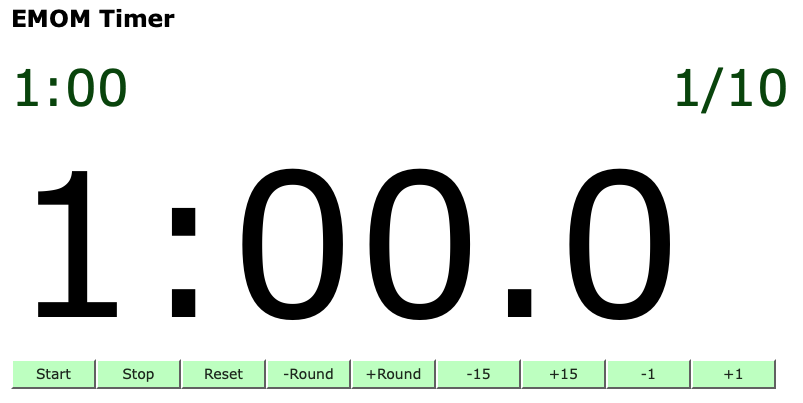](http://emom-timer-us-east-2-504242000181.s3-website.us-east-2.amazonaws.com)
**A high-performance EMOM (Every Minute On the Minute) workout timer with liquid glass aesthetics, built entirely in Rust and WebAssembly.**
🌐 **[Try it live →](http://emom-timer-us-east-2-504242000181.s3-website.us-east-2.amazonaws.com)**
�� **[Rust Documentation →](https://jac18281828.github.io/emomtimer/)**
## Features
### 🎯 Full-Featured Workout Timer
- **Precise EMOM timing** with visual and color cues
- **Customizable rounds** and intervals
- **Beautiful liquid glass UI** with animated wavy cloud effects
- **Responsive design** optimized for all devices
- **Zero drift** - maintains accuracy over long sessions
### 📚 Reusable Countdown Timer Library
- **Drift-correcting algorithm** - syncs with wall clock to prevent timing errors
- **Framework agnostic** - works with Yew, Leptos, Dioxus, or vanilla WASM
- **Production-ready** - extensively tested with comprehensive test suite
- **Easy to integrate** - simple API with sensible defaults
## Why This Timer?
Traditional JavaScript timers (`setInterval`, `setTimeout`) suffer from significant drift, especially in:
- **Background tabs** where browsers throttle to 1Hz
- **High CPU load** situations that delay callbacks
- **Power-saving modes** that affect timing precision
The `emom` countdown timer solves these problems by:
1. Using recursive `Timeout` calls for flexibility
2. Tracking expected tick time against wall clock
3. Periodically syncing and correcting drift
4. Adjusting when drift exceeds configurable thresholds
**Result**: Accurate timing that stays precise over minutes or hours, even under adverse conditions.
## Quick Start
### Use the Web App
Visit the live deployment:
**[http://emom-timer-us-east-2-504242000181.s3-website.us-east-2.amazonaws.com](http://emom-timer-us-east-2-504242000181.s3-website.us-east-2.amazonaws.com)**
### Run Locally with Docker
The easiest way to run locally is using the provided dev container:
1. **Open in VS Code**: `Reopen in Container`
2. **Build**: `trunk build --release`
3. **Serve**: `trunk serve --address=0.0.0.0 --release`
4. Open your browser to `http://localhost:8080`
## Using the Countdown Timer Library
Add to your `Cargo.toml`:
```toml
[dependencies]
emom = { git = "https://github.com/jac18281828/emomtimer" }
```
### Basic Example
```rust
use emom::countdown_timer::{CountdownTimer, TimerConfig};
let config = TimerConfig::default(); // 100ms ticks
});
timer.start();
// ... later ...
timer.stop();
```
### Countdown from Duration
```rust
use emom::countdown_timer::{CountdownTimer, TimerConfig};
use std::cell::RefCell;
use std::rc::Rc;
let remaining = Rc::new(RefCell::new(600)); // 60 seconds in tenths
let remaining_clone = Rc::clone(&remaining);
```
### Integration with Yew
```rust
use yew::prelude::*;
use emom::countdown_timer::{CountdownTimer, TimerConfig};
use std::rc::Rc;
#[function_component]
fn TimerComponent() -> Html {
let ticks = use_state(|| 0);
let timer = use_memo(|_| {
let ticks = ticks.clone();
CountdownTimer::new(TimerConfig::default(), move |t| {
ticks.set(t);
})
}, ());
let start = {
let timer = Rc::clone(&timer);
Callback::from(move |_| timer.start())
};
let stop = {
let timer = Rc::clone(&timer);
Callback::from(move |_| timer.stop())
};
html! {
<div>
<p>{ format!("Ticks: {}", *ticks) }</p>
<button onclick={start}>{"Start"}</button>
<button onclick={stop}>{"Stop"}</button>
</div>
}
}
```
### Configuration
Customize the timer behavior:
```rust
use emom::countdown_timer::TimerConfig;
let config = TimerConfig {
interval_ms: 100, // Tick every 100ms
sync_interval_ticks: 10, // Sync with wall clock every 10 ticks (1 second)
sync_threshold_ticks: 1, // Correct if drift exceeds 1 tick (100ms)
};
```
**Configuration Guidelines:**
- `interval_ms`: Tick interval in milliseconds. Use 100 for tenths of seconds, 1000 for full seconds
- `sync_interval_ticks`: How often to check for drift. Every 10 ticks (1 second) is recommended
- `sync_threshold_ticks`: Minimum drift before correction. Set to 1 to prevent micro-corrections
See [LIBRARY_USAGE.md](LIBRARY_USAGE.md) for detailed examples and advanced usage patterns.
## Technology Stack
Built with modern Rust tooling and frameworks:
- **[Rust](https://www.rust-lang.org/)** - Systems programming language ensuring memory safety and performance
- **[Yew](https://yew.rs/)** - Modern Rust framework for building WebAssembly web applications
- **[WebAssembly](https://webassembly.org/)** - Near-native performance in the browser
- **[Trunk](https://trunkrs.dev/)** - WASM web application bundler
- **[gloo-timers](https://docs.rs/gloo-timers/)** - Thin Rust wrapper over browser timing APIs
### Why Yew and WebAssembly?
**Yew** is a modern Rust framework comparable to React or Vue.js, but with unique advantages:
1. **WebAssembly Performance**: Compiles to WASM for near-native execution speed
2. **Component-Based Architecture**: Build complex UIs with reusable, isolated components
3. **Memory Safety**: Leverage Rust's guarantees to eliminate memory leaks and data races
4. **Strong Type System**: Catch errors at compile time, not runtime
5. **Virtual DOM**: Efficient rendering with minimal DOM updates
6. **Declarative UI**: Clear, readable code with macro-based JSX-like syntax
7. **JavaScript Interoperability**: Use existing JS libraries when needed
8. **Rich Tooling**: Cargo for package management, excellent IDE support
**Perfect for**: Applications where performance, reliability, and type safety are critical.
## Development
### Prerequisites
- Docker (for dev container)
- OR: Rust 1.70+, trunk, wasm-bindgen
### Building
```bash
# Development build
trunk build
# Release build with optimizations
trunk build --release
```
### Testing
```bash
# Run all tests
cargo test
# Run with coverage
cargo test --all-features
# Lint and format
cargo fmt --check
cargo clippy --all-features --no-deps -- -D warnings
```
### Project Structure
```
emomtimer/
├── src/
│ ├── lib.rs # Library exports and countdown timer
│ ├── main.rs # Yew application and UI
│ └── countdown_timer.rs # Drift-correcting timer implementation
├── style.css # Liquid glass UI styling
├── index.html # Application shell
├── Cargo.toml # Dependencies and package metadata
└── README.md # This file
```
## Contributing
Contributions are welcome! Please:
1. Fork the repository
2. Create a feature branch
3. Make your changes with tests
4. Ensure `cargo test` and `cargo clippy` pass
5. Submit a pull request
## License
This project is open source. See the repository for license details.
## Acknowledgments
Built with ❤️ using Rust and WebAssembly. Special thanks to the Yew and Rust communities for excellent tooling and documentation.
---
