# EMOM Timer
[](https://github.com/jac18281828/emomtimer/actions/workflows/ci-cd.yml)
[](https://github.com/jac18281828/emomtimer/actions/workflows/s3-sync.yml)
[](https://github.com/jac18281828/emomtimer/actions/workflows/deploy-crate.yml)
[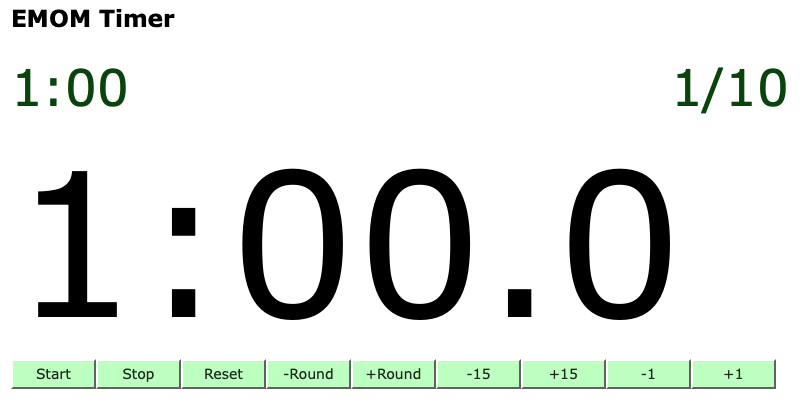](http://emom-timer-us-east-2-504242000181.s3-website.us-east-2.amazonaws.com)
# Customizable timer for your workout!
This is a customizable EMOM (Every Minute On the Minute) timer built with Rust and Yew, featuring a **drift-correcting countdown timer library** that can be reused in your own WebAssembly projects.
[Rust Doc](https://jac18281828.github.io/emomtimer/)
## Features
- 🎯 **EMOM Timer Web App**: Full-featured workout timer with visual cues
- 📚 **Reusable Library**: Drift-correcting `CountdownTimer` for accurate timekeeping in WASM
- ⚡ **Performance**: Uses recursive `Timeout` with wall clock sync to prevent drift
- 🦀 **Pure Rust**: Built entirely in Rust, compiled to WebAssembly
## Using the CountdownTimer Library
The `emom` crate includes a reusable `CountdownTimer` that provides accurate timing in WebAssembly environments:
```rust
use emom::countdown_timer::{CountdownTimer, TimerConfig};
let config = TimerConfig::default(); // 100ms ticks
});
timer.start();
```
See [LIBRARY_USAGE.md](LIBRARY_USAGE.md) for detailed examples and usage with Yew, Leptos, and other frameworks.
### Why This Timer Library?
Unlike JavaScript's `setInterval`, this timer:
- **Corrects for drift**: Syncs with wall clock to maintain accuracy
- **Works in background tabs**: Adjusts when browser throttles timers
- **Precise**: Maintains accuracy even under CPU load
Add to your `Cargo.toml`:
```toml
[dependencies]
emom = "1.0"
```
# Introduction
Yew is a modern Rust framework for creating multi-threaded front-end web apps using WebAssembly. It's comparable to JavaScript frameworks like React or Vue.js, but with the performance and safety benefits of Rust. Here are the key aspects of Yew:
1. **WebAssembly**: Yew compiles to WebAssembly (Wasm), enabling web applications to run at near-native speed. This makes Yew a powerful choice for performance-critical web applications.
2. **Component-Based**: Like React and Vue, Yew uses a component-based architecture. This makes it easier to build complex interfaces, as the UI is broken down into independent, reusable components.
3. **Rust Programming Language**: Leveraging Rust's performance and safety features, Yew ensures memory safety and thread safety, minimizing common web development bugs like memory leaks.
4. **Concurrent and Multi-Threaded**: Rust's support for concurrency and Yew's design allow for multi-threaded applications. This can lead to better performance, especially on modern multi-core processors.
5. **JS Interoperability**: Yew can interoperate with JavaScript, allowing developers to use existing JavaScript libraries and frameworks alongside Yew.
6. **Rich Tooling and Ecosystem**: Yew benefits from Rust's tooling, such as Cargo for package management, and an active community contributing to its ecosystem.
7. **Virtual DOM**: Like React, Yew uses a virtual DOM to optimize rendering. It only updates the parts of the real DOM that have changed, leading to efficient rendering and improved performance.
8. **Declarative UI**: Yew embraces a declarative approach to defining UI, which can make code more readable and easier to reason about compared to imperative UI coding.
9. **Macro-based Syntax**: Yew uses Rust macros to provide a JSX-like syntax, making it familiar for developers coming from a React background.
10. **Strong Type System**: Leveraging Rust’s strong type system, Yew applications benefit from compile-time error checking, which can catch errors early in the development process.
Yew is particularly suited for applications where performance, reliability, and Rust's strong type system are important. However, it does require familiarity with Rust, and the ecosystem is not as mature as JavaScript's, which could be a consideration for some projects.
### Quick Start
#### VSCode
`Reopen in container`
#### Build Trunk
```bash
$ trunk build --release
```
#### Serve Trunk
```bash
$ trunk serve --address=0.0.0.0 --release
```
## Library
# Using emom as a Reusable Timer Library
The `emom` crate provides a drift-correcting countdown timer that works in WebAssembly environments. Unlike simple `Interval`-based timers, it actively corrects for browser timing drift to ensure accurate timing over long periods.
## Features
- **Drift Correction**: Automatically syncs with wall clock to prevent timing drift
- **Configurable**: Adjust tick interval, sync frequency, and correction thresholds
- **Framework Agnostic**: Works with Yew, Leptos, Dioxus, or vanilla WASM
- **Accurate**: Maintains precision even in background tabs or under CPU load
## Installation
```toml
[dependencies]
emom = { git = "https://github.com/jac18281828/emomtimer" }
```
## Basic Usage
### Simple Countdown
```rust
use emom::countdown_timer::{CountdownTimer, TimerConfig};
// Create a timer that ticks every 100ms
let config = TimerConfig::default();
});
timer.start();
// ... later ...
timer.stop();
```
### Countdown from Duration
```rust
use emom::countdown_timer::{CountdownTimer, TimerConfig};
use std::cell::RefCell;
use std::rc::Rc;
let remaining = Rc::new(RefCell::new(600)); // 60 seconds in tenths
let remaining_clone = Rc::clone(&remaining);
```
### With Yew
```rust
use yew::prelude::*;
use emom::countdown_timer::{CountdownTimer, TimerConfig};
#[function_component]
fn TimerComponent() -> Html {
let ticks = use_state(|| 0);
let timer = use_memo(|_| {
let ticks = ticks.clone();
CountdownTimer::new(TimerConfig::default(), move |t| {
ticks.set(t);
})
}, ());
let start = {
let timer = timer.clone();
Callback::from(move |_| timer.start())
};
let stop = {
let timer = timer.clone();
Callback::from(move |_| timer.stop())
};
html! {
<div>
<p>{ format!("Ticks: {}", *ticks) }</p>
<button onclick={start}>{"Start"}</button>
<button onclick={stop}>{"Stop"}</button>
</div>
}
}
```
## Configuration
```rust
use emom::countdown_timer::TimerConfig;
let config = TimerConfig {
interval_ms: 100, // Tick every 100ms
sync_interval_ticks: 10, // Sync with wall clock every 10 ticks (1 second)
sync_threshold_ticks: 1, // Correct if drift exceeds 1 tick (100ms)
};
```
### Configuration Guidelines
- **interval_ms**: The tick interval. 100ms is good for displaying tenths of seconds
- **sync_interval_ticks**: How often to check for drift. Every 10 ticks (1 second) works well
- **sync_threshold_ticks**: Minimum drift before correction. 1 tick prevents micro-corrections
## Why This Approach?
JavaScript timers (`setTimeout`, `setInterval`) can drift significantly:
- Background tabs may throttle timers to 1Hz
- CPU load can delay callbacks
- Browser power-saving features affect timing
This library solves these issues by:
1. Using `Timeout` (setTimeout) for each tick
2. Tracking expected tick time based on wall clock
3. Periodically syncing actual ticks with wall clock time
4. Correcting drift when it exceeds threshold
This ensures your timer stays accurate even in challenging conditions.
