# embedded-text [](https://crates.io/crates/embedded_text) [](https://docs.rs/embedded-text/) 
TextBox for embedded-graphics.
This crate provides a configurable `TextBox` to render multiline text inside a bounding
`Rectangle` using [embedded-graphics].
`TextBox` supports the common text alignments:
- Horizontal:
- `Left`
- `Right`
- `Center`
- `Justified`
- Vertical:
- `Top`
- `Middle`
- `Bottom`
`TextBox` also supports some special characters not handled by embedded-graphics' `Text`:
- non-breaking space (`\u{200b}`)
- zero-width space (`\u{a0}`)
- soft hyphen (`\u{ad}`)
- carriage return (`\r`)
- tab (`\t`) with configurable tab size
`TextBox` also supports text coloring using [ANSI escape codes](https://en.wikipedia.org/wiki/ANSI_escape_code) via the `Ansi` plugin.
### Example
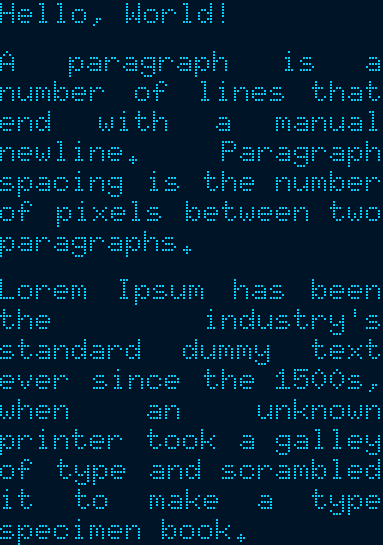
The examples are based on [the embedded-graphics simulator]. The simulator is built on top of
`SDL2`. See the [simulator README] for more information.
```rust
use embedded_graphics::{
mono_font::{ascii::FONT_6X10, MonoTextStyle},
pixelcolor::BinaryColor,
prelude::*,
primitives::Rectangle,
};
use embedded_graphics_simulator::{
BinaryColorTheme, OutputSettingsBuilder, SimulatorDisplay, Window,
};
use embedded_text::{
alignment::HorizontalAlignment,
style::{HeightMode, TextBoxStyleBuilder},
TextBox,
};
fn main() {
let text = "Hello, World!\n\
A paragraph is a number of lines that end with a manual newline. Paragraph spacing is the \
number of pixels between two paragraphs.\n\
Lorem Ipsum has been the industry's standard dummy text ever since the 1500s, when \
an unknown printer took a galley of type and scrambled it to make a type specimen book.";
// Specify the styling options:
// * Use the 6x10 MonoFont from embedded-graphics.
// * Draw the text fully justified.
// * Use `FitToText` height mode to stretch the text box to the exact height of the text.
// * Draw the text with `BinaryColor::On`, which will be displayed as light blue.
let character_style = MonoTextStyle::new(&FONT_6X10, BinaryColor::On);
let textbox_style = TextBoxStyleBuilder::new()
.height_mode(HeightMode::FitToText)
.alignment(HorizontalAlignment::Justified)
.paragraph_spacing(6)
.build();
// Specify the bounding box. Note the 0px height. The `FitToText` height mode will
// measure and adjust the height of the text box in `into_styled()`.
let bounds = Rectangle::new(Point::zero(), Size::new(128, 0));
// Create the text box and apply styling options.
let text_box = TextBox::with_textbox_style(text, bounds, character_style, textbox_style);
// Create a simulated display with the dimensions of the text box.
let mut display = SimulatorDisplay::new(text_box.bounding_box().size);
// Draw the text box.
text_box.draw(&mut display).unwrap();
// Set up the window and show the display's contents.
let output_settings = OutputSettingsBuilder::new()
.theme(BinaryColorTheme::OledBlue)
.scale(2)
.build();
Window::new("TextBox example with paragraph spacing", &output_settings).show_static(&display);
}
```
## Cargo features
* `plugin` (*experimental*): allows implementing custom plugins.
* `ansi`: enables ANSI sequence support using the `Ansi` plugin.
[embedded-graphics]: https://github.com/embedded-graphics/embedded-graphics/
[the embedded-graphics simulator]: https://github.com/embedded-graphics/embedded-graphics/tree/master/simulator
[simulator README]: https://github.com/embedded-graphics/embedded-graphics/tree/master/simulator#usage-without-sdl2
## Development setup
### Minimum supported Rust version
The minimum supported Rust version for embedded-text is 1.61.0 or greater. Ensure you have the latest stable version of Rust installed, preferably through https://rustup.rs.
### Installation
For setup in general, follow the installation instructions for [embedded-graphics].
To install SDL2 on Windows, see https://github.com/Rust-SDL2/rust-sdl2#windows-msvc
## Attribution
The last paragraph of the example text is copied from https://www.lipsum.com