1
2
3
4
5
6
7
8
9
10
11
12
13
14
15
16
17
18
19
20
21
22
23
24
25
26
27
28
29
30
31
32
33
34
35
36
37
38
39
40
41
42
43
44
45
46
47
48
49
50
51
52
53
54
55
56
57
58
59
60
61
62
63
64
65
66
67
68
69
70
71
72
73
74
75
76
77
78
79
80
81
82
83
84
85
86
87
88
89
90
91
92
93
94
95
96
97
98
99
100
101
102
103
104
105
106
107
108
109
110
111
112
113
114
115
116
117
118
119
120
121
122
123
124
125
126
127
128
129
130
131
132
133
134
135
136
137
138
139
140
141
142
143
144
145
146
147
148
149
150
151
152
153
154
155
156
157
158
159
160
161
162
163
164
165
166
167
168
169
170
171
172
173
174
175
176
177
178
179
180
181
182
183
184
185
186
187
188
189
190
191
192
193
194
195
196
197
198
199
200
201
202
203
204
205
206
207
208
209
210
211
212
213
214
215
216
217
218
219
220
221
222
223
224
225
226
227
228
229
230
231
232
233
234
235
236
237
238
239
240
241
242
243
244
245
246
247
248
249
250
251
252
253
254
255
256
257
258
259
260
261
262
263
264
265
266
267
268
269
270
271
272
273
274
275
276
277
278
279
280
281
282
283
284
285
286
287
288
289
290
291
292
293
294
295
296
297
298
299
//! Embedded-graphics is a 2D graphics library that is focused on memory constrained embedded devices.
//!
//! A core goal of embedded-graphics is to draw graphics without using any buffers; the crate is
//! `no_std` compatible and works without a dynamic memory allocator, and without pre-allocating
//! large chunks of memory. To achieve this, it takes an `Iterator` based approach, where pixel
//! colors and positions are calculated on the fly, with the minimum of saved state. This allows the
//! consuming application to use far less RAM at little to no performance penalty.
//!
//! It contains built in items that make it easy to draw 2D graphics primitives:
//!
//! * [Raw data images]
//! * [Primitives]
//! * [Lines]
//! * [Rectangles (and squares)]
//! * [Circles]
//! * [Ellipses]
//! * [Arcs]
//! * [Sectors]
//! * [Triangles]
//! * [Polylines]
//! * [Rounded rectangles]
//! * [Text]
//! * [Monospaced fonts]
//!
//! # Additional functions provided by external crates
//!
//! Embedded-graphics is designed to be extended by the application or other crates. Examples of
//! this are adding support for different image formats or implementing custom fonts.
//!
//! * [BMP images - `tinybmp`](https://crates.io/crates/tinybmp)
//! * [TGA images - `tinytga`](https://crates.io/crates/tinytga)
//! * [QOI images - `tinyqoi`](https://crates.io/crates/tinyqoi)
//! * [Large collection of fonts - `u8g2-fonts`](https://crates.io/crates/u8g2-fonts)
//! * [ProFont monospace font - `profont`](https://crates.io/crates/profont)
//! * [Picofont Pico8 font - `embedded-picofont`](https://crates.io/crates/embedded_picofont)
//! * [IBM437 font - `ibm437`](https://crates.io/crates/ibm437)
//! * [The fonts shipped with `embedded-graphics` 0.6 - `embedded-vintage-fonts`](https://crates.io/crates/embedded-vintage-fonts)
//! * [Simple layout/alignment functions - `embedded-layout`](https://crates.io/crates/embedded-layout)
//! * [TextBox with text alignment options - `embedded-text`](https://crates.io/crates/embedded-text)
//! * [Heapless plotting library for small embedded targets - `embedded-plots`](https://crates.io/crates/embedded-plots)
//! * [Virtual seven-segment displays - `eg-seven-segment`](https://crates.io/crates/eg-seven-segment)
//! * [Canvas for drawing onto before drawing on the display - `embedded-canvas`](https://crates.io/crates/embedded-canvas)
//! * [Frames Per Second counter for embedded devices - `embedded-fps`](https://crates.io/crates/embedded-fps)
//! * [Framebuffer with DMA support - `embedded-graphics-framebuf`](https://crates.io/crates/embedded-graphics-framebuf)
//!
//! Note that some of these crates may not support the latest version of embedded-graphics.
//!
//! If you know of a crate that is not in this list, please [open an
//! issue](https://github.com/embedded-graphics/embedded-graphics/issues/new) to add it.
//!
//! # Display drivers
//!
//! To support many different kinds of display, embedded-graphics doesn't include any drivers
//! directly but provides the [`DrawTarget`] API in [`embedded-graphics-core`] that can be
//! implemented by external crates. In addition to the drivers for real displays, the
//! [simulator](https://docs.rs/embedded-graphics-simulator/) can be used to test code during
//! development.
//!
//! 
//!
//! These are just some of the displays the community has added embedded-graphics support to. This
//! list is taken from the [dependent crates
//! list](https://crates.io/crates/embedded-graphics/reverse_dependencies) on crates.io so might be
//! missing some unpublished entries. Please [open an
//! issue](https://github.com/embedded-graphics/embedded-graphics/issues/new) if there's a display driver
//! that should be added to this list.
//!
//! Note that some drivers may not support the latest version of embedded-graphics.
//!
//! * [embedded-graphics-web-simulator](https://crates.io/crates/embedded-graphics-web-simulator): Simulated display in your browser via Webassembly
//! * [epd-waveshare](https://crates.io/crates/epd-waveshare) Driver for various ePaper displays (EPD) from Waveshare
//! * [hub75](https://crates.io/crates/hub75): A rust driver for hub75 rgb matrix displays
//! * [ili9341](https://crates.io/crates/ili9341): A platform agnostic driver to interface with the ILI9341 (and ILI9340C) TFT LCD display
//! * [ls010b7dh01](https://crates.io/crates/ls010b7dh01): A platform agnostic driver for the LS010B7DH01 memory LCD display
//! * [push2_display](https://crates.io/crates/push2_display): Ableton Push2 embedded-graphics display driver
//! * [sh1106](https://crates.io/crates/sh1106): I2C driver for the SH1106 OLED display
//! * [smart-leds-matrix](https://github.com/smart-leds-rs/smart-leds-matrix): Driver for smart LED (like ws2812) based LED matrixes.
//! * [ssd1306](https://crates.io/crates/ssd1306): I2C and SPI (4 wire) driver for the SSD1306 OLED display
//! * [ssd1309](https://crates.io/crates/ssd1309): I2C/SPI driver for the SSD1309 OLED display written in 100% Rust.
//! * [ssd1322](https://crates.io/crates/ssd1322): Pure Rust driver for the SSD1322 OLED display chip
//! * [ssd1331](https://crates.io/crates/ssd1331): SPI (4 wire) driver for the SSD1331 OLED display
//! * [ssd1351](https://crates.io/crates/ssd1351): SSD1351 driver
//! * [ssd1675](https://crates.io/crates/ssd1675): Rust driver for the Solomon Systech SSD1675 e-Paper display (EPD) controller
//! * [st7565](https://crates.io/crates/st7565): SPI driver for ST7565 based displays
//! * [st7735-lcd](https://crates.io/crates/st7735-lcd): Rust library for displays using the ST7735 driver
//! * [st7789](https://crates.io/crates/st7789): A Rust driver library for ST7789 displays
//! * [st7920](https://crates.io/crates/st7920): ST7920 LCD driver in Rust
//! * [gc9a01-rs](https://crates.io/crates/gc9a01-rs): SPI 4-wire driver for the Gc9a01 display driver
//!
//! # Simulator
//!
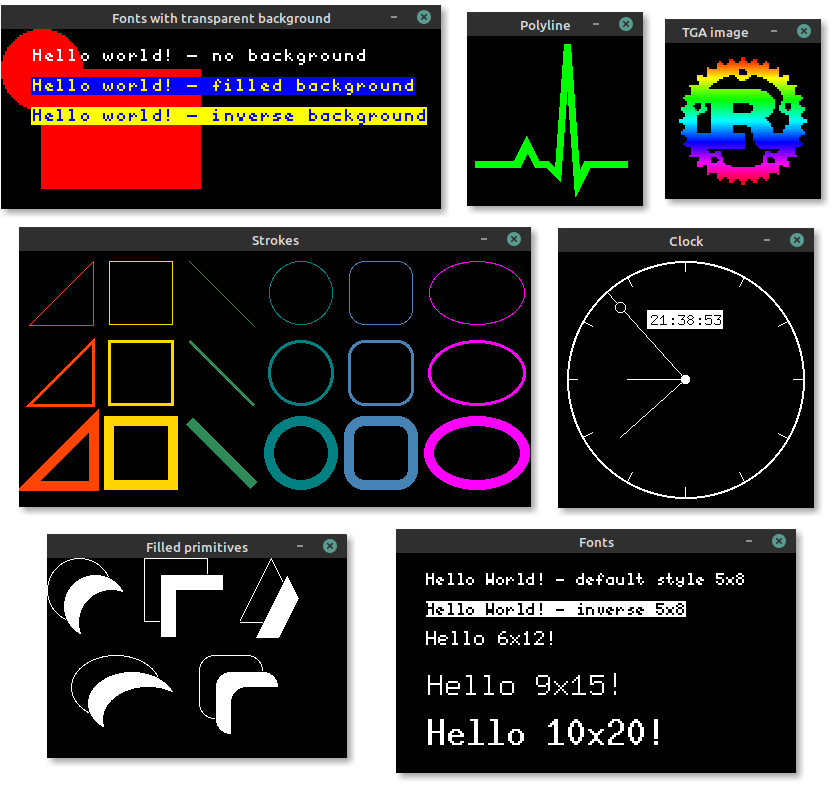
//! Embedded graphics comes with a [simulator]! The simulator can be used to test and debug
//! embedded graphics code, or produce examples and interactive demos to show off embedded graphics
//! features.
//!
//! 
//!
//! Take a look at the [examples repository](https://github.com/embedded-graphics/examples) to see what
//! embedded-graphics can do, and how it might look on a display. You can run the examples like
//! this:
//!
//! ```bash
//! git clone https://github.com/embedded-graphics/examples.git
//! cd examples/eg-0.7
//!
//! cargo run --example hello-world
//! ```
//!
//! # Crate features
//!
//! Additional features can be enabled by adding the following features to your `Cargo.toml`.
//!
//! * `nalgebra_support` - use the [Nalgebra](https://crates.io/crates/nalgebra) crate with `no_std`
//! support to enable conversions from `nalgebra::Vector2` to [`Point`] and [`Size`].
//!
//! * `fixed_point` - use fixed point arithmetic instead of floating point for all trigonometric
//! calculation.
//!
//! * `defmt` - provide implementations of `defmt::Format` for all types where possible. [`defmt`]
//! is a library for logging that moves as much work as possible over to a separate logging
//! machine, making it especially suited to low-resource MCUs. Note that `defmt` might not work with
//! older versions of rustc that are otherwise supported by embedded-graphics.
//!
//! # Migrating from older versions
//!
//! * [Migration guide from 0.5 to 0.6](https://github.com/embedded-graphics/embedded-graphics/blob/master/MIGRATING-0.5-0.6.md).
//! * [Migration guide from 0.6 to 0.7](https://github.com/embedded-graphics/embedded-graphics/blob/master/MIGRATING-0.6-0.7.md).
//!
//! # Implementing `embedded_graphics` support for a display driver
//!
//! To add support for embedded-graphics to a display driver, [`DrawTarget`] from
//! [`embedded-graphics-core`] must be implemented. This allows all embedded-graphics items to be
//! rendered by the display. See the [`DrawTarget`] documentation for implementation details.
//!
//! # Examples
//!
//! ## Drawing examples
//!
//! [][examples]
//!
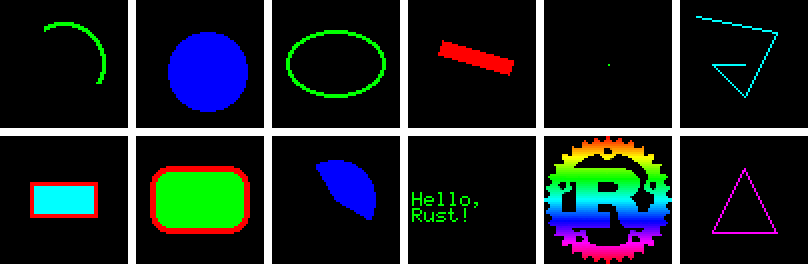
//! Example usage of drawing primitives, text and images with embedded-graphics can be found [here][examples].
//!
//! ## Shapes and text
//!
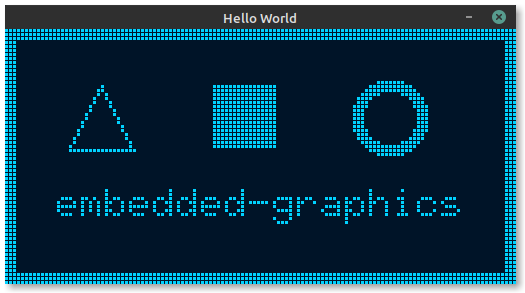
//! The following example draws some shapes and text to a [`MockDisplay`] in place of target
//! hardware. The [simulator](https://docs.rs/embedded-graphics-simulator/) can also be used for
//! debugging, development or if hardware is not available.
//!
//! ```rust,no_run
//! use embedded_graphics::{
//! mono_font::{ascii::FONT_6X10, MonoTextStyle},
//! pixelcolor::BinaryColor,
//! prelude::*,
//! primitives::{
//! Circle, PrimitiveStyle, PrimitiveStyleBuilder, Rectangle, StrokeAlignment, Triangle,
//! },
//! text::{Alignment, Text},
//! mock_display::MockDisplay,
//! };
//!
//! fn main() -> Result<(), std::convert::Infallible> {
//! // Create a new mock display
//! let mut display: MockDisplay<BinaryColor> = MockDisplay::new();
//! # display.set_allow_overdraw(true);
//!
//! // Create styles used by the drawing operations.
//! let thin_stroke = PrimitiveStyle::with_stroke(BinaryColor::On, 1);
//! let thick_stroke = PrimitiveStyle::with_stroke(BinaryColor::On, 3);
//! let border_stroke = PrimitiveStyleBuilder::new()
//! .stroke_color(BinaryColor::On)
//! .stroke_width(3)
//! .stroke_alignment(StrokeAlignment::Inside)
//! .build();
//! let fill = PrimitiveStyle::with_fill(BinaryColor::On);
//! let character_style = MonoTextStyle::new(&FONT_6X10, BinaryColor::On);
//!
//! let yoffset = 10;
//!
//! // Draw a 3px wide outline around the display.
//! display
//! .bounding_box()
//! .into_styled(border_stroke)
//! .draw(&mut display)?;
//!
//! // Draw a triangle.
//! Triangle::new(
//! Point::new(16, 16 + yoffset),
//! Point::new(16 + 16, 16 + yoffset),
//! Point::new(16 + 8, yoffset),
//! )
//! .into_styled(thin_stroke)
//! .draw(&mut display)?;
//!
//! // Draw a filled square
//! Rectangle::new(Point::new(52, yoffset), Size::new(16, 16))
//! .into_styled(fill)
//! .draw(&mut display)?;
//!
//! // Draw a circle with a 3px wide stroke.
//! Circle::new(Point::new(88, yoffset), 17)
//! .into_styled(thick_stroke)
//! .draw(&mut display)?;
//!
//! // Draw centered text.
//! let text = "embedded-graphics";
//! Text::with_alignment(
//! text,
//! display.bounding_box().center() + Point::new(0, 15),
//! character_style,
//! Alignment::Center,
//! )
//! .draw(&mut display)?;
//!
//! Ok(())
//! }
//! ```
//!
//! This example is also included in the [examples](https://github.com/embedded-graphics/examples) repository and
//! can be run using `cargo run --example hello-world`. It produces this output:
//!
//! 
//!
//! Additional examples can be found in the [examples](https://github.com/embedded-graphics/examples) repository.
//!
//! <!-- README-LINKS
//! [`Circle`]: https://docs.rs/embedded-graphics/latest/embedded_graphics/primitives/circle/struct.Circle.html
//! [`MockDisplay`]: https://docs.rs/embedded-graphics/latest/embedded_graphics/mock_display/struct.MockDisplay.html
//! [`Point`]: https://docs.rs/embedded-graphics/latest/embedded_graphics/geometry/struct.Point.html
//! [`Size`]: https://docs.rs/embedded-graphics/latest/embedded_graphics/geometry/struct.Size.html
//! [Raw data images]: https://docs.rs/embedded-graphics/latest/embedded_graphics/image/struct.ImageRaw.html
//! [Primitives]: https://docs.rs/embedded-graphics/latest/embedded_graphics/primitives/index.html
//! [Lines]: https://docs.rs/embedded-graphics/latest/embedded_graphics/primitives/line/struct.Line.html
//! [Rectangles (and squares)]: https://docs.rs/embedded-graphics/latest/embedded_graphics/primitives/rectangle/struct.Rectangle.html
//! [Circles]: https://docs.rs/embedded-graphics/latest/embedded_graphics/primitives/circle/struct.Circle.html
//! [Ellipses]: https://docs.rs/embedded-graphics/latest/embedded_graphics/primitives/ellipse/struct.Ellipse.html
//! [Arcs]: https://docs.rs/embedded-graphics/latest/embedded_graphics/primitives/arc/struct.Arc.html
//! [Sectors]: https://docs.rs/embedded-graphics/latest/embedded_graphics/primitives/sector/struct.Sector.html
//! [Triangles]: https://docs.rs/embedded-graphics/latest/embedded_graphics/primitives/triangle/struct.Triangle.html
//! [Polylines]: https://docs.rs/embedded-graphics/latest/embedded_graphics/primitives/polyline/struct.Polyline.html
//! [Rounded rectangles]: https://docs.rs/embedded-graphics/latest/embedded_graphics/primitives/rounded_rectangle/struct.RoundedRectangle.html
//! [Text]: https://docs.rs/embedded-graphics/latest/embedded_graphics/text/index.html
//! [Monospaced fonts]: https://docs.rs/embedded-graphics/latest/embedded_graphics/mono_font/index.html
//! [examples]: https://docs.rs/embedded-graphics/latest/embedded_graphics/examples/index.html
//! README-LINKS -->
//!
//! [`Circle`]: primitives::circle::Circle
//! [`MockDisplay`]: mock_display::MockDisplay
//! [`Point`]: geometry::Point
//! [`Size`]: geometry::Size
//! [Raw data images]: image::ImageRaw
//! [Primitives]: primitives
//! [Lines]: primitives::line::Line
//! [Rectangles (and squares)]: primitives::rectangle::Rectangle
//! [Circles]: primitives::circle::Circle
//! [Ellipses]: primitives::ellipse::Ellipse
//! [Arcs]: primitives::arc::Arc
//! [Sectors]: primitives::sector::Sector
//! [Triangles]: primitives::triangle::Triangle
//! [Polylines]: primitives::polyline::Polyline
//! [Rounded rectangles]: primitives::rounded_rectangle::RoundedRectangle
//! [Text]: text
//! [Monospaced fonts]: mono_font
//! [`Drawable`]: crate::Drawable
//! [`DrawTarget`]: https://docs.rs/embedded-graphics-core/latest/embedded_graphics_core/draw_target/trait.DrawTarget.html
//! [`embedded-graphics-core`]: https://docs.rs/embedded-graphics-core/
//! [simulator]: https://github.com/embedded-graphics/simulator
//! [simulator examples]: https://github.com/embedded-graphics/simulator/tree/master/examples
//! [`defmt`]: https://defmt.ferrous-systems.com/
pub use ;