1
2
3
4
5
6
7
8
9
10
11
12
13
14
15
16
17
18
19
20
21
22
23
24
25
26
27
28
29
30
31
32
33
34
35
36
37
38
39
40
41
42
43
44
45
46
47
48
49
50
51
52
53
54
55
56
57
58
59
60
61
62
63
64
65
66
67
68
69
70
71
72
73
74
75
76
77
78
79
80
81
82
83
84
85
86
87
88
89
90
91
92
93
94
95
96
97
98
99
100
101
102
103
104
105
106
107
108
109
110
111
112
113
114
115
116
117
118
119
120
121
122
123
124
125
126
127
128
129
130
131
132
133
134
135
136
137
138
139
140
141
142
143
144
145
146
147
148
149
150
151
152
153
154
155
156
157
158
159
160
161
162
163
164
165
166
167
168
169
170
171
172
173
174
175
176
177
178
179
180
181
182
183
184
185
186
187
188
189
190
191
192
193
194
195
196
197
198
199
200
201
202
203
204
205
206
207
208
209
210
211
212
213
214
215
216
217
218
219
220
//! This crate aims to make drawing 2D graphics primitives super easy. It currently supports the
//! following built in items:
//!
//! * [Raw data images](./image/struct.ImageRaw.html)
//! * [Primitives](./primitives/index.html)
//! * [Lines](./primitives/line/struct.Line.html)
//! * [Rectangles (and squares)](./primitives/rectangle/struct.Rectangle.html)
//! * [Circles](./primitives/circle/struct.Circle.html)
//! * [Triangles](./primitives/triangle/struct.Triangle.html)
//! * [Text with multiple fonts](./fonts/index.html#types)
//!
//! Additional functionality provided by external crates:
//!
//! * [BMP images - `tinybmp`](https://crates.io/crates/tinybmp)
//! * [TGA images - `tinytga`](https://crates.io/crates/tinytga)
//! * [ProFont monospace font - `profont`](https://crates.io/crates/profont)
//! * [Picofont Pico8 font - `picofont`](https://crates.io/crates/picofont)
//!
//! If you know of a crate that is not in this list, please [open an
//! issue](https://github.com/jamwaffles/embedded-graphics/issues/new).
//!
//! Note that some of these crates may not support the latest version of embedded-graphics.
//!
//! You can also add your own objects by implementing [`Drawable`] on them. Additionally, all
//! iterators over pixels (`Iterator<Item = Pixel<C>>`) have a default [`Drawable`] implementation
//! already created.
//!
//! A core goal of embedded-graphics is to draw graphics without using any buffers; the crate is
//! `no_std` compatible and works without a dynamic memory allocator, and without pre-allocating
//! large chunks of memory. To achieve this, it takes an `Iterator` based approach, where pixel
//! values and positions are calculated on the fly, with the minimum of saved state. This allows the
//! consuming application to use far less RAM at little to no performance penalty.
//!
//! # Supported displays
//!
//! These are just some of the displays the community has added embedded_graphics support to. This
//! list is taken from the [dependent crates
//! list](https://crates.io/crates/embedded-graphics/reverse_dependencies) on crates.io so might be
//! missing some unpublished entries. Please [open an
//! issue](https://github.com/jamwaffles/embedded-graphics/issues/new) if there's a display driver
//! that should be added to this list.
//!
//! Note that some drivers may not support the latest version of embedded-graphics.
//!
//! * [hub75](https://crates.io/crates/hub75): A rust driver for hub75 rgb matrix displays
//! * [ili9341](https://crates.io/crates/ili9341): A platform agnostic driver to interface with the ILI9341 (and ILI9340C) TFT LCD display
//! * [ls010b7dh01](https://crates.io/crates/ls010b7dh01): A platform agnostic driver for the LS010B7DH01 memory LCD display
//! * [sh1106](https://crates.io/crates/sh1106): I2C driver for the SH1106 OLED display
//! * [ssd1306](https://crates.io/crates/ssd1306): I2C and SPI (4 wire) driver for the SSD1306 OLED display
//! * [ssd1322](https://crates.io/crates/ssd1322): Pure Rust driver for the SSD1322 OLED display chip
//! * [ssd1331](https://crates.io/crates/ssd1331): SPI (4 wire) driver for the SSD1331 OLED display
//! * [ssd1351](https://crates.io/crates/ssd1351): SSD1351 driver
//! * [ssd1675](https://crates.io/crates/ssd1675): Rust driver for the Solomon Systech SSD1675 e-Paper display (EPD) controller
//! * [st7735-lcd](https://crates.io/crates/st7735-lcd): Rust library for displays using the ST7735 driver
//! * [st7920](https://crates.io/crates/st7920): ST7920 LCD driver in Rust
//!
//! # Simulator
//!
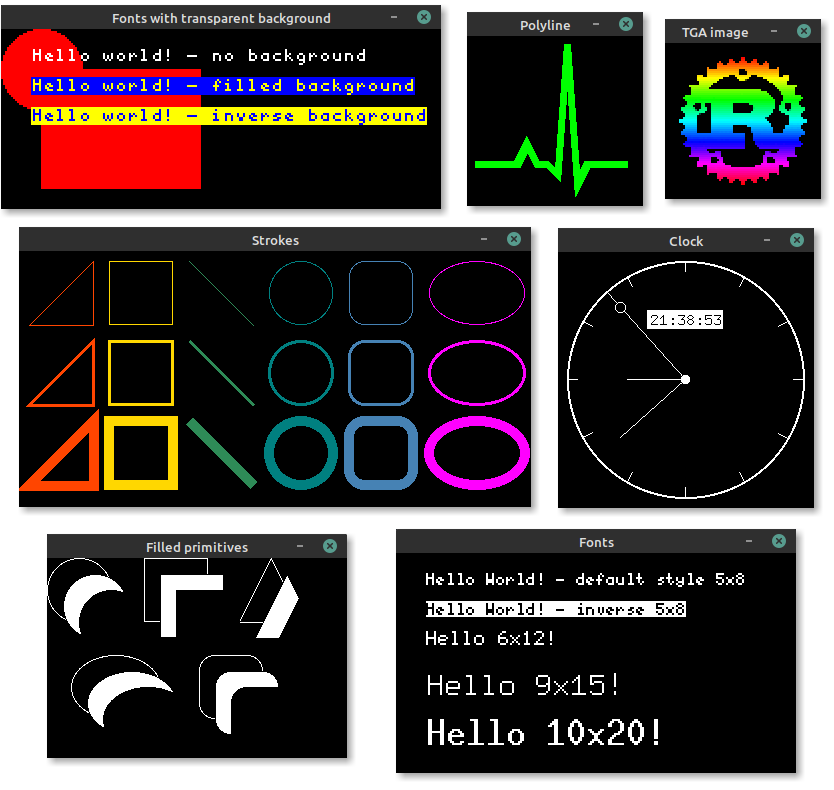
//! Embedded graphics comes with a [simulator]!
//!
//! 
//!
//! Take a look at the [simulator examples] to see what
//! embedded_graphics can do, and how it might look on a display. You can run the examples like
//! this:
//!
//! ```bash
//! git clone https://github.com/jamwaffles/embedded-graphics.git
//! cd embedded-graphics
//!
//! cargo run -p embedded-graphics-simulator --example hello
//! ```
//!
//! [simulator]: https://github.com/jamwaffles/embedded-graphics/tree/c4f74c12dae9f0a0193fa48192f905a002bf8c9d/simulator
//! [simulator examples]: https://github.com/jamwaffles/embedded-graphics/tree/c4f74c12dae9f0a0193fa48192f905a002bf8c9d/simulator/examples
//!
//! # Crate features
//!
//! Add these to your `Cargo.toml` to turn on extra bits of functionality.
//!
//! * `nalgebra_support` - use the [Nalgebra](https://crates.io/crates/nalgebra) crate with `no_std`
//! support to enable conversions from `nalgebra::Vector2` to [`Point`] and [`Size`].
//!
//! # Examples
//!
//! ## Draw a circle and some text
//!
//! This example uses the [`Circle`] primitive and the [`Font6x8`] font to draw a filled circle and some text over it on the screen.
//!
//! ```rust
//! use embedded_graphics::{
//! fonts::{Font6x8, Text},
//! mock_display::MockDisplay,
//! pixelcolor::Rgb565,
//! prelude::*,
//! primitives::Circle,
//! style::{PrimitiveStyle, TextStyle},
//! };
//!
//! // Create a draw target using the builtin MockDisplay. In real applications this would be
//! // replaced by a draw target that is provided by a display driver crate.
//! let mut display = MockDisplay::default();
//!
//! let c = Circle::new(Point::new(20, 20), 8).into_styled(PrimitiveStyle::with_fill(Rgb565::RED));
//! let t = Text::new("Hello Rust!", Point::new(20, 16))
//! .into_styled(TextStyle::new(Font6x8, Rgb565::GREEN));
//!
//! c.draw(&mut display)?;
//! t.draw(&mut display)?;
//! # Ok::<(), core::convert::Infallible>(())
//! ```
//!
//! ## Draw a circle and some text
//!
//! To make life even easier, some handy [macros](#macros) are provided for drawing styled
//! primitives and text. Converting the example above, we get this:
//!
//! ```rust
//! use embedded_graphics::{
//! egcircle, egtext, fonts::Font6x8, mock_display::MockDisplay, pixelcolor::Rgb565,
//! prelude::*, primitive_style, text_style,
//! };
//!
//! // Create a draw target using the builtin MockDisplay. In real applications this would be
//! // replaced by a draw target that is provided by a display driver crate.
//! let mut display = MockDisplay::default();
//!
//! let c = egcircle!(
//! center = (20, 20),
//! radius = 8,
//! style = primitive_style!(fill_color = Rgb565::RED)
//! );
//! let t = egtext!(
//! text = "Hello Rust!",
//! top_left = (20, 16),
//! style = text_style!(font = Font6x8, text_color = Rgb565::GREEN)
//! );
//!
//! c.draw(&mut display)?;
//! t.draw(&mut display)?;
//! # Ok::<(), core::convert::Infallible>(())
//! ```
//!
//! ## Chaining
//!
//! Items can be chained to build more complex graphics objects.
//!
//! ```rust
//! use embedded_graphics::{
//! egcircle, egrectangle, egtext, fonts::Font6x8, mock_display::MockDisplay,
//! pixelcolor::Rgb565, prelude::*, primitive_style, text_style,
//! };
//!
//! // Create a draw target using the builtin MockDisplay. In real applications this would be
//! // replaced by a draw target that is provided by a display driver crate.
//! let mut display: MockDisplay<Rgb565> = MockDisplay::default();
//!
//! fn build_thing(text: &'static str) -> impl Iterator<Item = Pixel<Rgb565>> {
//! egrectangle!(top_left = (0, 0), bottom_right = (40, 40))
//! .into_iter()
//! .chain(&egcircle!(
//! center = (20, 20),
//! radius = 8,
//! style = primitive_style!(fill_color = Rgb565::RED)
//! ))
//! .chain(&egtext!(
//! text = text,
//! top_left = (20, 16),
//! style = text_style!(font = Font6x8, text_color = Rgb565::GREEN)
//! ))
//! }
//!
//! # let mut display = MockDisplay::default();
//! build_thing("Hello Rust!").draw(&mut display)?;
//! # Ok::<(), core::convert::Infallible>(())
//! ```
//!
//! # Implementing `embedded_graphics` in a driver
//!
//! To add support for embedded_graphics to a display driver, [`DrawTarget`] should be implemented.
//! This allows all embedded_graphics objects to be rendered by the display. See the [`DrawTarget`]
//! documentation for implementation details.
//!
//! [`Circle`]: ./primitives/circle/struct.Circle.html
//! [`Point`]: ./geometry/struct.Point.html
//! [`Size`]: ./geometry/struct.Size.html
//! [`Font6x8`]: ./fonts/struct.Font6x8.html
//! [`DrawTarget`]: ./draw_target/trait.DrawTarget.html
//! [`Drawable`]: ./drawable/trait.Drawable.html
extern crate nalgebra;
pub use DrawTarget;