1
2
3
4
5
6
7
8
9
10
11
12
13
14
15
16
17
18
19
20
21
22
23
24
25
26
27
28
29
30
31
32
33
34
35
36
37
38
39
40
41
42
43
44
45
46
47
48
49
50
51
52
53
54
55
56
57
58
59
60
61
62
63
64
65
66
67
68
69
70
71
72
73
74
75
76
77
78
79
80
81
82
83
84
85
86
87
88
89
90
91
92
93
94
95
96
97
98
99
100
101
102
103
104
105
106
107
108
109
110
111
112
113
114
115
116
117
118
119
120
121
122
123
124
125
126
127
128
129
130
131
132
133
134
135
136
137
138
139
140
141
142
143
144
145
146
147
148
149
150
151
152
153
154
155
156
157
158
159
160
161
162
163
164
165
166
167
168
169
170
171
172
173
174
175
176
177
178
179
180
181
182
183
184
185
186
187
188
189
190
191
192
193
194
195
196
197
198
199
200
201
202
203
204
205
206
207
208
209
210
211
212
213
214
215
216
217
218
219
220
221
222
223
224
225
226
227
228
229
230
231
232
233
234
235
236
237
238
239
240
241
242
243
244
245
246
247
248
249
250
251
252
253
254
255
256
257
258
259
260
261
262
263
264
265
266
267
268
269
270
271
272
273
274
275
276
277
278
279
280
281
282
283
284
285
286
287
288
289
290
291
292
293
294
295
296
297
298
299
300
301
302
303
304
305
306
307
308
309
310
311
312
313
314
315
316
317
318
319
320
321
322
323
324
325
326
327
328
329
330
331
332
333
334
335
336
337
338
339
340
341
342
343
344
//! # Embedded graphics
//!
//! This crate aims to make drawing 2D graphics primitives super easy. It currently supports the
//! following:
//!
//! * [raw data images](./image/struct.Image.html)
//! * [BMP-format images](./image/struct.ImageBmp.html) (with `bmp` feature enabled)
//! * [TGA-format images](./image/struct.ImageTga.html) (with `tga` feature enabled)
//! * [Primitives](./primitives/index.html)
//! * [Lines](./primitives/line/struct.Line.html)
//! * [Rectangles (and squares)](./primitives/rectangle/struct.Rectangle.html)
//! * [Circles](./primitives/circle/struct.Circle.html)
//! * [Triangles](./primitives/triangle/struct.Triangle.html)
//! * [Text with multiple fonts](./fonts/index.html#types)
//!
//! You can also add your own objects by implementing `IntoIterator<Item = Pixel<C>>` to create an
//! iterator that [`Drawing#draw()`][`Drawing`] can consume.
//!
//! A core goal is to do the above without using any buffers; the crate should work without a
//! dynamic memory allocator and without pre-allocating large chunks of memory. To achieve this, it
//! takes an `Iterator` based approach, where pixel values and positions are calculated on the fly,
//! with the minimum of saved state. This allows the consuming application to use far less RAM at
//! little to no performance penalty.
//!
//! # Supported displays
//!
//! These are just some of the displays the community has added embedded_graphics support to. This
//! list is taken from the [dependent crates
//! list](https://crates.io/crates/embedded-graphics/reverse_dependencies) on crates.io so might be
//! missing some unpublished entries. Please [open an
//! issue](https://github.com/jamwaffles/embedded-graphics/issues/new) if there's a display driver
//! that should be added to this list.
//!
//! * [ili9341](https://crates.io/crates/ili9341): A platform agnostic driver to interface with the ILI9341 (and ILI9340C) TFT LCD display
//! * [ls010b7dh01](https://crates.io/crates/ls010b7dh01): A platform agnostic driver for the LS010B7DH01 memory LCD display
//! * [sh1106](https://crates.io/crates/sh1106): I2C driver for the SH1106 OLED display
//! * [ssd1306](https://crates.io/crates/ssd1306): I2C and SPI (4 wire) driver for the SSD1306 OLED display
//! * [ssd1322](https://crates.io/crates/ssd1322): Pure Rust driver for the SSD1322 OLED display chip
//! * [ssd1331](https://crates.io/crates/ssd1331): SPI (4 wire) driver for the SSD1331 OLED display
//! * [ssd1351](https://crates.io/crates/ssd1351): SSD1351 driver
//! * [ssd1675](https://crates.io/crates/ssd1675): Rust driver for the Solomon Systech SSD1675 e-Paper display (EPD) controller
//! * [st7735-lcd](https://crates.io/crates/st7735-lcd): Rust library for displays using the ST7735 driver
//!
//! # Simulator
//!
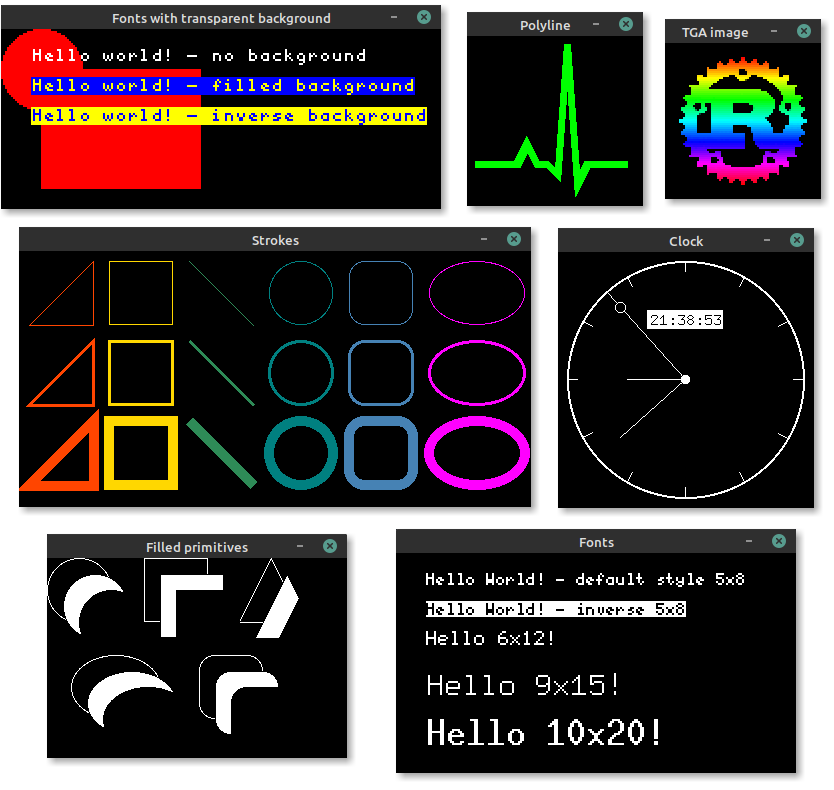
//! Embedded graphics comes with a [simulator]!
//!
//! 
//!
//! Take a look at the [simulator examples] to see what
//! embedded_graphics can do, and how it might look on a display. You can run the examples like
//! this:
//!
//! ```bash
//! git clone https://github.com/jamwaffles/embedded-graphics.git
//! cd embedded-graphics
//!
//! cargo run -p embedded-graphics-simulator --example hello
//! ```
//!
//! [simulator]: https://github.com/jamwaffles/embedded-graphics/tree/c4f74c12dae9f0a0193fa48192f905a002bf8c9d/simulator
//! [simulator examples]: https://github.com/jamwaffles/embedded-graphics/tree/c4f74c12dae9f0a0193fa48192f905a002bf8c9d/simulator/examples
//!
//! # Crate features
//!
//! Add these to your `Cargo.toml` to turn on extra bits of functionality.
//!
//! * `nalgebra_support` - use the [Nalgebra](https://crates.io/crates/nalgebra) crate with `no_std`
//! support to enable conversions from `nalgebra::Vector2` to [`Point`] and [`Size`].
//! * `bmp` - use the [TinyBMP](https://crates.io/crates/tinybmp) crate for BMP image support.
//! * `tga` - use the [TinyTGA](https://crates.io/crates/tinytga) crate for TGA image support.
//!
//! # Examples
//!
//! ## Draw a circle and some text
//!
//! This example uses the [`Circle`] primitive and the [`Font6x8`] font to draw a filled circle and some text over it on the screen.
//!
//! ```rust
//! use embedded_graphics::prelude::*;
//! use embedded_graphics::primitives::Circle;
//! use embedded_graphics::fonts::Font6x8;
//! use embedded_graphics::pixelcolor::Rgb565;
//! # use embedded_graphics::mock_display::MockDisplay;
//! # let mut display = MockDisplay::default();
//!
//! let c = Circle::new(Point::new(20, 20), 8).fill(Some(Rgb565::RED));
//! let t = Font6x8::render_str("Hello Rust!").fill(Some(Rgb565::GREEN)).translate(Point::new(20, 16));
//!
//! display.draw(c);
//! display.draw(t);
//! ```
//!
//! ## Draw a circle and some text
//!
//! To make life even easier, some handy [macros](#macros) are provided for drawing styled
//! primitives and text. Converting the example above, we get this:
//!
//! ```rust
//! use embedded_graphics::prelude::*;
//! use embedded_graphics::pixelcolor::Rgb565;
//! use embedded_graphics::{text_6x8, egcircle};
//! # use embedded_graphics::mock_display::MockDisplay;
//! # let mut display = MockDisplay::default();
//!
//! let c = egcircle!((20, 20), 8, fill = Some(Rgb565::RED));
//! let t = text_6x8!("Hello Rust!", fill = Some(Rgb565::GREEN)).translate(Point::new(20, 16));
//!
//! display.draw(c);
//! display.draw(t);
//! ```
//!
//! ## Chaining
//!
//! Items can be chained to build more complex graphics objects.
//!
//! ```rust
//! use embedded_graphics::prelude::*;
//! use embedded_graphics::pixelcolor::Rgb565;
//! use embedded_graphics::{text_6x8, egcircle, egrectangle};
//! # use embedded_graphics::mock_display::MockDisplay;
//!
//! fn build_thing(text: &'static str) -> impl Iterator<Item = Pixel<Rgb565>> {
//! egrectangle!((0, 0), (40, 40)).into_iter()
//! .chain(egcircle!((20, 20), 8, fill = Some(Rgb565::RED)))
//! .chain(text_6x8!(text, fill = Some(Rgb565::GREEN)).translate(Point::new(20, 16)))
//! }
//!
//! fn main() {
//! # let mut display = MockDisplay::default();
//! display.draw(build_thing("Hello Rust!"));
//! }
//! ```
//!
//! # Implementing `embedded_graphics` in a driver
//!
//! To add support for embedded_graphics to a display driver, [`Drawing`] (and if possible
//! [`SizedDrawing`]) should be implemented. This allows all embedded_graphics objects to be
//! rendered by the display. See their [respective][`Drawing`] [docs][`SizedDrawing`] for
//! implementation details.
//!
//! [`Circle`]: ./primitives/circle/struct.Circle.html
//! [`Point`]: ./geometry/struct.Point.html
//! [`Size`]: ./geometry/struct.Size.html
//! [`Font6x8`]: ./fonts/type.Font6x8.html
//! [`Drawing`]: ./trait.Drawing.html
//! [`SizedDrawing`]: ./trait.SizedDrawing.html
extern crate nalgebra;
use crateDimensions;
use cratePixelColor;
/// To use this crate in a driver, `Drawing` must be implemented. This allows display drivers to
/// support all embedded_graphics objects through the `draw()` method.
///
/// Note that you should also implement [`SizedDrawing`] if the display supports partial updates.
///
/// Here's an example for an imaginary display that has a 64x64px framebuffer of 8 bit values that
/// communicates over a (simplified) SPI interface:
///
/// ```rust
/// use embedded_graphics::prelude::*;
/// use embedded_graphics::Drawing;
/// use embedded_graphics::egcircle;
/// use embedded_graphics::pixelcolor::{Gray8, GrayColor};
///
/// # struct SPI1;
/// #
/// # impl SPI1 {
/// # pub fn send_bytes(&self, buf: &[u8]) -> Result<(), ()> {
/// # Ok(())
/// # }
/// # }
/// #
/// /// A fake display 64px x 64px where each pixel is stored as a single `u8`
/// struct ExampleDisplay {
/// framebuffer: [u8; 64 * 64],
/// iface: SPI1,
/// }
///
/// impl ExampleDisplay {
/// /// Send buffer to the display
/// pub fn flush(&self) -> Result<(), ()> {
/// self.iface.send_bytes(&self.framebuffer)
/// }
/// }
///
/// impl Drawing<Gray8> for ExampleDisplay {
/// /// Draw any item that can produce an iterator of `Pixel`s that have a colour defined as a `Gray8`
/// fn draw<T>(&mut self, item: T)
/// where
/// T: IntoIterator<Item = Pixel<Gray8>>,
/// {
/// for Pixel(coord, color) in item {
/// // Place an (x, y) pixel at the right index in the framebuffer
/// let index = coord[0] + (coord[1] * 64);
///
/// self.framebuffer[index as usize] = color.luma();
/// }
/// }
/// }
///
/// fn main() {
/// let mut display = ExampleDisplay {
/// framebuffer: [0; 4096],
/// iface: SPI1
/// };
///
/// // Draw a circle centered around `(32, 32)` with a radius of `10` and a white stroke
/// display.draw(egcircle!((32, 32), 10, stroke = Some(Gray8::WHITE)));
///
/// // Update the display
/// display.flush().expect("Failed to send data to display");
/// }
/// ```
///
/// [`SizedDrawing`]: ./trait.SizedDrawing.html