# Themes
edamame ships 27 themes and lets you write your own.
---
## Switching themes
`Ctrl-P` → **"Switch theme"**. The picker is fuzzy-searchable and previews live as you move, so you can see a theme before committing. `Esc` puts back what you had.
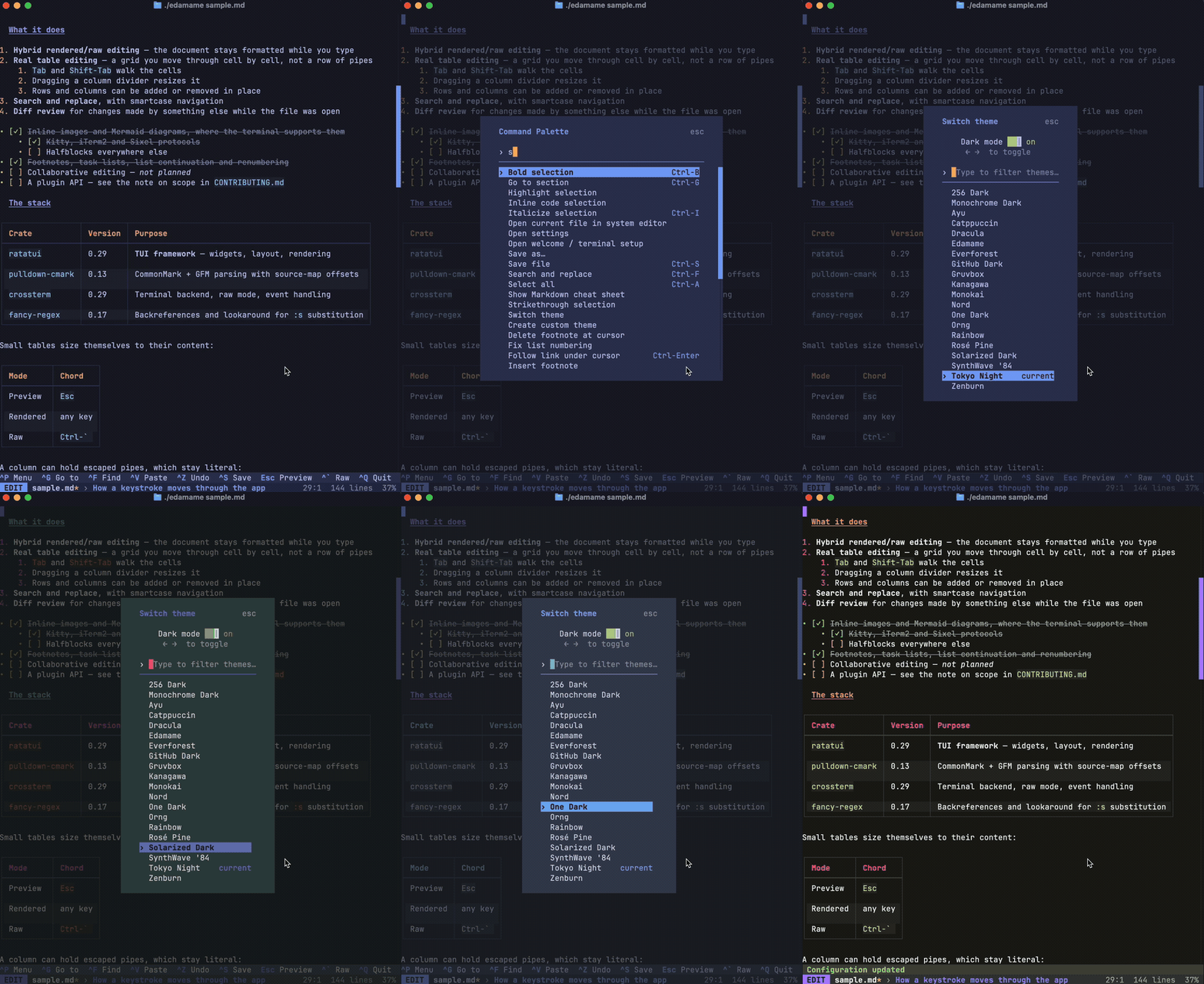
The **"Dark mode"** slider in the picker filters the list and sets `appearance` in your config. Themes that come in matching pairs — Solarized Dark and Light, GitHub Dark and Light, and so on — swap to their counterpart when you flip it.
## Built-in themes
**Dark:** 256 Dark, Monochrome Dark, Ayu, Catppuccin, Dracula, Edamame, Everforest, GitHub Dark, Gruvbox, Kanagawa, Monokai, Nord, One Dark, Orng, Rainbow, Rosé Pine, Solarized Dark, SynthWave '84, Tokyo Night, Zenburn
**Light:** 256 Light, Catppuccin Latte, GitHub Light, Gruvbox Light, Rosé Pine Dawn, Solarized Light, Tokyo Night Day
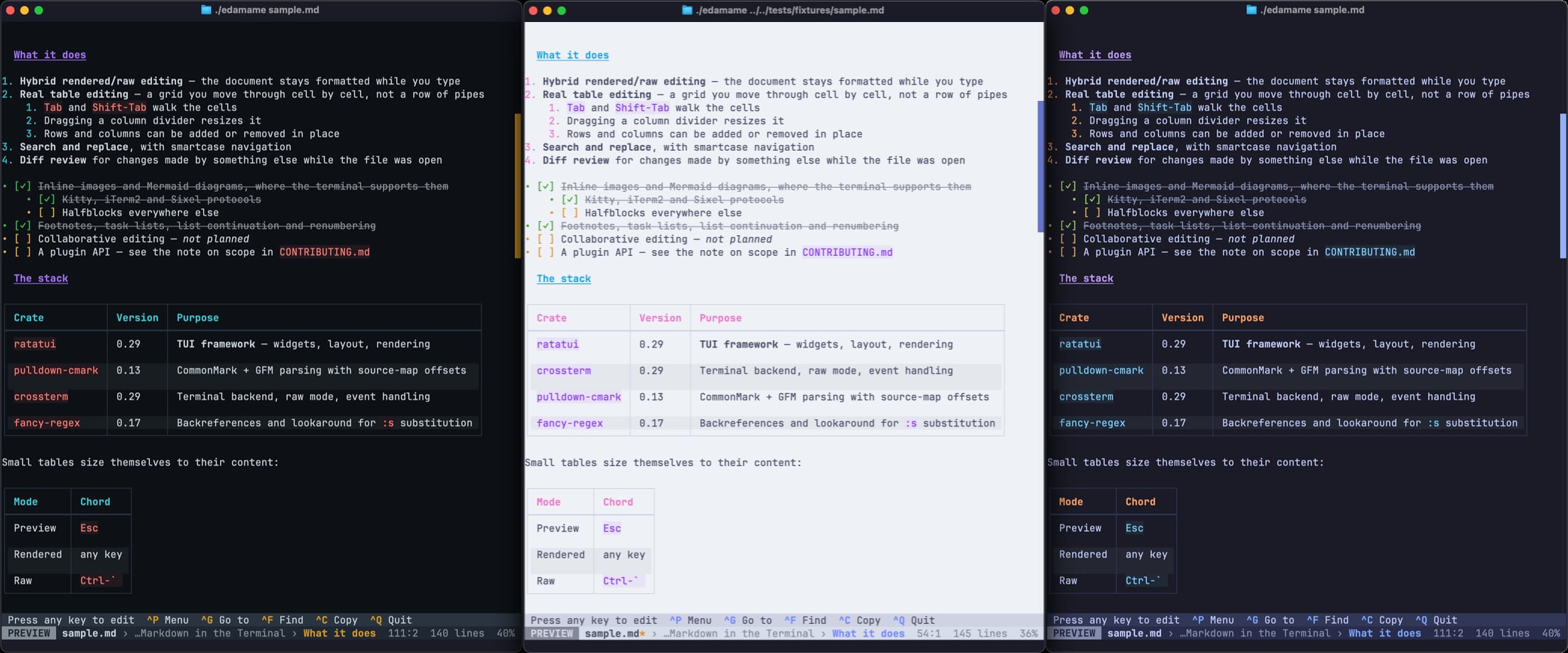
Built-in names are reserved: a file in your `themes/` folder named `Dracula.toml` is ignored entirely, without a warning. Pick a different name.
> **`256 Dark`, `256 Light` and `Monochrome Dark` are the ones designed for weaker terminals. ** Every other theme picks 24-bit colors. On a terminal without truecolor, edamame switches to whichever `256` theme matches your current theme's light/dark appearance and tells you why. That switch lasts for the session only — your `config.toml` keeps the theme you chose, so sharing one config between a capable and a limited terminal works. See [terminal-compatibility.md](terminal-compatibility.md#color).
---
## Making your own
**Start by copying one.** `Ctrl-P` → **"Create custom theme"**: pick a theme to copy, give it a name, and edamame writes `themes/<name>.toml` and switches to it. The exported file is fully populated — every palette color and every style spelled out — so you can change one line and see what happens rather than guessing what a field is called.
Then edit the file and restart, or reopen the picker to reload it.
Themes live in `themes/` inside your config folder (see [configuration.md](configuration.md#where-config-lives)). The **filename stem is the theme name**: `themes/midnight.toml` is selected with `theme = "midnight"`.
### Writing one from scratch
Everything is optional. This is a complete, valid theme:
```toml
[palette]
primary = "#a3d977"
```
Everything not mentioned falls back to the built-in default, and every styled element in the UI is derived from the palette. **Retinting the palette retints the whole app** — that is the intended way to write a theme.
A more complete example:
```toml
# Show this theme under "Light" in the picker. Purely a picker filter —
# it has no rendering effect. Default: false.
light = false
# Strike through the text of completed tasks. SEE THE WARNING BELOW.
task_strikethrough = true
[palette]
text = "#c8d3f5"
text_muted = "#7a88cf"
bg = "#222436"
bg_muted = "#2f334d"
surface = "#2d3f76"
surface_elevated = "#1e2030"
primary = "#c3e88d" # headings, focus fills, scrollbar thumb
secondary = "#ffc777" # rules, blockquote bar, structural chrome
accent = "#82aaff" # list markers, table headers, selection bg
link = "#86e1fc" # links only
success = "#c3e88d"
warning = "#ffc777"
error = "#ff757f"
code = "#c099ff"
diff_add = "#c3e88d"
diff_delete = "#ff757f"
```
### ⚠️ One trap: `task_strikethrough`
It is a plain boolean with no "unset" state, so **omitting it turns it off**, even though the built-in default is on. If you hand-write a theme and want completed tasks struck through, say so explicitly:
```toml
task_strikethrough = true
```
Themes made with "Create custom theme" always include it, so this only bites hand-written files.
---
## The palette
Sixteen colors. Every one is optional.
| Slot | Used for |
|---|---|
| `text` | Default document foreground |
| `text_muted` | Peripheral text — H6, completed tasks, close hints |
| `bg` | Document background |
| `bg_muted` | Table row stripes, scrollbar track |
| `surface` | Lighter chrome — the status bar |
| `surface_elevated` | Heavier chrome — hint line, messages, modal bodies |
| `primary` | Brand. Headings, mode chip, focus fills, scrollbar thumb |
| `secondary` | Structural chrome — rules, blockquote bar, footnote markers |
| `accent` | List markers, table headers, **selection background** |
| `link` | Link affordances only |
| `success` / `warning` / `error` | Status messages |
| `code` | Inline code and fenced code foreground |
| `diff_add` / `diff_delete` | Diff review added / deleted lines |
Focus, active and disabled states are made by layering **bold, reversed and dim** on these — there is no second set of slots for them. That is why retinting the palette stays coherent.
### Color formats
Four ways to write a color:
```toml
primary = "#a3d977" # 24-bit hex
primary = "magenta" # a named terminal color
primary = "236" # 256-color palette index, as a string
primary = 236 # 256-color palette index, as a number
```
Named colors are `black`, `red`, `green`, `yellow`, `blue`, `magenta`, `cyan`, `gray`, `darkgray`, `white`, the `light*` variants (`lightred`, `lightblue`, …) and `reset`.
`reset` means "whatever the terminal uses" — useful for a theme that wants to inherit the terminal's own background rather than paint one.
---
## Styling individual elements
To change one element rather than the whole palette, add a section named after it:
```toml
[h1]
fg = "#a3d977"
bold = true
underlined = true
[blockquote_text]
bg = "#1e2029" # the quote wash; add `italic = true` to slant quoted prose
[selection]
bg = "#3d59a1"
fg = "#ffffff"
```
Each section takes up to eight keys, all optional:
| Key | Type |
|---|---|
| `fg`, `bg` | color |
| `bold`, `italic`, `underlined`, `reversed`, `crossed_out`, `dim` | bool |
Those six are the complete set of modifiers. There is no blink or hidden.
**An empty section does nothing.** Writing `[h1]` with no keys under it leaves the derived default in place — it is not a way to clear styling. To force a plain style, set a color explicitly: `fg = "reset"` defers to the terminal.
**Modifiers only add.** You cannot remove bold from an element that derives it; you can only add more.
### Element names
**All 109 styleable elements:**
**Headings** — `h1` `h1_rule` `h2` `h3` `h4` `h5` `h6`
**Inline** — `bold` `italic` `strikethrough` `highlight` `code_span` `code_span_dim` `link_text` `link_file` `link_heading` `image_placeholder` `footnote`
**Blocks** — `code_block_border` `code_block_lang` `code_block_text` `blockquote_bar` `blockquote_text` `rule`
**Syntax highlighting** — `syntax_keyword` `syntax_string` `syntax_comment` `syntax_number` `syntax_type` `syntax_function` `syntax_attribute`
These color the tokens inside a fenced code block, and they are *layered over* `code_block_text` rather than replacing it — so each one only needs to say what differs, and none of them should set a `bg` (the code surface owns that). All seven derive from the palette, so every built-in theme has a coherent set without listing them. Setting all seven to plain `fg = ...` matching `code_block_text` effectively flattens highlighting for that theme; turning it off entirely is `syntax_highlighting = false` in `config.toml`.
A *derived* syntax color is automatically lifted toward `text` until it reaches a 4.5:1 contrast ratio against the code-block background, keeping its hue — a palette slot picked to read well on the page can otherwise land close to the code surface. This applies only to colors edamame derives for you. A color you name explicitly in a `[syntax_*]` section is used exactly as written, so if you override these, check them against your `code_block_text` background yourself.
**Frontmatter** — `frontmatter_delimiter` `frontmatter_key` `frontmatter_value`
**Lists** — `list_bullet` `list_number`
**Tasks** — `task_unchecked` `task_checked` `task_complete_text`
**Tables** — `table_border` `table_header` `table_header_border` `table_cell` `table_row_even` `table_row_odd` `table_drop_indicator` `table_drop_target` `table_handle` `table_handle_delete`
**Status bar** — `status_bar` `status_mode_preview` `status_mode_rendered` `status_mode_raw` `status_filename` `status_info` `status_modified` `status_breadcrumb_sep` `status_breadcrumb_ancestor` `status_breadcrumb_current`
**Hint line** — `hint_bar` `hint_chord` `hint_label`
**Messages** — `transient_info` `transient_success` `transient_warning` `transient_error`
**Modals** — `modal_bg` `modal_title_normal` `modal_title_warning` `modal_title_error` `modal_close_hint` `modal_item` `modal_item_hint` `modal_item_selected` `modal_item_selected_unfocused` `modal_item_selected_hint` `modal_description` `modal_section_heading` `modal_input_unfocused` `modal_input_focused` `modal_button_focused`
**General** — `normal` `selection` `selection_muted` `cursor` `active_line` `line_number`
**Mode chips** — `status_mode_search` `status_mode_vim_normal` `status_mode_vim_insert` `status_mode_vim_visual` `status_mode_diff`
**Scrollbar** — `scrollbar_track` `scrollbar_thumb` `scrollbar_thumb_active`
**Diff review** — `diff_add_line` `diff_delete_line` `diff_add_line_unfocused` `diff_delete_line_unfocused` `diff_add_inline` `diff_delete_inline` `diff_add_inline_unfocused` `diff_delete_inline_unfocused` `diff_decision_pending` `diff_decision_accepted` `diff_decision_rejected` `diff_decision_unfocused` `status_bar_diff` `hint_bar_diff`
---
## What gets derived for you
You don't have to specify these — they're computed from the palette:
- **The heading ramp.** `h1`–`h6` alternate `primary` and `secondary`, getting progressively darker: h1 and h2 are the base shades, h3/h4 are medium, h5/h6 are dull.
- **Code background.** `code` blended 92% toward `bg`, giving a faint tint distinct from the table-stripe color, so inline code on a striped row still reads as code.
- **Selection.** `accent` as the background, with the foreground picked automatically from whichever of `text` / `bg` contrasts better. The muted variant used for non-focused search matches blends toward `surface`.
- **Diff washes.** All eight focused and unfocused line and inline styles come from `diff_add` / `diff_delete`.
- **Cursor**, **line numbers**, and the **active scrollbar thumb**.
### If you build a theme from indexed or named colors
Blending, darkening and contrast-picking are only defined for 24-bit RGB. Give the palette indexed or named colors and every derivation above quietly becomes a no-op:
- `h1`–`h6` collapse to flat `primary` / `secondary` with no ramp
- the code background collapses onto the code foreground
- added and deleted lines in diff review become distinguishable only by gutter markers (`+/-`)
- the selection foreground falls back to `text`
So an indexed-color theme has to write those out by hand. Set `[h1]`–`[h6]`, the four code styles (`code_span`, `code_span_dim`, `code_block_border`, `code_block_text`), and `[diff_add_line]` and `[diff_delete_line]`. The built-in `256 Dark` and `256 Light` do exactly this — copy one as a starting point rather than starting from a hex theme.
This does not apply to hex themes, which is nearly all of them.
---
## Troubleshooting
**My theme isn't in the picker.** Check the name isn't a built-in — those are reserved and shadow your file silently. Also check the file is directly inside `themes/` and ends in `.toml`. A theme named `default` is deliberately hidden.
**edamame says my theme is missing.** If `theme` names a file that isn't there, edamame falls back to a built-in, warns, and rewrites `config.toml` so it doesn't nag on every launch.
**My theme file has an error.** Parse failures fall back to the default theme with a warning naming the file. Unknown keys are kept and reported rather than rejected, so a theme written by a different version still loads.
**Colors look wrong or washed out.** Your terminal probably lacks 24-bit color — see the note at the top, and [terminal-compatibility.md](terminal-compatibility.md#color). Check with `Ctrl-P` → "Open welcome / terminal setup".
---
The reasoning behind the palette and the UI's visual language is in [dev/theming.md](dev/theming.md), which is written for contributors.