# edamame
**A Terminal Markdown editor that stays rendered while you edit.**
<!-- GitHub badges -->
<p>
<a href="https://crates.io/crates/edamame"><img src="https://img.shields.io/crates/v/edamame.svg" alt="edamame on crates.io" height="20"></a>
<a href="https://docs.rs/edamame"><img src="https://docs.rs/edamame/badge.svg" alt="edamame documentation on docs.rs" height="20"></a>
<a href="https://github.com/mijowi/edamame/actions/workflows/ci.yml"><img src="https://github.com/mijowi/edamame/actions/workflows/ci.yml/badge.svg?branch=main" alt="CI status for the main branch" height="20"></a>
<a href="https://github.com/mijowi/edamame/blob/main/LICENSE"><img src="https://img.shields.io/crates/l/edamame.svg" alt="License: Apache-2.0" height="20"></a>
</p>
**Jump to:**
1. [Docs](#documentation)
2. [Installation](#installation)
3. [Terminal Support](#terminal-support)
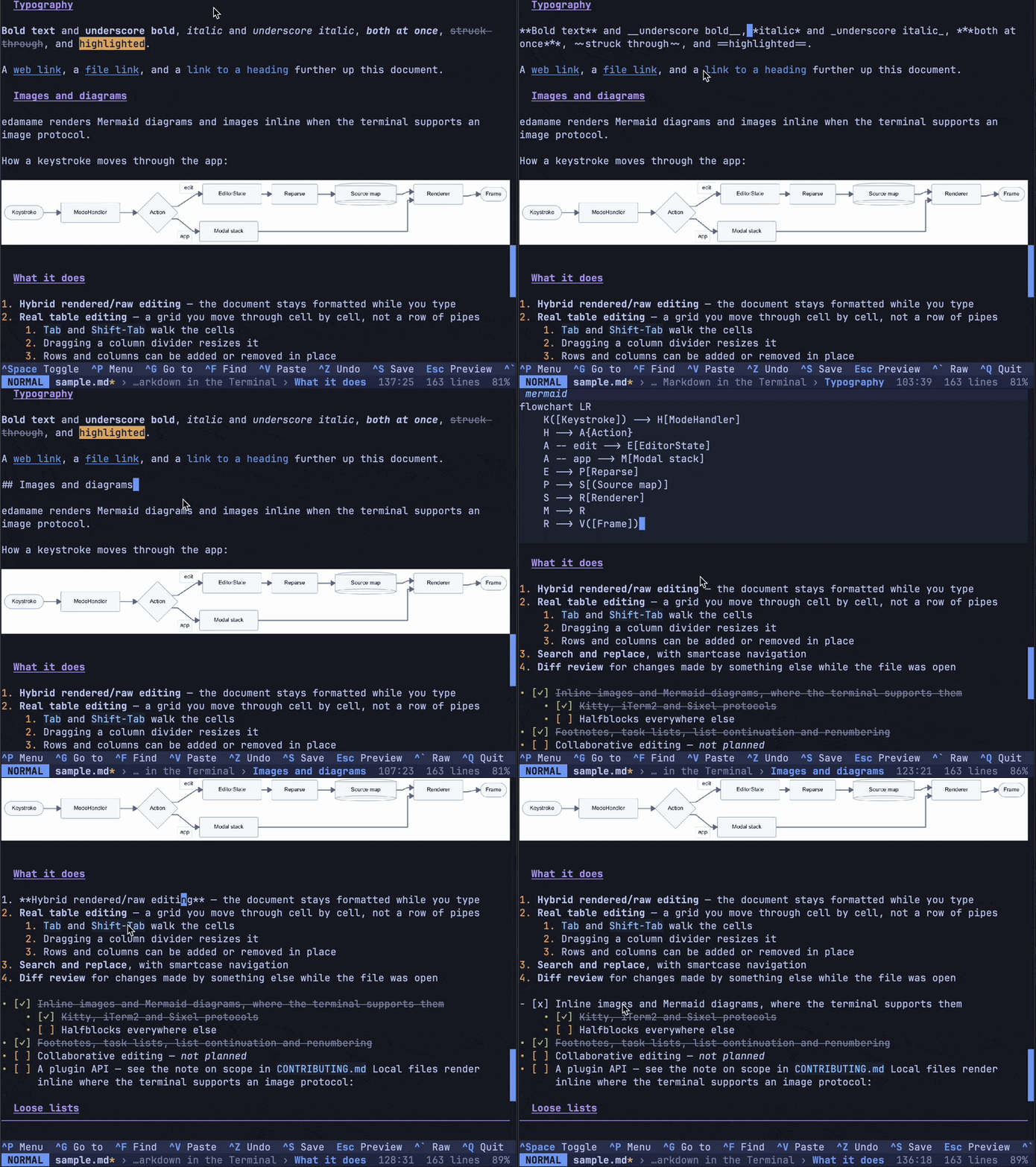
edamame shows your document *rendered* with headings, drawn table grids, inline images, and more — while you work on it. Only the line your cursor is on drops to raw Markdown, for easy editing.
---
## Demo
<https://github.com/user-attachments/assets/85e2a303-08d6-4122-9f1f-18975613a127>
---
## Features
- **Hybrid rendered/raw editing** — the document stays formatted; only the cursor's line shows its source
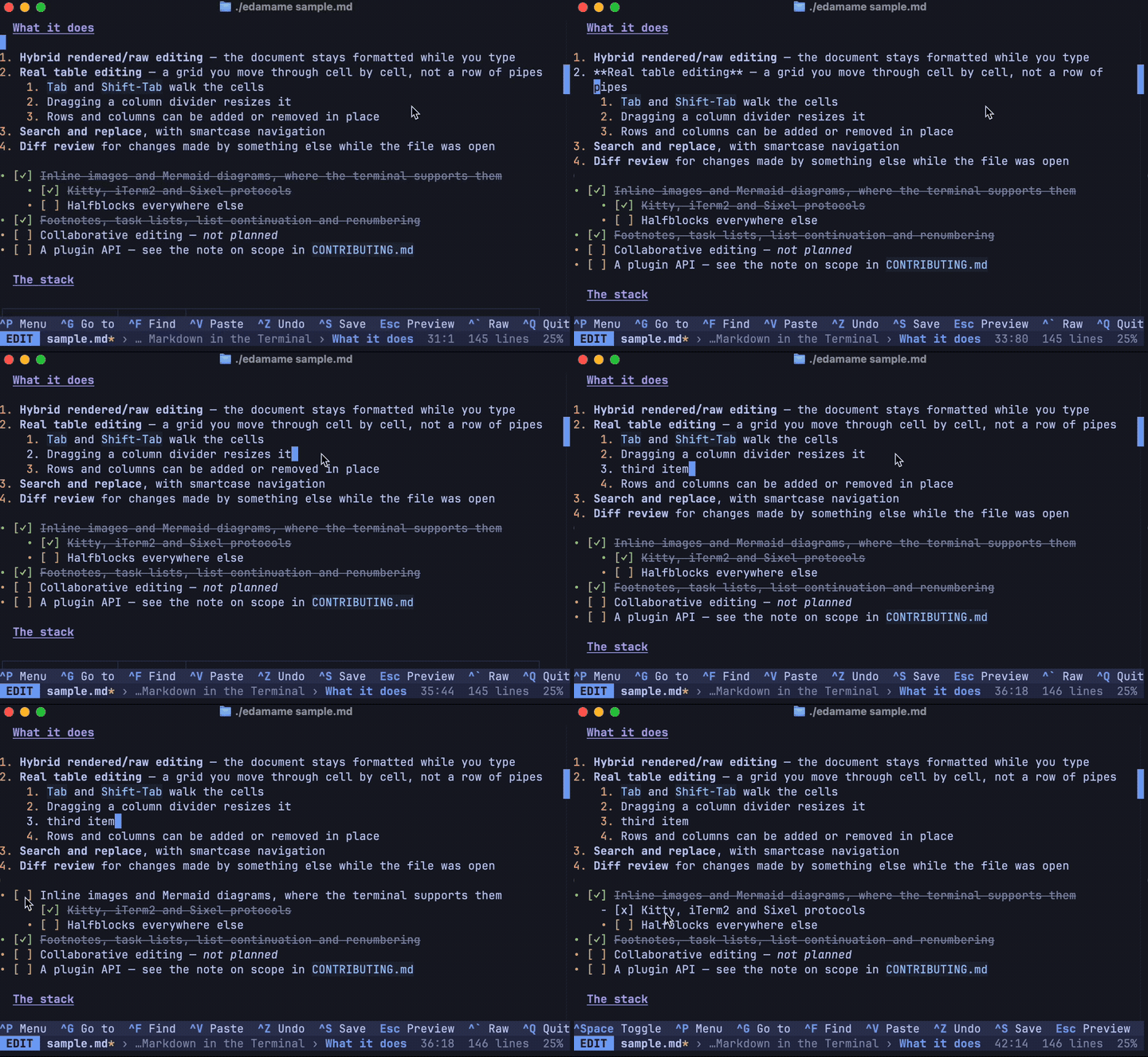
- **Real table editing** — tables render as a grid, you edit cell by cell, `Tab` between cells, drag with the mouse to reorder or resize
- **Inline images, Mermaid diagrams, and LaTeX math** on terminals that support them
- **Search and replace**, with smartcase navigation
- **Diff review for external changes** — when something else writes your file, accept or reject each change hunk by hunk instead of losing work
- **Vim mode**, optional — motions, operators, text objects, `:s` with a live preview
- **27 themes**, and a documented format for writing your own
- **HTML export**, self-contained or linked
- **Footnotes, task lists, list continuation and renumbering**
- Mouse support, fuzzy command palette, jump-to-heading, navigation history
### The hybrid view
The document stays formatted while you work. The cursor's line shows its source, and renders again as soon as you leave it — so list markers, emphasis and links are editable in place without turning the page into syntax.
### Tables as grids
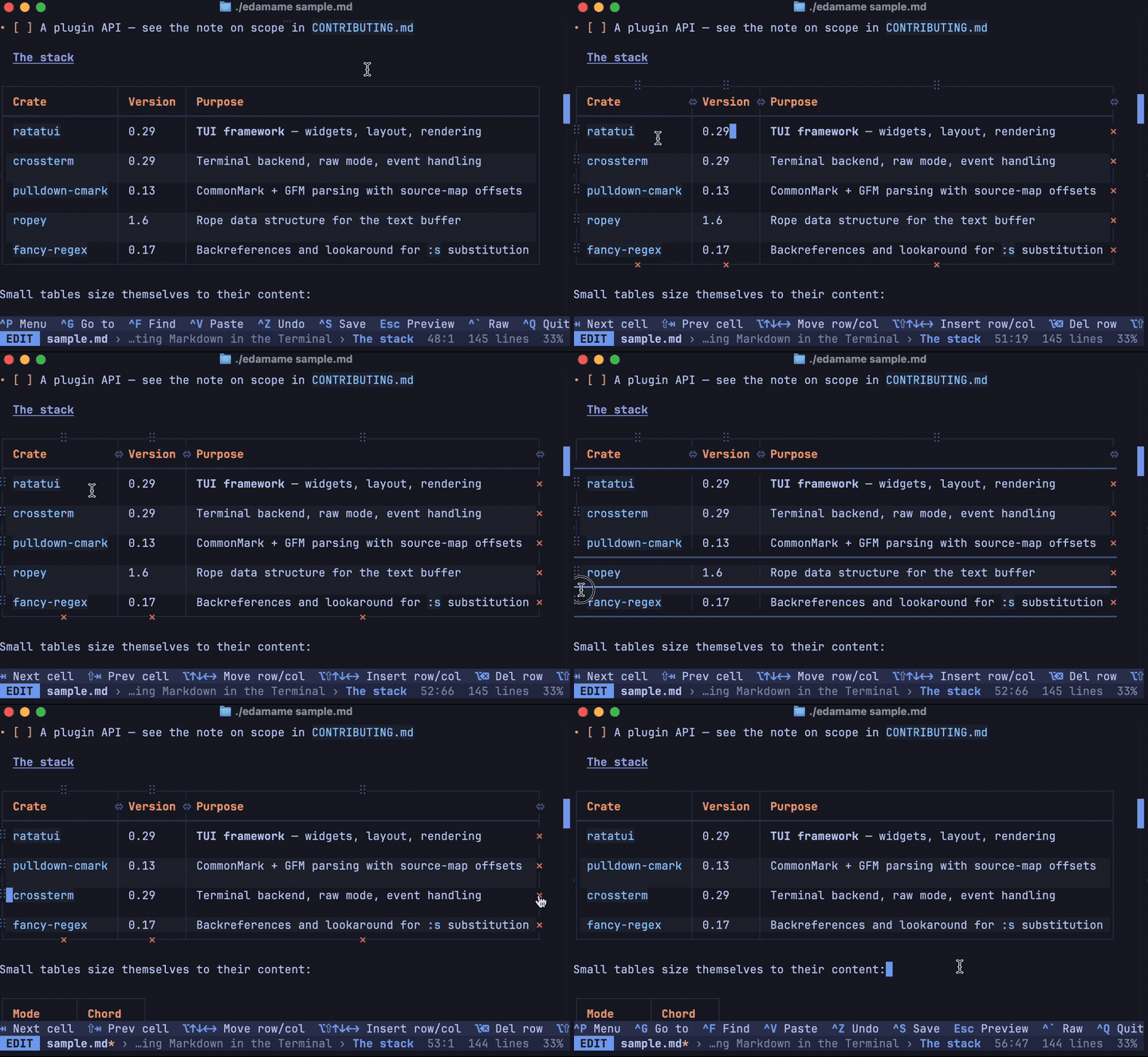
Tables are drawn, not printed as pipes. `Tab` walks the cells, rows and columns can be added or removed in place, and the mouse can drag a divider to resize or a handle to reorder.
### Themes
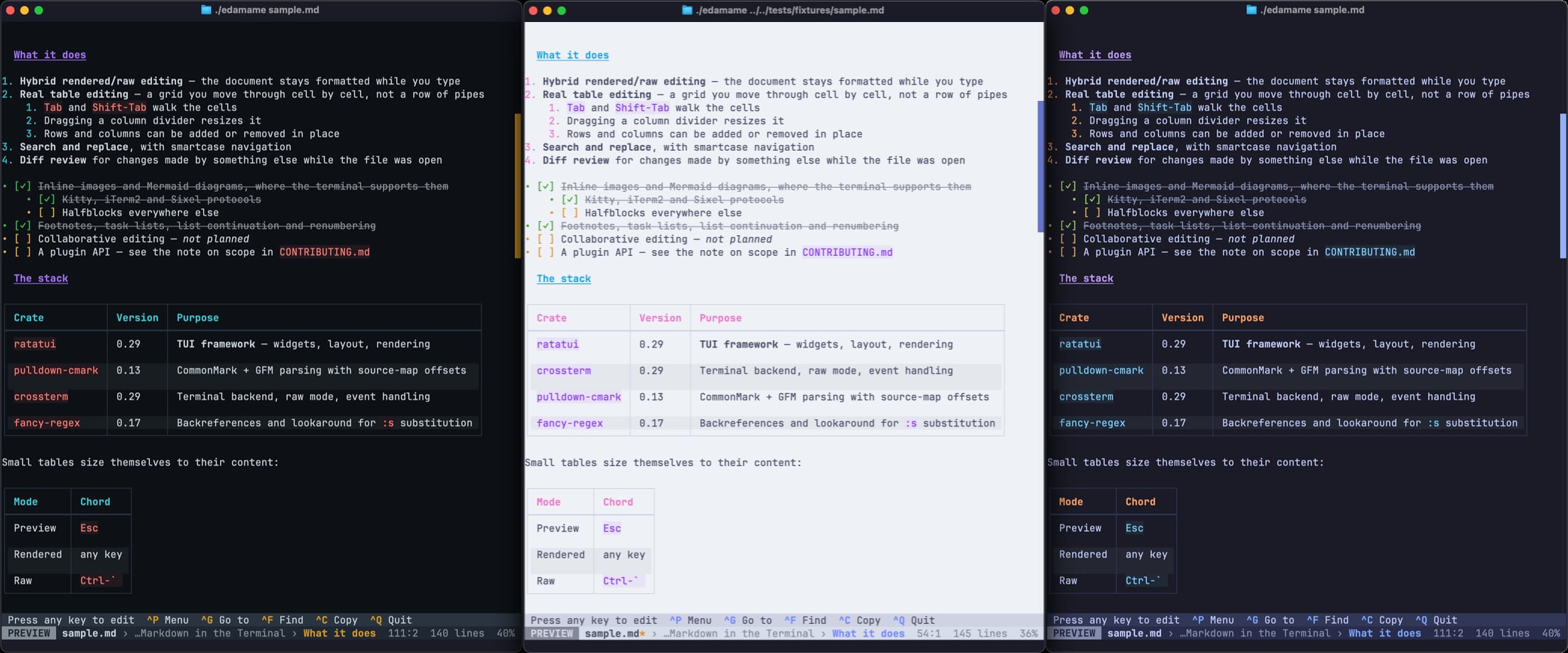
27 built in, and a documented TOML format for writing your own.
## Documentation
- [Getting started](https://github.com/mijowi/edamame/blob/main/docs/getting-started.md) — first run, the three view modes, reading the status bar
- [Editing](https://github.com/mijowi/edamame/blob/main/docs/editing.md) — tables, lists, links, footnotes, search, diff review, images, export
- [Keybindings](https://github.com/mijowi/edamame/blob/main/docs/keybindings.md) — every default chord and how to change it
- [Terminal compatibility](https://github.com/mijowi/edamame/blob/main/docs/terminal-compatibility.md) — what depends on your terminal, and what to do about each gap
- [Configuration](https://github.com/mijowi/edamame/blob/main/docs/configuration.md) — every setting
- [Themes](https://github.com/mijowi/edamame/blob/main/docs/themes.md) — switching, and writing your own
- [Vim mode](https://github.com/mijowi/edamame/blob/main/docs/vim-mode.md) — what's supported and how it differs from Vim
- [Security](https://github.com/mijowi/edamame/blob/main/docs/security.md) — what protects you when you open a document you didn't write
## Installation
### Homebrew
```bash
brew install mijowi/tap/edamame
```
### Cargo
```bash
cargo install edamame
```
Requires Rust 1.90 or newer.
### Shell installer
```bash
curl -LsSf https://github.com/mijowi/edamame/releases/latest/download/edamame-installer.sh | sh
```
Downloads the prebuilt binary for your platform, verifies its checksum, and places it in `~/.cargo/bin`, adding that directory to your `PATH` if it isn't already there. Set `EDAMAME_NO_MODIFY_PATH=1` to skip the `PATH` change. Linux (x86_64, aarch64, and a static musl build) and macOS (Intel and Apple Silicon) are supported.
### Prebuilt binaries
Download for your platform from [Releases](https://github.com/mijowi/edamame/releases).
### From source
```bash
git clone https://github.com/mijowi/edamame
cd edamame
cargo build --release
# binary at target/release/edamame
```
Requires Rust 1.90 or newer.
### Platforms
Linux and macOS are the supported platforms; the prebuilt binaries cover both. Windows is best-effort: edamame builds from source and passes its test suite there in CI, but nobody smoke-tests the running program on Windows, so terminal behavior — images, the clipboard, opening links, the external editor — is unverified. Use [Windows Terminal](https://github.com/microsoft/terminal); the legacy console lacks the alternate screen and mouse support a TUI depends on. If you run it on Windows and something is off, [an issue](https://github.com/mijowi/edamame/issues) with the terminal name and version is the most useful thing you can send.
### Upgrading
edamame checks for a new release once a day and tells you when one appears (see [getting started](https://github.com/mijowi/edamame/blob/main/docs/getting-started.md)). It does not update itself; use the same method you installed with:
| Installed with | Upgrade command |
|---|---|
| Homebrew | `brew upgrade edamame` |
| Shell installer | Re-run the installer one-liner above — it replaces the binary in place |
| Cargo | `cargo install edamame` (`cargo update` does not touch installed binaries) |
| Prebuilt binary | Download the new release and replace the file |
### Uninstalling
Homebrew and Cargo remove their own binaries — `brew uninstall edamame` or `cargo uninstall edamame` — but neither removes the config and data directories edamame creates (`~/.config/edamame` and, on Linux, `~/.local/share/edamame`; on macOS `~/Library/Application Support/edamame`).
For the shell installer, a manual binary copy, or to clean up those directories, there's an uninstall script:
```bash
curl -LsSf https://raw.githubusercontent.com/mijowi/edamame/main/uninstall.sh | sh
```
It removes the binary (unless Homebrew or Cargo manages it, in which case it prints the right command instead) and then **asks** before touching your config and data — keeping them by default. Add `--purge` to remove everything without prompting, or `--yes` to remove only the binary.
## Terminal support
edamame runs anywhere, but a few things depend on your terminal:
| Feature | Requires |
|---|---|
| Images, diagrams, math, most themes | 24-bit color (plus an image protocol for images) |
| Mouse selection and table handles | Mouse reporting |
| ``Ctrl-` ``, `Ctrl-Shift-T`, `Alt-Shift-*` | The kitty keyboard protocol |
Where support is missing, edamame adapts rather than breaking — it switches to a 256-color theme, keeps image placeholders, and tells you which chords won't arrive. Every command is reachable from the palette regardless.
Full support in kitty, Ghostty, WezTerm, and foot. Apple Terminal works, with the reduced feature set above. Run `edamame --doctor` to see what your terminal reports.
## Security
edamame is built to open documents you didn't write. Image decoding is bounded against decompression bombs, remote image fetches are consent-gated and filtered against internal addresses, and HTML export strips scripts and unsafe link schemes. Details and the threat model are in [docs/security.md](https://github.com/mijowi/edamame/blob/main/docs/security.md).
To report a vulnerability, please use GitHub's private reporting on the [Security tab](https://github.com/mijowi/edamame/security) rather than a public issue.
## Contributing
Start with [CONTRIBUTING.md](https://github.com/mijowi/edamame/blob/main/CONTRIBUTING.md). For anything non-trivial, please open an issue first — edamame keeps a deliberately narrow scope, so a feature can be well-built and still not fit.
Questions, ideas and anything you're not sure is a bug belong in [Discussions](https://github.com/mijowi/edamame/discussions).
[AGENTS.md](https://github.com/mijowi/edamame/blob/main/AGENTS.md) is the architecture guide — the module layout, the invariants that are easy to break, and the code style. `docs/dev/` holds the design specs.
Please run the following *before* opening a PR:
```bash
cargo fmt
cargo clippy --all-targets --all-features -- -D warnings
cargo test --no-fail-fast
```
## License
Apache-2.0. See [LICENSE](https://github.com/mijowi/edamame/blob/main/LICENSE).