# Vim Mode
edamame includes an optional Vim-style modal editing mode. It implements a focused subset of Vim — the motions, operators, text objects, search, and ex commands you reach for most often — adapted to edamame's live Markdown rendering.
This page documents **what is included** and, just as importantly, **how the included features differ from standard Vim**. If a key or command isn't listed here, assume it isn't implemented.
---
## Enabling vim mode
Vim mode is off by default. Turn it on in any of these ways:
- **First-run welcome modal** — toggle "Vim mode" when edamame first starts. This persists the setting.
- **Config file** — set the modal handler in `~/.config/edamame/config.toml`:
```toml
[modal]
handler = "vim" # "default" (the standard chord keymap) or "vim"
```
- **From the command palette** — "Toggle Vim mode"
Restart isn't required when toggling from the welcome modal or command palette; a config-file edit takes effect the next time the config is loaded.
When vim mode is active, the status bar shows the current sub-mode as a badge: `NORMAL`, `INSERT`, `VISUAL`, or `V-LINE`.
---
## How vim mode fits edamame
edamame is a Markdown viewer/editor that renders your document live. Vim mode layers modal editing on top of that, with a few consequences worth understanding up front:
- **Motions operate on the raw Markdown source.** `w`, `e`, `b`, `f{c}`, `x`, etc. move and act over the actual bytes of your file — including Markdown syntax like `**`, `[`, and `](url)`. So that the cursor never lands on characters you can't see, the line under the cursor reveals its raw source as you move (the same reveal behavior edamame already uses while editing).
- **Preview mode is replaced by Normal mode.** In standard edamame, Preview is the read-only "browse" mode. With vim active, Normal mode fills that role — there is no separate Preview. The `Esc`-to-Preview behavior reroutes to vim Normal.
- **Raw mode is fully supported.** You can toggle the whole document to raw Markdown (the existing toggle, `Ctrl-` `` ` ``) and every vim sub-mode works there too. In Raw mode, Markdown markers and table borders are real, editable text, so motions don't skip anything.
- **edamame's own shortcuts still work.** The `Ctrl-*` chords keep their edamame meaning in every vim sub-mode, with two exceptions (`Ctrl-Backspace` / `Ctrl-Delete`) — see [Ctrl chords](#ctrl-chords-edamame-shortcuts-not-vim-motions) below.
- **Inside a table, vim works on cells and rows.** Motions stay within the cell, `dd` deletes a table row, and edits that would break the grid are refused. See [Inside a table](#inside-a-table).
---
## Modes
| Mode | Enter with | Badge |
|---|---|---|
| Normal | `Esc` (from any mode) | `NORMAL` |
| Insert | `i I a A o O` | `INSERT` |
| Visual (charwise) | `v` | `VISUAL` |
| Visual Line | `V` | `V-LINE` |
- `i` insert before cursor · `I` insert at first non-blank · `a` append after cursor · `A` append at end of line.
- `o` open a line below · `O` open a line above (both enter Insert).
- `v` / `V` toggle each other; pressing the active mode's key again exits to Normal.
- **`Esc` from Insert moves the cursor one character left**, as in Vim (but never across a line boundary).
### Insert mode is edamame's normal editor
Insert mode is not a vim reimplementation of typing — it **is** edamame's regular editing pipeline. Everything edamame does while editing works unchanged in Insert mode: list continuation on `Enter`, indent on `Tab`, table-aware `Tab`/`Enter` navigation, and so on. Vim only owns `Esc` (and the table keys, which pass through). The practical upshot: any editing feature edamame gains automatically works in vim Insert mode.
---
## Motions
All counts are supported (e.g. `3w`, `5j`). Counts combine with operators in both orders — `3dw` and `d3w` both delete three words; `2d3w` deletes six.
| Motion | Keys |
|---|---|
| Left / down / up / right | `h` `j` `k` `l` |
| Word forward / end / back | `w` `e` `b` |
| WORD forward / end / back (whitespace-delimited) | `W` `E` `B` |
| Line start / first non-blank / line end | `0` `^` `$` |
| Document start / end | `gg` `G` |
| Go to line *N* | `{count}G` `{count}gg` |
| Find char forward / backward | `f{c}` `F{c}` |
| Till char forward / backward | `t{c}` `T{c}` |
| Repeat / reverse last find | `;` `,` |
| Paragraph forward / backward | `}` `{` |
| Matching pair | `%` |
| Next / previous search match | `n` `N` |
Notes on differences from standard Vim:
- **`w`/`e`/`b` use real word-class boundaries** (alphanumeric vs. punctuation vs. whitespace), matching Vim. `W`/`E`/`B` are whitespace-delimited WORDs.
- **`0` is context-sensitive.** A leading `0` (no count in progress) is the "line start" motion. A `0` typed after `1`–`9` is the digit zero (so `10j` moves ten lines).
- **`G` reads its count as a line number, not a repeat.** `5G` goes to line 5 (`5gg` is the same, as is `:5`); a bare `G` with no count goes to the last line, and `1G` to the first. A number past the end of the document lands on the last line. Line numbers are *source* lines — the same ones the line-number gutter shows in every mode. The operator forms are linewise in either direction: `d5G` from line 2 deletes lines 2–5, and from line 8 deletes lines 5–8. `$` and `^` still ignore counts.
- **Paragraph motions (`{`/`}`) treat only completely empty lines as boundaries** — whitespace-only lines are not boundaries (this matches Vim).
- **`%` finds the first bracket from the cursor to the line end**, then jumps to its match (nesting-aware, across lines). It works on `()`, `[]`, and `{}`. The Vim "`{count}%` = jump to percentage of file" form is **not** supported — `%` ignores any count.
- **`n`/`N` are plain next/previous** regardless of whether the search started with `/` or `?`. (Standard Vim reverses `n` after a `?` search; edamame does not.)
- **In a rendered view, `h`/`j`/`k`/`l` skip table border chrome** (the `|` separators and `|---|` alignment row), stepping cell-to-cell — the editor owns those characters, so landing on them would be meaningless. In Raw mode the borders are real source and nothing is skipped.
---
## Normal-mode editing
| Command | Action |
|---|---|
| `x` / `X` | Delete char under / before cursor (clamped to the line) |
| `dd` | Delete line (linewise) |
| `D` | Delete to end of line |
| `dw` `de` `db` (and any `d{motion}`) | Delete over motion |
| `cc` | Change line (keeps one empty line, enters Insert) |
| `C` | Change to end of line |
| `cw` `ce` `cb` (and any `c{motion}`) | Change over motion |
| `yy` / `Y` | Yank line (linewise) |
| `yw` `ye` `yb` (and any `y{motion}`) | Yank over motion |
| `p` / `P` | Paste after / before cursor |
| `>>` / `<<` | Indent / outdent line |
| `J` | Join line with the next |
| `r{c}` | Replace char under cursor with `{c}` |
| `~` | Toggle case of char under cursor |
| `u` | Undo |
| `Ctrl-R` | Redo |
Notes on differences:
- **`cw` on a non-blank behaves like `ce`** (it keeps the trailing space), matching Vim's special case.
- **Each operator is a single undo step.** `3dw` deletes three words and is undone by one `u`. (The exception: `dd` in an ordered list does the delete and then renumbers as a second step, matching edamame's non-vim delete.)
- **`p`/`P` honor the linewise/charwise distinction.** A line yanked with `yy`/`dd` pastes onto its own new line; a charwise yank pastes inline.
- **The vim register is separate from the system clipboard.** `y`/`d`/`p` use an internal unnamed register; `dd` then `Ctrl-V` will **not** share content. This is deliberate — see [Clipboard](#clipboard-vim-register-vs-system-clipboard).
- **Dot-repeat (`.`) is not implemented.**
- **Named registers, marks (`` m ``/`` ` ``/`'`), and macros are not implemented.**
### Markdown-aware editing
These commands integrate with edamame's Markdown structure:
- **`o`/`O` continue lists.** Pressing `o` after `1. Item` inserts `2. ` automatically; bullet lists copy their marker. (`O` on the very first item of a list falls back to a plain open-above.)
- **`dd` renumbers** the surrounding ordered list after deleting a line.
- **`>>`/`<<` nest list items.** A bare `>>`/`<<` on a list item nests/un-nests it structurally (with ordered renumber), rather than just adding spaces. A counted `N>>`, a non-list line, or Raw mode falls back to plain space-based indentation.
---
## Visual mode
Enter with `v` (charwise) or `V` (line). Motions extend the selection. Arrow keys mirror `h`/`j`/`k`/`l` in Visual.
| Command | Action |
|---|---|
| `d` / `x` | Delete selection |
| `y` | Yank selection |
| `c` / `s` | Change selection (delete + Insert) |
| `p` / `P` | Replace selection with the register |
| `r{c}` | Replace every char in selection with `{c}` |
| `~` | Toggle case of selection |
| `u` / `U` | Force lowercase / uppercase |
| `>` / `<` | Indent / outdent (linewise) |
| `J` | Join selected lines |
| `o` | Swap the selection's ends |
| `v` / `V` | Switch to the other Visual mode, or exit |
Notes on differences:
- **In Visual, `u`/`U` force case** (lowercase/uppercase) — they are **not** undo. Undo is Normal-mode only.
- **Charwise Visual selection is inclusive of the character under the cursor**, as in stock Vim: `v y` yanks one character and `v l d` deletes two. What's highlighted, what's copied, and what an operator acts on all come from one shared derivation (`vim_ops::visual_charwise_range`), so they can't disagree. One boundary difference from Vim: `$` parks edamame's cursor just past the last character (Vim's cursor stops on it), so the cursor block sits one cell further right at end of line — the selected span is identical either way, and a newline is never swallowed.
- **`p`/`P` over a selection do not overwrite the register** with the replaced text (stock Vim does). This lets you paste the same yank over several selections in turn.
- **Visual Line highlights and operates on whole lines** even though the underlying selection is tracked charwise — so toggling `v`↔`V` never loses your anchor.
---
## Inside a table
A rendered table's `|` borders and `|---|` alignment row are drawn chrome, not prose you wrote. So in Rendered and Preview, vim treats the **cell** as the unit a motion moves within, and the **row** as the unit a line command acts on.
**Raw mode is exempt** — there the borders are real text and everything below behaves normally, which is how you repair a broken table.
| Command | Inside a table |
|---|---|
| `h` `l` `w` `e` `b` `$` `^` `f{c}` | Stay within the current cell |
| `I` / `A` | Insert at start / end of the **cell**, not the line |
| `dd` | Delete the table **row** |
| `cc` | Clear the **cell** and enter Insert |
| `o` / `O` | Open a new table **row** below / above |
| `p` / `P` | Paste rows at a legal row boundary |
| `J`, `>`, `<` | Refused — they'd break the grid |
`j` and `k` still move between rows, and document motions like `gg` and `G` still leave the table.
**Edits that would break the table are refused**, with the reason on the hint line — a delete spanning the header and its alignment row, a change crossing a `|`, pasting something that isn't a table row over one. What *is* allowed: deleting whole data rows, deleting the entire table, editing within one cell, and editing the alignment row itself (which stays hand-editable by design).
Counted forms like `2dd` fall through to ordinary linewise behavior — still safe, because the same guard catches them.
---
## Search
| Key | Action |
|---|---|
| `/{pattern}` | Search forward |
| `?{pattern}` | Search backward |
| `n` / `N` | Next / previous match |
| `*` / `#` | Search for the word under the cursor (forward / backward) |
Notes on differences:
- **Search is incremental.** As you type after `/` or `?`, edamame jumps to and highlights the first match live, scrolling it into view. `Esc` restores your original cursor position, scroll, and any previous highlights; `Enter` commits.
- **Search is literal-substring, not regex.** `/` and `?` match the text you type verbatim. (Regex is available only in `:s`/`:%s` — see below.)
- **Escapes let a search cross a line break.** `\n` is a line break, `\t` a tab, `\r` a carriage return, `\\` a single backslash — so `/ \n` finds every line ending in two spaces. Because a backslash starts an escape, **a literal backslash must be typed `\\`**, and any other escape (`\d`, `\<`) is an error rather than a silent literal — search is not regex, and saying so beats returning nothing. Pasting into the prompt escapes the payload for you.
- **Smartcase applies to navigation.** A lowercase pattern matches case-insensitively; a pattern with any uppercase letter matches case-sensitively. This covers `/`, `?`, `n`/`N` and edamame's `Ctrl-F` *find* — but **not** search-and-replace, which is always case-sensitive so a lowercase term can't rewrite a casing variant you didn't type.
- **`*`/`#` match the literal keyword** under the cursor — there are no `\<…\>` whole-word boundaries (because search is literal, not regex). You don't need to escape anything for them; the keyword is taken from the buffer as-is.
- **`/` searches forward from the cursor, `?` searches backward**, wrapping around the document — matching Vim. `n`/`N` are plain next/previous afterward.
- **`Esc` in Normal clears the active search highlights** (the cursor stays on the match it reached). Standard Vim leaves `hlsearch` on after `Esc`; edamame clears it. There is no `:noh`.
- **`Tab`/`Shift-Tab` also walk matches** like `n`/`N` during an active search — in Normal mode only. In Visual they do nothing, and inside a table `Tab` moves to the next cell instead.
---
## Ex commands
Type `:` to open the command line.
| Command | Action |
|---|---|
| `:w` | Write (save) |
| `:w {path}` | Write a **copy** to `{path}`; the buffer keeps its own file |
| `:saveas {path}` | Write to `{path}` and **adopt** it — later `:w`s go there |
| `:saveas` | Open the Save-As prompt |
| `:q` | Quit (prompts if there are unsaved changes) |
| `:wq` / `:x` | Write and quit |
| `:wq {path}` | Write a copy to `{path}`, then quit |
| `:{N}` / `:$` | Go to line *N* / the last line |
| `:s/pat/rep/[flags]` | Substitute on the current line |
| `:%s/pat/rep/[flags]` | Substitute across the whole document |
| `:'<,'>s/pat/rep/[flags]` | Substitute across the lines of the last visual selection |
`:write` is accepted for `:w`, and `:xit` for `:x`. Any of the write commands takes a trailing `!` (`:w!`, `:saveas!`, `:wq!`) which skips the overwrite-confirmation prompt.
Supported substitution flags: `g` (every match on a line, not just the first) and `i` (case-insensitive).
Notes on differences:
- **`:s`/`:%s` preview live as you type them.** Once the command is complete enough to act on, the substitution is shown applied in the document, updating on every keystroke. Nothing is committed until you press Enter, and `Esc` leaves the buffer exactly as it was — the preview records no undo step and doesn't mark the file modified.
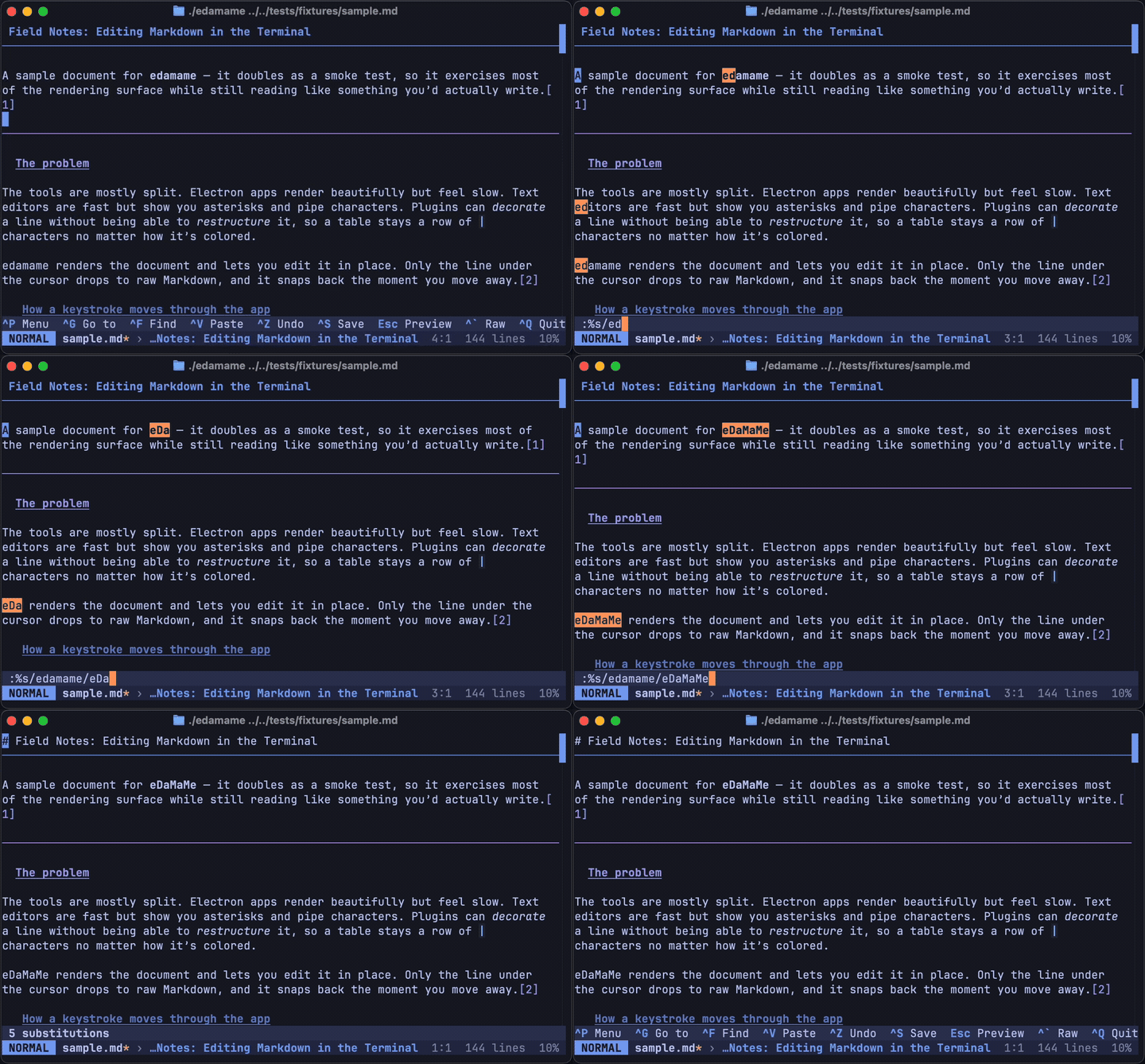
- **`:s`/`:%s` use real regex** with Vim's pattern dialect. You type patterns the way you would in Vim:
- Magic-level escaping (`\( \) \+ \|`) and the `\v \m \M \V` switches.
- Word boundaries `\<` `\>`.
- Character classes `\a \l \u \x \o \h`.
- Replacement specials: backreferences `\1`…, the whole match `&`, and case modifiers `\u \U \l \L \e \E`.
- Backreferences within the pattern (e.g. `\(.\)\1`) and lookaround work.
- A few rare atoms (`\zs`, `\ze`, postfix `\@=`, `\%[…]`, `\%^`, …) are **not** supported and produce a friendly error rather than a wrong result.
- **A pattern can match across a line break.** `\n` in the pattern matches the break itself, so `:%s/ \n/ /g` collapses every "two trailing spaces + line break" into a single space, and `:%s/\n//g` joins the document into one line. `^` and `$` still anchor per line, and `.` still refuses to cross a break, both as in Vim. Without `g`, the first match *starting on* each line is replaced (a match that swallows the lines below it takes them out of the running). `\n` in the *replacement* inserts a line break, so a substitution can split lines as well as join them.
- **A match never escapes the command's range.** `:'<,'>s` cannot join the last selected line with the one after it, and `:s` — a single-line range — therefore has no break to match at all. Vim allows both; edamame bounds them so a substitution can only ever change the lines you named. `:%s` is the whole buffer, so it *can* consume the file's final newline.
- **`:` works from Visual / Visual-Line too.** Pressing `:` on a selection opens the command line pre-filled with the `'<,'>` range (as in Vim), so `:'<,'>s/pat/rep/g` substitutes only within the selected lines. The range is line-oriented: a charwise selection still covers the whole lines it touches. `'<,'>` only scopes `:s`; the write/quit family (`:w`, `:wq`, `:q`, `:x`) ignores the auto-inserted prefix and acts on the whole buffer.
- **The command line supports history.** Press Up/Down while typing a `:` or `/` command to recall earlier entries from this session.
- **Paste works in the command line.** `Ctrl-V` (or whatever you have bound to paste) inserts the clipboard at the cursor, as does a terminal-level paste (⌘V, right-click, middle-click). The prompt is a single line, so line breaks are stripped from an `:` command and turned into `\n` escapes in a `/` `?` search.
- **`:q` respects unsaved changes** — it opens edamame's quit-confirm dialog, exactly like the normal quit shortcut. `:wq` saves first, so it quits cleanly.
- **`:x` writes only when the buffer is modified, then quits** — matching stock Vim, where `:wq` always writes (even an unchanged buffer) but `:x` skips the write on a clean buffer. `:xit` is accepted as a synonym.
- **Not supported:** `:e <path>` (open file), `:q!` (force quit), bare `:s` (repeat last substitution), and line ranges other than the current line, `%`, or the visual `'<,'>`.
---
## Text objects
Usable after an operator (`d`/`c`/`y`) in Normal, or to set the selection in Visual.
| Object | Inner / Around |
|---|---|
| Word | `iw` / `aw` |
| WORD | `iW` / `aW` |
| Double-quoted | `i"` / `a"` |
| Single-quoted | `i'` / `a'` |
| Backtick | `` i` `` / `` a` `` |
| Parentheses | `i(` `i)` `ib` / `a(` `a)` `ab` |
| Square brackets | `i[` `i]` / `a[` `a]` |
| Braces | `i{` `i}` `iB` / `a{` `a}` `aB` |
Examples: `diw` delete inner word · `ci(` change inside parens · `vi"` select inside quotes · `daw` delete a word including its trailing space.
Notes on differences:
- **Word objects never span lines** (a newline is always a hard boundary). `aw` extends over trailing whitespace, falling back to leading whitespace when there's none.
- **Quote objects are line-bounded** and pair quotes left-to-right; a cursor before or between strings selects the next one.
- **Bracket objects span lines** and are nesting-aware. Both `i(` and `i)` (and `ib`) resolve to the same enclosing pair, as in Vim.
- **`ci(` on an empty pair `()` still enters Insert** between the brackets (matching Vim), even though there's nothing to delete.
---
## Clipboard: vim register vs. system clipboard
edamame keeps the vim unnamed register and the OS clipboard **separate**, on purpose:
- **`y` / `d` / `p` / `P`** use the internal vim register. A `dd`/`yy` never clobbers what you copied with `Ctrl-C`, and vice versa — matching what Vim users expect.
- **`Ctrl-C` / `Ctrl-X` / `Ctrl-V`** use the system clipboard, in every vim sub-mode. On a Visual selection, `Ctrl-C`/`Ctrl-X` copy/cut exactly what's highlighted (for Visual Line, the whole highlighted lines).
---
## Ctrl chords: edamame shortcuts, not vim motions
`Ctrl-*` chords keep their **edamame** meaning in vim mode — they are not remapped to Vim's scrolling/editing chords. So:
- `Ctrl-S` save · `Ctrl-P` command palette · `Ctrl-F` search · `Ctrl-Z` undo · `Ctrl-R` redo · `Ctrl-C`/`Ctrl-X`/`Ctrl-V` system clipboard · `Ctrl-` `` ` `` toggle Raw view — all work as usual.
- The Vim chords that collide with edamame shortcuts are **not** implemented: `Ctrl-F`/`Ctrl-B` (page down/up), `Ctrl-D`/`Ctrl-U` (half-page), `Ctrl-E`/`Ctrl-Y` (scroll line), `Ctrl-A`/`Ctrl-X` (increment/decrement number). These keep their edamame functions.
- **`Ctrl-R` is the one Vim chord whose meaning carries over.** edamame's native redo is `Ctrl-Shift-Z`; `Ctrl-R` has no separate edamame function of its own, so it's bound to **Redo** for everyone — which happens to be exactly its Vim meaning. So it's the sole `Ctrl-*` collision where the Vim and edamame meanings agree, and it fires through the same plain passthrough as every other `Ctrl-*` chord, not a vim-specific path.
- **Two exceptions: `Ctrl-Backspace` and `Ctrl-Delete`.** Outside vim mode these delete a word backward / forward. In vim Normal and Visual they are intercepted and become plain cursor motions (left / right, honoring a count) — matching real Vim, where `Ctrl-H` is move-left. Use `db` / `dw` to delete a word.
---
## Quick summary of deviations from standard Vim
- No dot-repeat (`.`), marks, named registers, or macros.
- No block-wise Visual (`Ctrl-V`).
- `/` and `?` search is literal substring (regex only in `:s`/`:%s`), with `\n` `\t` `\r` `\\` escapes so it can cross a line break; smartcase on for navigation, off for replace.
- `:s` patterns can match across a line break, but never past the end of the command's range — so `:s/\n//` doesn't join with the next line the way Vim's does.
- `Esc` clears search highlights; no `:noh`.
- In Visual, `u`/`U` force case, not undo.
- Visual `p` does not overwrite the register.
- Vim register and system clipboard are separate buffers.
- `%` doesn't take a count; `n`/`N` don't honor search direction.
- `:x` writes only if the buffer is modified (`:wq` always writes); no `:e`, `:q!`, bare `:s`, or arbitrary line ranges.
- Vim's scroll/edit `Ctrl-*` chords are unimplemented (edamame's shortcuts win), and `Ctrl-Backspace` / `Ctrl-Delete` become plain motions.
- **Inside a rendered table**, motions are confined to the cell and `dd` / `cc` / `o` / `p` act on rows and cells; grid-breaking edits are refused. Raw mode is exempt.