1
2
3
4
5
6
7
8
9
10
11
12
13
14
15
16
17
18
19
20
21
22
23
24
25
26
27
28
29
30
31
32
33
34
35
36
37
38
39
40
41
42
43
44
45
46
47
48
49
50
51
52
53
54
55
56
57
58
59
60
61
62
63
64
65
66
67
68
69
70
71
72
73
74
75
76
77
78
79
80
81
82
83
84
85
86
87
88
89
90
91
92
93
94
95
96
97
98
99
100
101
102
103
104
105
106
107
108
109
110
111
112
113
114
115
116
117
118
119
120
121
122
123
124
125
126
127
128
129
130
131
132
133
134
135
136
137
// Copyright 2019 The xi-editor Authors.
//
// Licensed under the Apache License, Version 2.0 (the "License");
// you may not use this file except in compliance with the License.
// You may obtain a copy of the License at
//
//     http://www.apache.org/licenses/LICENSE-2.0
//
// Unless required by applicable law or agreed to in writing, software
// distributed under the License is distributed on an "AS IS" BASIS,
// WITHOUT WARRANTIES OR CONDITIONS OF ANY KIND, either express or implied.
// See the License for the specific language governing permissions and
// limitations under the License.

//! An example of a custom drawing widget.

use druid::kurbo::BezPath;
use druid::piet::{FontBuilder, ImageFormat, InterpolationMode, Text, TextLayoutBuilder};
use druid::widget::prelude::*;
use druid::{Affine, AppLauncher, Color, LocalizedString, Point, Rect, WindowDesc};

struct CustomWidget;

impl Widget<String> for CustomWidget {
    fn event(&mut self, _ctx: &mut EventCtx, _event: &Event, _data: &mut String, _env: &Env) {}

    fn lifecycle(
        &mut self,
        _ctx: &mut LifeCycleCtx,
        _event: &LifeCycle,
        _data: &String,
        _env: &Env,
    ) {
    }

    fn update(&mut self, _ctx: &mut UpdateCtx, _old_data: &String, _data: &String, _env: &Env) {}

    fn layout(
        &mut self,
        _layout_ctx: &mut LayoutCtx,
        bc: &BoxConstraints,
        _data: &String,
        _env: &Env,
    ) -> Size {
        // BoxConstraints are passed by the parent widget.
        // This method can return any Size within those constraints:
        // bc.constrain(my_size)
        //
        // To check if a dimension is infinite or not (e.g. scrolling):
        // bc.is_width_bounded() / bc.is_height_bounded()
        bc.max()
    }

    // The paint method gets called last, after an event flow.
    // It goes event -> update -> layout -> paint, and each method can influence the next.
    // Basically, anything that changes the appearance of a widget causes a paint.
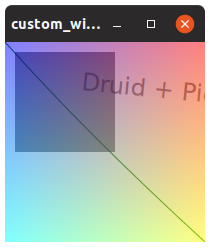
    fn paint(&mut self, ctx: &mut PaintCtx, data: &String, _env: &Env) {
        // Let's draw a picture with Piet!

        // Clear the whole widget with the color of your choice
        // (ctx.size() returns the size of the layout rect we're painting in)
        let size = ctx.size();
        let rect = Rect::from_origin_size(Point::ORIGIN, size);
        ctx.fill(rect, &Color::WHITE);

        // Note: ctx also has a `clear` method, but that clears the whole context,
        // and we only want to clear this widget's area.

        // Create an arbitrary bezier path
        let mut path = BezPath::new();
        path.move_to(Point::ORIGIN);
        path.quad_to((80.0, 90.0), (size.width, size.height));
        // Create a color
        let stroke_color = Color::rgb8(0, 128, 0);
        // Stroke the path with thickness 1.0
        ctx.stroke(path, &stroke_color, 1.0);

        // Rectangles: the path for practical people
        let rect = Rect::from_origin_size((10., 10.), (100., 100.));
        // Note the Color:rgba8 which includes an alpha channel (7F in this case)
        let fill_color = Color::rgba8(0x00, 0x00, 0x00, 0x7F);
        ctx.fill(rect, &fill_color);

        // Text is easy, if you ignore all these unwraps. Just pick a font and a size.
        let font = ctx
            .text()
            .new_font_by_name("Segoe UI", 24.0)
            .build()
            .unwrap();
        // Here's where we actually use the UI state
        let layout = ctx.text().new_text_layout(&font, data).build().unwrap();

        // Let's rotate our text slightly. First we save our current (default) context:
        ctx.with_save(|ctx| {
            // Now we can rotate the context (or set a clip path, for instance):
            ctx.transform(Affine::rotate(0.1));
            ctx.draw_text(&layout, (80.0, 40.0), &fill_color);
        });
        // When we exit with_save, the original context's rotation is restored

        // Let's burn some CPU to make a (partially transparent) image buffer
        let image_data = make_image_data(256, 256);
        let image = ctx
            .make_image(256, 256, &image_data, ImageFormat::RgbaSeparate)
            .unwrap();
        // The image is automatically scaled to fit the rect you pass to draw_image
        ctx.draw_image(
            &image,
            Rect::from_origin_size(Point::ORIGIN, size),
            InterpolationMode::Bilinear,
        );
    }
}

fn main() {
    let window = WindowDesc::new(|| CustomWidget {}).title(
        LocalizedString::new("custom-widget-demo-window-title").with_placeholder("Fancy Colors"),
    );
    AppLauncher::with_window(window)
        .use_simple_logger()
        .launch("Druid + Piet".to_string())
        .expect("launch failed");
}

fn make_image_data(width: usize, height: usize) -> Vec<u8> {
    let mut result = vec![0; width * height * 4];
    for y in 0..height {
        for x in 0..width {
            let ix = (y * width + x) * 4;
            result[ix + 0] = x as u8;
            result[ix + 1] = y as u8;
            result[ix + 2] = !(x as u8);
            result[ix + 3] = 127;
        }
    }
    result
}