# druid
## A data-first Rust-native UI toolkit.
[](https://crates.io/crates/druid)
[](https://docs.rs/druid/)
[](./LICENSE)
Druid is an experimental Rust-native UI toolkit. Its main goal is to
demonstrate the potential of Rust as an application programming language, while
letting users write fast, small, and generally efficient programs with minimal
hassle.
Druid's current development is largely driven by its use in [Runebender], a new
font editor.
We have been doing periodic releases of druid on crates.io, but it is under
active development and its API might change.
For an overview of some key concepts, see the (work in progress) [druid book].
## Example
Here's a simple counter example app.
```rust
use druid::widget::{Button, Flex, Label};
use druid::{AppLauncher, LocalizedString, Widget, WidgetExt, WindowDesc};
fn main() {
let main_window = WindowDesc::new(ui_builder);
let data = 0_u32;
AppLauncher::with_window(main_window)
.use_simple_logger()
.launch(data)
.expect("launch failed");
}
fn ui_builder() -> impl Widget<u32> {
// The label text will be computed dynamically based on the current locale and count
let text =
LocalizedString::new("hello-counter").with_arg("count", |data: &u32, _env| (*data).into());
let label = Label::new(text)
.padding(5.0)
.center();
let button = Button::new("increment").on_click(|_ctx, data, _env| *data += 1)
.padding(5.0);
Flex::column()
.with_child(label)
.with_child(button)
}
```
Check out the [the examples folder] for a more comprehensive demonstration of
druid's existing functionality and widgets.
## Screenshots
#### Linux
[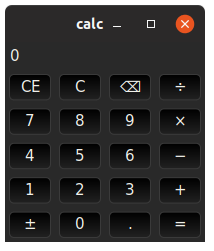](./druid/examples/calc.rs)
[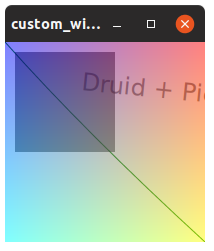](./druid/examples/custom_widget.rs)
[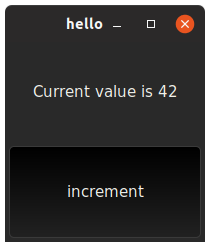](./druid/examples/hello.rs)
[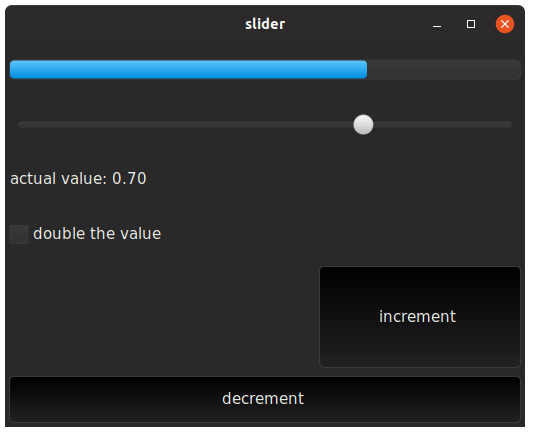](./druid/examples/slider.rs)
## Concepts
### druid-shell
The druid toolkit uses druid-shell for a platform-abstracting application shell.
Druid-shell is responsible for starting a native platform runloop, listening to
events, converting them into a platform-agnostic representation, and calling a
user-provided handler with them.
While druid-shell is being developed with the druid toolkit in mind, it is
intended to be general enough that it could be reused by other projects
interested in experimenting with Rust GUI. The druid-shell crate includes a
couple of [non-druid examples].
### piet
Druid relies on the [piet library] for drawing and text layout. Piet is a 2D
graphics abstraction with multiple backends: `piet-direct2d`, `piet-cairo`, and
`piet-web` are currently available, and a GPU backend is planned. In terms of
OS support, macOS and Linux use `piet-cairo`, and Windows uses `piet-direct2d`.
```rust
use druid::kurbo::{BezPath, Point, Rect};
use druid::piet::Color;
// Create an arbitrary bezier path
// (ctx.size() returns the size of the layout rect we're painting in)
let mut path = BezPath::new();
path.move_to(Point::ORIGIN);
path.quad_to(
(80.0, 90.0),
(ctx.size().width, ctx.size().height),
);
// Create a color
let stroke_color = Color::rgb8(0x00, 0x80, 0x00);
// Stroke the path with thickness 1.0
ctx.stroke(path, &stroke_color, 1.0);
// Rectangles: the path for practical people
let rect = Rect::from_origin_size((10., 10.), (100., 100.));
// Note the Color:rgba8 which includes an alpha channel (7F in this case)
let fill_color = Color::rgba8(0x00, 0x00, 0x00, 0x7F);
ctx.fill(rect, &fill_color);
```
### widgets
Widgets in druid (text boxes, buttons, layout components, etc.) are objects
which implement the [Widget trait]. The trait is parametrized by a type (`T`)
for associated data. All trait methods (`event`, `lifecycle`, `update`, `paint`,
and `layout`) are provided with access to this data, and in the case of
`event` the reference is mutable, so that events can directly update the data.
Whenever the application data changes, the framework traverses the widget
hierarchy with an `update` method.
All the widget trait methods are provided with a corresponding context
([EventCtx], [LifeCycleCtx], [UpdateCtx], [LayoutCtx], [PaintCtx]). The widget can request
things and cause actions by calling methods on that context.
In addition, all trait methods are provided with an environment `Env`, which
includes the current theme parameters (colors, dimensions, etc.).
```rust
impl<T: Data> Widget<T> for Button<T> {
fn event(&mut self, ctx: &mut EventCtx, event: &Event, data: &mut T, env: &Env) {
...
}
fn lifecycle(&mut self, ctx: &mut LifeCycleCtx, event: &LifeCycle, data: &T, env: &Env) {
...
}
fn update(&mut self, ctx: &mut UpdateCtx, old_data: &T, data: &T, env: &Env) {
...
}
fn layout(&mut self, ctx: &mut LayoutCtx, bc: &BoxConstraints, data: &T, env: &Env) -> Size {
...
}
fn paint(&mut self, ctx: &mut PaintCtx, data: &T, env: &Env) {
...
}
}
```
Druid provides a number of [basic utility and layout widgets] and it's easy to
implement your own. You can also compose widgets into new widgets:
```rust
fn build_widget() -> impl Widget<u32> {
let mut col = Flex::column();
for i in 0..30 {
let button = Button::new(format!("Button {}", i).padding(5.0);
col.add_child(button, 0.0);
}
Scroll::new(col)
}
```
### layout
Druid's layout protocol is strongly inspired by [Flutter's box layout model].
In druid, widgets are passed a `BoxConstraint` that provides them a minimum and
maximum size for layout. Widgets are also responsible for computing appropriate
constraints for their children if applicable.
### data
Druid uses a [Data trait] to represent [value types]. These should be cheap to
compare and cheap to clone.
In general, you can use `derive` to generate a `Data` impl for your types.
```rust
#[derive(Clone, Data)]
struct AppState {
which: bool,
value: f64,
}
```
### lens
The [Lens datatype] gives access to a part of a larger data structure. Like
`Data`, this can be derived. Derived lenses are accessed as associated constants
with the same name as the field.
```rust
#[derive(Clone, Data, Lens)]
struct AppState {
which: bool,
value: f64,
}
```
To use the lens, wrap your widget with `LensWrap` (note the conversion of
CamelCase to snake_case):
```rust
LensWrap::new(WidgetThatExpectsf64::new(), AppState::value);
```
Alternatively, lenses for structs, tuples, and indexable containers can be
constructed on-demand with the `lens` macro:
```rust
LensWrap::new(WidgetThatExpectsf64::new(), lens!(AppState, value));
```
This is particularly useful when working with types defined in another crate.
## Using druid
An explicit goal of druid is to be easy to build, so please open an issue if you
run into any difficulties. Druid is available on [crates.io] and should work as
a lone dependency (it re-exports all the parts of druid-shell, piet, and kurbo
that you'll need):
```toml
druid = "0.5.0"
```
Since druid is currently in fast-evolving state, you might prefer to drink from
the firehose:
```toml
druid = { git = "https://github.com/xi-editor/druid.git", version = "0.5" }
```
### Platform notes
#### macOS
On macOS, druid requires [cairo]; if you use homebrew, `brew install cairo`
should be sufficient. Removing this dependency is on the roadmap.
#### Linux
On Linux, druid requires gtk+3; see [gtk-rs dependencies] for installation
instructions.
## Alternatives
Druid is only one of many ongoing [Rust-native GUI experiments]. To mention a
few:
* [Azul](https://github.com/maps4print/azul)
* [Conrod](https://github.com/PistonDevelopers/conrod)
* [Iced](https://github.com/hecrj/iced)
* [Makepad](https://github.com/makepad/makepad)
* [Moxie](https://github.com/anp/moxie)
* [Reclutch](https://github.com/jazzfool/reclutch)
## Contributions
We gladly accept contributions via GitHub pull requests. Please see
[CONTRIBUTING.md] for more details.
A very good place to ask questions and discuss development work is our [Zulip
chat instance], in the #druid channel.
## Authors
The main authors are Raph Levien and Colin Rofls, with much support from an
active and friendly community.
[Runebender]: https://github.com/linebender/runebender
[the examples folder]: ./druid/examples
[piet library]: https://github.com/linebender/piet
[custom_widget]: ./druid/examples/custom_widget.rs
[basic utility and layout widgets]: ./druid/src/widget
[Flutter's box layout model]: https://api.flutter.dev/flutter/rendering/BoxConstraints-class.html
[value types]: https://sinusoid.es/lager/model.html#id2
[cairo]: https://www.cairographics.org
[gtk-rs dependencies]: http://gtk-rs.org/docs/requirements.html
[Rust-native GUI experiments]: https://areweguiyet.com
[CONTRIBUTING.md]: ./CONTRIBUTING.md
[Zulip chat instance]: https://xi.zulipchat.com
[non-druid examples]: ./druid-shell/examples/shello.rs
[crates.io]: https://crates.io/crates/druid
[EventCtx]: https://docs.rs/druid/0.5.0/druid/struct.EventCtx.html
[LifeCycleCtx]: https://docs.rs/druid/0.5.0/druid/struct.EventCtx.html
[LayoutCtx]: https://docs.rs/druid/0.5.0/druid/struct.LayoutCtx.html
[PaintCtx]: https://docs.rs/druid/0.5.0/druid/struct.PaintCtx.html
[UpdateCtx]: https://docs.rs/druid/0.5.0/druid/struct.UpdateCtx.html
[Widget trait]: https://docs.rs/druid/0.5.0/druid/trait.Widget.html
[Data trait]: https://docs.rs/druid/0.5.0/druid/trait.Data.html
[Lens datatype]: https://docs.rs/druid/0.5.0/druid/trait.Lens.html
[druid book]: https://xi-editor.io/druid/intro.html