1
2
3
4
5
6
7
8
9
10
11
12
13
14
15
16
17
18
19
20
21
22
23
24
25
26
27
28
29
30
31
32
33
34
35
36
37
38
39
40
41
42
43
44
45
46
47
48
49
50
51
52
53
54
55
56
57
58
59
60
61
62
63
64
65
66
67
68
69
70
71
72
73
74
75
76
77
78
79
80
81
82
83
84
85
86
87
88
89
90
91
92
93
94
95
96
97
98
99
100
101
102
103
104
105
106
107
108
109
110
111
112
113
114
115
116
117
118
119
120
121
122
123
124
125
126
127
128
129
130
131
132
//! # Graphviz Writer
//!
//! This is an ergonomic library for plotting graphs. It outputs the [Graphviz](https://www.graphviz.org/)
//! language [DOT](https://www.graphviz.org/doc/info/lang.html). Graphs written in DOT can then be easily
//! converted to SVG or other image formats using the Graphviz [dot executable](https://graphviz.org/doc/info/command.html).
//!
//! The structs in this library leverage the Rust type system and lifetimes to ensure that it's hard
//! to use them to construct an invalid DOT graph. It's important to note that this means you need
//! to make sure that child structs go out of scope before using their parents again. This is to make sure that
//! the [`Drop`] writes the closing brackets correctly. The compiler will tell you if you forget to do this though.
//!
//! ## Non Goals
//!
//! This library only writes DOT in a strongly typed way. It doesn't read DOT or render DOT into image files.
//! For that you'll need a different library, or the existing [Graphviz executable](https://www.graphviz.org/).
//!
//! ## Usage
//!
//! The end point into using the library is the [`DotWriter`] struct. The [`DotWriter`], can write to any struct
//! that implements [`std::io::Write`], a trait from the standard library. For example, you can write directly to
//! stdout ([`std::io::stdout()`]) or to a vector of bytes ([`Vec<u8>`]).
//!
//! To begin usign the library create a [`DotWriter`] struct as like this:
//!
//! ```
//! use dot_writer::DotWriter;
//!
//! let mut output_bytes = Vec::new();
//! let mut writer = DotWriter::from(&mut output_bytes);
//! ```
//!
//! Once a [`DotWriter`] exists you can use `.digraph()` or `.graph()` to start writing a DOT graph.
//! Then you can write edges using using `.edge()`. See [`Scope`] for more functionality.
//! Here's a simple "Hello world!" example:
//!
//! ```
//! use dot_writer::DotWriter;
//!
//! let mut output_bytes = Vec::new();
//! {
//! let mut writer = DotWriter::from(&mut output_bytes);
//! writer.set_pretty_print(false);
//! writer
//! .digraph()
//! .edge("Hello", "World"); // digraph goes out of scope here, writing closing bracket
//! // writer goes out of scope here, freeing up output_bytes for reading
//! }
//! assert_eq!(
//! String::from_utf8(output_bytes).unwrap(),
//! "digraph{Hello->World;}"
//! );
//! ```
//!
//! If instead you used [`std::io::stdout()`] or wrote to a file using
//! [File or BufReader](https://doc.rust-lang.org/std/fs/struct.File.html),
//! you could then use the [dot executable](https://graphviz.org/doc/info/command.html) to create an image file:
//!
//! ```bash
//! $ echo "digraph {Hello->World;}" | dot -Tsvg > mygraph.svg
//! ```
//!
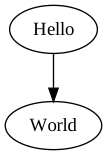
//! This generates the following image (you can open in firefox or chrome, or switch the image type to `png`
//! and use an image viewer of your choice):
//!
//! 
//!
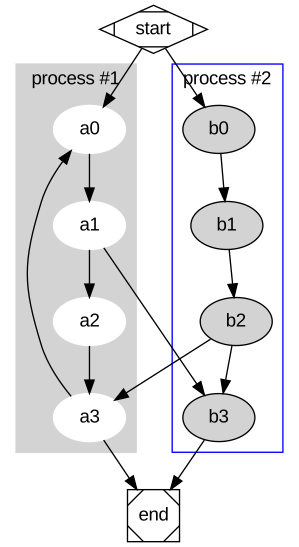
//! Heres a more complex example, demonstrating clustering, colors, labeling and shapes.
//! Note that chaining calls to `edge()` produces a series of nodes that are all connected.
//! Also note that there is just one call to `.digraph()`, as each call would create a new graph:
//!
//! ```
//! use dot_writer::{Color, DotWriter, Attributes, Shape, Style};
//!
//! let mut output_bytes = Vec::new();
//! {
//! let mut writer = DotWriter::from(&mut output_bytes);
//! writer.set_pretty_print(false);
//! let mut digraph = writer.digraph();
//! {
//! let mut cluster = digraph.cluster();
//! cluster.set_style(Style::Filled);
//! cluster.set_color(Color::LightGrey);
//! cluster.node_attributes()
//! .set_style(Style::Filled)
//! .set_color(Color::White);
//! cluster.edge("a0", "a1").edge("a2").edge("a3");
//! cluster.set_label("process #1");
//! // cluster goes out of scope here to write closing bracket
//! }
//! {
//! let mut cluster = digraph.cluster();
//! cluster.node_attributes()
//! .set_style(Style::Filled);
//! cluster.edge("b0", "b1").edge("b2").edge("b3");
//! cluster.set_label("process #2");
//! cluster.set_color(Color::Blue);
//! // cluster goes out of scope here to write closing bracket
//! }
//! digraph.edge("start", "a0");
//! digraph.edge("start", "b0");
//! digraph.edge("a1", "b3");
//! digraph.edge("b2", "a3");
//! digraph.edge("a3", "a0");
//! digraph.edge("a3", "end");
//! digraph.edge("b3", "end");
//! digraph.node_named("start")
//! .set_shape(Shape::Mdiamond);
//! digraph.node_named("end")
//! .set_shape(Shape::Msquare);
//! // digraph goes out of scope here to write closing bracket
//! // then writer goes out of scope here to free up output_bytes for reading
//! }
//! assert_eq!(
//! String::from_utf8(output_bytes).unwrap(),
//! "digraph{subgraph cluster_0{style=\"filled\";color=lightgray;node[style=\"filled\",color=white];a0->a1->a2->a3;label=\"process #1\";}subgraph cluster_1{node[style=\"filled\"];b0->b1->b2->b3;label=\"process #2\";color=blue;}start->a0;start->b0;a1->b3;b2->a3;a3->a0;a3->end;b3->end;start[shape=Mdiamond];end[shape=Msquare];}"
//! );
//! ```
//!
//! This produces (after render with dot) the following lovely graph:
//!
//! 
pub use ;
pub use ;
pub use DotWriter;