# log adapter for DLT
This crate is a [`log`](https://docs.rs/log) adapter for integrating with the Diagnostic Log and Trace (DLT) system.
It provides functionality to register applications and contexts with the DLT daemon and implements a logger that sends log messages to the DLT system.
The library is designed to be used with the standard [`log`](https://docs.rs/log) crate, which provides a flexible logging API for Rust applications.
The DLT system is a flexible and scalable logging framework that is widely used in the automotive industry for logging and tracing in embedded systems.
It provides features such as log level filtering, message formatting, and log message buffering.
For more information about DLT, see the [DLT project on GitHub](https://github.com/COVESA/dlt-daemon).
[](https://github.com/rusty-projects/dlt_log-rs/actions)
[](https://crates.io/crates/dlt_log)
## Documentation
Module documentation can be found at [docs.rs](https://docs.rs/dlt_log).
## Dependencies
At least rust version 1.82 is required to build this crate.
This is caused by latest `bindgen` version which is not compatible with older rust versions, see [bindgen issue #3052](https://github.com/rust-lang/rust-bindgen/issues/3052).
You need to have `libclang-dev` installed on your system to run the binding generation and `libdlt-dev` to link against the DLT library.
On Ubuntu, you can install that with the following command:
```bash
sudo apt-get install libclang-dev libdlt-dev
```
The integration with the DLT system is achieved through the underlying C library for DLT.
[`bindgen`](https://docs.rs/bindgen) is used to generate the FFI (Foreign Function Interface) bindings.
The bindings are generated during the build process in order to ensure that the Rust code remains in sync with the system’s DLT library.
## Example usage
Add the `dlt_log` crate to your `Cargo.toml`:
```toml
[dependencies]
log = { version = "0.4", features = ["std"] }
dlt_log = "0.1"
```
To use this library, you need to initialize it with your application and context information.
This will register your application and context with the DLT daemon and set up the logger.
```rust
fn main() {
let _ = dlt_log::init("TEST", "Rust tests", "EXPL", "Smoke test example");
log::trace!("Tracing the untraceable!");
log::debug!("Debugging the debugger!");
log::info!("Information overload: {} + {} = {}", 2, 2, 4);
log::warn!("Warning: Low on coffee!");
log::error!("Error: Something went terribly right!");
}
```
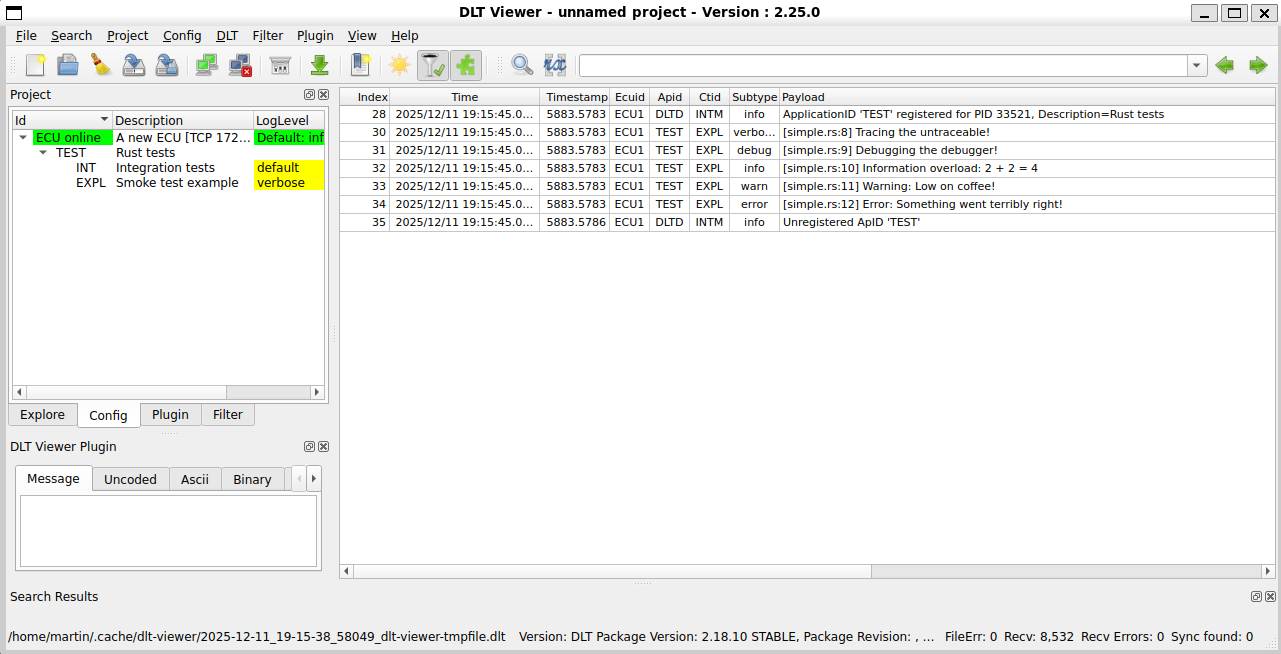
Connect the DLT viewer to the DLT daemon to view the log messages.
The default log level is set to `info`, so only log messages with a level of `info` or higher will be displayed.
See the [Log levels](#log-levels) section for more information on how to configure the log levels.
## Example for cross-compilation
As an example for cross-compilation, assume a yocto SDK is installed at `/opt/poky/5.1.2` for aarch64 architecture that includes the DLT library:
- `/opt/poky/5.1.2/environment-setup-cortexa57-poky-linux`
- `/opt/poky/5.1.2/sysroots/cortexa57-poky-linux/usr/lib/libdlt.so`
- `/opt/poky/5.1.2/sysroots/cortexa57-poky-linux/usr/include/dlt/dlt.h`
Create `.cargo/config.toml` in your project directory with the following content:
```toml
[target.aarch64-unknown-linux-gnu]
linker="/opt/poky/5.1.2/sysroots/x86_64-pokysdk-linux/usr/bin/aarch64-poky-linux/aarch64-poky-linux-gcc"
rustflags = [
"-C", "link-arg=--sysroot=/opt/poky/5.1.2/sysroots/cortexa57-poky-linux",
]
```
Bindgen needs to know the sysroot path to find the DLT headers, so set the `BINDGEN_EXTRA_CLANG_ARGS` environment variable before building the project:
```bash
export BINDGEN_EXTRA_CLANG_ARGS="--sysroot=/opt/poky/5.1.2/sysroots/cortexa57-poky-linux"
cargo build --release --target aarch64-unknown-linux-gnu
```
## Log levels
The log levels and logging backend are configured by the DLT system.
For configuration, follow the [DLT documentation](https://github.com/COVESA/dlt-daemon/blob/master/doc/dlt_for_developers.md).
For example, to enable all log levels, set the `DLT_INITIAL_LOG_LEVEL` environment variable to `::6`.
```bash
DLT_INITIAL_LOG_LEVEL="::6" cargo run --example simple
```
## Logging to console
By default, the log messages are sent to the DLT daemon.
To view the logs, you can use the DLT viewer tool provided by the DLT daemon.
The logs can also be redirected to the console by setting the `DLT_LOCAL_PRINT_MODE` environment variable to `FORCE_ON`.
```bash
DLT_LOCAL_PRINT_MODE=FORCE_ON DLT_INITIAL_LOG_LEVEL="::6" cargo run --example simple
```
The output will look like this:
```text
2025/12/11 18:13:51.456738 57739781 000 ECU1 TEST EXPL log verbose V 1 [[simple.rs:8] Tracing the untraceable!]
2025/12/11 18:13:51.456809 57739782 001 ECU1 TEST EXPL log debug V 1 [[simple.rs:9] Debugging the debugger!]
2025/12/11 18:13:51.456888 57739783 002 ECU1 TEST EXPL log info V 1 [[simple.rs:10] Information overload: 2 + 2 = 4]
2025/12/11 18:13:51.456931 57739783 003 ECU1 TEST EXPL log warn V 1 [[simple.rs:11] Warning: Low on coffee!]
2025/12/11 18:13:51.456989 57739784 004 ECU1 TEST EXPL log error V 1 [[simple.rs:12] Error: Something went terribly right!]
```
## License
This project is licensed under the MIT License - see the [LICENSE](https://github.com/rusty-projects/dlt_log-rs/blob/main/LICENSE) file for details.
License information for DLT daemon and library can be found at [Diagnostic Log and Trace](https://github.com/COVESA/dlt-daemon#license).