# Dither 1.3.6
Inspired by: <http://www.tannerhelland.com/4660/dithering-eleven-algorithms-source-code/>
- [crate](https://crates.io/crates/dither)
- [documentation](https://docs.rs/dither/1.3.6/dither/)
- [repository](https://gitlab.com/efronlicht/dither)
## License: MIT
The test photo (`"bunny.png"`) was obtained under the creative common license and is in the public domain.
## installation
```bash
cargo install dither
```
## CLI help:
```bash
dither --help
```
## usage
```bash
dither INPUT [OUTPUT] [-v] [--dither="floyd"] [--color="bw"] [--depth="1"] [--help]
```
## examples
# no-op

dither bunny.png burkes.png --dither=burkes

dither bunny.png crayon.png --color=crayon
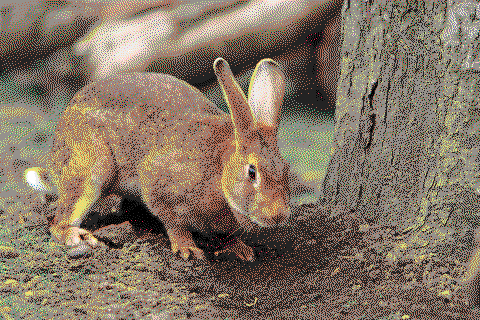
# Args
## `INPUT`
the path to an input image. known good image formats are `.png` and `.jpg`.
## `OUTPUT`
the path to write the output. this will create or truncate the file at the existing location, if necessary. the image type will be inferred from the filename. currently, only `.png` and `.jpg` are supported.
## `-c`, `--color`
The color mode to use. Default is "bw" (black and white).
Available options are
- bw (default)
- color
- cga
- crayon
- $COLOR
- $FILENAME
### `--color=bw` (default)
grayscale mode. dither to `--depth` bits; --depth=1 uses pure black and white, --depth=2 uses black, white, and two shades of gray, etc, etc.
### `color=color`
use RGB channels with specified bit depth. i.e, `--color=color, --depth=2` uses two bits each for the red, green, and blue channels.
### `--color=crayon`
use the crayon color palette. see "crayon.plt" for details.
### `--color=cga`
use the [cga](https://en.wikipedia.org/wiki/Color_Graphics_Adapter) color palette. see the wikipedia article or "cga.plt" for details.
### `--color=$COLOR`
single-color mode. dither in black and white to the specified bit depth, then replace white with the given color, using black for the background.
- BLUE
- GREEN
- CYAN
- RED
- MAGENTA
- BROWN
- LIGHT_GRAY
- GRAY
- LIGHT_BLUE
- LIGHT_GREEN
- LIGHT_CYAN
- LIGHT_RED
- LIGHT_MAGENTA
- YELLOW
- WHITE
### `--color=$FILENAME`
load a palette from file. palettes are specified as a list of two or more newline-separated 24-bit hexidecimals, with optional 0x prefix. see `crayon.plt` and `cga.plt` for examples.
// WHITE
0xffffff
// BLACK
0x000000
// RED
0xff0000
// GREEN
0x00ff00
// BLUE
0x0000ff
## `-d, --dither`
The type of ditherer to use. Available options are
- `"floyd"`, `"steinberg"`, `"floydsteinberg"` (default)
- `"atkinson"`,
- `"stucki"`,
- `"burkes"`,
- `"jarvis"`, `"judice"`, `ninke"`
- `"sierra"`, `"sierra3"`
See [the documentation](https://docs.rs/dither/1.3.6/dither/ditherer/index.html) or [Tanner Helland's article](http://www.tannerhelland.com/4660/dithering-eleven-algorithms-source-code) for technical details.
### `-v, --verbose`
Verbose debug output to stderr.
### `--depth`
The bit depth to compress each channel to. Should be an unsigned integer between 1 and 7 (default 1). Mutally exclusive with the `--color= $FILENAME`, `color==cga`, and `--color=crayon` options.


