# dirmon
dirmon is a utility that monitors a directory for new files and automatically sorts them into designated folders based on their file type.
---
## How It Works
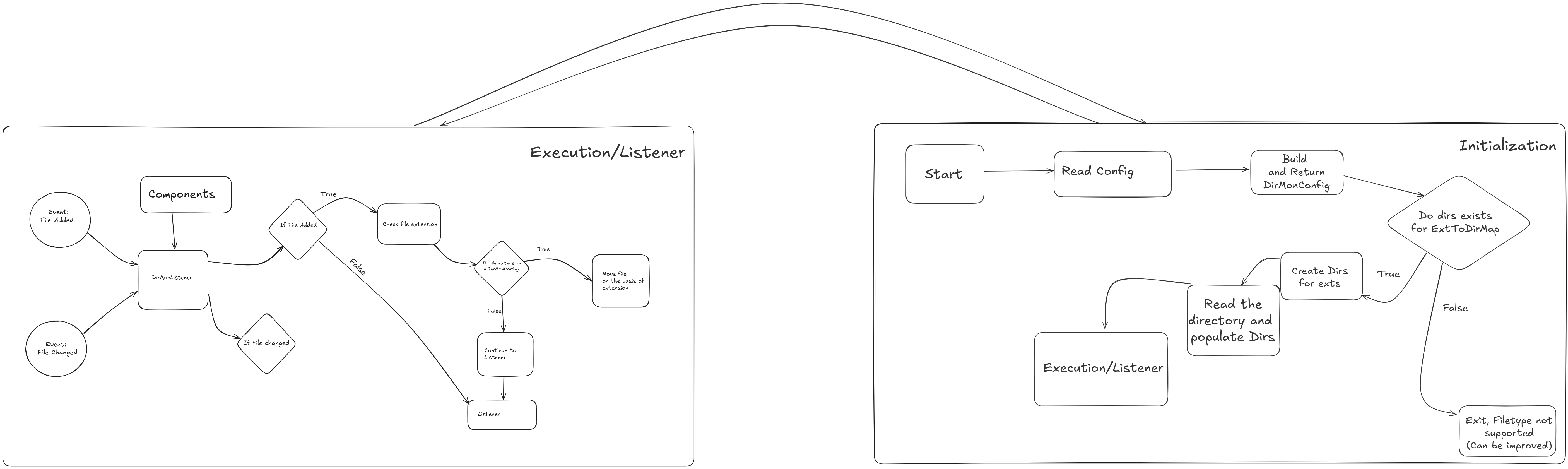
dirmon actively listens for changes in a target directory. When new files are added, it automatically identifies their type and moves them into pre-configured subdirectories.
### Before dirmon
Your monitored directory might look cluttered with various unsorted files, like this:
```/path/to/your/directory/
|- financial_report.pdf
|- company_intro.mov
|- new_song.mp3
|- meeting_notes.txt
|- podcast_episode.wav
|- product_demo.mp4
```
### After dirmon
Once initialized, dirmon creates the necessary folders and sorts the files accordingly, leaving the directory clean and organized:
```
/path/to/your/directory/
|
|-- TYPE_0/
|
|-- TYPE_1/
| |-- company_intro.mov
| |-- product_demo.mp4
|
|-- TYPE_2/
| |-- financial_report.pdf
| |-- meeting_notes.txt
---
```
## Configuration
dirmon is controlled by a simple configuration file.
- v0.0
1. The **first line** must be the absolute path to the directory you want to monitor, enclosed in square brackets `[]`.
2. Subsequent lines define the **sorting rules**. Each line specifies a folder name and the file extensions (separated by commas) that should be moved into it.
- v0.1
1. Has support for **multidirectory** monitoring.
The format is: `FOLDER_NAME = ext1,ext2,ext3`
### Example `config` file:
```ini
[/desired/path/here/]
TYPE_0 = mp3,wav
TYPE_1 = mov,mp4
TYPE_2 = txt,pdf