# Dioxus Motion 🚀
[](https://github.com/wheregmis/dioxus-motion/blob/main/LICENSE)
[](https://crates.io/crates/dioxus-motion)
[](https://docs.rs/dioxus-motion/0.1.4/dioxus_motion/)
A lightweight, cross-platform animation library for Dioxus, designed to bring smooth, flexible animations to your Rust web, desktop, and mobile applications.
## ⚠️ Important Note
This repository follows Dioxus's main branch for the latest features and improvements. For production use, we recommend using the stable version from [crates.io](https://crates.io/crates/dioxus-motion) instead of directly depending on the repository.
```toml
# Recommended: Stable version from crates.io
dioxus-motion = "0.3.1"
# Development version: Follows Dioxus main branch
dioxus-motion = { git = "https://github.com/wheregmis/dioxus-motion.git", branch = "main" }
```
## 🎯 Live Examples
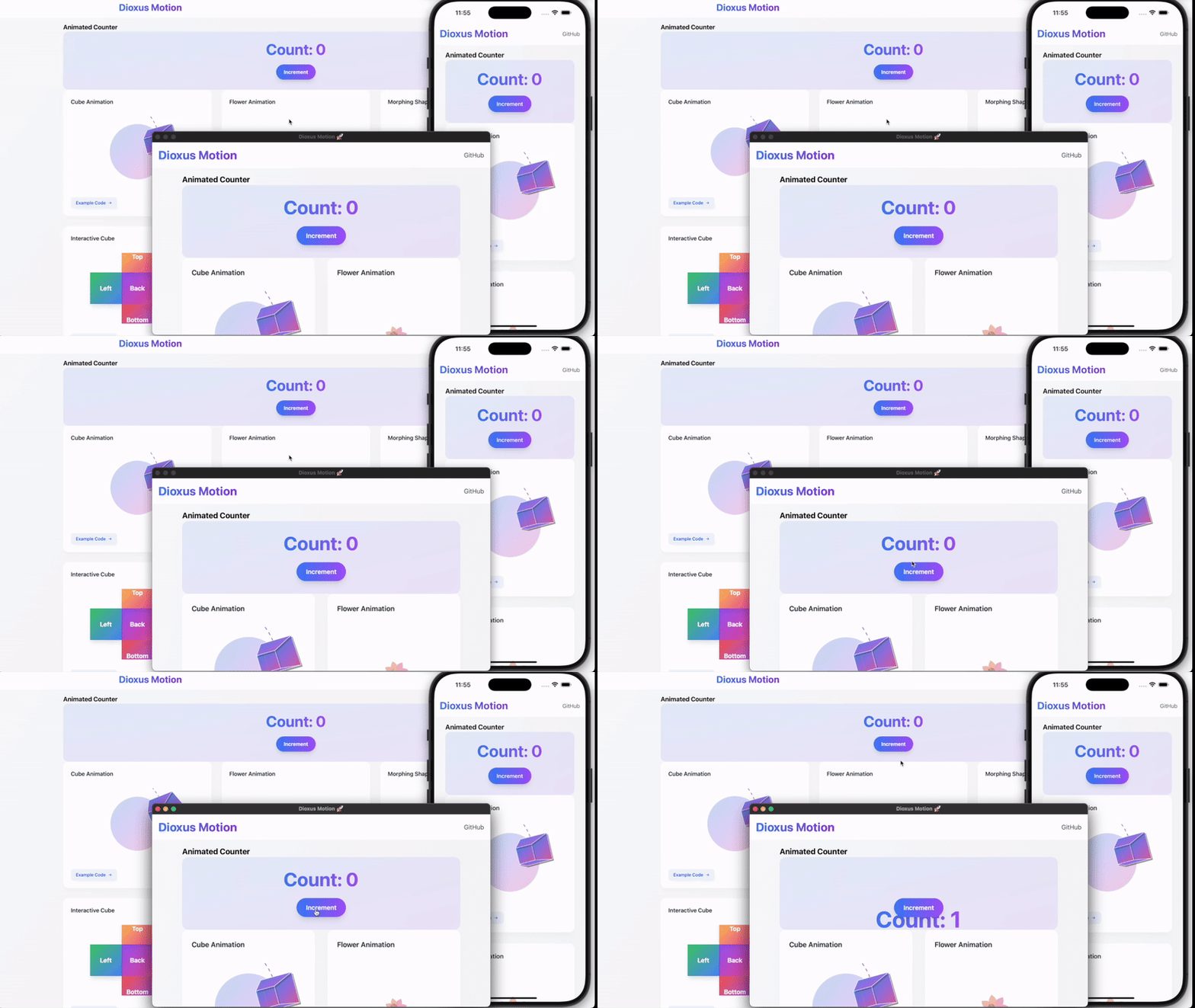
<img src="example.gif" width="100%" height="400" />
Visit our [Example Website](https://wheregmis.github.io/dioxus-motion/) to see these animations in action:
## 🚀 Page Transitions
```rust
use dioxus_motion::prelude::*;
#[derive(Routable, Clone, Debug, PartialEq, MotionTransitions )]
#[rustfmt::skip]
enum Route {
#[layout(NavBar)]
#[route("/")]
#[transition(Fade)]
Home {},
#[route("/slide-left")]
#[transition(ZoomIn)]
SlideLeft {},
#[route("/slide-right")]
SlideRight {},
#[route("/slide-up")]
SlideUp {},
#[route("/slide-down")]
SlideDown {},
#[route("/fade")]
Fade {},
#[end_layout]
#[route("/:..route")]
PageNotFound { route: Vec<String> },
}
```
And replace all your `Outlet::<Route> {}` with `AnimatedOutlet::<Route> {}` and place the layout containing OutletRouter on top with something like this
```rust
#[component]
fn NavBar() -> Element {
rsx! {
nav { id: "navbar take it",
Link { to: Route::Home {}, "Home" }
Link { to: Route::SlideLeft {}, "Blog" }
}
AnimatedOutlet::<Route> {}
}
}
```
Each route can have its own transition effect:
- `Fade`: Smooth opacity transition
- `ZoomIn`: Scale and fade combination
- `SlideLeft`: Horizontal slide animation
- [And more!](https://github.com/wheregmis/dioxus-motion/blob/main/src/transitions/page_transitions.rs)
- Also, add transitions feature to support page transitions. [Example](https://github.com/wheregmis/animated_router/blob/main/src/main.rs) which was translated from router [example](https://github.com/DioxusLabs/dioxus/blob/main/examples/router.rs) of Dioxus. More detailed guide will be updated soon.
### Quick Value Animation Example
```rust
use dioxus_motion::prelude::*;
#[component]
fn PulseEffect() -> Element {
let scale = use_motion(1.0f32);
use_effect(move || {
scale.animate_to(
1.2,
AnimationConfig::new(AnimationMode::Spring(Spring {
stiffness: 100.0,
damping: 5.0,
mass: 0.5,
velocity: 1.0
}))
.with_loop(LoopMode::Infinite)
);
});
rsx! {
div {
class: "w-20 h-20 bg-blue-500 rounded-full",
style: "transform: scale({scale.get_value()})"
}
}
}
```
### Animation Sequences Example
Chain multiple animations together with different configurations:
```rust
let scale = use_motion(1.0f32);
// Create a bouncy sequence
let sequence = AnimationSequence::new()
.then(
1.2, // Scale up
AnimationConfig::new(AnimationMode::Spring(Spring {
stiffness: 400.0,
damping: 10.0,
mass: 1.0,
velocity: 5.0,
}))
)
.then(
0.8, // Scale down
AnimationConfig::new(AnimationMode::Spring(Spring {
stiffness: 300.0,
damping: 15.0,
mass: 1.0,
velocity: -2.0,
}))
)
.then(
1.0, // Return to original
AnimationConfig::new(AnimationMode::Spring(Spring::default()))
);
// Start the sequence
scale.animate_sequence(sequence);
// Each step in the sequence can have its own timing, easing, and spring physics configuration. Sequences can also be looped or chained with other animations.
```
## ✨ Features
- **🔧 Simplified Animatable Trait**: Uses standard Rust operators (`+`, `-`, `*`) instead of custom methods
- **🌍 Cross-Platform Support**: Works on web, desktop, and mobile
- **⚙️ Flexible Animation Configuration**: Spring physics and tween animations
- **📊 Custom Easing Functions**: Built-in and custom easing support
- **🧩 Modular Feature Setup**: Choose only what you need
- **💡 Simple, Intuitive API**: Easy to learn and use
- **🎬 Page Transitions**: Smooth route transitions with the `transitions` feature
## 🛠 Installation
Add to your `Cargo.toml`:
```toml
[dependencies]
dioxus-motion = { version = "0.3.0", optional = true, default-features = false }
[features]
default = ["web"]
web = ["dioxus/web", "dioxus-motion/web"]
desktop = ["dioxus/desktop", "dioxus-motion/desktop"]
mobile = ["dioxus/mobile", "dioxus-motion/desktop"]
```
If you want to use page transiton dependency will look like,
```toml
[dependencies]
dioxus-motion = { version = "0.3.0", optional = true, default-features = false }
[features]
default = ["web"]
web = ["dioxus/web", "dioxus-motion/web", "dioxus-motion/transitions"]
desktop = [
"dioxus/desktop",
"dioxus-motion/desktop",
"dioxus-motion/transitions",
]
mobile = ["dioxus/mobile", "dioxus-motion/desktop", "dioxus-motion/transitions"]
```
## 🌐 Platform Support
Choose the right feature for your platform:
- `web`: For web applications using WASM
- `desktop`: For desktop and mobile applications
- `default`: Web support (if no feature specified)
## 🚀 Quick Start
## 🎨 Creating Custom Animatable Types
The simplified `Animatable` trait makes it easy to create custom animatable types:
```rust
use dioxus_motion::prelude::*;
#[derive(Debug, Copy, Clone, PartialEq, Default)]
struct Point3D {
x: f32,
y: f32,
z: f32,
}
// Point3D automatically implements Send + 'static since all fields are Send + 'static
// Implement standard Rust operator traits
impl std::ops::Add for Point3D {
type Output = Self;
fn add(self, other: Self) -> Self {
Self {
x: self.x + other.x,
y: self.y + other.y,
z: self.z + other.z,
}
}
}
impl std::ops::Sub for Point3D {
type Output = Self;
fn sub(self, other: Self) -> Self {
Self {
x: self.x - other.x,
y: self.y - other.y,
z: self.z - other.z,
}
}
}
impl std::ops::Mul<f32> for Point3D {
type Output = Self;
fn mul(self, factor: f32) -> Self {
Self {
x: self.x * factor,
y: self.y * factor,
z: self.z * factor,
}
}
}
// Implement Animatable with just two methods!
impl Animatable for Point3D {
fn interpolate(&self, target: &Self, t: f32) -> Self {
*self + (*target - *self) * t
}
fn magnitude(&self) -> f32 {
(self.x * self.x + self.y * self.y + self.z * self.z).sqrt()
}
}
// Now you can animate 3D points!
let mut position = use_motion(Point3D::default());
position.animate_to(
Point3D { x: 10.0, y: 5.0, z: -2.0 },
AnimationConfig::new(AnimationMode::Spring(Spring::default()))
);
```
**Previous vs. New Trait Complexity:**
- **Before**: 7 required methods (`zero`, `epsilon`, `magnitude`, `scale`, `add`, `sub`, `interpolate`)
- **After**: 2 required methods (`interpolate`, `magnitude`) + standard Rust operators
- **Result**: ~70% less boilerplate, more idiomatic Rust code!
## 🔄 Migration Guide (v0.3.0)
### Breaking Changes
- **`use_motion<T>` now requires `T: Send + 'static`**: The `use_motion<T>` function now requires types to implement `Send + 'static` in addition to `Animatable`. This enables better thread safety and resource management for animations.
### Migration Steps
- Most built-in types (`f32`, `Transform`, `Color`) already satisfy these bounds
- For custom types, ensure they implement `Send + 'static`:
- Types with non-Send fields (like `Rc<T>`) will need to be refactored
- Use `Arc<T>` instead of `Rc<T>` for shared ownership in animatable types
- Minor exports might change so just import `prelude::*` if anything breaks on import
```rust
use dioxus_motion::prelude::*;
// ✅ This works - f32 is Send + 'static
let motion = use_motion(0.0f32);
// ✅ This works - custom type with Send + 'static
#[derive(Copy, Clone, Default)]
struct Point { x: f32, y: f32 } // Send + 'static automatically derived
let point_motion = use_motion(Point::default());
// ❌ This won't compile - Rc<T> is not Send
// let bad_motion = use_motion(std::rc::Rc::new(0.0f32));
// ✅ Use Arc<T> instead for shared ownership
// Note: The type inside Arc must implement Animatable
#[derive(Copy, Clone, Default)]
struct SharedValue { value: f32 }
impl std::ops::Add for SharedValue {
type Output = Self;
fn add(self, other: Self) -> Self {
Self { value: self.value + other.value }
}
}
impl std::ops::Sub for SharedValue {
type Output = Self;
fn sub(self, other: Self) -> Self {
Self { value: self.value - other.value }
}
}
impl std::ops::Mul<f32> for SharedValue {
type Output = Self;
fn mul(self, factor: f32) -> Self {
Self { value: self.value * factor }
}
}
impl dioxus_motion::animations::core::Animatable for SharedValue {
fn interpolate(&self, target: &Self, t: f32) -> Self {
Self { value: self.value + (target.value - self.value) * t }
}
fn magnitude(&self) -> f32 {
self.value.abs()
}
}
let shared_motion = use_motion(SharedValue { value: 0.0 });
// ✅ Alternative: Use Arc to share the motion itself (not the value)
let shared_motion_handle = std::sync::Arc::new(use_motion(0.0f32));
// Now you can clone the Arc and share the motion across components
let motion_clone = shared_motion_handle.clone();
```
## 🔄 Migration Guide (v0.2.0)
### Breaking Changes
- Combined `use_value_animation` and `use_transform_animation` into `use_motion`
- New animation configuration API
- Updated spring physics parameters
- Changed transform property names
### New Animation API
```rust
use dioxus_motion::prelude::*;
// Before (v0.1.x)
let mut motion = use_value_animation(Motion::new(0.0).to(100.0));
// After (v0.2.x)
let mut value = use_motion(0.0f32);
value.animate_to(
100.0,
AnimationConfig::new(AnimationMode::Tween(Tween {
duration: Duration::from_secs(2),
easing: easer::functions::Linear::ease_in_out,
}))
);
// Before (v0.1.x)
let mut transform = use_transform_animation(Transform::default());
// After (v0.2.x)
let mut transform = use_motion(Transform::default());
transform.animate_to(
Transform::new(100.0, 0.0, 1.2, 45.0),
AnimationConfig::new(AnimationMode::Spring(Spring {
stiffness: 100.0,
damping: 10.0,
mass: 1.0,
..Default::default()
}))
);
```
### If you were using transform.get_style(), that function is removed to make the library more generic so I recommend building something like
```rust
let transform = use_motion(Transform::default());
let transform_style = use_memo(move || {
format!(
"transform: translate({}px, {}px) scale({}) rotate({}deg);",
transform.get_value().x,
transform.get_value().y,
transform.get_value().scale,
transform.get_value().rotation * 180.0 / std::f32::consts::PI
)
});
// and using the memo in the component
rsx! {
div {
class: "...",
style: "{transform_style.read()}",
// ...rest of component...
}
}
```
## 🆕 New Features
### Loop Modes
```rust
.with_loop(LoopMode::Infinite)
.with_loop(LoopMode::Times(3))
```
### Animation Delays
```rust
.with_delay(Duration::from_secs(1))
```
### On Complete
```rust
## 🎓 Advanced Guide: Extending Animations
### Implementing the Animatable Trait
[Cube Component Example](https://github.com/wheregmis/dioxus-motion/blob/main/docs/src/old_showcase/components/cube_animation.rs)
The `Animatable` trait allows you to animate any custom type.
Definition of Animatable Trait
```rust
pub trait Animatable:
Copy + 'static + Default +
std::ops::Add<Output = Self> +
std::ops::Sub<Output = Self> +
std::ops::Mul<f32, Output = Self>
{
fn interpolate(&self, target: &Self, t: f32) -> Self;
fn magnitude(&self) -> f32;
fn epsilon() -> f32 { 0.01 } // Default implementation
}
```
Here's how to implement it:
### Custom Position Type
```rust
#[derive(Debug, Copy, Clone)]
struct Position {
x: f32,
y: f32,
}
#[derive(Debug, Copy, Clone, PartialEq, Default)]
struct Position {
x: f32,
y: f32,
}
// Implement standard Rust operator traits
impl std::ops::Add for Position {
type Output = Self;
fn add(self, other: Self) -> Self {
Self { x: self.x + other.x, y: self.y + other.y }
}
}
impl std::ops::Sub for Position {
type Output = Self;
fn sub(self, other: Self) -> Self {
Self { x: self.x - other.x, y: self.y - other.y }
}
}
impl std::ops::Mul<f32> for Position {
type Output = Self;
fn mul(self, factor: f32) -> Self {
Self { x: self.x * factor, y: self.y * factor }
}
}
// Implement Animatable with just two methods!
impl Animatable for Position {
fn interpolate(&self, target: &Self, t: f32) -> Self {
*self + (*target - *self) * t
}
fn magnitude(&self) -> f32 {
(self.x * self.x + self.y * self.y).sqrt()
}
}
```
### Best Practices
- **Default State**: Implement `Default` trait for your type's neutral state
- **Operator Traits**: Implement `Add`, `Sub`, and `Mul<f32>` using standard Rust operators
- **Magnitude**: Return the square root of sum of squares for vector types
- **Interpolate**: Use linear interpolation for smooth transitions
- **Epsilon**: Uses default 0.01, or override with `with_epsilon()` for custom precision
### Common Patterns
#### Circular Values (e.g., angles)
```rust
fn interpolate(&self, target: &Self, t: f32) -> Self {
let mut diff = target.angle - self.angle;
// Ensure shortest path
if diff > PI { diff -= 2.0 * PI; }
if diff < -PI { diff += 2.0 * PI; }
Self { angle: self.angle + diff * t }
}
```
#### Normalized Values (e.g., colors)
```rust
fn scale(&self, factor: f32) -> Self {
Self {
value: (self.value * factor).clamp(0.0, 1.0)
}
}
```
## 🌈 Supported Easing Functions
Leverages the `easer` crate, supporting:
- Linear
- Quadratic
- Cubic
- Quartic
- And more!
## 🤝 Contributing
1. Fork the repository
2. Create your feature branch
3. Commit changes
4. Push to the branch
5. Create a Pull Request
## 📄 License
MIT License
## 🐞 Reporting Issues
Please report issues on the GitHub repository with:
- Detailed description
- Minimal reproducible example
- Platform and feature configuration used
## 🌟 Motivation
Bringing elegant, performant motion animations to Rust's web and desktop ecosystems with minimal complexity.