
demogod




Records terminal and browser demos from a tape. Write what happens, one command per line — type this, wait for that, click here — and demogod records it into a GIF, MP4, WebM, PNG or asciicast. The same tape gives the same timing every time, on any machine.
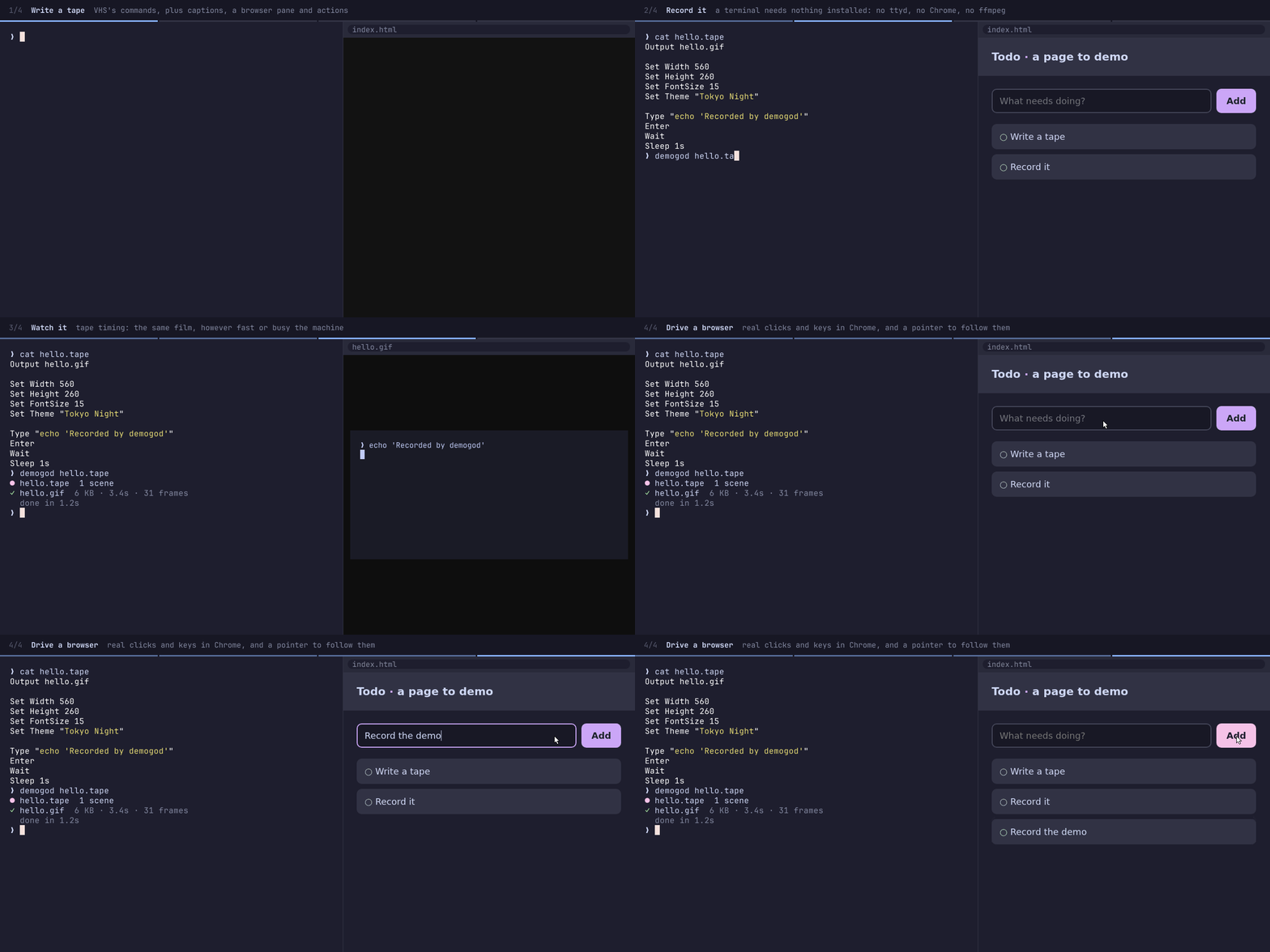
This GIF is recorded by demogod from docs/demo/demo.tape: make demo.
Why demogod
demogod reads VHS's tape language, so a VHS tape is a demogod tape. What is different is how it records them:
| demogod | VHS | |
|---|---|---|
| Recording a terminal needs | one binary, 2.4 MB | VHS, ttyd, ffmpeg and a Chromium |
| The same tape, recorded twice | the same timing, step for step (tape timing) | as long as each run took |
| Recording a 20s demo takes | about as long as its Sleeps |
20s or more |
| Web pages | a browser pane: Open, Click, Type, Scroll |
— |
| Scenes | Caption "title" "detail", with a progress bar |
— |
| Work off camera | Do reset: a shell command, or JavaScript or Rust |
Hide … Show |
| From code | a Rust crate and an npm package | the CLI |
Install
|
Or download a binary from the releases: Linux (static, x64 and arm64), macOS (Intel and Apple Silicon) and Windows (x64 and arm64).
Terminal demos need nothing else. Tapes that Open a page need Chrome, Chromium or Edge installed,
or CHROME_BIN pointing at one — and DEMOGOD_CHROME_FLAGS for any flags it needs on your
system. .mp4 and .webm need ffmpeg on PATH.
A tape
Output demo.gif

Set Width 1200
Set Height 600
Set Theme "Catppuccin Mocha"

Caption "Run the tests" "in a real shell"
Type "npm test"
Enter
Wait /passing/
Sleep 2s

Caption "Open the app" "and use it, in a browser beside the terminal"
Type "npm start"
Enter
Wait /listening on/
Open "http://localhost:3000"
Click "text=Sign in"
Type "ada@example.com"
Enter
Wait /Welcome, Ada/
Every line is a command, and a line can hold several: Type "ls" Sleep 500ms Enter. # starts
a comment. Paths are relative to the tape, so it records the same from any directory, and a tape
without an Output is saved beside itself: demo.tape to demo.gif.
Commands
| Command | What it does |
|---|---|
Type "text", Type@20ms "text" |
types it, a character every TypingSpeed (or the @ speed) |
Enter, Tab, Space, Backspace 3 |
presses a key, optionally several times: also Escape, Delete, Insert, Up, Down, Left, Right, Home, End, PageUp, PageDown |
Ctrl+C, Alt+B, Shift+Tab, Ctrl+Alt+Left |
presses a key with modifiers |
Sleep 2s |
waits: 500ms, 2s, 1.5, 1m |
Wait |
until the command finishes: the prompt comes back |
Wait /pattern/, Wait+Line /done$/i |
until the screen (or its last line) matches; @10s sets a timeout |
Hide, Show |
stop and start filming; hidden steps take no time in the film |
Caption "title" "detail" |
starts a scene, titled in a strip along the top |
Open "http://localhost:3000" |
opens the browser pane at a page; a path opens a file beside the tape |
Click "button.save", Click "text=Save" |
moves the pointer to an element and clicks it |
Hover "nav a" |
moves the pointer to an element |
Scroll 400, Scroll "#pricing" |
scrolls the page by pixels, or to an element |
ScrollUp 3, ScrollDown |
scrolls the terminal through its scrollback |
Focus terminal, Focus browser |
where the keys that follow go (Open and Click focus the browser) |
Image "screen.png" |
shows a picture in the pane |
Action reset "git stash" |
names a shell command… |
Do reset |
…and runs it off camera, between two keystrokes |
Screenshot "shot.png" |
saves the film as it is at this moment |
Copy "text", Paste |
a clipboard to type from |
Output demo.gif |
where to save: .gif .mp4 .webm .png .cast .txt or frames/ |
Require git |
fails before recording unless git is installed |
Env NODE_ENV "test" |
sets a variable for the shell |
Source "setup.tape" |
reads another tape in place |
Click, Hover and Scroll "selector" wait for their element to be visible first, up to
WaitTimeout, so a page that renders late needs no Sleep.
Settings
| Setting | Default | |
|---|---|---|
Set Width 1200, Set Height 600 |
1200 × 600 | the whole film, in pixels |
Set Columns 80, Set Rows 24 |
size the terminal in cells instead; the film grows to fit | |
Set FontSize 16 |
16 | |
Set FontFamily "Fira Code" |
JetBrains Mono | an installed family, a .ttf/.otf path, or a comma-separated list; JetBrains Mono and DejaVu Sans Mono are built in |
Set LineHeight 1.25, Set LetterSpacing 0 |
||
Set Theme "Tokyo Night" |
Dracula | a built-in theme (demogod themes) or a JSON object of colors |
Set Padding 20 |
20 | inside the window |
Set Margin 40, Set MarginFill "#6b50ff" |
0 | around the windows |
Set WindowBar Colorful |
None | Colorful, ColorfulRight, Rings, RingsRight; WindowBarSize its height |
Set BorderRadius 10 |
0 | rounded windows, when there is a margin |
Set Shell "zsh" |
bash (PowerShell on Windows) | bash, zsh, fish and sh start clean, with no rc files |
Set Prompt "$ " |
❯ |
|
Set Directory "../app" |
the tape's | where the shell starts |
Set TypingSpeed 50ms |
50ms | can change between steps |
Set WaitTimeout 15s |
15s | how long a Wait or Click looks before failing; can change |
Set WaitPattern /done/ |
the prompt | what a bare Wait waits for; can change |
Set Timing "real" |
tape | see timing |
Set WaitDuration 1s |
1s | how long each Wait and Open lasts in the film, under tape timing |
Set PaneWidth 45% |
45% | the browser pane's share of the width, or pixels |
Set BrowserZoom 0.8 |
1 | lay the page out wider and scale it down into the pane |
Set Framerate 50 |
50 | the most frames a second; a still screen costs no frames |
Set PlaybackSpeed 1.5 |
1 | |
Set CursorBlink true |
false | |
Set LoopOffset 50% |
0 | where the GIF starts: frames, a percentage, or a time |
Timing
By default each step lasts as long as the tape says — Type its length times the typing speed,
Wait one WaitDuration, a keypress a moment — however long it really took. A command that ran
for twelve seconds on a busy CI runner and one second on a laptop both show as one second. So the
same tape makes a film of the same length, with every step at the same moment, on any machine; and
recording is faster than playing, since keys go in at machine speed and slow commands are
compressed.
What happens during a step is kept, in order and in proportion: output streaming in during a
Wait streams in during that second of film. Set Timing "real" keeps the clock of the recording
instead, the way VHS does.
Actions
Do <name> runs something between two keystrokes, off camera: plant a bug before a test run,
fix it during a --watch, reset a database. The name has to be declared — by Action in the tape,
or by the code recording it — and a Do nothing declares fails before recording starts.
Action break "sed -i 's/qty: 3/qty: 1/' test/cart-test.ts"
Action fix   "git checkout test/cart-test.ts"

Do break
Type "npm test -- --watch"
Enter
Wait /1 failing/
Do fix
Wait /passing/
Errors
A tape is read whole, and checked, before anything runs — demogod check demo.tape does only that.
Errors say where, and how to fix them when that is clear:
error: no such command: Slep
  --> demo.tape:12
   |
12 | Slep 2s
   | ^^^^
   = help: did you mean Sleep?
A Wait that times out shows the screen it was looking at.
The command line
demogod <tape>... [options]   record each tape, and save it to its Output files
demogod new [file]            write a starter tape (demo.tape if no file is given)
demogod check <tape>...       check each tape can be recorded, without recording
demogod themes                list the built-in themes

  -o, --output <file>   save here instead of the tape's Output; repeatable
  -w, --watch           record again each time a tape changes
  -q, --quiet           print nothing but errors
      --json            print progress as JSON lines on stdout
      --action <name>   with --json: `Do <name>` asks the caller to run it
- reads a tape from stdin: echo 'Type "hi"' | demogod - -o hi.gif.
From JavaScript
import from 'demogod';
import from 'node:fs/promises';
const saved = await ;
console.log; // [{ path: '…/demo.gif', bytes: 512000, frames: 180, duration: 12.4 }]
// A tape can be written in place, too.
await ;
check(tape) checks without recording, and themes() lists the themes. A failed recording
rejects with a DemogodError carrying location ({ file, line }) and help. Types are
included. The package runs the native binary for the platform, installed as an optional dependency;
DEMOGOD_BINARY points it at another.
From Rust
use Demo;
let saved = from_file?
.action
.on_event
.run?;
Demo::record returns the Recording to save wherever and however often; Tape::parse reads a
tape without running anything. See docs.rs/demogod.
In CI
Keep the README's GIF in step with the code by recording it in CI, on Linux or macOS:
- uses: browser-actions/setup-chrome@v2   # only if the tape opens a page
- uses: izelnakri/demogod@v0
  with:
    tape: docs/demo.tape
- run: git diff --exit-code docs/demo.gif || echo "::warning::docs/demo.gif is out of date"
Or without the action: npx demogod docs/demo.tape.
How it works
The shell runs in a real pseudo-terminal, read into a terminal emulator (vt100) that keeps a snapshot of the screen each time it changes. The browser is headless Chrome, driven over the DevTools protocol, and filmed by its own screencast — which sends a frame whenever the page repaints. Every snapshot and frame is stamped with the moment it happened, then moved onto the tape's clock.
Nothing is drawn until the end. Then each distinct moment is rendered — text with fontdue, box-drawing and block characters drawn to fill their cells exactly, the window, caption strip and pointer — on every core, and written out. A GIF frame holds only the rectangle that changed, with the pixels inside it that did not change left transparent, so a keystroke costs a few hundred bytes.
Developing
nix develop has everything the tests and make demo use: Rust, Node, Chromium, ffmpeg and git-cliff.
Releasing
make release VERSION=0.2.0 sets the version everywhere, writes the changelog from the commits
(Conventional Commits) and tags. Pushing the tag builds every
binary, then publishes the GitHub release, the crate and the npm packages, with provenance.
The very first release needs two repository secrets, CARGO_REGISTRY_TOKEN and NPM_TOKEN: trusted
publishing can only be set up for a package that exists. Once it does, set it up on crates.io and
npmjs.com for this repository's ci.yml, and delete the secrets.
License
MIT. The built-in fonts are JetBrains Mono (OFL) and DejaVu Sans Mono (license).