# Delta Funnel

<h3 align="center">
<strong>Delta Lake to SQL Server. No Spark. No JDBC/ODBC bottleneck.</strong>
</h3>
<p align="center">
DataFusion SQL in.<br/>
Native TDS bulk load out.
</p>
<p align="center">
<strong>Observed:</strong> 13.4M rows in ~14 minutes vs. a ~2 hour Spark/JDBC path.<br/>
<a href="https://mag1cfrog.github.io/delta-funnel/">Read the Delta Funnel documentation</a>.
</p>
<p align="center">
<a href="https://docs.rs/delta-funnel"><img alt="Rust docs" src="https://docs.rs/delta-funnel/badge.svg"></a>
<a href="https://crates.io/crates/delta-funnel"><img alt="crates.io" src="https://img.shields.io/crates/v/delta-funnel.svg"></a>
<a href="https://pypi.org/project/deltafunnel/"><img alt="PyPI" src="https://img.shields.io/pypi/v/deltafunnel.svg"></a>
<a href="https://pypi.org/project/deltafunnel/"><img alt="Python 3.10+" src="https://img.shields.io/badge/python-3.10%2B-blue.svg"></a>
</p>
> [!NOTE]
> Delta Funnel is early project code. The Rust crate is available on crates.io,
> and the Python package is available on PyPI.
## When To Use It
Use Delta Funnel when:
- SQL Server writes are the bottleneck.
- Spark is too much machinery for a focused export.
- You want SQL transforms over Delta Lake without a cluster.
- You want Rust or Python orchestration with reports and tracing.
## Install
For Rust, add the `delta-funnel` crate:
```bash
cargo add delta-funnel
```
For Python, add the `deltafunnel` package:
```bash
uv add deltafunnel
```
## Python Quickstart
```python
from deltafunnel import Session
ado_connection_string = (
"server=tcp:localhost,1433;"
"database=warehouse;"
"User ID=etl_user;"
"Password=REPLACE_ME;"
"encrypt=true;"
"TrustServerCertificate=yes"
)
session = Session(default_mssql_connection_string=ado_connection_string)
# Register the Delta table as "orders" so SQL can reference it.
orders = session.delta_lake("file:///path/to/orders-delta", name="orders")
# Build a lazy DataFusion SQL query. No rows are read yet.
daily_orders = session.table_from_sql("""
select customer_id, order_date, total_amount
from orders
where order_date >= date '2026-01-01'
""")
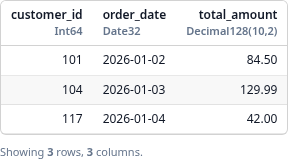
# Preview executes the DataFusion query with a limit; notebooks render it as a table.
daily_orders.preview(limit=20)
```
```python
# Write executes the query and loads the result into SQL Server.
report = daily_orders.write_to_mssql(
schema="dbo",
table="daily_orders",
load_mode="create_and_load", # "replace" also supports a missing target
# dry_run=True, # validate the load plan without writing rows
)
```
For private S3 sources, SQL Server load modes, dry runs, and reports, see the
[`private S3 sources`](https://mag1cfrog.github.io/delta-funnel/advanced/private-s3/),
[`SQL Server guide`](https://mag1cfrog.github.io/delta-funnel/sql-server/), and
[`dry runs and reports`](https://mag1cfrog.github.io/delta-funnel/dry-runs-reports/).
## Multi-output Writes
For workflows that write several related tables in one run, use
`Table.to_mssql(...)` to create output specs and `Session.write_all(...)` to
execute them together. Shared lazy SQL dependencies can be cached during the
workflow so common upstream work is not repeated for each output.
See the
[`multiple outputs and shared caching`](https://mag1cfrog.github.io/delta-funnel/advanced/multiple-outputs/)
guide for setup, dry runs, cache options, and failure behavior.
## Rust Quickstart
```rust
use delta_funnel::{
DeltaFunnelRuntime, DeltaFunnelSession, DeltaSourceConfig, LoadMode,
MssqlConnectionConfig, MssqlOutputTarget, MssqlTargetConfig,
MssqlTargetTable, OutputWritePlan, RunMode, SessionOptions,
};
fn main() -> Result<(), Box<dyn std::error::Error>> {
let ado_connection_string = concat!(
"server=tcp:localhost,1433;",
"database=warehouse;",
"User ID=etl_user;",
"Password=REPLACE_ME;",
"encrypt=true;",
"TrustServerCertificate=yes",
);
let default_connection = MssqlConnectionConfig::new(ado_connection_string)?
.with_display_label("warehouse");
let mut session = DeltaFunnelSession::new(
SessionOptions::new().with_default_mssql_connection(default_connection),
)?;
let runtime = DeltaFunnelRuntime::new()?;
// Register the Delta table as "orders" so SQL can reference it.
let _orders = session.delta_lake(DeltaSourceConfig::new(
"orders",
"file:///path/to/orders-delta",
))?;
// Build a lazy DataFusion SQL query. No rows are read yet.
let daily_orders = runtime.table_from_sql(
&mut session,
r#"
select customer_id, order_date, total_amount
from orders
where order_date >= date '2026-01-01'
"#,
)?;
// Preview executes the DataFusion query with a limit.
let preview = runtime.preview_table(&session, &daily_orders, 20)?;
println!("{}", preview.text());
// Write executes the query and loads the result into SQL Server.
let target = MssqlTargetConfig::new(MssqlTargetTable::new("dbo", "daily_orders")?)
.with_load_mode(LoadMode::CreateAndLoad);
let output = OutputWritePlan::new(
daily_orders,
MssqlOutputTarget::new("daily_orders", target, RunMode::Execute),
);
let report = runtime.write_to_mssql(&session, &output)?;
println!("wrote output {}", report.output_name());
Ok(())
}
```
For a guided version of this workflow, see the
[`Rust quickstart`](https://mag1cfrog.github.io/delta-funnel/rust-quickstart/).
For the full Rust API, see
[`docs.rs/delta-funnel`](https://docs.rs/delta-funnel) and the
[`query_load_dry_run` example](crates/delta-funnel/examples/query_load_dry_run.rs).
## Development
For local builds and test setup, see the
[`local development guide`](https://mag1cfrog.github.io/delta-funnel/contributing/development/).