# Logging and visualization
An active callback tells you which threads and locks form a cycle. Logging adds
the execution path that led there: thread lifecycle, lock attempts, acquisitions,
releases, condition-variable events, and the final finding.
## Enable logging
```toml
[dependencies]
deloxide = { version = "1.1", features = ["logging-and-visualization"] }
```
Choose a log path when Deloxide starts:
```rust,no_run
# extern crate deloxide;
use deloxide::Deloxide;
Deloxide::new()
.with_log("logs/deloxide_{timestamp}.log")
.callback(|report| eprintln!("{report:#?}"))
.start()
.expect("start Deloxide");
```
Without `with_log`, a logging-enabled build uses `deloxide.log`. The logger
creates missing parent directories and truncates an existing selected file.
For production captures, add a PID, UUID, or another collision-proof component;
the built-in timestamp has one-second precision.
## Open the viewer
Use `showcase` for a retained file:
```rust,no_run
# extern crate deloxide;
use deloxide::showcase;
showcase("logs/deloxide_20260729_120000.log")
.expect("open visualization");
```
Use `showcase_this()` when the current process owns the active logger. It flushes
pending records before opening the current file.
```console
cargo run --features logging-and-visualization --bin deloxide -- \
logs/deloxide_20260729_120000.log
```
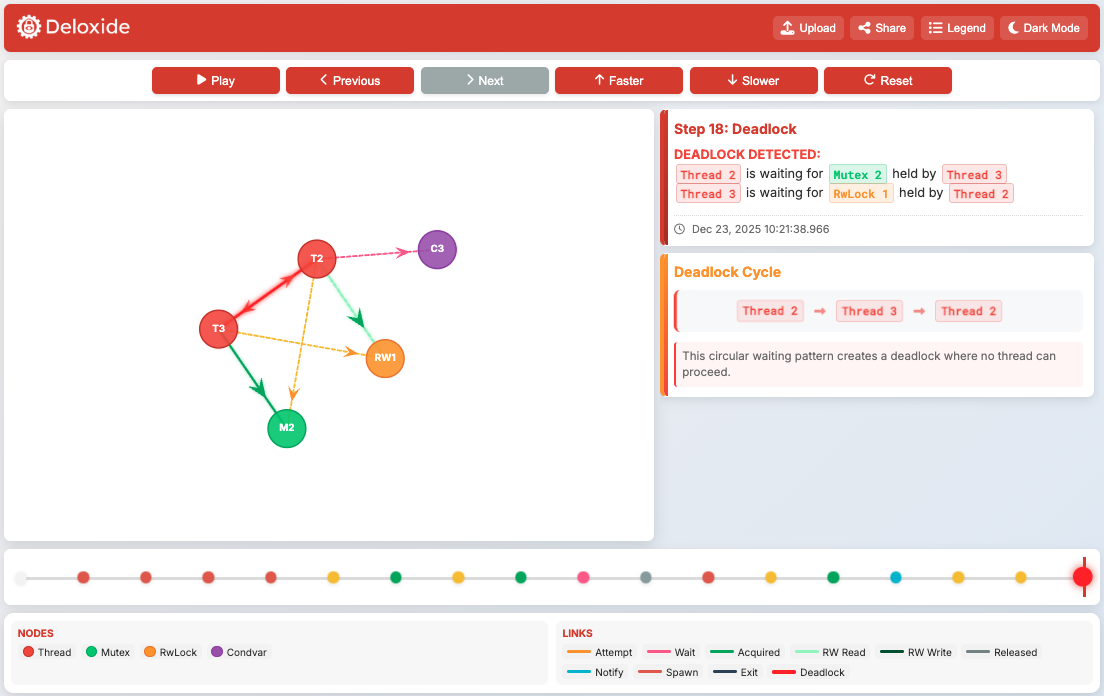
The timeline shows the tracked events leading to the report. The graph lets you
follow each waiting thread to the lock and incompatible owner that complete the
cycle. Use the shared IDs to correlate the callback, log, and application
telemetry.
## Operational notes
The viewer compresses and encodes the log into a URL parameter, then opens
`https://deloxide.vercel.app/`. Review the log for sensitive identifiers before
opening it outside an approved environment.
The ordinary-event logger queue is currently unbounded. During a long capture,
monitor memory, file growth, storage retention, and writer progress. Keep the
structured callback as the primary alert; visualization is supporting evidence.
Browser launch and file handling can fail. Do not open the viewer inside the
deadlock callback. Hand the report to an incident worker, retain the log, and
open it from a controlled path.