# Dekor
Simple to use general character and styling library for Rust, designed to enhance console output with various text styles and UTF-8 characters.
## Features
- **Ease of Use**: Apply multiple text styles with a single macro call or function.
- **Safety**: Macro compile-time checks prevent the use of invalid style names.
- **Flexible Styling:**: The `style!()` macro supports.
- Generating styled strings for console output using `ANSI` codes.
- Coloring text foreground and background.
- Applying **bold**, <u>underline</u>(Markdown doesn't do underlined), and *italicize* the text in any combination
- **RGB Color Support**: Apply custom text colors using RGB values.
- **Comprehensive Character Set**: The `Utf8` enum provides various UTF-8 characters
- Intention is to complete the list of characters over time
- Character list source: <https://www.fileformat.info/info/charset/UTF-8/list.htm>
- Implements `Display` and has the function `.repeat(n)` where `n` is `usize`
## Getting Started
To start using Dekor, add the following to your `Cargo.toml`:
```toml
[dependencies]
dekor = "0.2.1"
```
- Minimum supported Rust version: `1.56.1`
## Usage
### Basic Text Styling
```rust
use dekor::*;
fn main() {
let decorated_text_macro = style!(Bold, Underline, FGBlue => "This is decorated text");
println!("{}", decorated_text_macro);
// Output will be blue text that is underlined and bolded.
let styles = [Style::Bold, Style::Underline, Style::FGBlue];
let decorated_text_function = style(styles, "This is decorated text");
assert_eq!(decorated_text_macro, decorated_text_function);
}
```
### Using RGB Colors
```rust
use dekor::*;
fn main() {
// Applying RGB colors for foreground and background
let styles = vec![(Style::FGRGB, 255, 100, 50), (Style::BGRGB, 0, 0, 255)];
let rgb_text_function = styler(styles, "RGB Styled Text");
println!("{}", rgb_text_function);
// The text will have a custom foreground and background color.
let rgb_text_macro = style!((FGRGB, 255, 100, 50), (BGRGB, 0, 0, 255) => "RGB Styled Text");
assert_eq!(rgb_text_function, rgb_text_macro);
}
```
### Working with UTF-8 Characters
```rust
use dekor::*;
fn main() {
let decorated_text = style!(Bold, Underline, FGBlue => "This is decorated text");
let pipes = format!("{}\n{}{}\n{}{}",
Utf8::VPipeSlim,
Utf8::JointPipeSlim, Utf8::HPipeSlim,
Utf8::NodePipeSlim, Utf8::HPipeSlim,
);
// Output:
// This is decorated text <-- Will be blue text that is underlined and bolded
// │
// ├— <-- Note: Markdown will display the horizontal line slimmer than it is
// └—
println!("{}\n{}", decorated_text, pipes);
}
```
### Example Output:
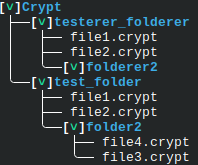
- Characters: `Utf8::VPipeSlim`, `Utf8::JointPipeSlim`, `Utf8::NodePipeCurved`, `Utf8::HPipeSlim`, and `Utf8::ModLetterDownArrowhead`
- Styles: `FGBlue`, `Bold`
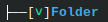
```rust
use dekor::*;
fn main() {
let folder = style!(FGBlue, Bold => "Folder"); // Style the folder
let down_arrow = style!(Bold, FGGreen => Utf8::ModLetterDownArrowhead); // Style the open/close indicator
let hpipe = Utf8::HPipeSlim.repeat(2); // `Utf8` implements `Display` and `.repeat()`
println!("{}\n{}{}[{}]{}",
Utf8::VPipeSlim, Utf8::JointPipeSlim, hpipe, down_arrow, folder
);
}
```
## Goals
- [x] Create a macro which allows for text styling
- [x] Allow for handling RGB and Hex inputs
- [x] Provide function implementations of the macros for a more robust approach
- [x] Import characters necessary for file tree display
- [ ] Import the remaining UTF-8 characters
- [ ] Look into using escape keys for these characters as some of them do not display properly
## License
This project is licensed under the MIT License - see the [LICENSE](LICENSE) file for details.
## Contributing
._. why would you do this?
- Assisting with importing all characters into the characters library would help greatly, just branch and make a pull request. Do your best to use the provided link and their naming schema to keep things consistent.

