# deconvolution
[](https://crates.io/crates/deconvolution) [](https://docs.rs/deconvolution) [](LICENSE)
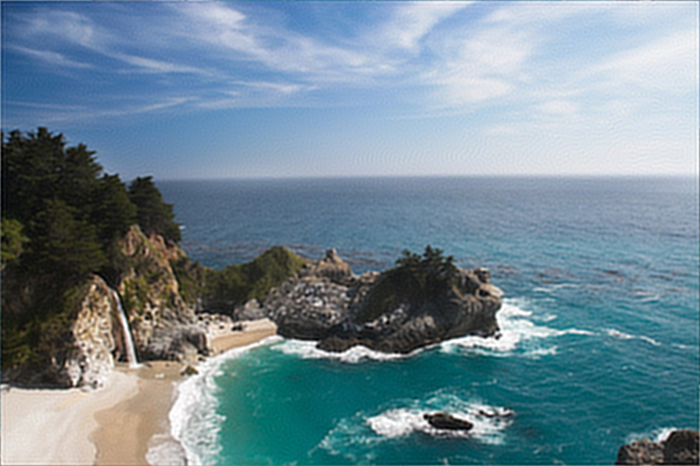
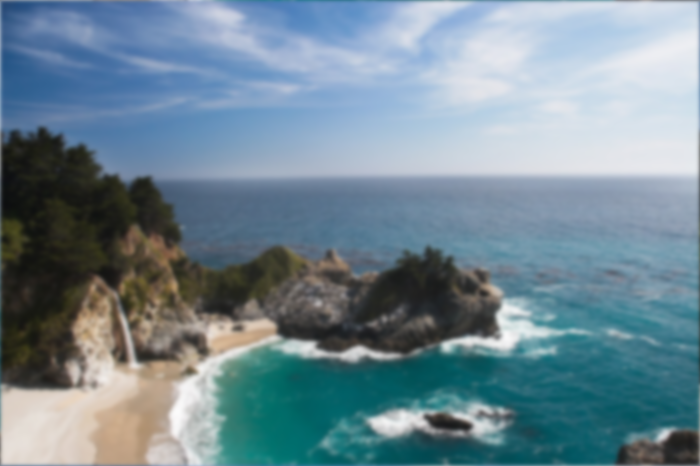
| <img src="before_deconvolution.png" alt="Before deconvolution" width="400"> | <img src="after_deconvolution.png" alt="After deconvolution" width="400"> |
_Before (left) is the motion-blurred sample; after (right) is restored using `wiener_with`._
Rust image deconvolution and restoration library.
Recovering images from blur depends on a point-spread function, stable
frequency-domain utilities, and careful regularization. `deconvolution`
provides known-PSF restoration, blind workflows, PSF/OTF conversion,
preprocessing helpers, simulation fixtures, and ndarray APIs.
### Overview
- **Image API**: Top-level functions use `image::DynamicImage` and return images
ready to save.
- **Known PSF methods**: Inverse filters, Wiener, Richardson-Lucy, constrained,
proximal, Krylov, and MLE-style restoration.
- **Blind methods**: Blind Richardson-Lucy, blind maximum likelihood, and
parametric PSF estimation.
- **PSF and OTF types**: `Kernel2D`, `Kernel3D`, `Transfer2D`, `Transfer3D`,
and `Blur2D`/`Blur3D`.
- **PSF tools**: Gaussian, motion, defocus, microscopy models, support utilities,
and PSF/OTF conversion.
- **Preprocessing**: Edge tapering, apodization, range normalization, and NSR
estimation.
- **Simulation**: Deterministic blur, noise, and synthetic fixture generation.
- **ndarray support**: 2D image arrays and 3D volume workflows.
- **Feature flags**: `rayon` by default; optional `f16` support.
### Installation
```bash
cargo add deconvolution
```
```toml
[dependencies]
deconvolution = "0.2.1"
```
Image loading: Add `image` when your application opens or saves image files.
```bash
cargo add image
```
Serial build: Disable default features to turn off `rayon`.
```toml
[dependencies]
deconvolution = { version = "0.2.1", default-features = false }
```
### Quick Start
```rust
use deconvolution::psf::basic::gaussian2d;
use deconvolution::spectral::{wiener_with, Wiener};
fn main() -> Result<(), Box<dyn std::error::Error>> {
let input = image::open("before_deconvolution.png")?;
let psf = gaussian2d((15, 15), 2.15)?;
let restored = wiener_with(&input, &psf, &Wiener::new().nsr(2.5e-4))?;
restored.save("after_deconvolution.png")?;
Ok(())
}
```
### Image API
Supported `DynamicImage` variants:
- `ImageLuma8`
- `ImageLumaA8`
- `ImageRgb8`
- `ImageRgba8`
- `ImageLuma16`
- `ImageLumaA16`
- `ImageRgb16`
- `ImageRgba16`
- `ImageRgb32F`
- `ImageRgba32F`
Configuration enums are shared across algorithm families:
- **`Boundary`**: `Zero`, `Replicate`, `Reflect`, `Symmetric`, `Periodic`
- **`Padding`**: `None`, `Same`, `Minimal`, `NextFastLen`, `Explicit2`,
`Explicit3`
- **`ChannelMode`**: `Independent`, `LumaOnly`, `IgnoreAlpha`,
`PremultipliedAlpha`
- **`RangePolicy`**: `PreserveInput`, `Clamp01`, `ClampNegPos1`, `Unbounded`
Use `ChannelMode::Independent` for per-channel color restoration,
`ChannelMode::LumaOnly` when the blur should primarily affect luminance, and
`RangePolicy::PreserveInput` when working in normal image sample ranges.
### PSF and OTF API
Basic PSF generators:
- `delta2d`, `delta3d`
- `gaussian2d`, `gaussian3d`
- `motion_linear`
- `disk`, `pillbox`, `defocus`
- `box2d`, `box3d`
- `oriented_gaussian`
Blind initialization helpers:
- `psf::init::uniform`
- `psf::init::gaussian_guess`
- `psf::init::motion_guess`
- `psf::init::from_support`
Support utilities:
- `normalize`, `normalize_3d`
- `center`, `center_3d`
- `pad_to`, `pad_to_3d`
- `crop_to`, `crop_to_3d`
- `flip`, `flip_3d`
- `validate`, `validate_3d`
- `support_mask`, `support_mask_3d`
Transfer conversion utilities:
- `otf::convert::psf2otf`
- `otf::convert::psf2otf_3d`
- `otf::convert::otf2psf`
- `otf::convert::otf2psf_3d`
Optical and microscopy models:
- `BornWolfParams` / `born_wolf`
- `GibsonLanniParams` / `gibson_lanni`
- `VariableRiGibsonLanniParams` / `variable_ri_gibson_lanni`
- `RichardsWolfParams` / `richards_wolf`
- `lorentz2d`
- `astigmatic`
- `double_helix`
- `otf::spectra::koehler_otf`
- `otf::spectra::defocus_otf`
### Known PSF Methods
#### Spectral and inverse filters
Frequency-domain restoration.
- `naive_inverse_filter`
- `inverse_filter`
- `truncated_inverse_filter`
- `regularized_inverse_filter`
- `tikhonov_inverse_filter`
- `wiener`
- `unsupervised_wiener`
Configuration types:
- `InverseFilter`
- `RegularizedInverseFilter`
- `TikhonovInverseFilter`
- `Wiener`
- `UnsupervisedWiener`
Custom configs: Use `_with` variants.
#### Richardson-Lucy and regularized RL
Poisson-style multiplicative restoration.
- `richardson_lucy`
- `damped_richardson_lucy`
- `richardson_lucy_tv`
Configuration types:
- `RichardsonLucy`
- `RichardsonLucyTv`
#### Iterative least-squares methods
Residual-update restoration.
- `landweber`
- `van_cittert`
- `tikhonov_miller`
- `ictm`
Configuration types:
- `Landweber`
- `VanCittert`
- `TikhonovMiller`
- `Ictm`
#### Constrained solvers
Bound-aware restoration.
- `nnls`
- `bvls`
Configuration types:
- `Nnls`
- `Bvls`
#### Sparse and proximal methods
Proximal-gradient restoration.
- `ista`
- `fista`
Configuration and model types:
- `Ista`
- `Fista`
- `SparseBasis`
#### Krylov and advanced iterative methods
Scientific imaging solvers.
- `mrnsd`
- `cgls`
- `wpl`
- `hybr`
Configuration types:
- `Mrnsd`
- `Cgls`
- `Wpl`
- `Hybr`
#### Maximum-likelihood family
Microscopy-oriented MLE-style restoration.
- `cmle`
- `gmle`
- `qmle`
Configuration types:
- `Cmle`
- `Gmle`
- `Qmle`
### Blind Deconvolution
Blind workflows estimate both the restored image and the PSF.
Image-facing blind workflows support Gray and GrayAlpha `DynamicImage` variants
for u8 and u16 samples.
- `blind::richardson_lucy`
- `blind::maximum_likelihood`
- `blind::parametric`
`blind::maximum_likelihood` shares the same Poisson EM restoration core as blind Richardson-Lucy.
Configuration and output types:
- `BlindRichardsonLucy`
- `BlindMaximumLikelihood`
- `BlindParametric`
- `BlindOutput<I>`
- `BlindReport`
- `ParametricPsf`
- `PsfConstraint`
PSF constraints:
- `Nonnegative`
- `NormalizeSum`
- `SupportMask(...)`
Parametric PSF families:
- `Gaussian { sigma }`
- `MotionLinear { length, angle_deg }`
- `Defocus { radius }`
- `OrientedGaussian { sigma_major, sigma_minor, angle_deg }`
### ndarray Workflows
The public `nd` module exposes array-first workflows for users who already work
in ndarray or need 3D volumes.
Enable the optional `f16` feature to pass `half::f16` arrays into the 2D
ndarray API while keeping computation in `f32`.
2D known-PSF methods in `nd::known_psf`:
- `wiener`, `unsupervised_wiener`
- `richardson_lucy`, `richardson_lucy_tv`
- `landweber`, `van_cittert`, `tikhonov_miller`, `ictm`
- `nnls`, `bvls`
- `ista`, `fista`
- `mrnsd`, `cgls`, `wpl`, `hybr`
Blind methods in `nd::blind`:
- `richardson_lucy`
- `maximum_likelihood`
3D and microscopy methods in `nd::microscopy`:
- `wiener`
- `richardson_lucy`
- `richardson_lucy_tv`
- `cmle`
- `gmle`
- `qmle`
### Preprocessing
Preprocessing utilities help reduce ringing and prepare numerical inputs.
- `preprocess::apodize`
- `preprocess::apodize::window_edges`
- `preprocess::edgetaper`
- `preprocess::estimate_nsr`
- `preprocess::normalize_range`
Use `edgetaper` or apodization before frequency-domain deconvolution when
strong edge discontinuities create ringing artifacts.
### Simulation and Fixtures
Deterministic: Same input and seed produce the same simulated output.
Fixtures: Synthetic images and volumes for tests, examples, and benchmarks.
Blur and degradation:
- `simulate::blur::blur`
- `simulate::blur::blur_otf`
- `simulate::blur::blur_3d`
- `simulate::blur::blur_otf_3d`
- `simulate::blur::degrade`
Noise models:
- `simulate::noise::add_gaussian_noise`
- `simulate::noise::add_poisson_noise`
- `simulate::noise::add_readout_noise`
Synthetic fixtures:
- `simulate::phantom::checkerboard_2d`
- `simulate::phantom::gaussian_blob_2d`
- `simulate::phantom::rgb_edges_2d`
- `simulate::phantom::phantom_3d`
### Optional rayon Integration
`rayon` is enabled by default. The optional `f16` feature adds `half::f16`
input/output support for the 2D ndarray API; computation remains in `f32`.
```toml
[features]
default = ["rayon"]
rayon = ["dep:rayon", "ndarray/rayon", "image/rayon"]
f16 = ["dep:half"]
```
Disable default features for serial builds:
```bash
cargo test --no-default-features
```
### Example Programs
Image-facing workflows:
```bash
cargo run --example wiener -- input.png output.png
cargo run --example richardson_lucy
cargo run --example blind_motion
cargo run --example edgetaper
cargo run --example custom_regularizer
```
Volume workflow:
```bash
cargo run --example microscopy_volume
```
### Benchmarks and Development
Benchmarks: Criterion benchmark families.
- `spectral`
- `rl`
- `blind`
- `volume`
```bash
cargo bench --no-run
cargo bench --bench spectral
cargo bench --bench rl
cargo bench --bench blind
cargo bench --bench volume
```
Checks:
```bash
cargo fmt --all -- --check
cargo clippy --all-features --all-targets -- -D warnings
cargo check --all-features
cargo test --all-features
cargo test --doc --all-features
RUSTDOCFLAGS="-D warnings" cargo doc --all-features --no-deps
cargo package --allow-dirty
```
### Limitations and Scope
- Known-PSF image-facing algorithms support u8/u16 Gray, GrayAlpha, Rgb, and Rgba
`DynamicImage` variants, plus 32-bit float Rgb and Rgba images.
- Blind image-facing algorithms support u8/u16 Gray and GrayAlpha
`DynamicImage` variants.
## License
deconvolution is licensed under the [MIT License](LICENSE), copyright (c) 2026 pbkx.