# declutter
**Read the code, not the commentary.**
AI agents write diffs where the logic hides under doc blocks that repeat the function name,
a comment above every line, a log call in every branch, tests twice the size of the change
and a formatter's worth of whitespace. `declutter` is a terminal diff viewer that peels
those layers off, one key each, so you review what the code *does* first — and the rest
when you choose to.
- **`c`** — comments gone, even the ones trailing a line of code, along with the blank
lines they brought.
- **`C`** — *only* the comments: check what the AI claims against what it wrote.
- **`t` `i` `l` `f`** — tests, imports, logging and whitespace-only changes, hidden or alone.
- **`declutter <PR URL>`** — review a GitHub or Azure DevOps pull request, leave notes on
lines, and post them as review comments when you quit.
- **`declutter notes add`** — let a coding agent hand you its review findings as draft
notes; nothing is posted until you've opened each one.
It parses the code with tree-sitter, so a `//` inside a string stays code, every line
number points at the real file, and the status line always says what is hidden.
**Languages:** Swift, TypeScript/TSX, JavaScript, Python, Go, Rust and Kotlin — see
[Supported languages](#supported-languages). Any other file still gets the tests and
formatting layers and moved-code detection.
```sh
brew install nikolajmosbaek/tap/declutter # or: cargo install declutter-diff
declutter # the branch you're on, against main
```
## What it looks like
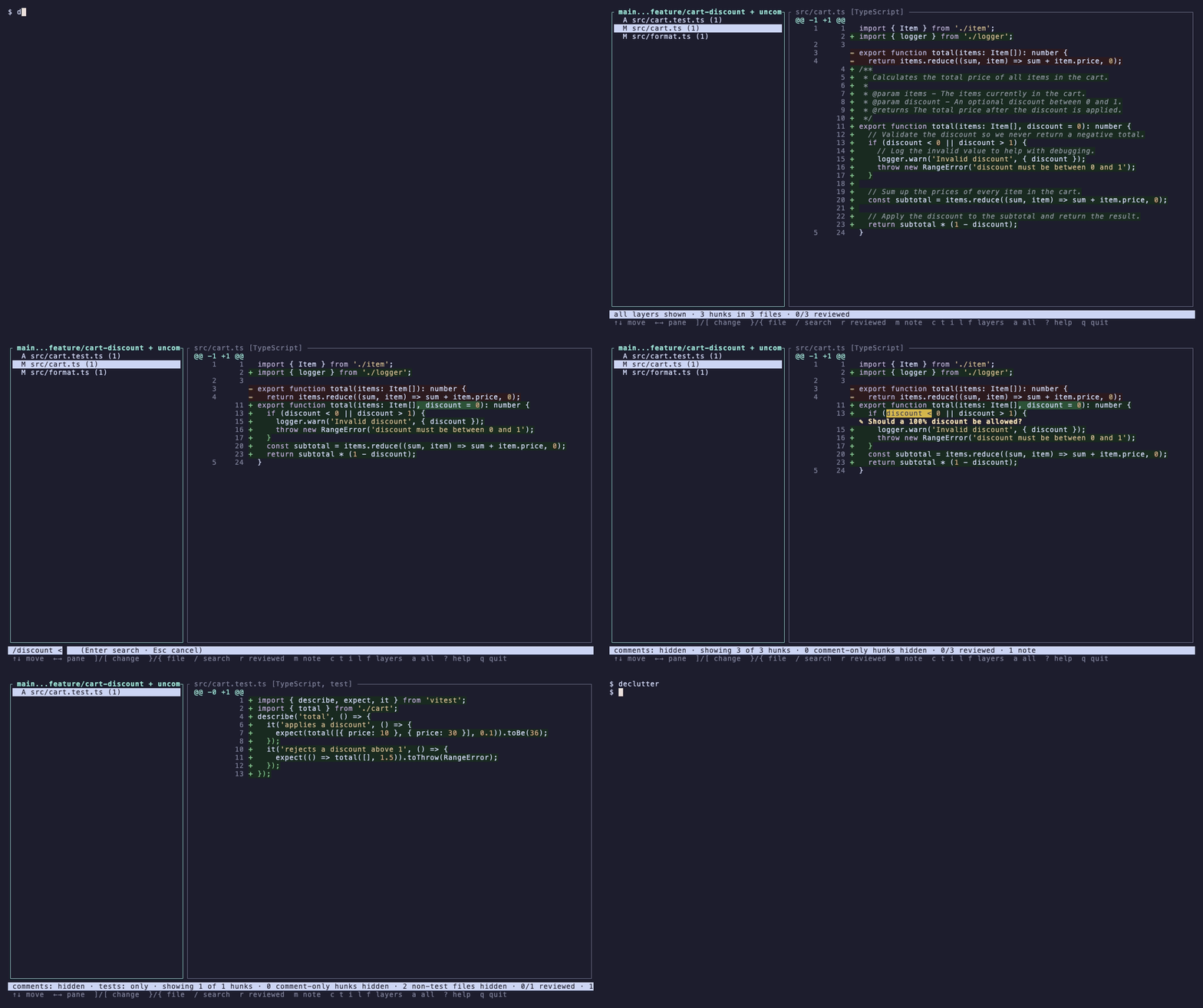
An AI-written change to a small cart module, everything shown — the way a plain diff
reads:
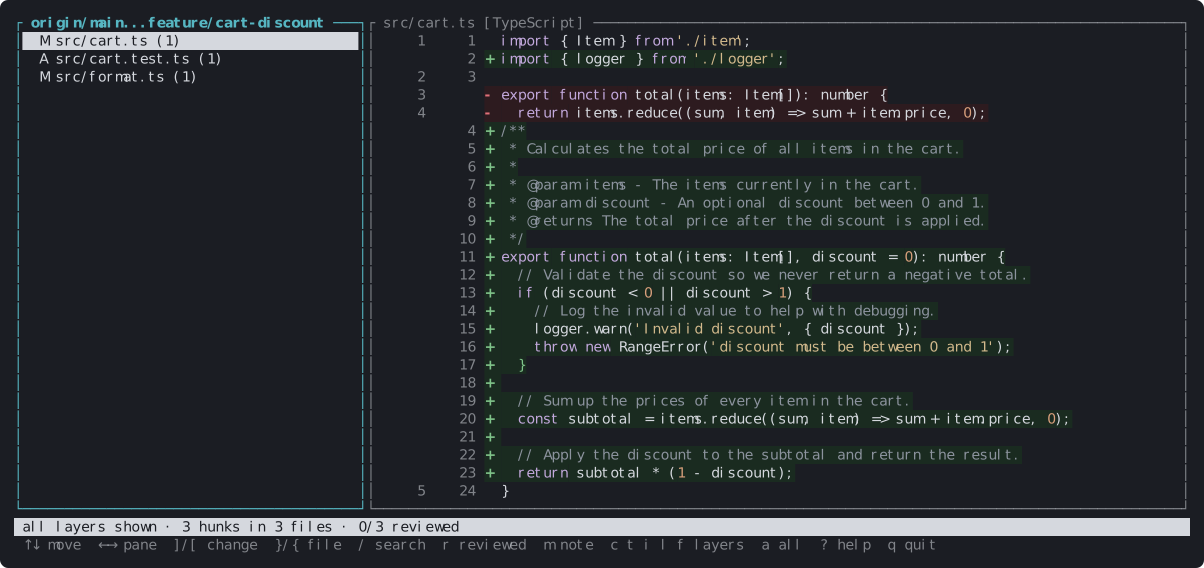
The same change with comments and logging hidden (`c`, `l`): only the code is left, with a
review note (`m`) on the line that needs a decision:
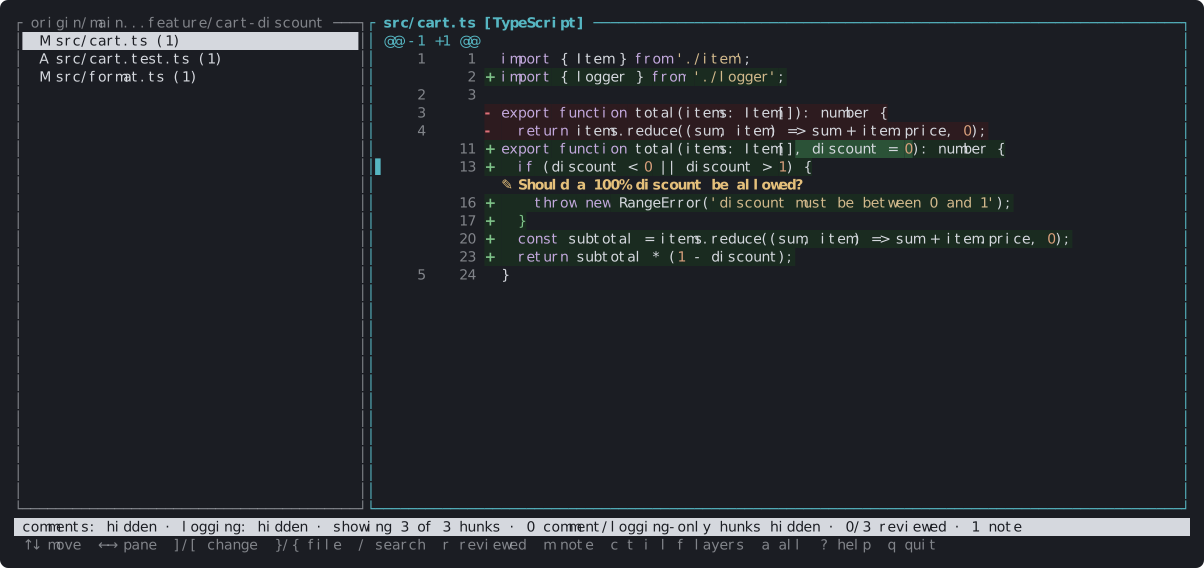
Comments only (`C`) — check what the AI claims its code does, on its own:
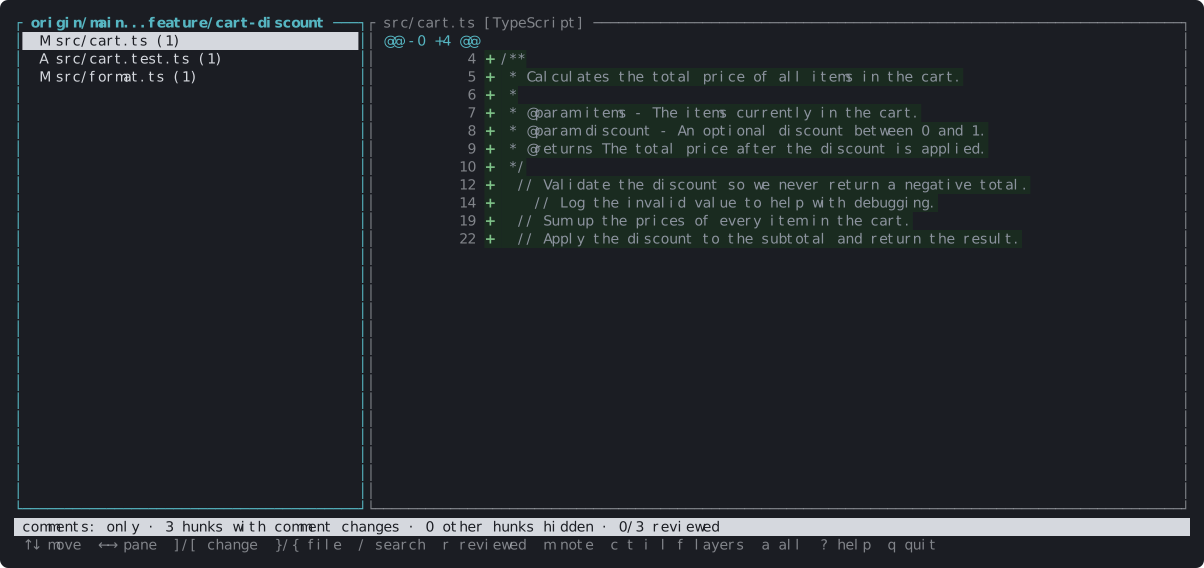
`?` lists every key:
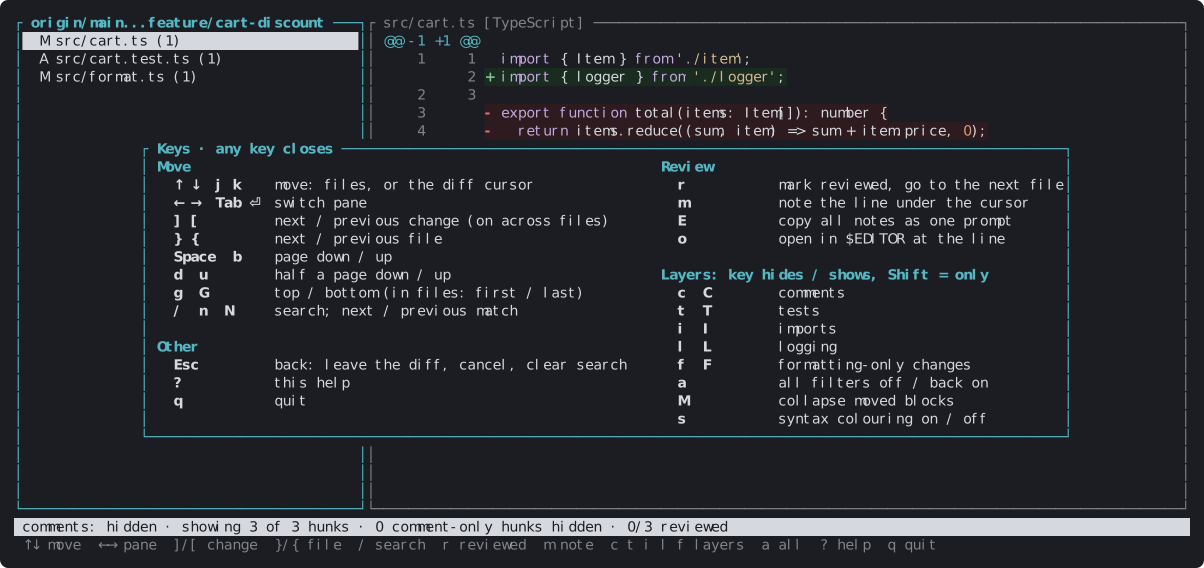
The pictures are drawn by the viewer itself — see [Development](#development) to redraw them.
## Review pull requests in one line
Copy the pull request's URL from the browser and hand it to `declutter`:
```sh
declutter https://github.com/acme/shop/pull/42
declutter https://dev.azure.com/contoso/Mobile/_git/shop/pullrequest/1234
declutter pr 42 # just the number, for the repository you're in
```
That's the whole setup. `declutter` fetches the PR — no branch to check out, nothing of
yours touched — and shows exactly the diff the PR page shows, layers and all. Leave notes
with `m` as you go; when you quit, it lists them and asks:
```
You left 1 note in this review:
`src/cart.ts:13` Should a 100% discount be allowed?
Post 1 comment to PR 42? [y/N] y
Posted 1 comment to PR 42.
```
Each note lands on its line in the PR, posted under your own account:
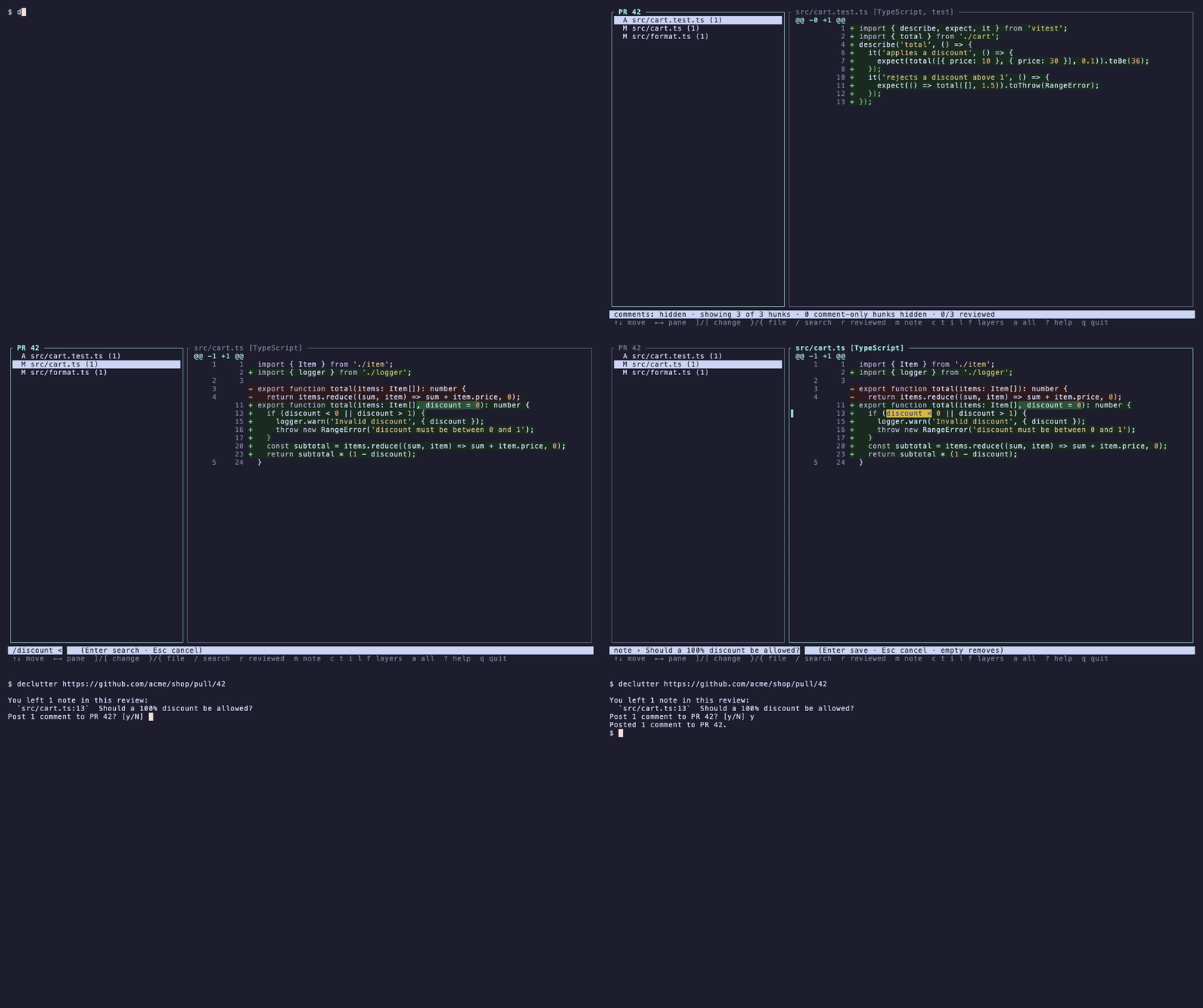
<sub>The recording uses a pretend `acme/shop` served from a local repository — see
`docs/pr.tape`.</sub>
| Open a PR | your normal git access to the repository | your normal git access to the repository |
| Post your notes | the `gh` CLI, signed in (`gh auth login`) | the `az` CLI, signed in (`az login`) |
| A note becomes | one review, with each note a comment on its line (`P`'s note is the review's text) | a comment thread on the line (`P`'s note: a thread on the PR) |
Nothing is posted unless you answer `y`; notes you don't post are kept for next time.
### Notes from a coding agent
An agent that reviews the PR can hand you its findings as notes, for you to read, edit
or drop before anything is posted:
```sh
declutter notes add pr 42 --path src/cart.ts --line 13 --text "A 100% discount is allowed"
declutter notes add pr 42 --json findings.json # [{"path", "line", "side": "old", "text"}, …]
declutter notes add pr 42 --text "Nothing tests the new branch" # on the PR, not a line
```
A note has to sit on a line of the diff (the error says which lines are); `--json` adds
all of its notes or, if any is refused, none. A second note on a line goes under the
first. These notes are **drafts**: marked as such in the viewer and never posted until you
open one with `m` (or `P`) and press Enter — edited or not. Emptying a note deletes it.
Afterwards, `declutter notes pr 42 --json` shows what is still pending and what was posted,
with a link to each comment, so the agent can see which findings you kept.
`declutter notes post pr 42` posts without opening the viewer (`--yes` skips the question;
drafts still stay).
## Layers
Five layers, each shown, hidden or shown on its own:
- **Comments**: line and block comments and doc comments (Python docstrings, Rust `///`,
KDoc, Go doc comments) in every supported language.
- **Tests**: whole test files, by the usual conventions in any language — `Tests/`,
`FooTests/`, `__tests__/`, `src/test/`, `FooTests.swift`, `FooTest.kt`, `foo.test.ts`,
`test_foo.py`, `foo_test.go` — or by importing a test framework (XCTest, Testing, Quick,
pytest, unittest, vitest, jest, JUnit, kotlin.test, Kotest). Inside Rust source files,
`#[cfg(test)]` modules and `#[test]` functions are test blocks of their own: hiding tests
cuts them out, *only* tests keeps just them.
- **Imports**: `import` statements and `export … from` re-exports, Go `import` blocks,
Rust `use` and `extern crate`, Kotlin `import`.
- **Logging**: statements that only log — `print`, `NSLog`, `os_log`, `console.*`, Go's
`fmt.Print*`/`log.Print*`/`slog`, Rust's `println!`/`dbg!`/`log`/`tracing` macros,
Kotlin's `println`, Android `Log.*` and `Timber` — and `debug/info/warn/error/…` calls on
any `logger`. Calls that do more than log stay code: `fmt.Fprintf` (it may write a
response) and `log.Fatal` (it ends the program).
- **Formatting**: changes that only move whitespace — re-indenting, re-spacing, re-wrapping
a statement over more or fewer lines, added blank lines. When hidden, the new layout stays
visible as context. Indentation counts as code in Python and in files without a grammar.
## Supported languages
| Swift | `.swift` | ✓ | ✓ | ✓ | ✓ | | ✓ |
| TypeScript | `.ts` `.mts` `.cts` `.tsx` | ✓ | ✓ | ✓ | ✓ | | ✓ |
| JavaScript | `.js` `.mjs` `.cjs` `.jsx` | ✓ | ✓ | ✓ | ✓ | | ✓ |
| Python | `.py` `.pyi` | ✓ docstrings too | ✓ | ✓ | ✓ | | ✓ |
| Go | `.go` | ✓ | ✓ | ✓ | ✓ | | ✓ |
| Rust | `.rs` | ✓ | ✓ | ✓ | ✓ | ✓ `#[cfg(test)]`, `#[test]` | ✓ |
| Kotlin | `.kt` `.kts` | ✓ | ✓ | ✓ | ✓ | | ✓ |
| Anything else | | | | | ✓ by path | | |
Formatting-only changes and moved code are found in every file, whatever the language. In
a file without a grammar, nothing else is hidden and indentation is treated as code.
Adding a language takes its tree-sitter grammar and a few rules in `src/lang.rs` and
`src/classify.rs`; [issues](https://github.com/NikolajMosbaek/declutter-diff/issues) asking
for one are welcome.
## Install
```sh
brew install nikolajmosbaek/tap/declutter # macOS and Linux, with Homebrew
cargo install declutter-diff # build it yourself (needs Rust)
```
All four install the `declutter` command. Ready-made binaries are on the
[releases page](https://github.com/NikolajMosbaek/declutter-diff/releases) for macOS (Apple
silicon and Intel) and Linux (x86-64 and ARM).
Or from a clone: `cargo build --release`, then use `target/release/declutter`. Needs Rust
1.90 or newer. Reviewing pull requests uses git's own access to the remote; posting notes
uses the `az` (Azure DevOps) or `gh` (GitHub) CLI.
The design, the decisions behind it and the roadmap are in
[prod.md](https://github.com/NikolajMosbaek/declutter-diff/blob/main/prod.md).
## Use
Run inside a git repository:
```sh
declutter # the branch you're on vs main, uncommitted work included
declutter <PR URL> # a GitHub or Azure DevOps pull request
declutter pr 42 # PR 42 of the repository origin points at
declutter feature/login # a branch vs main, from where it split off
declutter feature/login --base develop # … vs another branch
declutter --base develop # the branch you're on vs develop
declutter HEAD # only your uncommitted work
declutter main...feature # any range, as in git diff
declutter HEAD~3 # a revision vs the working tree
declutter --staged # HEAD vs the index
declutter --print # print instead of opening the viewer
declutter -p --comments only # print only the comment changes
declutter -n # print with each row's old and new line numbers
declutter notes [<target>] [--json] # the notes as a prompt (or JSON), of one review or all
declutter notes add <target> … # add draft notes, e.g. from a coding agent
declutter notes post <target> [--yes] # post a PR's notes without opening the viewer
declutter --tests hidden # start with test files left out
```
- **Pull requests** — paste the URL from the browser. The PR is fetched into
`refs/declutter/pr/<n>/` — `base` and `head`, plus `merge` when the host publishes one,
so `git rev-parse refs/declutter/pr/42/head` tells you which commit was reviewed; no
local branch is created or moved — and shown as the PR page shows it. It is read from the merge ref both hosts publish, so all it needs is git's own
access to the remote; only when there is no merge ref (a conflicting or closed PR) does it
ask the `gh` or `az` CLI for the branches.
- **No arguments** — on a branch, everything it changes: its commits since it split off from
the main branch plus whatever isn't committed yet, untracked files included. On the main
branch itself (or a detached HEAD) it shows just the uncommitted work.
- **Branches** — a local branch, or one on `origin` (fetched first if you don't have it yet),
is compared with the main branch: what `origin/HEAD` points at, else `main` or `master`.
`--base` picks another. Naming the main branch itself, or any other revision, compares it
with your working tree.
The file list's title says what is being compared (`origin/main...feature/login`, `PR 42`).
Viewer keys:
| `↑` `↓` / `j` `k` | move through the files, or the diff's line cursor |
| `←` `→` / `Tab` / `Enter` | switch between the file list and the diff |
| `]` `[` | next / previous change, on into the next file |
| `}` `{` | next / previous file |
| `Space` `b` | page down / up (`d` `u` half a page) |
| `g` `G` | top / bottom of the diff (first / last file in the file list) |
| `/` `n` `N` | search the diff; next / previous match (smart case) |
| `r` | mark the file reviewed and jump to the next unreviewed one (again to unmark) |
| `m` | leave a note on the line under the cursor, or open the draft there (`Alt+Enter`: new line — on macOS, with the terminal's "Use Option as Meta" on) |
| `P` | leave a note on the change as a whole |
| `E` | copy all notes to the clipboard as one prompt for a coding agent |
| `o` | open the file in `$VISUAL` / `$EDITOR` at the cursor's line |
| `c` `t` `i` `l` `f` | hide / show comments, tests, imports, logging, formatting-only changes |
| `C` `T` `I` `L` `F` | show only that layer; press again to go back |
| `a` | all filters off (everything shown); press again to put them back |
| `M` | collapse moved blocks to their one-line marker, or expand them |
| `s` | syntax colouring on / off (`--no-syntax` starts with it off) |
| `?` | every key |
| `Esc` | back: leave the diff, close a prompt, clear the search |
| `q` | quit |
Toggling a layer keeps the cursor on the same line of the file (or the closest one still
shown), so you can flip comments on and off without losing your place.
Layers combine: everything set to *hidden* is cut out together. A layer set to *only*
wins — with comments on *only* you see just the comment changes, whatever else is hidden.
**Moved code** (`M` collapses). A block of three or more lines removed in one place and added in another —
same file or a different one, re-indented or not — is drawn in its own tint with a marker
(`⇄ 14 lines moved to Checkout.swift:173`) at each end, in the viewer and in `--print`.
The status line always says what is hidden, e.g.
`comments: hidden · tests: hidden · showing 7 of 12 hunks · 5 comment-only hunks hidden · 4 test files hidden`.
Review marks are saved per repository in `.git/declutter/reviewed.tsv` (shared by
worktrees, never committed). A mark belongs to the exact change, so a file you reviewed
shows up unreviewed again as soon as a new commit touches it.
Notes belong to the review they were left in — a pull request, or a range such as
`origin/main...feature` — and only show up there. They are kept in
`.git/declutter/notes.json`. `E` copies the review's notes (drafts left out) as a prompt ("Please address
these review comments… 1. `path:line`: note") and also saves it to
`.git/declutter/review-notes.md`; `declutter notes` prints every note (`declutter notes
<target>` one review's) and `declutter notes --clear` deletes them.
**Posting notes to the pull request.** When you quit a review of a PR, declutter lists the
notes you left and asks `Post 3 comments to PR 42? [y/N]`. Only `y` posts: each note
becomes a comment on its line (a thread in Azure DevOps via `az rest`; on GitHub, one
review via `gh api` — or, if GitHub refuses it, one comment per note, on the file when
GitHub won't take that line), as whoever those CLIs are signed in as. Drafts you haven't
opened are kept back. Posted notes move to `.git/declutter/posted.jsonl` with a link to
where they landed; any that fail stay, with the error.
`o` knows the line syntax of VS Code (and Cursor/Windsurf), Sublime, Zed, Helix, Vim/Neovim,
nano, Emacs, micro, Xcode (`xed`) and JetBrains IDEs; terminal editors take over the screen
until you quit them. With no editor set it uses the system opener. It opens the working-tree
file, which is the reviewed version unless you're reviewing an older range.
## Development
```sh
cargo test # the whole suite (113 tests), under 10 seconds once built
cargo test --test navigation # one area (file names below)
cargo test brackets # tests whose name contains "brackets"
cargo clippy --all-targets # lint; kept at zero warnings
```
The suite runs offline and touches nothing outside a temporary directory. It needs
nothing but `git` on your `PATH`:
- **Git fixtures** — repositories are built per test in temp directories, with your
global git config switched off, so they behave the same on every machine.
- **Pull requests** — a local repository plays GitHub (a fake `github.com/acme/shop`
reached through git's `insteadOf`), with the PR published as a merge ref, the way the
hosts publish it. The `gh`/`az` lookup and the comment posting are swapped for stubs:
no test talks to GitHub or Azure DevOps.
- **The viewer** — drawn into an in-memory terminal (ratatui's `TestBackend`), then
checked cell by cell: text, colours, the cursor, what a key press changes.
What each test file covers:
| `comments.rs` | Finding comments and docstrings in each language; hiding them without leaving gaps or false changes; line numbers staying true |
| `languages.rs` | Go, Rust and Kotlin: comments, imports, logging (and what is *not* logging), Rust test blocks, test files, colours |
| `test_layer.rs` | Which files count as tests; hiding them or showing only them |
| `import_logging.rs` | Finding imports and logging-only statements; layers combining, and *only* winning over *hidden* |
| `formatting.rs` | Telling whitespace-only changes from real ones — including Python, where indentation is code |
| `print.rs` | `--print` output, and line numbers that stay right with rows hidden |
| `moves.rs` | Spotting moved blocks within and across files, and not mistaking short or trivial runs for moves |
| `inline.rs`, `syntax.rs` | Word-level highlights, syntax colours, the palette and the `s` toggle |
| `parsing.rs` | Swift the grammar can't parse being stood in for, and partial parses saying where they failed |
| `navigation.rs`, `tui.rs` | The keymap: changes and files, search, paging, `?`, `Esc`, `a`, keeping your place on layer toggles |
| `review_marks.rs`, `notes.rs`, `editor.rs` | Review marks; notes, drafts and their prompt; the note editor; opening the editor at the right line |
| `note_add.rs`, `note_post.rs` | Adding notes from the command line — only on lines of the diff, all or none — and posting them: drafts held back, one GitHub review, the posted log |
| `git.rs`, `targets.rs` | What is compared: working tree, branches against main, ranges, untracked and deleted files, renames |
| `pr.rs`, `upload.rs` | Opening PRs by URL or number, and posting notes — only on `y`, never drafts, keeping the ones that fail |
Most behaviours were checked the other way round too: break the code, see the test fail.
The README's pictures are made from the same code — `cargo run --example demo` redraws
the screenshots and `vhs docs/demo.tape` / `vhs docs/pr.tape` re-record the animations
(`brew install vhs`).
## License
[MIT](LICENSE)