# dear-file-browser
[](https://crates.io/crates/dear-file-browser)
[](https://docs.rs/dear-file-browser)
File dialogs and in-UI file browser for `dear-imgui-rs` with two backends:
- Native (`rfd`): OS dialogs on desktop, Web File Picker on WASM
- ImGui UI: a pure Dear ImGui file browser/widget (configurable layout + UX)
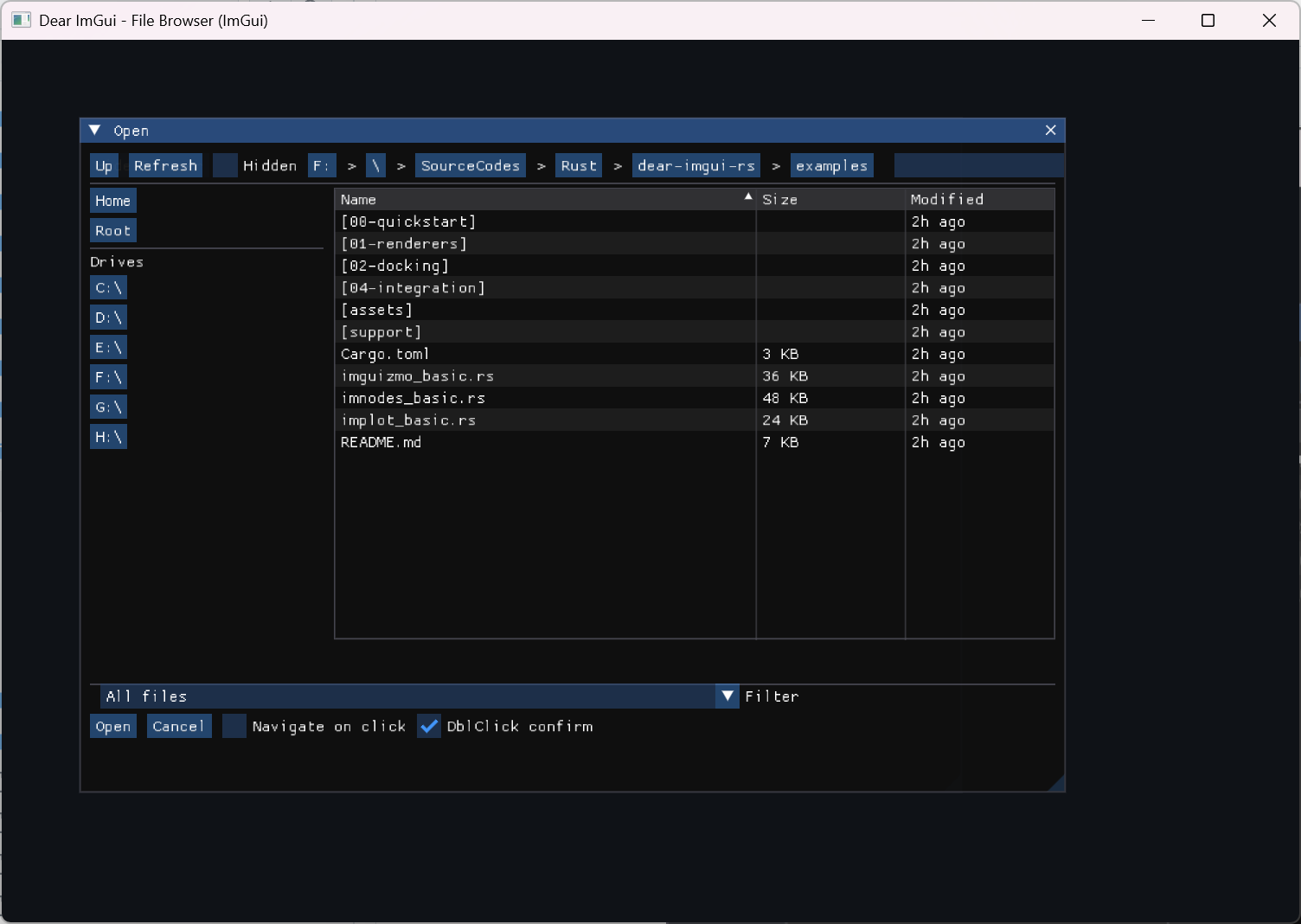
> Note: the screenshot may lag behind the latest UI. For the current IGFD-like look/feel, run the demo in
> `examples/04-integration/file_browser_imgui.rs`.
## Links
- Native backend: https://github.com/PolyMeilex/rfd
- In-UI: Pure Dear ImGui implementation (no C API)
## Fearless Refactor (IGFD-Grade)
- Architecture: `docs/FEARLESS_REFACTOR_ARCHITECTURE.md`
- IGFD source reference map: `docs/IGFD_SOURCE_REFERENCE_MAP.md` (1:1 UI/behavior alignment guide)
- P2 performance/async design: `docs/FEARLESS_REFACTOR_P2_PERF_ASYNC_DESIGN.md`
- P2 synthetic perf baseline: `docs/P2_PERF_BASELINE_2026-02-06.md`
- Roadmap / TODO: `docs/FEARLESS_REFACTOR_TODO_MILESTONES.md`
- Parity + deviations (non-C-API): `docs/IGFD_PARITY_AND_DEVIATIONS.md`
- Thumbnails cookbook: `docs/THUMBNAILS_INTEGRATION_COOKBOOK.md`
- Demo parity pack: `examples/04-integration/file_browser_imgui.rs`
## Compatibility
| Crate | 0.10.x |
| dear-imgui-rs | 0.10.x |
## Features
- Backends: `Backend::Auto|Native|ImGui` with runtime selection
- Modes: `OpenFile`, `OpenFiles`, `PickFolder`, `SaveFile`
- Native (rfd): blocking and async APIs (desktop); Web File Picker on WASM
- ImGui (pure UI):
- Layouts: `Standard` (quick locations + list) or `Minimal`
- Filters by extension, substring Search, directories-first (configurable)
- Filter selection defaults to the first configured filter (explicit "All files" option available)
- View modes: `List`, `ThumbnailsList`, `Grid`
- Sorting by Name/Ext/Size/Modified via table headers (list views) or a sort combo (grid)
- List columns: configurable visibility for Preview/Extension/Size/Modified (per dialog state)
- Navigation toolbar: back/forward/up/refresh with history
- Toolbar density + optional icon labels (host-provided glyphs)
- If you use `ToolbarIconMode::IconOnly`, ensure your font contains the glyphs; otherwise prefer `IconAndText` for a safe text fallback.
- File-dialog style address bar (typed path + Go + history + Tab completion) + breadcrumbs (auto-compress on long paths)
- Bottom action row: status text + filter selector + OK/Cancel
- Click behavior for directories: `Select` or `Navigate`
- Double-click to navigate/confirm (configurable)
- Places: editable groups + bookmarks/devices, export/import via compact versioned string (v1)
- Places pane: show/hide + splitter-resizable width (Standard layout); popup access in Minimal layout
- File styles: icons/colors/tooltips via `FileStyleRegistry`
- Thumbnails: request queue + LRU cache (host-provided decode/upload backend)
- Multi-selection (OpenFiles): Ctrl/Shift + click, Ctrl+A select all
- Generation-safe incremental scan policy with tuned presets (default; set `ScanPolicy::Sync` to disable)
- Keyboard navigation: Up/Down arrows + Enter, Backspace, Ctrl+L (focus path), Ctrl+F (focus search)
- Empty-state hint with configurable color/message
- CJK/emoji supported via user-provided fonts
- Unified `Selection` + `FileDialogError` across backends
- Optional `tracing` instrumentation
- Optional selection cap (IGFD-style `0/1/n`)
## Features (Cargo)
- `imgui` (default): enable the in-UI file browser
- `native-rfd` (default): enable native dialogs via `rfd`
- `tracing` (default): enable internal tracing spans
Default enables both backends; at runtime `Backend::Auto` prefers native and
falls back to ImGui if not available.
## Quick Start
```rust
use dear_file_browser::{Backend, DialogMode, FileDialog};
// Native async dialog (desktop/wasm):
# #[cfg(feature = "native-rfd")]
let selection = pollster::block_on(
FileDialog::new(DialogMode::OpenFiles)
.backend(Backend::Auto)
.max_selection(5)
.filter(("Images", &["png", "jpg"]))
.open_async()
);
// ImGui-embedded browser (non-blocking):
# use dear_imgui_rs::*;
# let mut ctx = Context::create();
# let ui = ctx.frame();
use dear_file_browser::{ClickAction, ExtensionPolicy, FileDialogExt, FileDialogState, LayoutStyle};
use dear_file_browser::HeaderStyle;
use dear_file_browser::FileListViewMode;
let mut state = FileDialogState::new(DialogMode::OpenFile);
// Optional: make it feel closer to ImGuiFileDialog (IGFD).
// (This also sets `ui.header_style = HeaderStyle::IgfdClassic`.)
state.apply_igfd_classic_preset();
// Optional configuration
state.ui.layout = LayoutStyle::Standard; // or Minimal
state.ui.header_style = HeaderStyle::IgfdClassic; // or ToolbarAndAddress
state.ui.file_list_view = FileListViewMode::List; // or Grid (enables thumbnails)
state.ui.file_list_columns.show_preview = false; // compact list without preview column
state.ui.file_list_columns.show_modified = false; // optional
state.core.click_action = ClickAction::Select; // or Navigate
state.core.double_click = true;
state.core.dirs_first = true;
state.core.save_policy.confirm_overwrite = true;
state.core.save_policy.extension_policy = ExtensionPolicy::AddIfMissing;
state.ui.breadcrumbs_max_segments = 6;
state.ui.empty_hint_enabled = true;
state.ui.empty_hint_color = [0.7, 0.7, 0.7, 1.0];
ui.window("Open")
.size([600.0, 420.0], dear_imgui_rs::Condition::FirstUseEver)
.build(|| {
if let Some(res) = ui.file_browser().show(&mut state) {
match res {
Ok(sel) => {
for p in sel.paths { println!("{:?}", p); }
}
Err(e) => eprintln!("dialog: {e}"),
}
}
});
```
### Reopen Semantics (IGFD-style Open/Display/Close)
Like ImGuiFileDialog's `OpenDialog -> Display -> Close`, this crate exposes explicit dialog visibility helpers on `FileDialogState`:
```rust
if ui.button("Open File Dialog") {
state.open();
}
if state.is_open() {
if let Some(result) = ui.file_browser().show(&mut state) {
match result {
Ok(sel) => {
// use selection
let _ = sel;
}
Err(_e) => {
// cancelled or invalid
}
}
state.close();
}
}
```
## List Column Preferences
List-view columns can be tuned per dialog instance. When users drag-resize or drag-reorder list columns, runtime preferences are written back into `state.ui.file_list_columns` automatically:
- The `Columns` menu also provides one-click layouts:
- `Compact`: hides `Preview` + `Modified`, keeps `Size` visible.
- `Balanced`: shows `Preview` + `Size` + `Modified`.
- These presets only change visibility/order and keep `weight_overrides` intact.
```rust
use dear_file_browser::{FileListColumnsConfig, FileListDataColumn};
state.ui.file_list_columns.order = [
FileListDataColumn::Name,
FileListDataColumn::Size,
FileListDataColumn::Modified,
FileListDataColumn::Extension,
];
state.ui.file_list_columns.weight_overrides.name = Some(0.60);
state.ui.file_list_columns.weight_overrides.size = Some(0.18);
let persisted = state.ui.file_list_columns.serialize_compact();
let restored = FileListColumnsConfig::deserialize_compact(&persisted)?;
state.ui.file_list_columns = restored;
```
## Result Convenience (IGFD-style)
`Selection` keeps `paths: Vec<PathBuf>` as the canonical result model, and also provides
IGFD-style convenience helpers:
```rust
let selection = FileDialog::new(DialogMode::OpenFile)
.backend(Backend::Auto)
.open_blocking()?;
let full_path = selection.file_path_name(); // like GetFilePathName()
let base_name = selection.file_name(); // like GetFileName()
let named = selection.selection_named_paths(); // like GetSelection()
```
## Filters
`FileFilter` supports a simple extension list API (case-insensitive, without leading dots):
```rust
use dear_file_browser::FileFilter;
let images = FileFilter::new("Images", vec!["png".into(), "jpg".into(), "jpeg".into()]);
```
ImGui backend advanced tokens (native `rfd` ignores non-plain extensions):
- Wildcards (`*` / `?`) are matched against the full extension string (e.g. `".tar.gz"`):
- `".vcx.*"`, `".*.filters"`, `".*"`
- Regex tokens wrapped in `((...))` are matched against the full base name (case-insensitive):
- `"((^imgui_.*\\.rs$))"`
You can also parse IGFD-style filter strings (collections):
```rust
use dear_file_browser::{DialogMode, FileDialog};
let dlg = FileDialog::new(DialogMode::OpenFile)
.filters_igfd("C/C++{.c,.cpp,.h},Rust{.rs}")
.unwrap();
```
ImGui backend default selection mirrors IGFD: when filters are configured, the active filter defaults to the first filter unless the user explicitly selects "All files" (no active filter). Filters are displayed in the insertion order.
## Embedding (No Host Window)
If you want to embed the browser into an existing window/popup/tab, draw only the contents:
```rust
// handle res
}
});
```
## Custom Window Host
To customize the hosting ImGui window (title/size), use `WindowHostConfig`:
```rust
use dear_file_browser::WindowHostConfig;
let cfg = WindowHostConfig {
title: "Open Asset".into(),
initial_size: [900.0, 600.0],
size_condition: dear_imgui_rs::Condition::FirstUseEver,
min_size: Some([640.0, 420.0]),
max_size: Some([1600.0, 1000.0]),
};
if let Some(res) = ui.file_browser().show_windowed(&mut state, &cfg) {
// handle res
}
```
## Modal Host
For an IGFD-style modal workflow without manually wiring popup open/close logic, use `ModalHostConfig`:
```rust
use dear_file_browser::ModalHostConfig;
let cfg = ModalHostConfig {
popup_label: "Open Asset###asset_modal".into(),
initial_size: [900.0, 600.0],
size_condition: dear_imgui_rs::Condition::FirstUseEver,
min_size: Some([640.0, 420.0]),
max_size: Some([1600.0, 1000.0]),
};
let fs = dear_file_browser::StdFileSystem;
if let Some(res) = ui
.file_browser()
.show_modal_with(&mut state, &cfg, &fs, None, None)
{
// handle res
}
```
## Validation Buttons
To tune the bottom action row (placement/order/width/labels), edit `state.ui.validation_buttons`:
```rust
use dear_file_browser::{ValidationButtonsAlign, ValidationButtonsOrder};
state.ui.validation_buttons.align = ValidationButtonsAlign::Right;
state.ui.validation_buttons.order = ValidationButtonsOrder::CancelConfirm;
state.ui.validation_buttons.button_width = Some(120.0);
```
## Managing Multiple Dialogs
For an IGFD-style workflow (open now, display later; multiple dialogs concurrently), use `DialogManager`:
```rust
use dear_file_browser::{DialogManager, DialogMode};
let mut mgr = DialogManager::new();
let open_id = mgr.open_browser(DialogMode::OpenFile);
// Later, per-frame:
if let Some(res) = mgr.show_browser(ui, open_id) {
// res: Result<Selection, FileDialogError>
}
```
## Custom Pane (IGFD-style)
To render extra widgets below the file list and optionally block confirmation, implement `CustomPane`:
```rust
use dear_file_browser::{ConfirmGate, CustomPane, CustomPaneCtx};
#[derive(Default)]
struct MyPane {
must_select: bool,
}
impl CustomPane for MyPane {
fn draw(&mut self, ui: &dear_imgui_rs::Ui, ctx: CustomPaneCtx<'_>) -> ConfirmGate {
ui.checkbox("Require selection", &mut self.must_select);
ui.text(format!("selected paths: {}", ctx.selected_paths.len()));
ui.text(format!("files: {}, dirs: {}", ctx.selected_files_count, ctx.selected_dirs_count));
if self.must_select && ctx.selected_paths.is_empty() {
ConfirmGate {
can_confirm: false,
message: Some("Select at least one entry".into()),
}
} else {
ConfirmGate::default()
}
}
}
let mut pane = MyPane::default();
if let Some(res) = ui
.file_browser()
.draw_contents_with(&mut state, &dear_file_browser::StdFileSystem, Some(&mut pane), None)
{
// handle res
}
```
## EntryId Selection Readback
When you need stable selection state before confirm, treat IDs as source-of-truth
and resolve paths from the current snapshot:
```rust
let selected_paths = state
.core
.selected_entry_ids()
.into_iter()
.filter_map(|id| state.core.entry_path_by_id(id).map(std::path::Path::to_path_buf))
.collect::<Vec<_>>();
```
If an ID is temporarily unresolved (for example right before rescan),
`entry_path_by_id()` returns `None`.
## File Styles (ImGui UI)
To decorate entries (folder icon, per-extension colors, tooltips), configure the `FileStyleRegistry`:
```rust
use dear_file_browser::{FileStyle, StyleMatcher};
state.ui.file_styles.push_rule(
StyleMatcher::AnyDir,
FileStyle {
icon: Some("[DIR]".into()),
text_color: Some([0.9, 0.8, 0.3, 1.0]),
tooltip: Some("Directory".into()),
font_token: None,
},
);
state.ui.file_styles.push_link_style(FileStyle {
icon: Some("[LNK]".into()),
text_color: Some([0.8, 0.6, 1.0, 1.0]),
tooltip: Some("Symbolic link".into()),
font_token: None,
});
state.ui.file_styles.push_extension_style(
"png",
FileStyle {
icon: Some("[IMG]".into()),
text_color: Some([0.3, 0.8, 1.0, 1.0]),
tooltip: Some("Image file".into()),
font_token: None,
},
);
// Name-based matching (case-insensitive):
state.ui.file_styles.push_name_contains_style(
"readme",
FileStyle {
icon: Some("[DOC]".into()),
text_color: Some([0.8, 0.8, 0.8, 1.0]),
tooltip: Some("Documentation".into()),
font_token: None,
},
);
state.ui.file_styles.push_name_regex_style(
r"((^imgui_.*\.rs$))",
FileStyle {
icon: Some("[SRC]".into()),
text_color: Some([0.2, 0.9, 0.2, 1.0]),
tooltip: Some("ImGui source".into()),
font_token: None,
},
);
// Dynamic callback provider (evaluated before static rules):
state
.ui
.file_styles
.set_callback(dear_file_browser::FileStyleCallback::new(|name, kind| {
if matches!(kind, dear_file_browser::EntryKind::File)
&& name.to_ascii_lowercase().ends_with(".md")
{
Some(FileStyle {
icon: Some("[MD]".into()),
text_color: Some([0.9, 0.9, 0.5, 1.0]),
tooltip: Some("Markdown".into()),
font_token: Some("icons".into()),
})
} else {
None
}
}));
// Optional font mapping for style font_token:
// state.ui.file_style_fonts.insert("icons".into(), my_icon_font_id);
```
## Thumbnails (ImGui UI)
`dear-file-browser` provides a renderer-agnostic thumbnail request queue and LRU cache. There are two integration styles:
1) Manual: decode/upload in your app, then call `fulfill_request()` and destroy evicted textures.
2) Backend-driven: implement `ThumbnailProvider` + `ThumbnailRenderer`, pass a `ThumbnailBackend` to the UI, and the UI
will call `maintain()` each frame.
```rust
use dear_imgui_rs::texture::TextureId;
use dear_file_browser::ThumbnailRequest;
state.ui.thumbnails_enabled = true;
state.ui.thumbnail_size = [48.0, 48.0];
// Manual integration (per-frame, after drawing the dialog):
let requests: Vec<ThumbnailRequest> = state.ui.thumbnails.take_requests();
for req in &requests {
// 1) decode req.path into pixels (RGBA8), 2) upload to GPU, 3) get a TextureId
let tex: TextureId = TextureId::new(0); // placeholder
state.ui.thumbnails.fulfill_request(req, Ok(tex));
}
// Destroy evicted textures in your renderer:
let to_destroy: Vec<TextureId> = state.ui.thumbnails.take_pending_destroys();
for tex in to_destroy {
// renderer.destroy(tex);
let _ = tex;
}
```
Backend-driven integration:
```rust
use dear_file_browser::{ThumbnailBackend, ThumbnailProvider, ThumbnailRenderer};
let mut backend = ThumbnailBackend {
provider: &mut my_provider,
renderer: &mut my_renderer,
};
// The UI will call `state.ui.thumbnails.maintain(&mut backend)` internally when drawing.
let _ = ui
.file_browser()
.draw_contents_with(&mut state, &dear_file_browser::StdFileSystem, None, Some(&mut backend));
```
Optional decoder (`thumbnails-image` feature):
```rust
// Cargo.toml:
// dear-file-browser = { version = "...", features = ["thumbnails-image"] }
use dear_file_browser::ImageThumbnailProvider;
let mut provider = ImageThumbnailProvider::default();
// Still required: a `ThumbnailRenderer` implementation for your graphics backend.
```
## WASM
- Native: `rfd` uses the browser file picker and is the recommended way to access user files.
- ImGui: the pure UI browser relies on `std::fs` to enumerate directories. In the browser this cannot access the OS filesystem, so the view will be empty. Prefer the native `rfd` backend on wasm.
## Fonts (CJK/Emoji)
Dear ImGui’s default font does not include CJK glyphs or emoji. If your filesystem contains non‑ASCII names (e.g., Chinese), load a font with the required glyphs into the atlas during initialization. See `examples/style_and_fonts.rs` for a complete pattern. Enabling the `freetype` feature in `dear-imgui-rs` also improves text quality.
## License
MIT OR Apache-2.0