
dear-file-browser


File dialogs and in-UI file browser for dear-imgui-rs with two backends:
- Native (
rfd): OS dialogs on desktop, Web File Picker on WASM - ImGui UI: a pure Dear ImGui file browser/widget (configurable layout + UX)
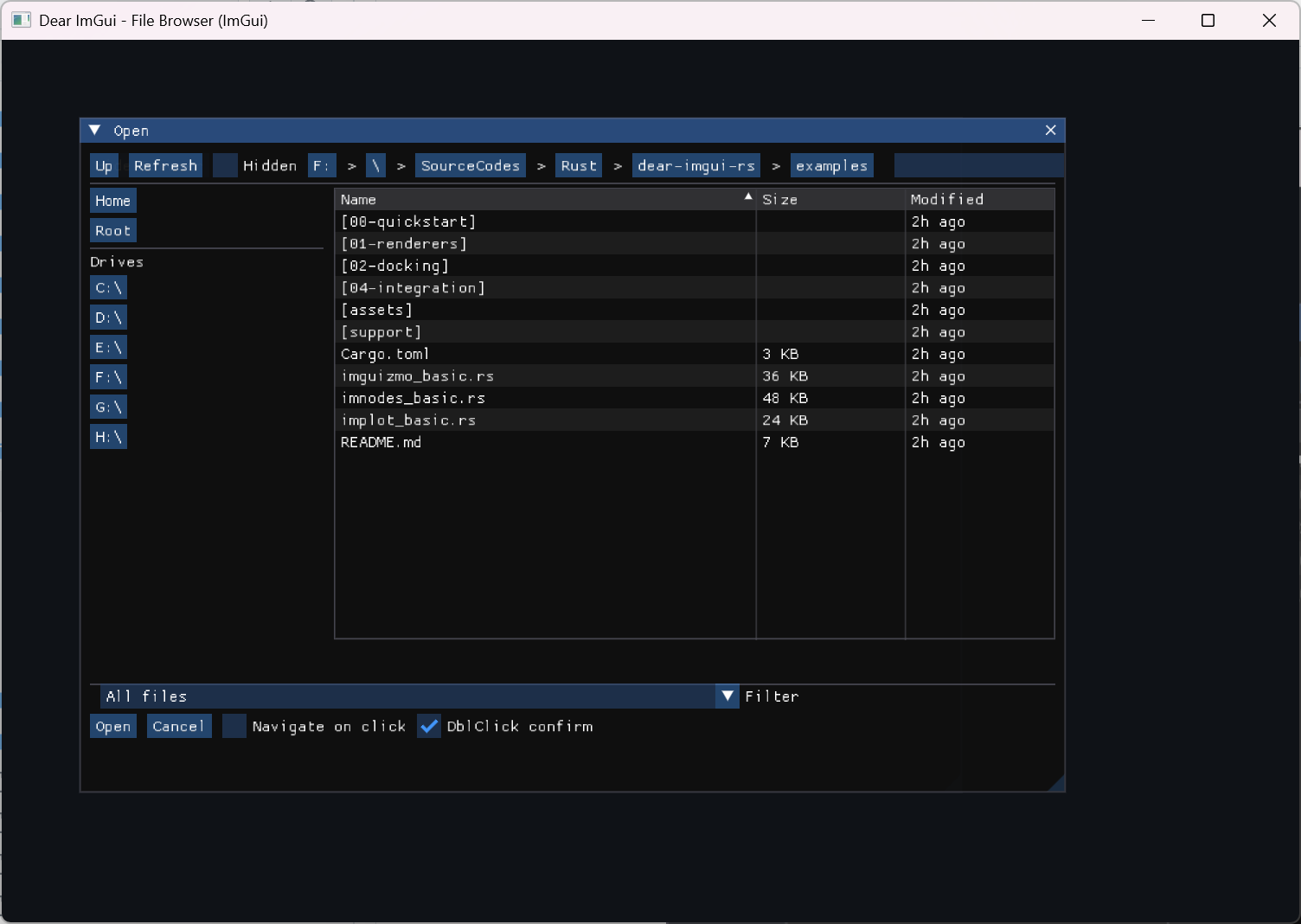
Note: the screenshot may lag behind the latest UI. For the current IGFD-like look/feel, run the demo in
examples/04-integration/file_browser_imgui.rs.
Links
- Native backend: https://github.com/PolyMeilex/rfd
- In-UI: Pure Dear ImGui implementation (no C API)
Fearless Refactor (IGFD-Grade)
- Architecture:
docs/FEARLESS_REFACTOR_ARCHITECTURE.md - IGFD source reference map:
docs/IGFD_SOURCE_REFERENCE_MAP.md(1:1 UI/behavior alignment guide) - P2 performance/async design:
docs/FEARLESS_REFACTOR_P2_PERF_ASYNC_DESIGN.md - P2 synthetic perf baseline:
docs/P2_PERF_BASELINE_2026-02-06.md - Roadmap / TODO:
docs/FEARLESS_REFACTOR_TODO_MILESTONES.md - Parity + deviations (non-C-API):
docs/IGFD_PARITY_AND_DEVIATIONS.md - Thumbnails cookbook:
docs/THUMBNAILS_INTEGRATION_COOKBOOK.md - Demo parity pack:
examples/04-integration/file_browser_imgui.rs
Compatibility
| Item | Version |
|---|---|
| Crate | 0.10.x |
| dear-imgui-rs | 0.10.x |
Features
- Backends:
Backend::Auto|Native|ImGuiwith runtime selection - Modes:
OpenFile,OpenFiles,PickFolder,SaveFile - Native (rfd): blocking and async APIs (desktop); Web File Picker on WASM
- ImGui (pure UI):
- Layouts:
Standard(quick locations + list) orMinimal - Filters by extension, substring Search, directories-first (configurable)
- Filter selection defaults to the first configured filter (explicit "All files" option available)
- View modes:
List,ThumbnailsList,Grid - Sorting by Name/Ext/Size/Modified via table headers (list views) or a sort combo (grid)
- List columns: configurable visibility for Preview/Extension/Size/Modified (per dialog state)
- Navigation toolbar: back/forward/up/refresh with history
- Toolbar density + optional icon labels (host-provided glyphs)
- If you use
ToolbarIconMode::IconOnly, ensure your font contains the glyphs; otherwise preferIconAndTextfor a safe text fallback.
- If you use
- File-dialog style address bar (typed path + Go + history + Tab completion) + breadcrumbs (auto-compress on long paths)
- Bottom action row: status text + filter selector + OK/Cancel
- Click behavior for directories:
SelectorNavigate - Double-click to navigate/confirm (configurable)
- Places: editable groups + bookmarks/devices, export/import via compact versioned string (v1)
- Places pane: show/hide + splitter-resizable width (Standard layout); popup access in Minimal layout
- File styles: icons/colors/tooltips via
FileStyleRegistry - Thumbnails: request queue + LRU cache (host-provided decode/upload backend)
- Multi-selection (OpenFiles): Ctrl/Shift + click, Ctrl+A select all
- Generation-safe incremental scan policy with tuned presets (default; set
ScanPolicy::Syncto disable)
- Layouts:
- Keyboard navigation: Up/Down arrows + Enter, Backspace, Ctrl+L (focus path), Ctrl+F (focus search)
- Empty-state hint with configurable color/message
- CJK/emoji supported via user-provided fonts
- Unified
Selection+FileDialogErroracross backends - Optional
tracinginstrumentation - Optional selection cap (IGFD-style
0/1/n)
Features (Cargo)
imgui(default): enable the in-UI file browsernative-rfd(default): enable native dialogs viarfdtracing(default): enable internal tracing spans
Default enables both backends; at runtime Backend::Auto prefers native and
falls back to ImGui if not available.
Quick Start
use ;
// Native async dialog (desktop/wasm):
#
let selection = block_on;
// ImGui-embedded browser (non-blocking):
# use *;
# let mut ctx = create;
# let ui = ctx.frame;
use ;
use HeaderStyle;
use FileListViewMode;
let mut state = new;
// Optional: make it feel closer to ImGuiFileDialog (IGFD).
// (This also sets `ui.header_style = HeaderStyle::IgfdClassic`.)
state.apply_igfd_classic_preset;
// Optional configuration
state.ui.layout = Standard; // or Minimal
state.ui.header_style = IgfdClassic; // or ToolbarAndAddress
state.ui.file_list_view = List; // or Grid (enables thumbnails)
state.ui.file_list_columns.show_preview = false; // compact list without preview column
state.ui.file_list_columns.show_modified = false; // optional
state.core.click_action = Select; // or Navigate
state.core.double_click = true;
state.core.dirs_first = true;
state.core.save_policy.confirm_overwrite = true;
state.core.save_policy.extension_policy = AddIfMissing;
state.ui.breadcrumbs_max_segments = 6;
state.ui.empty_hint_enabled = true;
state.ui.empty_hint_color = ;
ui.window
.size
.build;
Reopen Semantics (IGFD-style Open/Display/Close)
Like ImGuiFileDialog's OpenDialog -> Display -> Close, this crate exposes explicit dialog visibility helpers on FileDialogState:
if ui.button
if state.is_open
List Column Preferences
List-view columns can be tuned per dialog instance. When users drag-resize or drag-reorder list columns, runtime preferences are written back into state.ui.file_list_columns automatically:
- The
Columnsmenu also provides one-click layouts:Compact: hidesPreview+Modified, keepsSizevisible.Balanced: showsPreview+Size+Modified.
- These presets only change visibility/order and keep
weight_overridesintact.
use ;
state.ui.file_list_columns.order = ;
state.ui.file_list_columns.weight_overrides.name = Some;
state.ui.file_list_columns.weight_overrides.size = Some;
let persisted = state.ui.file_list_columns.serialize_compact;
let restored = deserialize_compact?;
state.ui.file_list_columns = restored;
Result Convenience (IGFD-style)
Selection keeps paths: Vec<PathBuf> as the canonical result model, and also provides
IGFD-style convenience helpers:
let selection = new
.backend
.open_blocking?;
let full_path = selection.file_path_name; // like GetFilePathName()
let base_name = selection.file_name; // like GetFileName()
let named = selection.selection_named_paths; // like GetSelection()
Filters
FileFilter supports a simple extension list API (case-insensitive, without leading dots):
use FileFilter;
let images = new;
ImGui backend advanced tokens (native rfd ignores non-plain extensions):
- Wildcards (
*/?) are matched against the full extension string (e.g.".tar.gz"):".vcx.*",".*.filters",".*"
- Regex tokens wrapped in
((...))are matched against the full base name (case-insensitive):"((^imgui_.*\\.rs$))"
You can also parse IGFD-style filter strings (collections):
use ;
let dlg = new
.filters_igfd
.unwrap;
ImGui backend default selection mirrors IGFD: when filters are configured, the active filter defaults to the first filter unless the user explicitly selects "All files" (no active filter). Filters are displayed in the insertion order.
Embedding (No Host Window)
If you want to embed the browser into an existing window/popup/tab, draw only the contents:
ui.window.build;
Custom Window Host
To customize the hosting ImGui window (title/size), use WindowHostConfig:
use WindowHostConfig;
let cfg = WindowHostConfig ;
if let Some = ui.file_browser.show_windowed
Modal Host
For an IGFD-style modal workflow without manually wiring popup open/close logic, use ModalHostConfig:
use ModalHostConfig;
let cfg = ModalHostConfig ;
let fs = StdFileSystem;
if let Some = ui
.file_browser
.show_modal_with
Validation Buttons
To tune the bottom action row (placement/order/width/labels), edit state.ui.validation_buttons:
use ;
state.ui.validation_buttons.align = Right;
state.ui.validation_buttons.order = CancelConfirm;
state.ui.validation_buttons.button_width = Some;
Managing Multiple Dialogs
For an IGFD-style workflow (open now, display later; multiple dialogs concurrently), use DialogManager:
use ;
let mut mgr = new;
let open_id = mgr.open_browser;
// Later, per-frame:
if let Some = mgr.show_browser
Custom Pane (IGFD-style)
To render extra widgets below the file list and optionally block confirmation, implement CustomPane:
use ;
let mut pane = default;
if let Some = ui
.file_browser
.draw_contents_with
EntryId Selection Readback
When you need stable selection state before confirm, treat IDs as source-of-truth and resolve paths from the current snapshot:
let selected_paths = state
.core
.selected_entry_ids
.into_iter
.filter_map
.;
If an ID is temporarily unresolved (for example right before rescan),
entry_path_by_id() returns None.
File Styles (ImGui UI)
To decorate entries (folder icon, per-extension colors, tooltips), configure the FileStyleRegistry:
use ;
state.ui.file_styles.push_rule;
state.ui.file_styles.push_link_style;
state.ui.file_styles.push_extension_style;
// Name-based matching (case-insensitive):
state.ui.file_styles.push_name_contains_style;
state.ui.file_styles.push_name_regex_style;
// Dynamic callback provider (evaluated before static rules):
state
.ui
.file_styles
.set_callback;
// Optional font mapping for style font_token:
// state.ui.file_style_fonts.insert("icons".into(), my_icon_font_id);
Thumbnails (ImGui UI)
dear-file-browser provides a renderer-agnostic thumbnail request queue and LRU cache. There are two integration styles:
- Manual: decode/upload in your app, then call
fulfill_request()and destroy evicted textures. - Backend-driven: implement
ThumbnailProvider+ThumbnailRenderer, pass aThumbnailBackendto the UI, and the UI will callmaintain()each frame.
use TextureId;
use ThumbnailRequest;
state.ui.thumbnails_enabled = true;
state.ui.thumbnail_size = ;
// Manual integration (per-frame, after drawing the dialog):
let requests: = state.ui.thumbnails.take_requests;
for req in &requests
// Destroy evicted textures in your renderer:
let to_destroy: = state.ui.thumbnails.take_pending_destroys;
for tex in to_destroy
Backend-driven integration:
use ;
let mut backend = ThumbnailBackend ;
// The UI will call `state.ui.thumbnails.maintain(&mut backend)` internally when drawing.
let _ = ui
.file_browser
.draw_contents_with;
Optional decoder (thumbnails-image feature):
// Cargo.toml:
// dear-file-browser = { version = "...", features = ["thumbnails-image"] }
use ImageThumbnailProvider;
let mut provider = default;
// Still required: a `ThumbnailRenderer` implementation for your graphics backend.
WASM
- Native:
rfduses the browser file picker and is the recommended way to access user files. - ImGui: the pure UI browser relies on
std::fsto enumerate directories. In the browser this cannot access the OS filesystem, so the view will be empty. Prefer the nativerfdbackend on wasm.
Fonts (CJK/Emoji)
Dear ImGui’s default font does not include CJK glyphs or emoji. If your filesystem contains non‑ASCII names (e.g., Chinese), load a font with the required glyphs into the atlas during initialization. See examples/style_and_fonts.rs for a complete pattern. Enabling the freetype feature in dear-imgui-rs also improves text quality.
License
MIT OR Apache-2.0