<div align="center">
<h1>db9s</h1>
A k9s-style terminal UI to browse, query, and edit your databases and message queues 🦀

<div>
  [](https://opensource.org/licenses/MIT) [](https://github.com/damien-mathieu1/db9s/releases/latest) [](https://github.com/damien-mathieu1/db9s/actions/workflows/ci.yml)
</div>
</div>
## Installation
```bash
cargo install db9s
```
Or grab a prebuilt binary (Linux, macOS, Windows) from the
[releases page](https://github.com/damien-mathieu1/db9s/releases/latest).
## Supported databases
| Database | Status |
|---|---|
| PostgreSQL | 🟢 Supported |
| MongoDB | 🟢 Supported |
| RabbitMQ | 🟢 Supported |
| Redis | 🟢 Supported |
| MySQL / MariaDB | 🔴 Planned |
| SQLite | 🔴 Planned |
| Microsoft SQL Server | 🔴 Planned |
| ClickHouse | 🔴 Planned |
| Cassandra / ScyllaDB | 🔴 Planned |
Every backend gets the same screens and keys. Want one sooner? See
[CONTRIBUTING.md](CONTRIBUTING.md#adding-a-backend).
## Quick Start
```bash
db9s --postgres postgres://user:pass@localhost/db
db9s --mongo mongodb://localhost:27017
db9s --redis redis://localhost:6379 # rediss:// for TLS
db9s --rabbitmq http://guest:guest@localhost:15672 # management API
db9s --rabbitmq 'amqp://guest:guest@localhost:5672/%2F?queues=orders,emails' # plain AMQP
```
Or just run `db9s` and add connections from the TUI (`a`). They are saved to
`~/.config/db9s/config.toml` (Linux) / `~/Library/Application Support/db9s/config.toml` (macOS):
```toml
[[connections]]
name = "local pg"
kind = "postgres"
url = "postgres://user:pass@localhost/db"
[[connections]]
name = "local mongo"
kind = "mongo"
url = "mongodb://localhost:27017"
[[connections]]
name = "local redis"
kind = "redis"
url = "redis://localhost:6379"
[[connections]]
name = "local rabbit"
kind = "rabbitmq"
url = "http://guest:guest@localhost:15672"
editor = "nvim" # optional, for `E` — defaults to $EDITOR, then vi
```
## Usage
| Key | Action |
|---|---|
| `j`/`k` / arrows | move (highlighting a table/collection previews its rows) |
| `enter` / `tab` | open, switch between containers and rows pane |
| `esc` / `q` | back a level (`q` quits from connections) |
| `/` | raw query: SQL for Postgres, JSON filter or `[$match, ...]` pipeline for Mongo |
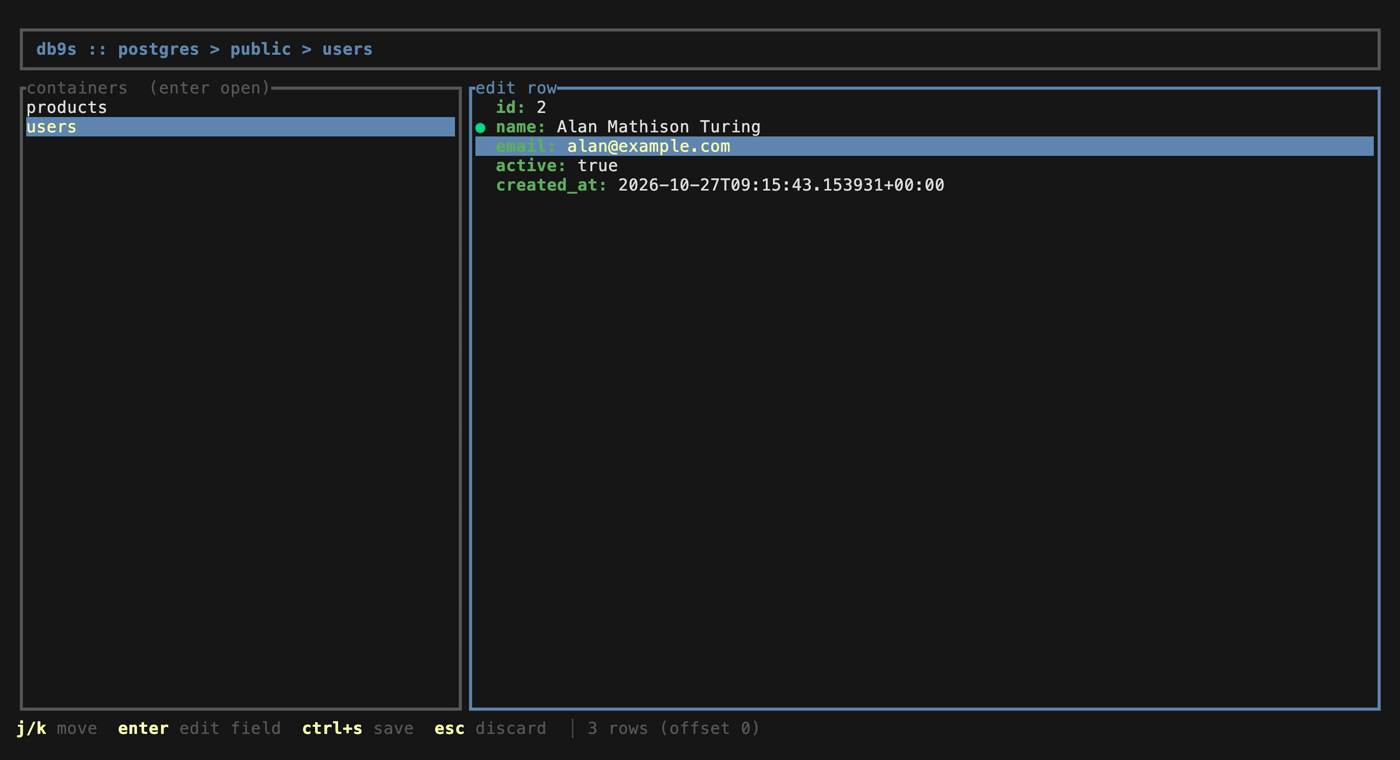
| `e` | edit the selected row/document inline, field by field (`ctrl+s` save) |
| `E` | edit the selected row/document in `$EDITOR`, confirm the diff to save |
| `d` | delete the selected row/document |
| `n` / `p` | next / previous page |
| `r` | refresh |
| `a` / `e` / `d` / `s` | connections screen: add / edit / delete a connection, settings |
The footer always shows the keys available where you are. In any text field:
`←`/`→` move the cursor, `home`/`end` (or `ctrl+a`/`ctrl+e`) jump, `delete`
removes forward, `ctrl+u` clears before the cursor.
### Redis
Databases are the logical DBs (`db0` plus every non-empty one), containers are
**keys** (first 1000 from `SCAN`), and rows follow the key type:
| Type | Rows | Edit (`e`) | Delete (`d`) |
|---|---|---|---|
| string | `value` | `SET` (keeps the TTL) | deletes the key |
| hash | `field`, `value` | change value or rename field | `HDEL` |
| list | `index`, `value` | `LSET` | removes that index |
| set | `member` | rename member | `SREM` |
| zset | `member`, `score` | change score or member | `ZREM` |
| stream | `id`, `fields` | read-only | `XDEL` |
`/` runs any Redis command (`HGETALL user:1`, `SET greeting "hi there"`) and
shows the raw reply, like `redis-cli`.
### RabbitMQ
Same screens: databases are **vhosts**, containers are **queues**, rows are
**messages**. Two ways to connect, picked from the URL scheme:
| URL | Uses | Lists |
|---|---|---|
| `http(s)://user:pass@host:15672` | management API (plugin `rabbitmq_management`) | every vhost and queue |
| `amqp(s)://user:pass@host:5672/<vhost>?queues=a,b` | plain AMQP ([lapin](https://github.com/amqp-rs/lapin)), no plugin needed | the vhost in the URL, the queues in `queues=` (AMQP can't list them) |
- Messages are peeked, not consumed: they stay in the queue, but RabbitMQ marks
them as redelivered.
- `/` publishes a message to the queue, `d` purges the whole queue (a single
message can't be removed), `e`/`E` are disabled: messages are read-only.

## Notes
- Row edit/delete on Postgres needs a primary key column named `id`.
- Color palette ported from [mongotui](https://github.com/kreulenk/mongotui).
## Contributing
See [CONTRIBUTING.md](CONTRIBUTING.md): local Postgres, Mongo, Redis and RabbitMQ with seed data,
conformance tests for every backend, and how releases work.
## License
MIT