# datafusion-server crate
[](https://crates.io/crates/datafusion-server)
[](./LICENSE)
[](https://github.com/sal-openlab/datafusion-server/actions?query=workflow%3Apush-trigger)
[](https://sal-openlab.github.io/datafusion-server/)
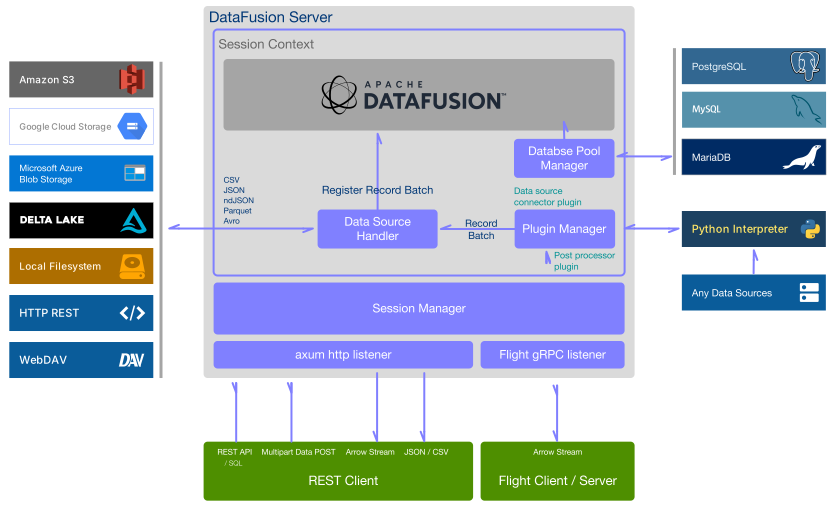
Multiple session, variety of data sources query server implemented by Rust.
* Asynchronous architecture used by [Tokio](https://tokio.rs/) ecosystem
* [Apache Arrow](https://arrow.apache.org/) with [Apache DataFusion](https://arrow.apache.org/datafusion/)
+ Supports multiple data source with SQL queries
* Python plugin feature for data source connector and post processor
* Horizontal scaling architecture between servers using
the [Arrow Flight](https://arrow.apache.org/docs/format/Flight.html) gRPC feature
Please see the **[Documentation](https://sal-openlab.github.io/datafusion-server/introduction/)** for an introductory
tutorial and a full usage guide. Additionally,
the [REST API documentation](https://sal-openlab.github.io/datafusion-server/api/v1/) is available according to the
OpenAPI specification. Also, refer to
the [CHANGELOG](https://github.com/sal-openlab/datafusion-server/blob/main/CHANGELOG.md) for the latest information.
## System Overview
## License
License under the [MIT](LICENSE)
Copyright © 2022 - 2025 SAL Ltd. - https://sal.co.jp
## Supported environment
* Linux
* BSD based Unix incl. macOS / Mac OSX
* SVR based Unix
* Windows incl. WSL2 / Cygwin
and other [LLVM](https://llvm.org/docs/GettingStarted.html#hardware) supported environment.
## Using pre-built Docker image (Currently available amd64 architecture only)
### Pre-require
* Docker CE / EE v20+
### Pull container image from GitHub container registry
```sh
$ docker pull ghcr.io/sal-openlab/datafusion-server/datafusion-server:latest
```
or built without Python plugin version.
```sh
$ docker pull ghcr.io/sal-openlab/datafusion-server/datafusion-server-without-plugin:latest
```
### Executing container
```sh
$ docker run -d --rm \
-p 4000:4000 \
-v ./data:/var/datafusion-server/data \
--name datafusion-server \
ghcr.io/sal-openlab/datafusion-server/datafusion-server:latest
```
If you are only using sample data in a container, omit the `-v ./data:/var/xapi-server/data`.
## Build container your self
### Pre-require
* Docker CE / EE v20+
### Build two containers, datafusion-server and datafusion-server-without-plugin
```sh
$ cd <repository-root-dir>
$ ./make-containers.sh
```
### Executing container
```sh
$ docker run -d --rm \
-p 4000:4000 \
-v ./bin/data:/var/datafusion-server/data \
--name datafusion-server \
datafusion-server:0.19.6
```
If you are only using sample data in a container, omit the `-v ./bin/data:/var/xapi-server/data`.
## Build from source code for use in your project
### Pre-require
* Rust Toolchain 1.81+ (Edition 2021) from https://www.rust-lang.org
* _or_ the Rust official container from https://hub.docker.com/_/rust
### How to run
```sh
$ cargo init server-executor
$ cd server-executor
```
#### Example of Cargo.toml
```toml
[package]
name = "server-executor"
version = "0.1.0"
edition = "2021"
[dependencies]
datafusion-server = "0.19.6"
clap = { version = "4.5", features = ["derive"] }
```
#### Example of src/main.rs
```rust
use std::path::PathBuf;
use clap::Parser;
use datafusion_server::settings::Settings;
#[derive(Parser)]
#[clap(author, version, about = "Arrow and other large datasets web server", long_about = None)]
struct Args {
#[clap(
long,
value_parser,
short = 'f',
value_name = "FILE",
help = "Configuration file",
default_value = "./config.toml"
)]
config: PathBuf,
}
fn main() -> Result<(), Box<dyn std::error::Error>> {
let args = Args::parse();
let settings = Settings::new_with_file(&args.config)?;
datafusion_server::execute(settings)?;
Ok(())
}
```
For details, further reading [main.rs](bin/src/main.rs) and [Config.toml](bin/Cargo.toml).
#### Example of config.toml
```toml
# Configuration file of datafusion-server
[server]
port = 4000
flight_grpc_port = 50051
base_url = "/"
data_dir = "./data"
plugin_dir = "./plugins"
[session]
default_keep_alive = 3600 # in seconds
upload_limit_size = 20 # MB
[log]
# trace, debug, info, warn, error
level = "debug"
```
#### Debug build and run
```sh
$ cargo run
```
## datafusion-server with Python plugins feature
Require Python interpreter v3.7+
### How to run
#### Example of Cargo.toml
```toml
[dependencies]
datafusion-server = { version = "0.19.6", features = ["plugin"] }
```
#### Debug build and run
```sh
$ cargo run
```
### Release build with full optimization
#### Example of Cargo.toml
```toml
[profile.release]
opt-level = 'z'
strip = true
lto = "fat"
codegen-units = 1
[dependencies]
datafusion-server = { version = "0.19.6", features = ["plugin"] }
```
#### Build for release
```sh
$ cargo build --release
```
### Clean workspace
```sh
$ cargo clean
```
## Usage
### Multiple data sources with SQL query
* Can be used many kind of data source format (Parquet, JSON, ndJSON, CSV, ...).
* Data can be retrieved from the local file system and from external REST services.
+ Processing by JSONPath can be performed if necessary.
* Query execution across multiple data sources.
+ SQL query engine uses Arrow DataFusion.
- Details https://arrow.apache.org/datafusion/user-guide/sql/index.html for more information.
* Arrow, JSON and CSV formats to response.
#### Example (local file)
```sh
$ curl -X "POST" "http://localhost:4000/dataframe/query" \
-H 'Content-Type: application/json' \
-d $'
{
"dataSources": [
{
"format": "csv",
"name": "sales",
"location": "file:///superstore.csv",
"options": {
"inferSchemaRows": 100,
"hasHeader": true
}
}
],
"query": {
"sql": "SELECT * FROM sales"
},
"response": {
"format": "json"
}
}'
```
#### Example (remote REST API)
```sh
$ curl -X "POST" "http://localhost:4000/dataframe/query" \
-H 'Content-Type: application/json' \
-H 'Accept: text/csv' \
-d $'
{
"dataSources": [
{
"format": "json",
"name": "population",
"location": "https://datausa.io/api/data?drilldowns=State&measures=Population",
"options": {
"jsonPath": "$.data[*]"
}
}
],
"query": {
"sql": "SELECT * FROM population WHERE \"ID Year\">=2020"
}
}'
```
#### Example (Python datasource connector plugin)
```sh
$ curl -X "POST" "http://localhost:4000/dataframe/query" \
-H 'Content-Type: application/json' \
-H 'Accept: application/json' \
-d $'
{
"dataSources": [
{
"format": "arrow",
"name": "example",
"location": "excel://example-workbook.xlsx/Sheet1",
"pluginOptions": {
"skipRows": 2
}
}
],
"query": {
"sql": "SELECT * FROM example"
}
}'
```