d88dmp
=======

[](https://circleci.com/gh/ORYZAPAO/d88dmp/tree/main)
[日本語(Japanese)](/d88dmp/README_J.md)
Introduction
-----------
d88dmp is D88 file dump tool.
D88 file is disk Image for Retro PC, [NEC PC-8801 Series](https://en.wikipedia.org/wiki/PC-8800_series), [Sharp X1 Series](https://en.wikipedia.org/wiki/Sharp_X1), [MSX](https://en.wikipedia.org/wiki/MSX) etc..
Output
--------
The Output of d88dmp are shown below.
If you use --summary option, output disk header, track offset table and sector summary.
### Floppy Disk Header
+ Disk Name
+ Write Protect
+ Floppy Disk Type(2D/2DD/2HD)
+ Floppy Disk Size(as byte)
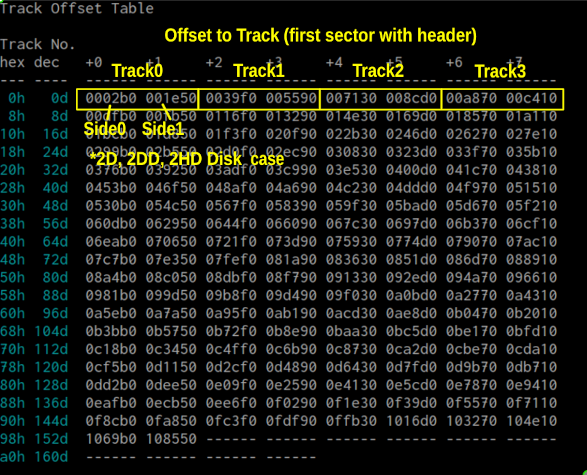
### Track Offset Table
+ Offset to Track
+ 
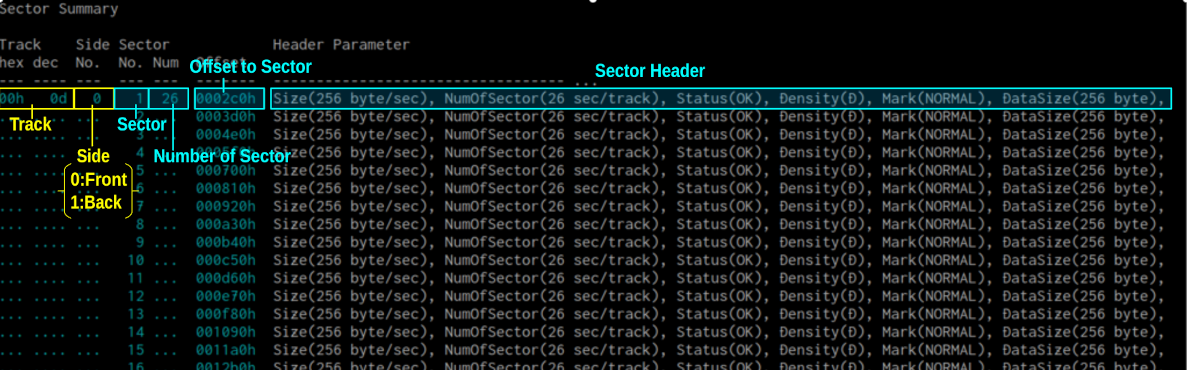
### Sector Header
+ Cylinder Number(Zero Start...)
+ Side (0:surface、1:back)
+ Sector Number(One Start...)
+ Sector Size(as byte)
+ Number Of Sector in Track
+ Density(D:Single, DD:Double-Density, HD:High-Density)
+ Delete Flag
+ Status
+ Data Size of Sector(as byte)
+ Sector Summary
+ 
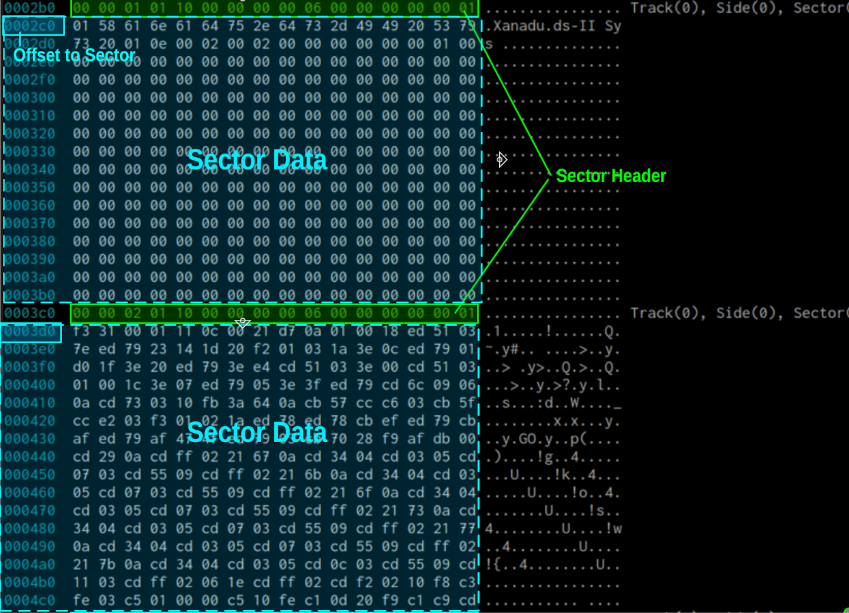
### Sector Data
+ Header and Data
+ 
Install
---------------------
```
cargo install d88dmp
```
Source Code
------------
--> 
I use ArchLinux, Intel Mac.
How to Use
------
```
$ d88dmp <D88 Disk Image FIle>
```
## usage
```
d88dmp ver 0.14.0
ORYZA (https://github.com/ORYZAPAO)
D88 Disk Image Dump.
USAGE:
d88dmp [OPTIONS] <*.D88>
ARGS:
<*.D88> D88 Disk Image
OPTIONS:
-h, --help
Print help information
-n, --no-info
No information
--no-color
No color
-p, --position <TRACK,SIDE,SECTOR>
Sector position
<TRACK> 0,1,2, ...
<SIDE> 0:front or 1:back
<SECTOR> 1,2,3, ...
-s, --sort
Sort by disk sector order
--summary
Summary only
-v, --verbose
Verbose report
-V, --version
Print version information
```
Example) CP/M formated Disk Image(Sharp X1turbo, turbo CP/M)
```
$ .\d88dmp sample/CPM_Format_2D_turboCPM_X1turbo.d88
```
Build
---------------------
```
$ git clone git@github.com:ORYZAPAO/d88dmp.git
$ cargo build --release
```
Licence
----------
MIT Licens
Change Log
----------
+ [Change Log](CHANGELOG.md)
See also
---------------------
+ [.D88形式のフロッピーディスクイメージフォーマット - (仮)](https://gra4.hatenadiary.jp/entry/20171108/1510096429)
+ [D88形式フォーマット | HuDisk](https://boukichi.github.io/HuDisk/DISK.html)
+ [wii88/FORMAT.TXT at master · jpzm/wii88](https://github.com/jpzm/wii88/blob/master/document/FORMAT.TXT)