```bash
o
o /---o
/---/---o
o---/
\---\---o
o \---o
o
```
# Cyme
[](https://crates.io/crates/cyme)
[](https://docs.rs/cyme/latest/cyme/)
List system USB buses and devices; a lib and modern `lsusb` that attempts to maintain compatibility with, but also add new features. Includes a macOS `system_profiler SPUSBDataType` parser module and libusb profiler for non-macOS systems/gathering more verbose information.
The project started as a quick replacement for the barely working [lsusb script](https://github.com/jlhonora/lsusb) and is my _yearly_ Rust project to keep up to date! Like most fun projects, it quickly experienced feature creep as I developed it into a cross-platform replacement for `lsusb`. As a developer of embedded devices, I use a USB list tool on a frequent basis and developed this to cater what I believe at the short comings of `lsusb`; verbose dump is too _verbose_, tree doesn't contain useful data on the whole, it barely works on non-Linux platforms and modern terminals support features that make glancing through the data easier.
It's not perfect as it started out as a Rust refresher but I had a lot of fun developing it and hope others will find it useful and can contribute. Reading around the [lsusb source code](https://github.com/gregkh/usbutils/blob/master/lsusb.c), USB-IF and general USB information was also a good knowledge builder.
The name comes from the technical term for the type of blossom on a Apple tree: [cyme](https://en.wikipedia.org/wiki/Inflorescence#Determinate_or_cymose) - it is Apple related and also looks like a USB device tree 😃🌸.
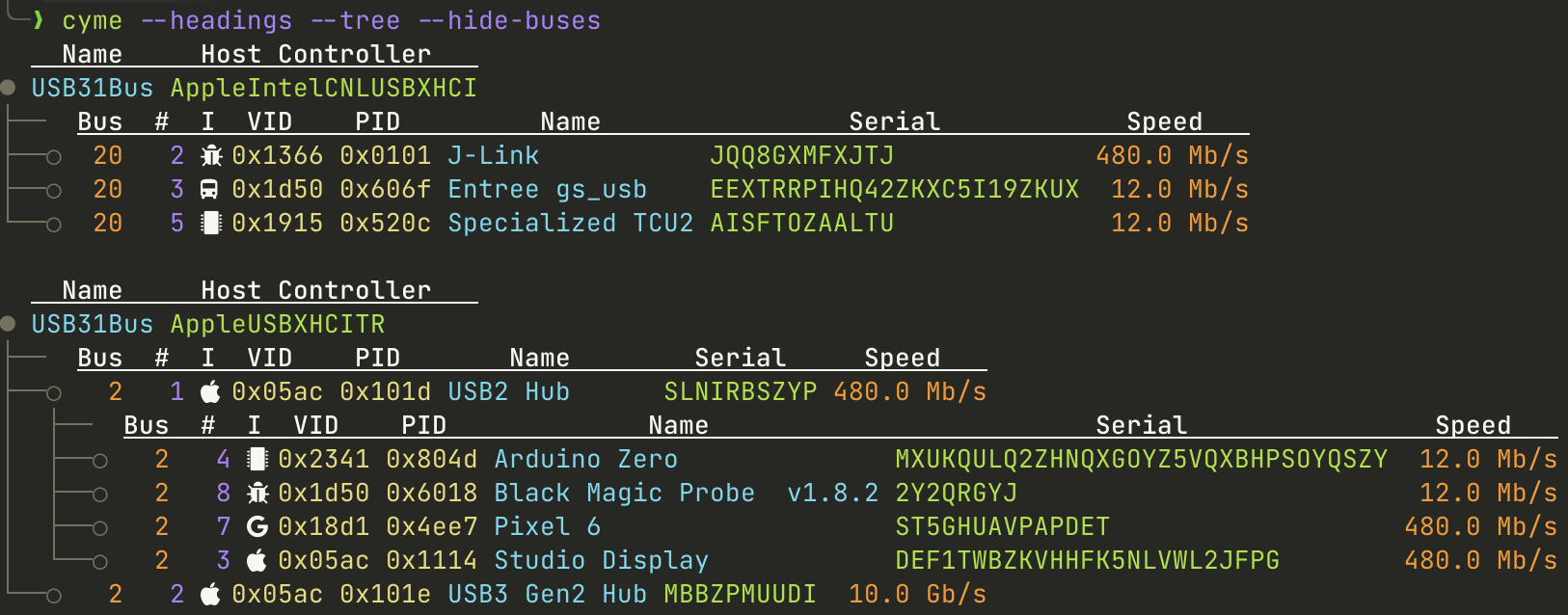
# Features
* Compatible with `lsusb` using `--lsusb` argument. Supports all arguments including `--verbose` output using libusb. Output is identical for use with no args (list), almost matching for tree (driver port number not included) and near match for verbose.
* Filters like `lsusb` but that also work when printing `--tree`. Adds `--filter_name`, `--filter_serial` and option to hide empty `--hide-buses`/`--hide-hubs`.
* Improved `--tree` mode; shows device, configurations, interfaces and endpoints as tree depending on level of `--verbose`.
* Controllable block data like `lsd --blocks` for device, bus, configurations, interfaces and endpoints. Use `--more` to see more by default.
* Modern terminal features with coloured output, utf-8 characters and icon look-up based device data. Can be turned off and customised.
* Can be used as a library too with `system_profiler` parsing module, `lsusb` module using libusb and `display` module for printing amongst others.
* `--json` output that honours filters and `--tree`.
* `--headers` to show meta data only when asked and not take space otherwise.
* Targets for Linux, macOS, perhaps Windows...
## Demo
[](https://asciinema.org/a/IwYyZMrGMbXL4g15qDIaUViyM)
## Feature Ideas/TODO
* lib Error type rather than std::io::Error.
* Fully decode device class based base class on tables at [USB-IF](https://www.usb.org/defined-class-codes).
* Support 'auto', 'always', 'never' or icon, colours, utf-8 etc.
* Print format for width constrained devices? Can remove blocks with args but maybe there is a different format to consider.
* More examples for lib usage.
# Install
For pre-compiled binaries, see the [releases](https://github.com/tuna-f1sh/cyme/releases).
From crates.io with a Rust tool-chain installed: `cargo install cyme`. To do it from within a local clone: `cargo install --path .`.
If wishing to use only macOS `system_profiler` and not obtain more verbose information, remove the 'libusb' feature with `cargo install --no-default-features cyme`
I also have a Homebrew tap, which will also install a man page and completions:
```bash
brew tap tuna-f1sh/taps
brew install cyme
```
## Linux udev
To obtain device and interface drivers being used on Linux like `lsusb`, one must install 'libudev-dev' via a package manager and the `--features udev` feature when building. Only supported on Linux targets.
## Alias `lsusb`
If one wishes to create a macOS version of lsusb or just use this instead, create an alias one's environment with the `--lsusb` compatibility flag:
`alias lsusb='cyme --lsusb'`
# Usage
Will cover this more as it develops. Use `cyme --help` for basic usage or `man ./doc/cyme.1`. There are also autocompletions in './doc'.
## Crate
For usage as a library for profiling system USB devices, the crate is 100% documented so look at [docs.rs](https://docs.rs/cyme/latest/cyme/)
## Config
`cyme` will check for a 'cyme.json' config file in:
* Linux: "$XDG_CONFIG_HOME or $HOME/.config"
* macOS: "$HOME/Library/Application Support"
* Windows: "{FOLDERID_RoamingAppData}"
One can also be supplied with `--config`. Copy or refer to './doc/cyme_example_config.json' for configurables. Supplied args will override these. Use `--debug` to see where it is looking or if it's not loading.
### Custom Icons and Colours
See './doc/cyme_example_config.json' for an example of how icons can be defined and also the [docs](https://docs.rs/cyme/latest/cyme/icon/enum.Icon.html). The config can exclude the "user"/"colours" keys if one wishes not to define any new icons/colours.
Icons are looked up in an order of User -> Default. For devices: `VidPid` -> `VidPidMsb` -> `Vid` -> `UnknownVendor` -> `get_default_vidpid_icon`, classes: `ClassifierSubProtocol` -> `Classifier` -> `UndefinedClassifier` -> `get_default_classifier_icon`. User supplied colours override all internal; if a key is missing, it will be `None`.
# Known Issues
* Version major BCD Device difference between libusb and macOS `system_profiler`: If the major version is large, libusb seems to read a different value to macOS. I don't think it's a parsing error but open to ideas.
* libusb cannot read special non-user Apple buses; T2 chip for example. These will still be listed by `system_profiler`. The result is that when merging for verbose data, these will not print verbose information. Use `--force-libusb` to ignore them.
* `sudo` is required to read Linux root_hub string descriptors - a stderr will be printed regarding this. The program works fine without these however.