```
o
o /---o
/---/---o
o---/
\---\---o
o \---o
o
```
# Cyme
[](https://crates.io/crates/cyme)
List system USB buses and devices; a modern `lsusb` that attempts to maintain compatibility with, but also add new features. Includes a macOS `system_profiler SPUSBDataType` parser module and libusb tool for non-macOS systems/gathering more verbose information.
The project started as a quick replacement for the barely working [lsusb script](https://github.com/jlhonora/lsusb) and is my _yearly_ Rust project to keep up to date! It is currently in flux as I build the foundations, learn about custom serde Deserializers and newer Rust features.
The name comes from the technical term for the type of blossom on a Apple tree: [cyme](https://en.wikipedia.org/wiki/Inflorescence#Determinate_or_cymose) - it is Apple related and also looks like a USB device tree 😃🌸.
# Features
* Compatible with `lsusb` using `--lsusb` argument. Supports all arguments including `--verbose` output using libusb. Output is indentical for use with no args (list), almost matching for tree (driver port number not included) and near match for verbose.
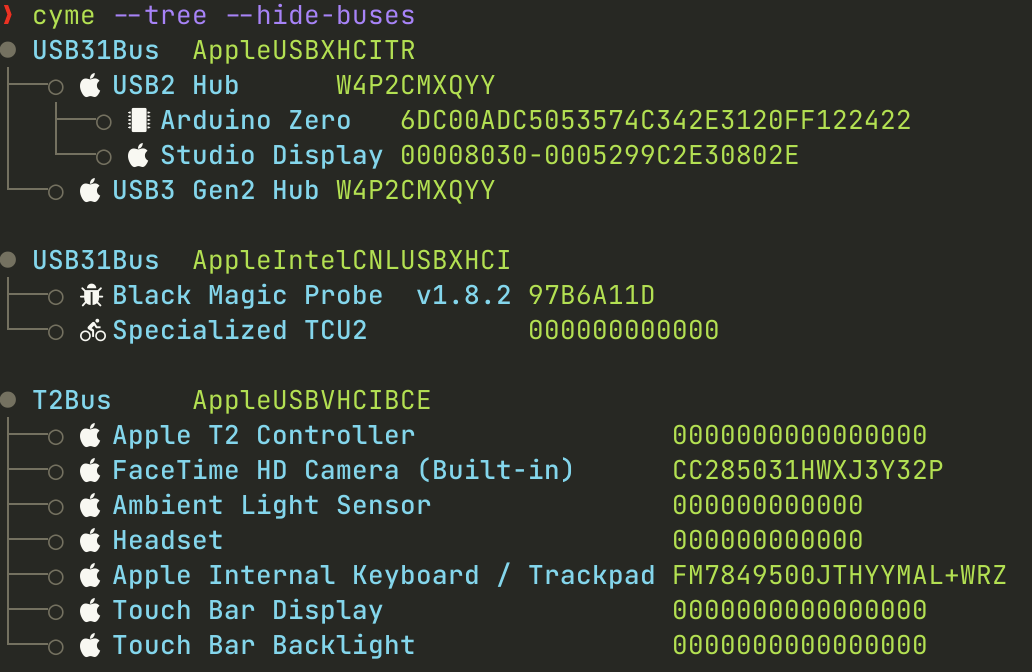
* Filters like `lsusb` but that also work when printing `--tree`. Adds `--filter_name`, `--filter_serial` and option to hide empty `--hide-buses`/`--hide-hubs`.
* Improved `--tree` mode; shows device, configurations, interfaces and endpoints as tree depending on level of `--verbose`.
* Modern terminal features with coloured output, utf-8 characters and icons. Can be turned off and customised.
* Can be used as a library too with `system_profiler` parsing module, `lsusb` module using libusb and `display` module for printing amoungst others.
* `--json` output that honours filters and `--tree`.
## Planned Features for 1.0.0 Release
- [x] Controllable block data like `lsd --blocks`
- [x] Modern drawing of device tree with utf-8 boxes.
- [x] Nerd font icon look up and icon theming like `lsd --icon`.
- [x] libusb optional to get more USB data and support other OS with switch from `system_profiler`.
- [x] Group by in list mode.
- [x] udev support on Linux to get device driver etc.
- [x] Interface and Device Descriptor icon look up.
- [x] Drawing of headers.
- [x] Tree support of all device interfaces and endpoints.
- [x] --device devpath arg to dump single device.
- [x] Merge of macOS `system_profiler` output with libusb output to keep non-user Apple buses.
- [x] Integration tests for lsusb output.
- [ ] Integration tests for internal bin operation.
- [ ] User defined icon map and colour import.
# Install
For pre-compiled binaries, see the [releases](https://github.com/tuna-f1sh/cyme/releases).
From crates.io with a Rust tool-chain installed: `cargo install cyme`. If wishing to do it from within a local clone: `cargo install --path .`.
If wishing to use only macOS `system_profiler` and not obtain more verbose information, remove the 'libusb' feature with `cargo install --no-default-features cyme`
I also have a Homebrew tap, which will also install a man page and completions:
```
brew tap tuna-f1sh/cyme
brew install cyme
```
## Linux udev
To obtain device and interface drivers being used on Linux like `lsusb`, one must install 'libudev-dev' via a package manager and the `--features udev` feature when building. Only supported on Linux targets.
## Alias `lsusb`
If one wishes to create a macOS version of lsusb or just use this instead, create an alias one's environment with the `--lsusb` compatibility flag:
`alias lsusb='cyme --lsusb'`
# Usage
Will cover this more as it develops. Use `cyme --help` for basic usage or `man ./doc/cyme.1`.