# Cursive
[](https://crates.io/crates/cursive)
[](https://travis-ci.org/gyscos/Cursive)
[](https://clippy.bashy.io/github/gyscos/Cursive/master/log)
[](./LICENSE)
Cursive is a TUI (Text User Interface) library for rust. It is currently based on jeaye's [ncurses-rs](https://github.com/jeaye/ncurses-rs).
It allows you to build rich user interfaces for terminal applications.
# [Documentation](http://gyscos.github.io/Cursive/cursive/index.html)
It is designed to be safe and easy to use:
```
[dependencies]
cursive = "0.2"
```
Or to use the latest git version:
```
[dependencies]
cursive = { git = "https://github.com/gyscos/Cursive" }
```
(You will also need ncurses installed - if it isn't already, check in your package manager.)
```rust
extern crate cursive;
use cursive::prelude::*;
fn main() {
// Creates the cursive root - required for every application.
let mut siv = Cursive::new();
// Creates a dialog with a single "Quit" button
siv.add_layer(Dialog::new(TextView::new("Hello Dialog!"))
.title("Cursive")
.button("Quit", |s| s.quit()));
// Starts the event loop.
siv.run();
}
```
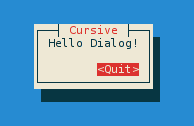
Check out the other [examples](https://github.com/gyscos/Cursive/tree/master/examples) to get these results, and more:
<img src="doc/examples/edit.png" alt="`edit` example", width="49%" />
<img src="doc/examples/lorem.png" alt="`lorem` example", width="49%" />
<img src="doc/examples/menubar.png" alt="`menubar` example", width="49%" />
<img src="doc/examples/select.png" alt="`select` example", width="49%" />
<img src="doc/examples/list_view.png" alt="`list_view` example", width="49%" />
<img src="doc/examples/theme.png" alt="`theme` example", width="49%" />
_(Colors may depend on your terminal configuration.)_
## Goals
* **Ease of use.** Simple apps should be simple. Complex apps should be manageable.
* **Linux TTY Compatibility.** Colors may suffer, and UTF-8 may be too much, but most features *must* work properly on a Linux TTY.
* **Flexibility.** This library should be able to handle simple UI scripts, complex real-time applications, or even games.
* In particular, it tries to have enough features to recreate these kind of tools:
* [menuconfig](http://en.wikipedia.org/wiki/Menuconfig#/media/File:Linux_x86_3.10.0-rc2_Kernel_Configuration.png)
* [nmtui](https://access.redhat.com/documentation/en-US/Red_Hat_Enterprise_Linux/7/html/Networking_Guide/sec-Configure_a_Network_Team_Using_the_Text_User_Interface_nmtui.html)
## _Non_-goals
* **Extreme performance.** This is a simple layout library, guys, not [compiz](https://www.google.com/search?q=compiz&tbm=isch) piped into [libcaca](https://www.google.com/search?q=libcaca&tbm=isch). Unless you are running it on your microwave's microcontroller, it's not going to be slow.
* **Multi-threaded UI.** Callback methods are blocking - careful what you're doing in there! Feel free to use threads on your side, though.
* **Complete ncurses equivalent.** You _can_ access the underlying ncurses window when creating your own custom views, so you can do what you want with that, but the main library will probably only use a subset of the ncurses features.
## Compatibility
First off, terminals are messy. A small set of features is standard, but beyond that, almost every terminal has its own implementation.
### Output
* **Colors**: the basic 8-colors palette should be broadly supported. User-defined colors is not supported in the raw linux TTY, but should work in most terminals, although it's still kinda experimental.
* **UTF-8**: Currently Cursive really expects a UTF-8 locale. It may eventually get patched to support window borders on other locales, but it's not a priority.
Also, Cursive currently expects every codepoint to be a one-column character, so some things may break with exotic characters...
### Input
* The `key_codes` example can be a useful tool to see how the library reacts to various key presses.
* Keep in mind that if the terminal has shortcuts registered, they probably won't be transmitted to the app.
* UTF-8 input should work fine in a unicode-enabled terminal emulator, but raw linux TTY may be more capricious.
Here is the support table for input keys. Tested terminals are mostly Gnome terminal and Linux TTY, xterm, and a few others now and then.
| Letters | All | All | All (except c,z,q,s,i,h,m) | None |
| Numbers | All | All | None (can crash the app) | None |
| Punctuation | All | All | None (can crash the app) | None |
| Enter, Esc | All | None | None | None |
| Left, Right arrow keys | All | VTE+Xterm | VTE+Xterm | VTE+Xterm |
| Up, Down arrow keys | All | Xterm | VTE+Xterm | Xterm |
| Ins | All | None (paste clipboard) | Xterm | None |
| Del | All | VTE+Xterm | VTE+Xterm | VTE+Xterm |
| Home, End | All | Xterm | Xterm | Xterm |
| PageUp, PageDown | All | All | All | None |
| Fn keys: F1-F4 | All | All except Konsole | Gnome+XTerm | Gnome+Xterm |
| Fn keys: F5-F8 | All | All | All except TTY | All except TTY |
| Fn keys: F9-F12 | All | All except TTY | All except TTY | All except TTY |
| PrtScn, ScrollLock | None | None | None | None |
| Window, Menu | None | None | None | None |
## Contribute
You want to help? Great! Here is a non-exhaustive list of things you could do:
* Provide example use-case: a good idea of application for existing or new components.
* Check compatibility: run the `key_codes` example on your favorite terminal, and report the results!
* Test and reports issues: a bug won't get fixed if we don't know it's there.
* Hack the code! If you feel confident with rust, pick an issue you like and hack away!