<h1 style="color: #b87333;"><img src="https://github.com/copper-project/copper-rs/blob/master/doc/static/cu29.png?raw=true" width="60" /> Copper Runtime & SDK</h1>
[](https://github.com/gbin/copper-project/actions/workflows/general.yml)


[](https://deps.rs/repo/github/copper-project/copper-rs)
[](https://opensource.org/licenses/Apache-2.0)
[](https://discord.gg/VkCG7Sb9Kw)
<blockquote>
🤖    
<em style="font-size: 1.2em;">
Copper is to robots what a game engine is to games.
</em>
</blockquote>
<p><strong style="color: #b87333;">🦀 User Friendly</strong>: Copper offers a high-level configuration system and a natural Rust-first API.</p>
<p><strong style="color: #b87333;">🚀 Fast</strong>: Copper uses Rust's zero-cost abstractions and a data-oriented approach to achieve sub-microsecond latency on commodity hardware, avoiding heap allocation during execution.</p>
<p><strong style="color: #b87333;">⏱️ Deterministic</strong>: When you replay a log, Copper will execute the same code with the same data in the same order, ensuring that your robot behaves consistently every time. <strong>No more test datasets that are flip flopping between runs!</strong></p>
<p><strong style="color: #b87333;">🛡️ Reliable</strong>: Copper leverages Rust's ownership, type system, and concurrency model to minimize bugs and ensure thread safety.</p>
<p><strong style="color: #b87333;">📦 Built to ship</strong>: Copper aims to avoid late-stage infra integration issues by generating a very predictable runtime.</p>
Copper has been tested on:
<table style="color: white; background-color: black; font-family: sans-serif;">
<tr>
<td style="text-align: center; padding: 12px;">
<img src="https://upload.wikimedia.org/wikipedia/commons/3/35/Tux.svg" width="50"/>
</td>
<td style="font-weight: bold; text-align: center;">Linux</td>
<td style="text-align: right; padding-left: 10px;">x86_64<br>armv7<br>aarch64<br>riscv64</td>
</tr>
<tr>
<td style="text-align: center; padding: 12px;">
<img src="https://upload.wikimedia.org/wikipedia/commons/3/31/Apple_logo_white.svg" width="50"/>
</td>
<td style="font-weight: bold; text-align: center;">macOS</td>
<td style="text-align: right; padding-left: 10px;">arm64</td>
</tr>
<tr>
<td style="text-align: center; padding: 12px;">
<img src="https://upload.wikimedia.org/wikipedia/commons/thumb/6/6a/Windows_logo_-_2021_%28White%29.svg/768px-Windows_logo_-_2021_%28White%29.svg.png?20230326181935" width="50"/>
</td>
<td style="font-weight: bold; text-align: center;">Windows</td>
<td style="text-align: right; padding-left: 10px;">x86_64</td>
</tr>
<tr>
<td style="text-align: center; padding: 12px;">
<img src="https://upload.wikimedia.org/wikipedia/commons/d/d7/Android_robot.svg" width="50"/>
</td>
<td style="font-weight: bold; text-align: center;">Android</td>
<td style="text-align: right; padding-left: 10px;">arm64</td>
</tr>
</table>
### Technical Overview
Copper is a deterministic and data-oriented Robot SDK with these key components:
* **Task Graph**:
<img align="right" width="100" src="https://github.com/copper-project/copper-rs/blob/master/doc/graph.png?raw=true" alt="graph"/>
Configures the system's topology, specifies inter-task communication paths, and sets types for nodes and messages. The
Task Graph is generated in [RON](https://github.com/ron-rs/ron),
* **Runtime Generator**: Creates an execution plan based on the Task Graph's metadata. It preallocates a
"Copper List" to maximize sequential memory access during execution.
* **Zero-Copy Data Logging**: Records all messages between tasks without copying data, ensuring efficient logging and
perfect determinism.
* **Fast Structured Logging**: Interns and indexes logging strings at compile time, avoiding runtime string construction
and ensuring high-speed textual logging.
### Blazing Fast
Our latency numbers are expressed in **nanoseconds (ns)** on commodity hardware.
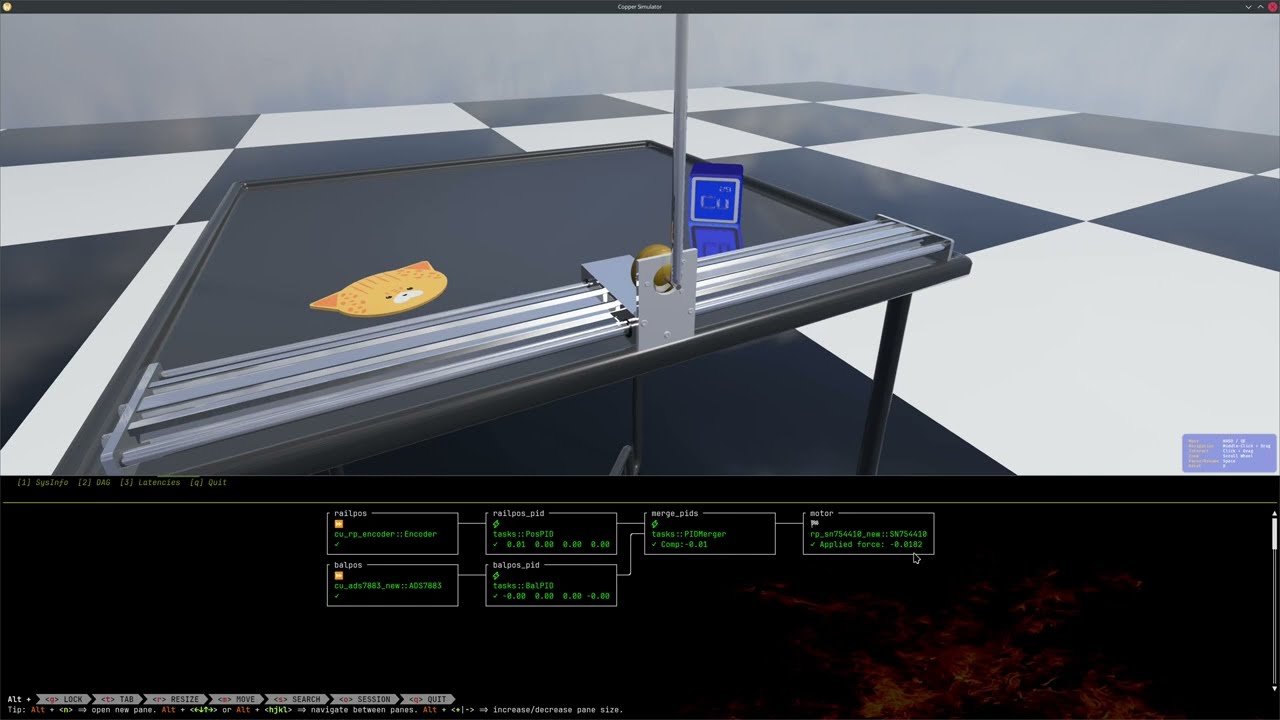
### You don't have a real robot yet? Try it in our minimalistic sim environment!
[](https://youtu.be/kC6sGRZUxLE)
Here is a Copper-based robot in action in a Bevy simulation environment!
The realistic sim is created using [Bevy](https://crates.io/crates/bevy) (A Rust Game Engine)
and [Avian3d](https://crates.io/crates/avian3d) (Physics Engine in Rust).
On your mac or linux machine (x86-64 or Arm) just run ...
```bash
$ cargo install cu-rp-balancebot
$ balancebot-sim
```
... to try it locally.
The source code for this demo is available in the [examples/cu_rp_balancebot](examples/cu_rp_balancebot) directory.
### Features
1. **Task interface and Lifecycle**: Traits you can use to implement new algorithms, sensors, and actuators.
2. **Runtime generation**: Generates a scheduling at compile time for your robot.
3. **Log reader**: You can export the logs generated by Copper to any format supported by Rust Serde.
4. **Structured log reader**: Debug logs are indexed and string interned at compile time for maximum efficiency.
5. **Components**: We have a growing number of drivers, algorithms and standard interfaces. If you have implemented a
new component, ping us and we will add it to the list below!
6. **log replay / resim**: You can deterministically replay/resim a log. You will get the exact same result
as a real log on the robot or from the sim.
7. **Simulation**: We have a simple simulation environment to test your robot. Test your robot before the hardware is
built and try out your robot the first time without risking a real crash.
### Growing list of readily available Components
<table style="border-collapse:collapse; width:100%;">
<thead style="background:#1f3f1f; color:white;">
<tr>
<th style="padding:8px; border:1px solid #444;">Category</th>
<th style="padding:8px; border:1px solid #444;">Type</th>
<th style="padding:8px; border:1px solid #444;"> </th>
<th style="padding:8px; border:1px solid #444;">Description</th>
<th style="padding:8px; border:1px solid #444;">Crate Name</th>
</tr>
</thead>
<tbody>
<tr style="background:#111;">
<td rowspan="7" style="padding:8px; border:1px solid #444;">Sensors</td>
<td style="padding:8px; border:1px solid #444;">Lidar</td>
<td style="padding:8px; border:1px solid #444; text-align:center;"><img width="200" src="https://github.com/copper-project/copper-rs/blob/master/components/sources/cu_vlp16/doc/vlp16.jpg?raw=true"/></td>
<td style="padding:8px; border:1px solid #444;"><a href="components/sources/cu_vlp16">Velodyne/Ouster VLP16</a></td>
<td style="padding:8px; border:1px solid #444;"><code>cu-vlp16</code></td>
</tr>
<tr style="background:#1a1a1a;">
<td style="padding:8px; border:1px solid #444;">Lidar</td>
<td style="padding:8px; border:1px solid #444; text-align:center;"><img width="200" src="https://github.com/copper-project/copper-rs/blob/master/components/sources/cu_hesai/doc/XT32-16.png?raw=true"/></td>
<td style="padding:8px; border:1px solid #444;"><a href="components/sources/cu_hesai">Hesai/XT32</a></td>
<td style="padding:8px; border:1px solid #444;"><code>cu-hesai</code></td>
</tr>
<tr style="background:#111;">
<td style="padding:8px; border:1px solid #444;">Video Camera</td>
<td style="padding:8px; border:1px solid #444; text-align:center;"><img width="200" src="https://github.com/copper-project/copper-rs/blob/master/components/sources/cu_v4l/doc/camera.png?raw=true"/></td>
<td style="padding:8px; border:1px solid #444;"><a href="components/sources/cu_v4l">Video4Linux</a></td>
<td style="padding:8px; border:1px solid #444;"><code>cu-v4l</code></td>
</tr>
<tr style="background:#1a1a1a;">
<td style="padding:8px; border:1px solid #444;">Video Camera</td>
<td style="padding:8px; border:1px solid #444; text-align:center;"><img width="200" src="https://gstreamer.freedesktop.org/data/images/artwork/gstreamer-logo-75.png"/></td>
<td style="padding:8px; border:1px solid #444;"><a href="components/sources/cu_v4l">Video4Linux</a></td>
<td style="padding:8px; border:1px solid #444;"><code>cu-v4l</code></td>
</tr>
<tr style="background:#111;">
<td style="padding:8px; border:1px solid #444;">IMU</td>
<td style="padding:8px; border:1px solid #444; text-align:center;"><img width="200" src="https://github.com/copper-project/copper-rs/blob/master/components/sources/cu_wt901/doc/wt901.jpg?raw=true"/></td>
<td style="padding:8px; border:1px solid #444;"><a href="components/sources/cu_wt901">WitMotion WT901</a></td>
<td style="padding:8px; border:1px solid #444;"><code>cu-wt901</code></td>
</tr>
<tr style="background:#1a1a1a;">
<td style="padding:8px; border:1px solid #444;">ADC/Position</td>
<td style="padding:8px; border:1px solid #444; text-align:center;"><img width="200" src="https://github.com/copper-project/copper-rs/blob/master/components/sources/cu_ads7883/doc/ads7883-scale.jpg?raw=true"/></td>
<td style="padding:8px; border:1px solid #444;"><a href="components/sources/cu_ads7883">ADS 7883 3MPSPS SPI ADC</a></td>
<td style="padding:8px; border:1px solid #444;"><code>cu-ads7883</code></td>
</tr>
<tr style="background:#111;">
<td style="padding:8px; border:1px solid #444;">Encoder</td>
<td style="padding:8px; border:1px solid #444; text-align:center;"><img width="200" src="https://github.com/copper-project/copper-rs/blob/master/components/sources/cu_rp_encoder/doc/encoder.jpg?raw=true"/></td>
<td style="padding:8px; border:1px solid #444;"><a href="components/sources/cu_rp_encoder">Generic Directional Wheel encoder</a></td>
<td style="padding:8px; border:1px solid #444;"><code>cu-rp-encoder</code></td>
</tr>
<tr style="background:#1a1a1a;">
<td rowspan="3" style="padding:8px; border:1px solid #444;">Actuators</td>
<td style="padding:8px; border:1px solid #444;">GPIO</td>
<td style="padding:8px; border:1px solid #444; text-align:center;"><img width="200" src="https://github.com/copper-project/copper-rs/blob/master/components/sinks/cu_rp_gpio/doc/rp.jpg?raw=true"/></td>
<td style="padding:8px; border:1px solid #444;"><a href="components/sinks/cu_rp_gpio">Raspberry Pi</a></td>
<td style="padding:8px; border:1px solid #444;"><code>cu-rp-gpio</code></td>
</tr>
<tr style="background:#111;">
<td style="padding:8px; border:1px solid #444;">Servo</td>
<td style="padding:8px; border:1px solid #444; text-align:center;"><img width="200" src="https://github.com/copper-project/copper-rs/blob/master/components/sinks/cu_lewansoul/doc/lewansoul.jpg?raw=true"/></td>
<td style="padding:8px; border:1px solid #444;"><a href="components/sinks/cu_lewansoul">Lewansoul Servo Bus (LX-16A, etc.)</a></td>
<td style="padding:8px; border:1px solid #444;"><code>cu-lewansoul</code></td>
</tr>
<tr style="background:#1a1a1a;">
<td style="padding:8px; border:1px solid #444;">DC Motor Driver</td>
<td style="padding:8px; border:1px solid #444; text-align:center;"><img width="200" src="https://github.com/copper-project/copper-rs/blob/master/components/sinks/cu_rp_sn754410/doc/sn754410.jpeg?raw=true"/></td>
<td style="padding:8px; border:1px solid #444;"><a href="components/sinks/cu_rp_sn754410">Half-H Driver for CD Motors</a></td>
<td style="padding:8px; border:1px solid #444;"><code>cu-rp-sn754410</code></td>
</tr>
<tr style="background:#1a1a1a;">
<td>Algorithms</td>
<td style="padding:8px; border:1px solid #444;">PID Controller</td>
<td style="padding:8px; border:1px solid #444; text-align:center;"><img width="200" src="https://github.com/copper-project/copper-rs/blob/master/components/tasks/cu_pid/doc/pid.png?raw=true"/></td>
<td style="padding:8px; border:1px solid #444;"><a href="components/tasks/cu_pid">PID Controller</a></td>
<td style="padding:8px; border:1px solid #444;"><code>cu-pid</code></td>
</tr>
<tr style="background:#111;">
<td>Monitors</td>
<td style="padding:8px; border:1px solid #444;">TUI Monitor</td>
<td style="padding:8px; border:1px solid #444; text-align:center;"><img width="300" src="https://github.com/copper-project/copper-rs/blob/master/components/monitors/cu_consolemon/doc/tasks.png?raw=true"/></td>
<td style="padding:8px; border:1px solid #444;"><a href="components/monitors/cu_consolemon">Console based monitor</a></td>
<td style="padding:8px; border:1px solid #444;"><code>cu-consolemon</code></td>
</tr>
<tr style="background:#111;">
<td rowspan="3">Middleware</td>
<td style="padding:8px; border:1px solid #444;">IPC</td>
<td style="padding:8px; border:1px solid #444; text-align:center;"><img width="200" src="https://zenoh.io/img/zenoh-dragon-bg-150x163.png"/></td>
<td style="padding:8px; border:1px solid #444;">Zenoh<br/><a href="components/sinks/cu_msp_sink">sink</a></td>
<td style="padding:8px; border:1px solid #444;"><code>cu-zenoh-sink</code></td>
</tr>
<tr style="background:#111;">
<td style="padding:8px; border:1px solid #444;">IPC</td>
<td style="padding:8px; border:1px solid #444; text-align:center;"><img width="200" src="https://user-images.githubusercontent.com/8661268/114321508-64a6b000-9b1b-11eb-95ef-b84c91387cff.png"/></td>
<td style="padding:8px; border:1px solid #444;">Iceroryx2<br/><a href="components/sources/cu_iceoryx2_src">source</a><br/><a href="components/sinks/cu_iceoryx2_sink">sink</a></td>
<td style="padding:8px; border:1px solid #444;"><code>cu-iceoryx2-src</code><br/><code>cu-iceoryx2-sink</code></td>
</tr>
<tr style="background:#1a1a1a;">
<td style="padding:8px; border:1px solid #444;">Flight Controller (Drones)</td>
<td style="padding:8px; border:1px solid #444; text-align:center;"><img width="200" src="https://github.com/copper-project/copper-rs/blob/master/components/sources/cu_msp_src/doc/fc.webp?raw=true"/></td>
<td style="padding:8px; border:1px solid #444;">Multiwii Serial Protocol (MSP)<br/><a href="components/sources/cu_msp_src">source</a><br/><a href="components/sinks/cu_msp_sink">sink</a></td>
<td style="padding:8px; border:1px solid #444;"><code>cu-msp-src</code><br/><code>cu-msp-sink</code></td>
</tr>
<tr style="background:#111;">
<td rowspan="1">Bridges</td>
<td style="padding:8px; border:1px solid #444;">ROS2 (Humble+)</td>
<td style="padding:8px; border:1px solid #444; text-align:center;"><img width="200" src="https://github.com/copper-project/copper-rs/blob/master/components/sinks/cu_zenoh_ros_sink/doc/ROS2.png?raw=true"/></td>
<td style="padding:8px; border:1px solid #444;">ROS2 Bridge (over Zenoh)<br/><a href="components/sinks/cu_zenoh_ros_sink">sink</a></td>
<td style="padding:8px; border:1px solid #444;"><code>cu-zenoh-ros-sink</code></td>
</tr>
</tbody>
</table>
### Kickstarting a Copper project for the impatient
You can generate a project from one of Copper's templates.
The generator will ask you the name for your new project interactively:
```bash
cargo install cargo-generate
git clone https://github.com/copper-project/copper-rs
cd copper-rs/templates
cargo cunew [path_where_you_want_your_project_created]
🤷 Project Name:
```
Check out [copper-templates](templates/README.md) for more info.
### What does a Copper application look like?
Here is a simple example of a Task Graph in RON:
```RON
(
tasks: [
(
id: "src", // this is a friendly name
type: "FlippingSource", // This is a Rust struct name for this task see main below
),
(
id: "gpio", // another task, another name
type: "cu_rp_gpio::RPGpio", // This is the Rust struct name from another crate
config: { // You can attach config elements to your task
"pin": 4,
},
),
],
cnx: [
// Here we simply connect the tasks telling to the framework what type of messages we want to use.
(src: "src", dst: "gpio", msg: "cu_rp_gpio::RPGpioMsg"),
],
```
Then, on your main.rs:
```rust,ignore
// Import the prelude to get all the macros and traits you need.
use cu29::prelude::*;
// Your application will be a struct that will hold the runtime, loggers etc.
// This proc macro is where all the runtime generation happens. If you are curious about what code is generated by this macro
// you can activate the feature macro_debug and it will display it at compile time.
#[copper_runtime(config = "copperconfig.ron")] // this is the ron config we just created.
struct MyApplication {}
// Here we define our own Copper Task
// It will be a source flipping a boolean
pub struct FlippingSource {
state: bool,
}
// We implement the CuSrcTask trait for our task as it is a source / driver (with no internal input from Copper itself).
impl CuSrcTask for FlippingSource {
type Output<'m> = output_msg!(RPGpioPayload);
// You need to provide at least "new" out of the lifecycle methods.
// But you have other hooks in to the Lifecycle you can leverage to maximize your opportunity
// to not use resources outside of the critical execution path: for example start, stop,
// pre_process, post_process etc...
fn new(config: Option<&copper::config::ComponentConfig>) -> CuResult<Self>
where
Self: Sized,
{
// the config is passed from the RON config file as a Map.
Ok(Self { state: true })
}
// Process is called by the runtime at each cycle. It will give:
// 1. the reference to a monotonic clock
// 2. a mutable reference to the output message (so no need to allocate of copy anything)
// 3. a CuResult to handle errors
fn process(&mut self, clock: &RobotClock, output: &mut Self::Output<'_>) -> CuResult<()> {
self.state = !self.state; // Flip our internal state and send the message in our output.
output.set_payload(RPGpioPayload {
on: self.state,
creation: Some(clock.now()).into(),
actuation: Some(clock.now()).into(),
});
Ok(())
}
}
fn main() {
// Copper uses a special log format called "unified logger" that is optimized for writing. It stores the messages between tasks
// but also the structured logs and telemetry.
// A log reader can be generated at the same time as the application to convert this format for post processing.
let logger_path = "/tmp/mylogfile.copper";
// This basic setup is a shortcut to get you running. If needed you can check out the content of it and customize it.
let copper_ctx =
basic_copper_setup(&PathBuf::from(logger_path), true).expect("Failed to setup logger.");
// This is the struct logging implementation tailored for Copper.
// It will store the string away from the application in an index format at compile time.
// and will store the parameter as an actual field.
// You can even name those: debug!("This string will not be constructed at runtime at all: my_parameter: {} <- but this will be logged as 1 byte.", my_parameter = 42);
debug!("Logger created at {}.", logger_path);
// A high precision monotonic clock is provided. It can be mocked for testing.
// Cloning the clock is cheap and gives you the exact same clock.
let clock = copper_ctx.clock;
debug!("Creating application... ");
let mut application =
MyApplication::new(clock.clone(), copper_ctx.unified_logger.clone())
.expect("Failed to create runtime.");
debug!("Running... starting clock: {}.", clock.now()); // The clock will be displayed with units etc.
application.run().expect("Failed to run application.");
debug!("End of program: {}.", clock.now());
}
```
But this is a very minimal example for a task; please see [lifecycle](doc/lifecycle.md) for a more complete explanation
of a task lifecycle.
### Modular Configuration
Copper supports modular configuration through file includes and parameter substitution, allowing you to:
1. Split large configurations into manageable, reusable chunks
2. Create configuration variations without duplicating the entire RON file
3. Parameterize configurations for different deployment environments
#### Including Configuration Files
You can include other RON configuration files using the `includes` section:
```ron
(
tasks: [
// Your main configuration tasks...
],
cnx: [
// Your main configuration connections...
],
includes: [
(
path: "path/to/included_config.ron",
params: {}, // Optional parameter substitutions
),
],
)
```
#### Parameter Substitution
You can parameterize your included configurations using template variables:
```ron
// included_config.ron
(
tasks: [
(
id: "task_{{instance_id}}", // Will be replaced with the provided instance_id
type: "tasks::Task{{instance_id}}",
config: {
"param_value": {{param_value}}, // Will be replaced with the provided param_value
},
),
],
cnx: [],
)
// main_config.ron
(
tasks: [],
cnx: [],
includes: [
(
path: "included_config.ron",
params: {
"instance_id": "42", // Replaces {{instance_id}} with "42"
"param_value": 100, // Replaces {{param_value}} with 100
},
),
],
)
```
#### Use Cases
1. **Sharing common components** across multiple robot configurations
2. **Creating environment-specific configurations** (development, testing, production)
3. **Reusing task templates** with different parameters (e.g., multiple motors with different pins)
For more details on modular configuration, see the [Modular Configuration documentation](doc/modular_config.md).
## Deployment of the application
Check out the [deployment](doc/deploy.md) page for more information.
## How is Copper better or different from the ROS (Robot Operating System)?
As explained above, Copper is a "user-friendly runtime engine" written in Rust which manages task execution, data flow,
logging, and more.
In contrast, the [ROS](https://github.com/ros) is an open-source set of software libraries and tools primarily written
in C++ and Python.
Let's talk about some of the benefits and differences between the two.
### 🚀 Performance
In the example directory, we have 2 equivalent applications. One written in C++ for ROS and a port in Rust with Copper.
```bash
examples/cu_caterpillar
examples/ros_caterpillar
```
You can try them out by either just logging onto a desktop, or with GPIOs on a RPi.
You should see a couple order of magnitude difference in performance.
Copper has been designed for performance first. Not unlike a game engine,
we use a data-oriented approach to minimize latency
and maximize throughput.
### Safety
As Copper is written in Rust, it is memory safe and thread safe by design. It is also designed to be easy to use and
avoid common pitfalls.
As we progress on this project we plan on implementing more and more early warnings to help you avoid "the death by a
thousand cuts" that can happen in a complex system.
### Release Notes
You can find the full release notes [here](https://github.com/copper-project/copper-rs/wiki/Copper-Release-Log).
### Roadmap
> [!NOTE]
> We are looking for contributors to help us build the best robotics framework possible. If you are interested, please
> join us on [Discord](https://discord.gg/VkCG7Sb9Kw) or open an issue.
Here are some of the features we just release and some we plan to implement next, if you are interested in contributing
on any of those, please let us know!:
- [x] **Buffer Pools**: Implement a large buffer (Host or Device/GPU) pools for 0 copy large inter-task transfers.
- [x] **Missions**: Implement a way to have multiple DAGS in the RON configuration file and have a centralized way to
switch from one to another. This is useful for running the stack for a specific mission: for example Data acquisition
missiom, Full autonomy mission, Charging, etc.
- [x] **Modular Configuration**: As robots built with Copper gain complexity, users will need to build "variations" of
their robots without duplicating their entire RON file.
- [x] **ROS2/DDS interfacing**: Build a pair of sink and source to connect to existing [ROS2](https://github.com/ros2)
systems, helping users migrate their stack bit by bit.
- [ ] **Log Compression & Selection**: Implement a pluggable compression system for logs and its resim counterpart.
For example to encode video from images. Selection is about NOT logging something if it is not needed.
- [ ] **Microcontroller and RTOS support**: Modify all necessary Copper code packages to remove dependencies on the
standard library (std) to support "no_std" (#![no_std])
to support running the code on bare-metal on microcontrollers. This will allow a seamless environment for high level
calls on a standard kernel (ML inference etc...)
and low level tasks on MCUs (control, HW interfacing...).
- [ ] **Parallel Copper Lists**: allow Copper lists to be executed in a staggered and parallel way to improve
throughput.
- [ ] **Extensible scheduling**: Enable a way to give hints to Copper to better schedule workloads at compile time.
- [ ] **Swarm support**: Implement Zenoh to allow a swarm of robots powered by Copper to cooperate.
- [ ] **MCAP support**: Allow the interfacing of Foxglove and [ROS](https://github.com/ros) ecosystems at the logging
level.