# Showcase
Ready-to-use `cship.toml` configurations — from minimal to full-featured. Each can be dropped into `~/.config/cship.toml`.
---
## 1. Minimal
One clean row. Model, cost with colour thresholds, context bar.

```toml
[cship]
lines = ["$cship.model $cship.cost $cship.context_bar"]
[cship.cost]
style = "green"
warn_threshold = 2.0
warn_style = "yellow"
critical_threshold = 5.0
critical_style = "bold red"
[cship.context_bar]
width = 10
warn_threshold = 40.0
warn_style = "yellow"
critical_threshold = 70.0
critical_style = "bold red"
```
---
## 2. Git-Aware Developer
Two rows: Starship git status on top, Claude session below.
Starship passthrough (`$directory`, `$git_branch`, `$git_status`) requires [Starship](https://starship.rs) to be installed.

```toml
[cship]
lines = [
"$directory $git_branch $git_status",
"$cship.model $cship.cost $cship.context_bar",
]
[cship.model]
symbol = "🤖 "
style = "bold cyan"
[cship.cost]
warn_threshold = 2.0
warn_style = "yellow"
critical_threshold = 5.0
critical_style = "bold red"
[cship.context_bar]
width = 10
warn_threshold = 40.0
warn_style = "yellow"
critical_threshold = 70.0
critical_style = "bold red"
```
---
## 3. Cost Guardian
Shows cost, lines changed, rolling API usage limits, and a peak-time indicator. Colour escalates as budgets fill.

```toml
[cship]
lines = [
"$cship.model $cship.cost +$cship.cost.total_lines_added -$cship.cost.total_lines_removed",
"$cship.context_bar $cship.usage_limits $cship.peak_usage",
]
[cship.model]
style = "bold purple"
[cship.cost]
warn_threshold = 1.0
warn_style = "bold yellow"
critical_threshold = 3.0
critical_style = "bold red"
[cship.context_bar]
width = 10
warn_threshold = 40.0
warn_style = "yellow"
critical_threshold = 70.0
critical_style = "bold red"
[cship.usage_limits]
ttl = 60 # cache TTL in seconds; increase if running many concurrent sessions
five_hour_format = "5h {pct}%"
seven_day_format = "7d {pct}%"
separator = " "
warn_threshold = 70.0
warn_style = "bold yellow"
critical_threshold = 90.0
critical_style = "bold red"
[cship.peak_usage]
style = "bold yellow"
```
---
## 4. Material Hex
Every style value is a `fg:#rrggbb` hex colour — no named colours anywhere. Amber warns, coral criticals.

```toml
[cship]
lines = [
"$cship.model $cship.cost",
"$cship.context_bar $cship.usage_limits",
]
[cship.model]
style = "fg:#c3e88d"
[cship.cost]
style = "fg:#82aaff"
warn_threshold = 2.0
warn_style = "fg:#ffcb6b"
critical_threshold = 6.0
critical_style = "bold fg:#f07178"
[cship.context_bar]
width = 10
style = "fg:#89ddff"
warn_threshold = 40.0
warn_style = "fg:#ffcb6b"
critical_threshold = 70.0
critical_style = "bold fg:#f07178"
[cship.usage_limits]
five_hour_format = "5h {pct}%"
seven_day_format = "7d {pct}%"
separator = " "
warn_threshold = 70.0
warn_style = "fg:#ffcb6b"
critical_threshold = 90.0
critical_style = "bold fg:#f07178"
```
---
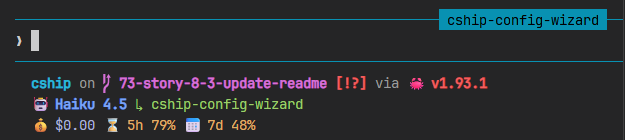
## 5. Tokyo Night
Three-row layout for polyglot developers. Starship handles language runtimes and git; cship handles session data. Styled with the [Tokyo Night](https://github.com/folke/tokyonight.nvim) colour palette.
```toml
[cship]
lines = [
"""
$directory\
$git_branch\
$git_status\
$python\
$nodejs\
$rust
""",
"$cship.model $cship.agent",
"$cship.context_bar $cship.cost $cship.usage_limits",
]
[cship.model]
symbol = "🤖 "
style = "bold fg:#7aa2f7"
[cship.agent]
symbol = "↳ "
style = "fg:#9ece6a"
[cship.context_bar]
width = 10
style = "fg:#7dcfff"
warn_threshold = 40.0
warn_style = "fg:#e0af68"
critical_threshold = 70.0
critical_style = "bold fg:#f7768e"
[cship.cost]
symbol = "💰 "
style = "fg:#a9b1d6"
warn_threshold = 2.0
warn_style = "fg:#e0af68"
critical_threshold = 5.0
critical_style = "bold fg:#f7768e"
[cship.usage_limits]
five_hour_format = "⌛ 5h {pct}%"
seven_day_format = "📅 7d {pct}%"
separator = " "
warn_threshold = 70.0
warn_style = "fg:#e0af68"
critical_threshold = 90.0
critical_style = "bold fg:#f7768e"
```
---
## 6. Nerd Fonts
Requires a [Nerd Font](https://www.nerdfonts.com) in your terminal. Icons are embedded as `symbol` values on each module and as literal characters in the format string for Starship passthrough rows.

```toml
[cship]
lines = [
"""
$directory\
$git_branch\
$git_status\
$python\
$nodejs\
$rust
""",
"$cship.model $cship.cost $cship.context_bar $cship.usage_limits",
]
[cship.model]
symbol = " " # nf-fa-microchip
style = "bold fg:#7aa2f7"
[cship.cost]
symbol = "💰 "
style = "fg:#a9b1d6"
warn_threshold = 2.0
warn_style = "fg:#e0af68"
critical_threshold = 5.0
critical_style = "bold fg:#f7768e"
[cship.context_bar]
symbol = " " # nf-fa-database
format = "[$symbol$value]($style)"
width = 10
style = "fg:#7dcfff"
warn_threshold = 40.0
warn_style = "fg:#e0af68"
critical_threshold = 70.0
critical_style = "bold fg:#f7768e"
[cship.usage_limits]
five_hour_format = "⌛ 5h {pct}%"
seven_day_format = "📅 7d {pct}%"
separator = " "
warn_threshold = 70.0
warn_style = "fg:#e0af68"
critical_threshold = 90.0
critical_style = "bold fg:#f7768e"
```
---
## 7. Full Starship Prompt
Two-row layout featuring the complete rendered Starship prompt on top and Claude Code session data on bottom. `$starship_prompt` invokes `starship prompt` to display your entire Starship configuration (directory, git status, language runtimes, and any custom modules) in a single call.

```toml
[cship]
lines = [
"$starship_prompt",
"$cship.model $cship.cost $cship.context_bar $cship.usage_limits",
]
[cship.model]
symbol = " " # nf-fa-microchip
style = "bold fg:#7aa2f7"
[cship.cost]
symbol = "💰 "
style = "fg:#a9b1d6"
warn_threshold = 2.0
warn_style = "fg:#e0af68"
critical_threshold = 5.0
critical_style = "bold fg:#f7768e"
[cship.context_bar]
symbol = " " # nf-fa-database
format = "[$symbol$value]($style)"
width = 10
style = "fg:#7dcfff"
warn_threshold = 40.0
warn_style = "fg:#e0af68"
critical_threshold = 70.0
critical_style = "bold fg:#f7768e"
[cship.usage_limits]
five_hour_format = "⌛ 5h {pct}%"
seven_day_format = "📅 7d {pct}%"
separator = " "
warn_threshold = 70.0
warn_style = "fg:#e0af68"
critical_threshold = 90.0
critical_style = "bold fg:#f7768e"
```
---
## Submit Your Config
Have a beautiful CShip setup? Share it with the community!
Open a pull request to [stephenleo/cship](https://github.com/stephenleo/cship) adding your config to this page.
Include:
- A screenshot or GIF of your statusline in action
- Your full annotated `cship.toml`
- A short description of the design choices