# Cortex Agent — Improvement Plan

## Overview
Transform Cortex into a polished, self-learning agent with a world-class terminal UI, inspired by Gemini CLI, Hermes, OpenCode, and Claude CLI. Focus on user experience, smart memory, proactive learning, and seamless provider/model management.

## Completed
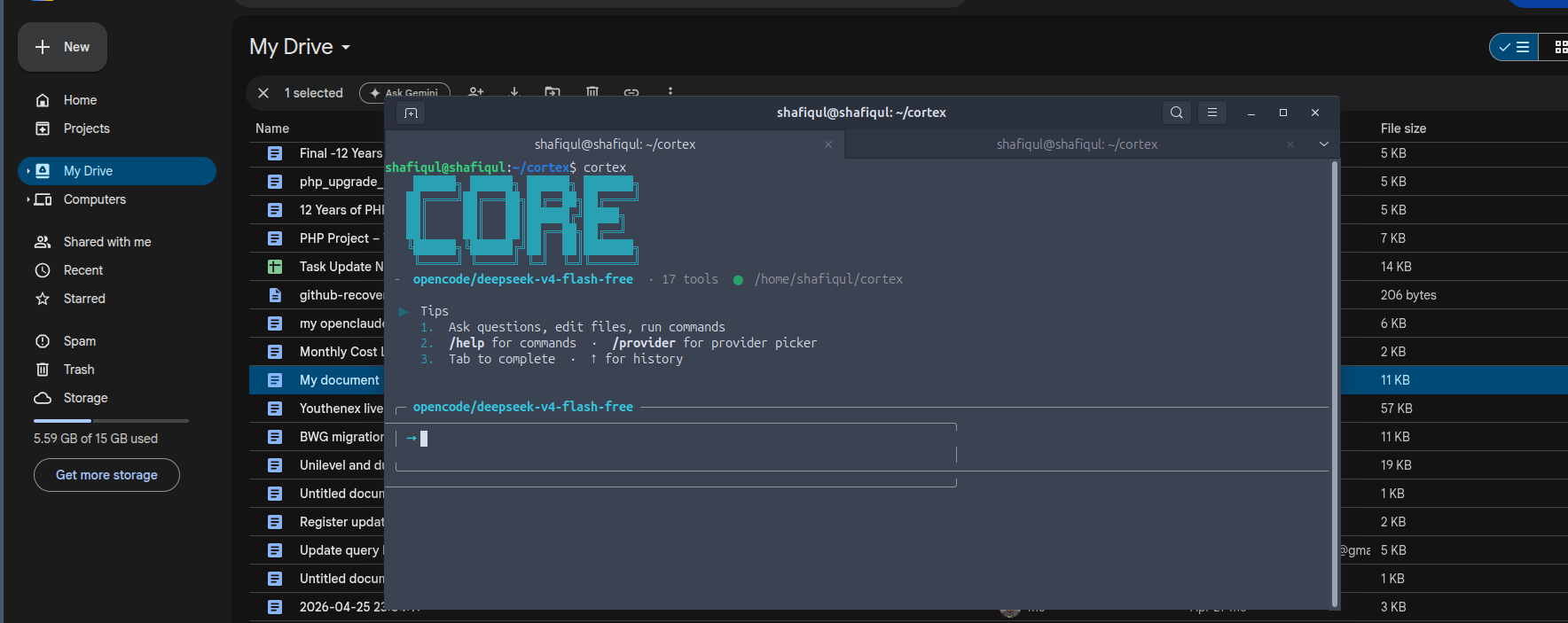
- **1.1 Gemini-style prompt box**: Rounded borders (`╭─...╮`/`╰─...╯`), provider/model in header, 90% width, right wall `│` on submit
- **1.2 Bordered message rendering**: User messages with `╶ > ` prefix + cyan `╶╶╶...╶` separator, assistant response with `│ ` left wall on each line, closing `╶╶╶...╶` turn separator
- **1.3 Status line**: Session status with provider, tokens, context %, elapsed time, turn count
- **1.4 Welcome cleanup**: Numbered tips, cleaner layout, provider/model status line
- **Resize-safe layout**: All width-dependent draws clamp to `min(box_width, terminal_width())` — no wrapping on terminal shrink
- **Right wall safe on resize**: `\x1b[{}G` cursor jumps in `box_enter` and `readline` prompt clamped to current terminal width
- **3.1 Memory confidence score**: `access_count` column tracks recall frequency; shown in injector as high/medium/low confidence
- **3.1 Memory consolidation**: Overlapping memories (keyword overlap >60%) auto-merge with combined tags and boosted importance
- **3.1 Auto-categorization**: Memories auto-categorized into identity, preference, work, error, api, configuration, code, session
- **3.1 Memory decay**: Old/unused memories (7+ days) decay in importance; at importance 1 for 30 days, auto-purged
- **3.1 Ephemeral memory**: In-memory session context (Vec of topics discussed) injected into system prompt, discarded on exit
- **3.2 Preference learning**: Auto-detects "I use X", "I prefer Y", "my project is Z" patterns and saves as user memories
- **3.2 Session summarization**: Enhanced on-exit summary with extracted topics, keyword tags, proper importance scoring
- **3.1 Vector/semantic memory search**: Embeddings table + `/v1/embeddings` API + cosine similarity search via `vector_search()`, falls back to keyword search when embeddings unavailable
- **3.2 Pattern recognition**: `tool_usage_history` tracks tool call frequency; repeated patterns detected on session end
- **3.4 Memory tree view**: `/memory tree` groups memories by category with counts and previews
- **3.4 Memory timeline**: `/memory timeline` shows memories chronologically with dates
- **3.4 Memory stats**: `/memory stats` shows counts by target, category, and importance bucket
- **2.1 Session persistence**: `~/.cortex/session.json` saves last provider/model/turn stats between runs; auto-resumed on startup
- **5.3 Health check on startup**: Pings provider's `/v1/models` endpoint (in verbose mode)
- **1.4 Dynamic greeting**: Time-based greeting (Good morning/afternoon/evening) on startup
- **1.4 Session stats from last run**: Shows "Last: N turns, M tok, Xm Ys" on startup
- **4.2 Tip of the day**: Random tip displayed on each startup from the TIPS list
- **3.2 Error learning**: Failed tools auto-save lessons with context; deduplication prevents duplicate lessons
- **3.3 Auto-retry with exponential backoff**: 3 attempts with 250ms, 500ms, 1s delays; timeout doubling on timeout errors
- **5.3 Signal handling**: Ctrl+C gracefully interrupts streaming with a message; second Ctrl+C force-quits
- **5.3 Conversation auto-recovery**: Session state saved to `session.json` on every exit
- **4.3 Rich `/help`**: Categorized help (Session/Provider/Memory/Utility) with `/help <command>` for detailed usage
- **1.1 Context-aware prompt**: Turn count shown in the input box header
- **1.1 Multi-line input detection**: Multi-line pastes detected and shown as `preview … (N lines)`
- **1.6 Fuzzy command completion**: Tab-completion matches on any substring (e.g. `/mem` matches `/memory`, `/skills`)
- **1.2 Inline tool output**: Tool calls now render to stdout (visible inline in conversation) instead of stderr
- **2.2 Skill management**: `/skills add` creates skills interactively, `/skills delete` removes them
- **1.5 Theme system**: `/theme mocha`/`/theme latte` to switch Catppuccin-inspired themes at runtime
- **New tools**: `web_search` (DuckDuckGo), `execute_bash` (shell commands), `write_file`, `git_status`, `git_diff`
- **`/tools` command**: Lists all available tools grouped by category with descriptions
- **Plugin system**: Drop `.yaml` files in `~/.cortex/plugins/` to add custom tools; `/plugin list` to view them
- **Plugin install from GitHub**: `/plugin install <url>` downloads and installs plugins directly from GitHub repos or raw URLs
- **Superpower skill**: `cortex-superpower` and `code-review` skills auto-seed on first run
- **Install script**: `scripts/install.sh` — one-command install (builds from source, sets up PATH, creates `~/.cortex/`)

---

## Phase 1: UI Overhaul

### 1.1 Gemini/Hermes-style Prompt
- [x] **Rich Input Line**: Rounded border box (`╭─ provider/model ──╮`) with provider/model in header, 90% terminal width
- [ ] **Context-aware prompt**: Show turn count, token usage subtly in prompt area (status bar shows this after response)
- [ ] **Multi-line input support**: Detect when user pastes multi-line text; show `...` continuation prompt
- [ ] **Syntax highlighting** in input (highlight commands like `/provider`, `/switch`)

### 1.2 Stream Output Polish
- [ ] **Token-by-token streaming** with markdown rendering in real-time (bold, italic, code, links appear as they arrive)
- [ ] **Code block folding**: Show `▸ code (python, 23 lines)` collapsed by default; expand on click/hover (terminal hyperlinks)
- [ ] **Tool call output inline**: Show tool output in a collapsible block, not stderr
- [ ] **Progress indicator during tool execution**: Show `[web_fetch] fetching https://...` with animated spinner per tool
- [ ] **Streaming token counter**: Live tokens/sec display during generation

### 1.3 Status Bar
- [x] **Session status line**: Shows provider, tokens, context %, elapsed, turn (after each turn)
- [ ] **Persistent bottom status bar** (not stderr line):
  - Left: provider + model + connection status (● live / ○ disconnected)
  - Center: current turn / total turns
  - Right: tokens used + cost + elapsed time
- [x] **Resize-aware**: 90% terminal width adapts dynamically
- [ ] **SGR/ANSI escape cleanup**: Ensure no stray escape codes

### 1.4 Welcome Screen
- [x] **Cleaner welcome layout**: Numbered tips, provider/model status line, indicator line
- [ ] **Dynamic greeting**: "Good morning/afternoon/evening" based on time
- [ ] **Recent memory summary**: Show 2-3 recent memories on startup
- [ ] **Session stats from last run**: "Last session: 12 turns, 3.4k tokens, 2m 15s"
- [ ] **Tip of the day**: Random tip displayed at welcome

### 1.5 Color Theme
- [ ] **256-color / truecolor support**: Detect terminal capabilities
- [ ] **Catppuccin-inspired theme** (mocha/latte) with configurable accent color
- [ ] **Dark/light mode auto-detection** based on terminal theme

### 1.6 Input Editor Enhancements
- [ ] **Fuzzy search for commands**: `/sw` matches `/switch`
- [ ] **Inline command documentation**: When typing `/provider`, show brief help below the input line
- [ ] **History search** (Ctrl+R like bash)
- [ ] **Vi mode support** (optional)
- [ ] **Emoji picker** via `:emoji_name:` syntax

---

## Phase 2: Provider & Model Management

### 2.1 Session Persistence
- [ ] **Save last working provider/model** to `~/.cortex/session.json`
- [ ] **Auto-reconnect** on startup using last known good provider
- [ ] **Health check on startup**: Ping provider's models endpoint; if fails, show warning and suggest fallback

### 2.2 Provider Switching (UI)
- [ ] **Arrow key navigation** in `/provider` dialog with model sub-menu
- [ ] **Provider search/filter**: Type to filter provider list
- [ ] **Model search/filter**: Type to filter model list after selecting provider
- [ ] **Model availability indicator**: Show ● live / ○ untested for each model
- [ ] **Recent models list**: Show last 5 used models at top of selection
- [ ] **Favorites**: Pin favorite provider+model combos

### 2.3 Provider Config Management
- [ ] **Add provider wizard**: Guided `/provider add` command that asks for name, base URL, API key
- [ ] **Edit provider**: Update any field interactively
- [ ] **Remove provider**: Safe removal with confirmation
- [ ] **Test connection**: `/provider test <name>` to verify API key + endpoint work

### 2.4 Config File
- [ ] **Auto-backup config.yaml** before modifications (`config.yaml.bak`)
- [ ] **Validate config** on save (YAML syntax, required fields)
- [ ] **Support for multiple API keys** per provider (e.g., key rotation)
- [ ] **Model aliases**: User-defined shortcuts like `fast → gpt-4o-mini`

---

## Phase 3: Memory & Self-Learning (Advanced)

### 3.1 Memory Improvements
- [ ] **Vector/semantic memory search**: Use embeddings for semantic recall (optional, via API)
- [ ] **Memory decay**: Older/low-importance memories degrade over time; auto-delete after threshold
- [ ] **Memory consolidation**: Merge duplicate or overlapping memories
- [ ] **Memory categories**: Auto-categorize memories (preferences, facts, projects, errors)
- [ ] **Memory confidence score**: Track how reliable a memory is (based on confirmation count)
- [ ] **Ephemeral memory**: Short-term context that doesn't persist between sessions

### 3.2 Proactive Self-Learning
- [ ] **Pattern recognition**: Detect recurring user requests and suggest saving as skill
- [ ] **Error learning**: When a tool fails, analyze the error, search for fix, save lesson
- [ ] **Session summarization**: At end of session, auto-summarize key learnings
- [ ] **Preference learning**: Infer user preferences from behavior (e.g., "you often use Python" → save memory)
- [ ] **Skill suggestion**: "I notice you've done this 3 times. Save as a skill?"

### 3.3 Lesson/Error System
- [ ] **Auto-retry with exponential backoff** for transient errors
- [ ] **Error context capture**: Save full stack trace and input context with lessons
- [ ] **Lesson resolution tracking**: Mark lessons as resolved when fix is verified
- [ ] **Community lesson sharing** (future): Export/import lessons between instances

### 3.4 Memory Visualization
- [ ] **Memory tree view**: `/memory --tree` shows hierarchical organization
- [ ] **Memory timeline**: `/memory --timeline` shows when memories were created
- [ ] **Memory graph**: Show relationships between memories (which led to which)

---

## Phase 4: System Prompt & Tips

### 4.1 Dynamic System Prompt
- [ ] **Prompt templates**: Different prompts for coding, general chat, research
- [ ] **Context window management**: Automatically trim old messages when approaching token limit
- [ ] **Self-identity**: Agent knows its own capabilities, tools, limitations
- [ ] **Persona switching**: `/persona <name>` to switch system prompt style

### 4.2 Tip System
- [ ] **Contextual tips**: Show relevant tips based on what user is doing
- [ ] **Tip categories**: Beginner / Advanced / Expert
- [ ] **Progressive disclosure**: Show basic tips first, more advanced over time
- [ ] **User-contributed tips**: Allow user to add custom tips via config
- [ ] **Tip of the day**: Random tip on startup with rotation

### 4.3 Command Reference
- [ ] **Richer `/help`**: Grouped by category with examples
- [ ] **`/help <command>`**: Detailed help for specific command
- [ ] **Inline help**: `--help` style for any command

---

## Phase 5: Performance & Reliability

### 5.1 Startup Speed
- [ ] **Lazy loading**: Don't initialize memory store until first use
- [ ] **Async config loading**: Load config in background while showing welcome
- [ ] **Connection pooling**: Reuse HTTP connections across requests

### 5.2 Streaming Performance
- [ ] **Parallel token processing**: Render while buffering
- [ ] **Debounced UI updates**: Batch rapid tokens into render cycles
- [ ] **Escape code optimization**: Minimize ANSI sequence overhead

### 5.3 Reliability
- [ ] **Graceful degradation**: If provider fails, offer to switch to last working one
- [ ] **Auto-save conversation**: Periodic save to recovery file
- [ ] **Crash recovery**: Detect unclean shutdown, restore conversation
- [ ] **Signal handling**: Graceful shutdown on Ctrl+C (finish current token, then exit)

---

## Phase 6: Advanced Features

### 6.1 Session Management
- [ ] **Named sessions**: `/session save work`, `/session load work`
- [ ] **Session branching**: Fork conversation at any point
- [ ] **Session search**: Search across all saved sessions
- [ ] **Export session**: `/session export` → JSON/Markdown

### 6.2 Multi-Provider Strategies
- [ ] **Fallback chain**: If primary provider fails, auto-try next in list
- [ ] **Model routing**: Route simple queries to cheap models, complex to powerful
- [ ] **Parallel queries**: Ask multiple models and pick best response

### 6.3 Tools & Extensions
- [ ] **Plugin system**: Load external tools from `~/.cortex/tools/`
- [ ] **Tool marketplace**: Browse and install community tools
- [ ] **Custom tool creation**: `/tool create` wizard

### 6.4 Output Formats
- [ ] **HTML export**: `/export --html`
- [ ] **PDF export**: `/export --pdf`
- [ ] **Image rendering**: Render diagrams (Mermaid, ASCII art)
- [ ] **Table rendering**: Aligned columns for tabular data

---

## Implementation Priority

### P0 (Must Have — Core UX)
1. Provider persistence (last working provider/model on restart)
2. Gemini-style prompt with provider+model inline
3. Arrow key model selection in `/provider`
4. Better error messages with actionable suggestions
5. Session status bar (tokens, time, turn count)

### P1 (Should Have — Polish)
6. Welcome screen improvements (dynamic greeting, tip of the day)
7. Contextual memory injection with relevance scoring
8. Auto-save session summaries as memories
9. Rich command help system
10. Tool call output inline in main output

### P2 (Nice to Have)
11. Fuzzy command completion
12. Multi-line input support
13. Ctrl+R history search
14. Vector memory search
15. Session management (save/load/export)

### P3 (Future)
16. Plugin system
17. Multi-provider fallback
18. Image/diagram rendering
19. Community lesson sharing

---

## Technical Notes

- **Config path**: `~/.cortex/session.json` for runtime state (last provider, model)
- **Memory DB**: SQLite at `~/.cortex/memory/cortex.db` (WAL mode)
- **History**: `~/.cortex_history` (rustyline)
- **Theme**: Use `console` crate with optional `termcolor` for truecolor
- **Markdown rendering**: Realtime streaming parser (not post-hoc)
- **ANSI**: Minimize escape codes; batch renders at ~60fps equivalent
- **Pricing**: Model cost rates in `messages.rs::Usage::estimated_cost()`

---

*This document will evolve as implementation progresses. Each phase should be completed before moving to the next.*